 praetorian-inc/titus
Scanner di segreti ad alte prestazioni. CLI, libreria Go, estensione Burp Suite ed estensione Chrome. 487 regole di rilevamento con validazione delle credenziali in tempo reale.



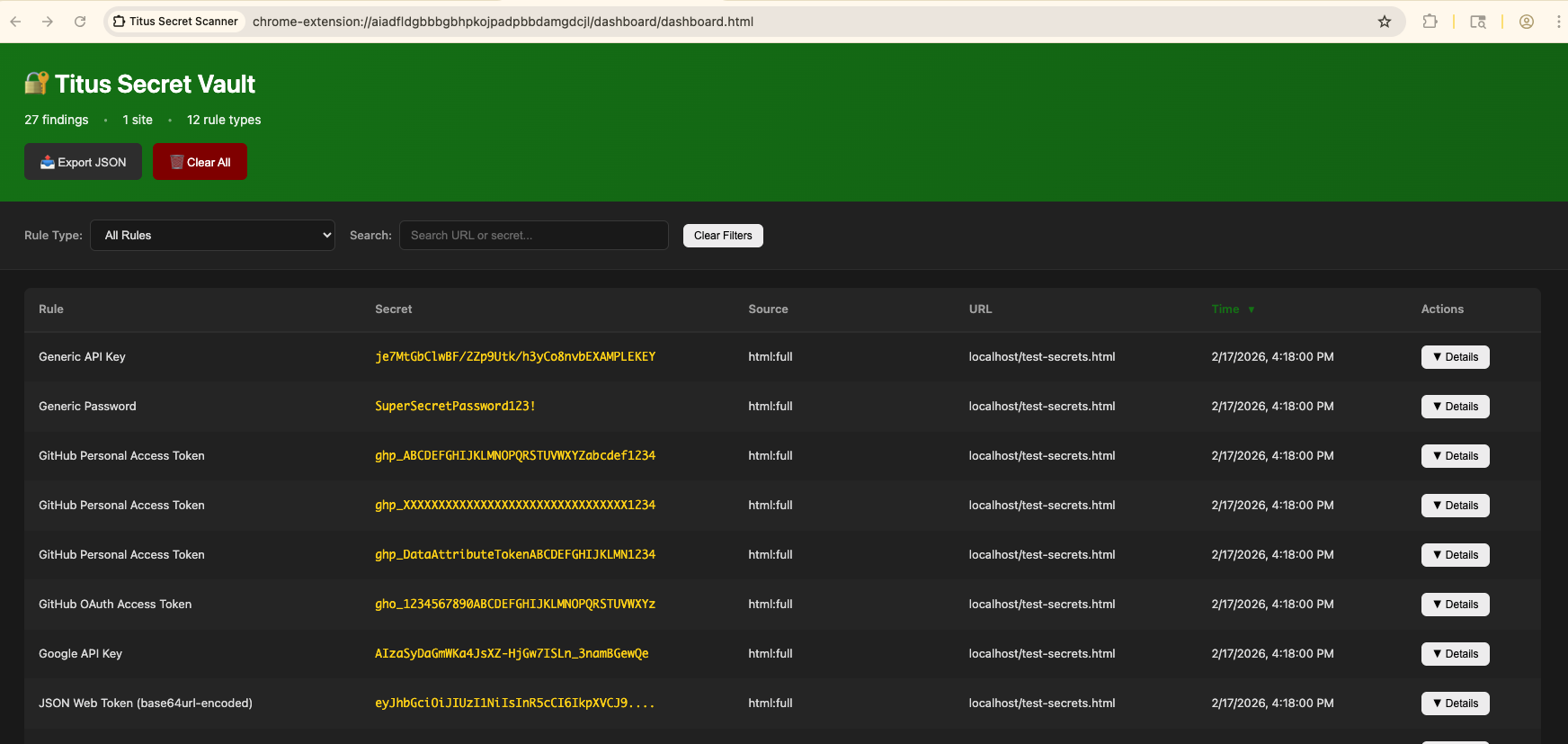
Titus è uno scanner di segreti ad alte prestazioni che rileva credenziali, chiavi API e token in codice sorgente, file e cronologia git. Include 487 regole di rilevamento che coprono centinaia di servizi e tipi di credenziali, tratte da NoseyParker e Kingfisher. Titus funziona come CLI, libreria Go, estensione per Burp Suite ed estensione per browser Chrome — tutte condividono lo stesso motore di rilevamento e lo stesso set di regole.
Progettato per ingegneri della sicurezza, penetration tester e team DevSecOps, Titus combina il matching regex accelerato da Hyperscan/Vectorscan con la validazione delle credenziali in tempo reale per trovare e verificare i segreti trapelati in tutto il tuo codebase.
Scarica un binario precompilato dalla pagina Releases oppure compila dal sorgente:
make build
Il binario sarà in dist/titus.
# Scan a file for secrets
titus scan path/to/file.txt

# Scan a directory for leaked credentials
titus scan path/to/directory

# Scan a public GitHub repository (no token needed)
titus scan github.com/org/repo

# Scan a public GitLab project (no token needed)
titus scan gitlab.com/namespace/project

# Scan git history for secrets in past commits
titus scan --git path/to/repo

# Scan a Docker / OCI image (pulled from a registry — no docker daemon required)
titus scan --docker alpine:latest

# Validate detected secrets against source APIs
titus scan path/to/code --validate
I risultati vengono scritti in un datastore (titus.ds per impostazione predefinita) e stampati sulla console.
Titus organizza le sue funzionalità in questi sottocomandi mirati:
titus analyze # Analyze a credential on demand — detect type, validate, score, and enumerate resources
titus enum    # Enumerate remote services for secrets
titus explore # Interactively explore scan results
titus report  # Generate a report from scan results
titus rules   # Manage detection rules
titus scan    # Scan a target for secrets
titus serve   # Run as streaming server for Burp extension integration
titus version # Show version information
Ogni sottocomando accetta --help per i propri flag. Le forme di primo livello titus <provider> che precedono titus enum <provider> funzionano ancora, ma sono nascoste e deprecate anziché essere alias, quindi sono elencate nel riferimento generato invece che qui.
Il riferimento completo — ogni sottocomando, alias e flag, inclusi quelli nascosti da --help — è generato in docs/CLI.md.
Scansiona i repository pubblici direttamente tramite URL — nessun token API richiesto:
# Scan a GitHub repository
titus scan github.com/kubernetes/kubernetes

# Scan a GitLab project
titus scan gitlab.com/gitlab-org/cli

# Full URLs work too
titus scan https://github.com/org/repo
titus scan https://gitlab.com/namespace/project.git
Per la scansione a livello di organizzazione o di utente, utilizzare i sottocomandi dedicati:
# Scan all public repos in a GitHub org
titus github --org kubernetes

# Scan all repos in a GitHub org with a token (private repos + higher rate limits)
titus github --org kubernetes --token $GITHUB_TOKEN

# Scan all repos for a GitHub user
titus github --user octocat

# Scan all projects in a GitLab group
titus gitlab scan --group mygroup --token $GITLAB_TOKEN

# Scan a single repo with git history (finds deleted secrets)
titus github scan owner/repo --git
I token sono opzionali per i repository pubblici. Imposta GITHUB_TOKEN o GITLAB_TOKEN (oppure usa --token) per l'accesso ai repository privati e limiti di frequenza API più elevati.
Scansiona le immagini dei container direttamente — nessun daemon docker, nessun binario docker richiesto. Titus estrae le immagini direttamente da qualsiasi registry OCI tramite HTTPS (usando le credenziali da ~/.docker/config.json), oppure legge le immagini da un tarball locale docker save o da una directory di layout di immagini OCI. Successivamente scansiona i metadati del manifest/config dell'immagine e ogni file regolare in ogni layer, inclusi i file dei layer inferiori eliminati dai layer successivi (poiché i segreti possono rimanere recuperabili dalla cronologia dell'immagine).
# Pull from a registry and scan
titus scan --docker alpine:latest
titus scan docker://ghcr.io/owner/repo:tag

# Scan an image saved to a tarball:
#   docker save my-app:latest -o my-app.tar
#   podman save my-app:latest -o my-app.tar
titus scan --docker ./my-app.tar

