
Skip to content
KitploitKITPLOIT
ToolsExploitsBlog
Log in
Submit
ToolsExploitsBlog
Submit

Hacking, PenTest, and Cybersecurity Tools for Your Security Arsenal!

Kitploit is a directory of hacking, cybersecurity, and pentesting tools. Discover the latest project updates to find vulnerabilities, analyze systems, automate testing, and strengthen your security.

FeedsContactPrivacy© 2026 Kitploit

Tool Directory

Categories

View all categories
Loading categories
memOptix — A Jupyter notebook to assist with the analysis of the output generated from Volatility memory extraction framework. | Kitploit
Tools/GitHubGitHub/blueteam0ps/memoptix
Memory ForensicsForensicsDigital ForensicsThreat IntelligenceIncident Response
GitHubblueteam0ps/memoptix

memOptix

A Jupyter notebook to assist with the analysis of the output generated from Volatility memory extraction framework.

View Repository
988333 years agoReviewed by Kitploit
Share

enter image description here

memOptix

made-with-python

This Jupyter notebook was created to assist DFIR professionals with triaging Windows memory dumps.

Please note that this notebook was created based on the output generated from CrowdStrike's Supermem python script (https://github.com/CrowdStrike/SuperMem). SuperMem triage mode 2 or 3 should be run against the memory dump prior to running this notebook. A separate Volatility processing cell is provided as part of this notebook, if you decide to run Volatility against a memory dump interactively to generate the required output.

Following Open Source projects are used in this notebook

https://github.com/microsoft/msticpy

https://github.com/volatilityfoundation/volatility3

https://github.com/CrowdStrike/SuperMem

Author : J Marasinghe

Pre-requisites

  • Python 3.8 or above
  • Volatility3
  • Following API keys are required to support MSTICPY with its enrichments. GeoIPLite, GreyNoise and OTX

Usage

  1. git clone https://github.com/blueteam0ps/memOptix.git
  2. Update msticpyconfig.yaml and include the API keys described in the pre-requisites
  3. Open the memOptix-analyst.ipynb within Jupyter and follow instructions within the notebook
  4. If you are not planning to run Supermem and want to generate the CSVs required for the notebook please run the following cell. If you already have the CSVs, then update the path as instructed and skip the CSV generation.

Generate CSVs

Screenshots

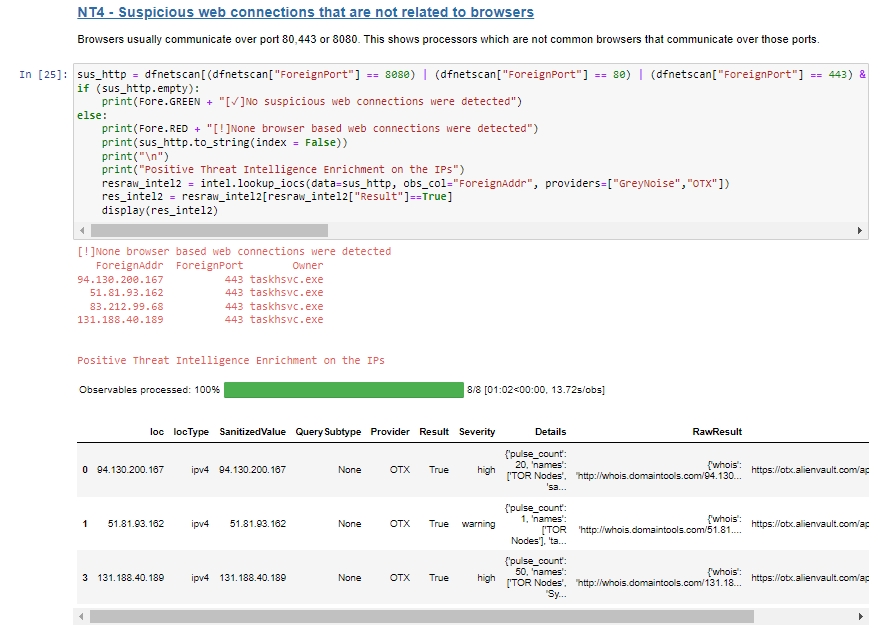
Network IOC enrichment

Process Tree Visualisation

Timeseries analysis

Image Credit Memory icons created by Darius Dan - Flaticon

Download Tool

Most Popular

View all →

Discover the most used tools by our community.

  • 1

    OsintHunter

    letox4/osinthunter

    🎯 The ultimate OSINT toolkit: investigation graph, confidence scoring, alias families, map, timeline and reports. 49 modules, 400+ sites, no API keys required.

    837
  • 2

    ghostlock-app

    yukonga/ghostlock-app

    GhostLock One-Tap Execution App (CVE-2026-43499)

    536
  • 3

    ARTEX

    baarai/artex

    LLM multi-agent autonomous penetration testing platform with planner/worker agents, asset and exploration graphs, MITM traffic recording, and vulnerability retesting.

    424
  • 4

    redforge

    cybersecurity91/redforge

    Browser-side red team toolkit with 102 offline tools for recon, payload generation, credential attacks, crypto, encoding and engagement reporting.

    355
  • 5

    looking-glass

    anonghosty/looking-glass

    CSIRT platform that ingests Shadowserver reports into MongoDB and replays them as interactive maps, analysis, findings, advisories and executive dashboards.

    294
  • 6

    CyberStrikeAI

    ed1s0nz/cyberstrikeai

    The system of action for AI-native cybersecurity—where intent becomes governed execution, evidence becomes operational memory, and every operation improves the next.

    276

Explore all tools

Browse our collection of tools

View all tools →





