
Skip to content
KitploitKITPLOIT
ToolsExploitsBlog
Log in
Submit
ToolsExploitsBlog
Submit

Hacking, PenTest, and Cybersecurity Tools for Your Security Arsenal!

Kitploit is a directory of hacking, cybersecurity, and pentesting tools. Discover the latest project updates to find vulnerabilities, analyze systems, automate testing, and strengthen your security.

FeedsContactPrivacy© 2026 Kitploit

Tool Directory

Categories

View all categories
Loading categories
Centry — Panic button for protection against cold boot attacks | Kitploit

Tools/GitHubGitHub/0xpoly/centry
Defensive ToolsEncryption/Decryption ToolsMemory ForensicsData RecoveryHardware SecurityIncident Response
GitHub0xpoly/centry

Centry

Panic button for protection against cold boot attacks

View Repository
145244412 years agoReviewed by Kitploit
Share

Centry

WARNING: THIS IS EXPERIMENTAL SOFTWARE. IT IS LIKELY TO CONTAIN BUGS.

Updates

If you have already installed Centry, please run git pull to update to the latest version. The latest updates make it much more secure against replay attacks.

Introduction

Centry is a panic button intended to protect users against Cold Boot Attacks, Direct Memory Access Attacks and other live system threats. Centry is most effective when deployed on systems with Full Disk Encryption and without a swap/page file. The panic function can be activated through the GUI or through a network request (through browser, smartphone, etc). Upon recieving the panic instruction, Centry will attempt to remove sensitive keys from memory, securily overwrite the RAM and then force a shutdown.
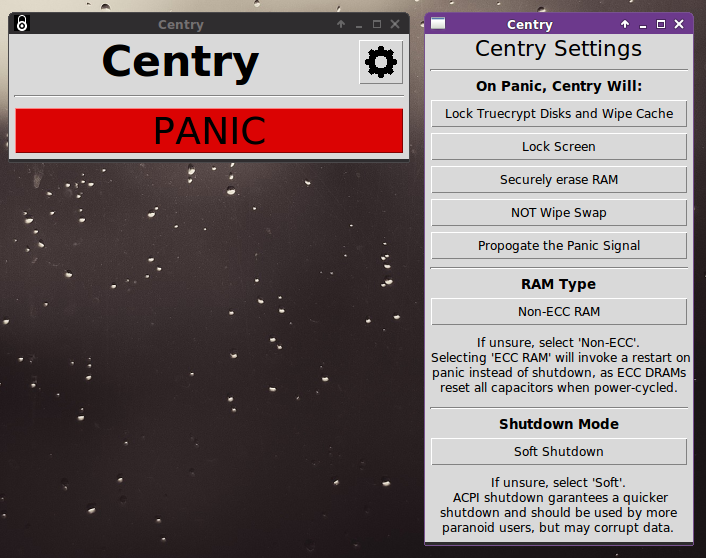
screenshot

Features

  • User-friendly GUI interface
  • When in panic mode, Centry can:
    • Lock the screen
    • Unmount all Truecrypt disks and clear the password/keyfile cache
    • Write zeros to RAM using sdmem (on UNIX-like systems)
    • Force an ACPI shutdown (equivilent holding down the power button)
    • Propogate the panic signal to all other nodes in the network
  • Settings to improve security on ECC-enabled systems
  • Extensively customizable
  • Compatable with Linux and Mac OS; with significantly more security in Linux.

Installation

####Linux#### For significantly improved security install the secure-delete package. On Ubuntu/Debian:

 sudo apt-get install secure-delete

Then download and run Centry as root:

 git clone https://github.com/0xPoly/Centry.git
 sudo python centry.py "password"

Contributors and License

  • 0xPoly - twitter

This is a free open-source program distirbuted under the GNU General Public License. Comments, suggestions and pull requests are all heartily encouraged.


Download Tool

Most Popular

View all →

Discover the most used tools by our community.

  • 1

    OsintHunter

    letox4/osinthunter

    🎯 The ultimate OSINT toolkit: investigation graph, confidence scoring, alias families, map, timeline and reports. 49 modules, 400+ sites, no API keys required.

    837
  • 2

    ghostlock-app

    yukonga/ghostlock-app

    GhostLock One-Tap Execution App (CVE-2026-43499)

    536
  • 3

    ARTEX

    baarai/artex

    LLM multi-agent autonomous penetration testing platform with planner/worker agents, asset and exploration graphs, MITM traffic recording, and vulnerability retesting.

    424
  • 4

    redforge

    cybersecurity91/redforge

    Browser-side red team toolkit with 102 offline tools for recon, payload generation, credential attacks, crypto, encoding and engagement reporting.

    355
  • 5

    looking-glass

    anonghosty/looking-glass

    CSIRT platform that ingests Shadowserver reports into MongoDB and replays them as interactive maps, analysis, findings, advisories and executive dashboards.

    294
  • 6

    CyberStrikeAI

    ed1s0nz/cyberstrikeai

    The system of action for AI-native cybersecurity—where intent becomes governed execution, evidence becomes operational memory, and every operation improves the next.

    276

Explore all tools

Browse our collection of tools

View all tools →




