storytold/craft-anything
纯 Rust 逆向工程引擎,内置 314 个 CLI/MCP 检查工具(反汇编、反编译、字符串提取、调用图),可分析任意应用、网站或游戏,并由 AI 智能体重建。
<!-- 本文件是 README.md 的简体中文翻译;英文版有改动时请一并更新本文件。 -->
<p align="center">
<a href="https://getartcraft.com/">
<picture>
<source media="(prefers-color-scheme: dark)" srcset="docs/brand/artcraft-logo-white.svg">
<img alt="ArtCraft" src="https://raw.githubusercontent.com/storytold/craft-anything/main/docs/brand/artcraft-logo.svg" width="200">
</picture>
</a>
</p>
<p align="center">
<img src="https://assets.kitploit.com/production/public/readmes/58798/2e9ac7807d28a03cb95e598c259db6a67217ca28ec52b967fae6a2e4e7710094/b9ebf8cd52a4d1c6cfa2171678b9ef00687d7d2935192a4f104336889c0e252b-display-v1.webp" width="128" height="128" alt="Craft Anything 图标:蓝色底块上雕刻的乌鸦">
</p>
<h1 align="center">Craft Anything</h1>
<p align="center">
<a href="https://github.com/storytold/craft-anything/blob/main/README.md">English</a> · <a href="https://github.com/storytold/craft-anything/blob/main/README.ja.md">日本語</a> · <b>简体中文</b> · <a href="https://github.com/storytold/craft-anything/blob/main/README.zh-hant.md">繁體中文</a> · <a href="https://github.com/storytold/craft-anything/blob/main/README.ko.md">한국어</a> · <a href="https://github.com/storytold/craft-anything/blob/main/README.es.md">Español</a> · <a href="https://github.com/storytold/craft-anything/blob/main/README.fr.md">Français</a> · <a href="https://github.com/storytold/craft-anything/blob/main/README.vi.md">Tiếng Việt</a> · <a href="https://github.com/storytold/craft-anything/blob/main/README.pt.md">Português</a>
</p>
<p align="center">
<b>看清任意网站、应用或游戏是怎么做的,再让 AI 给你造一个自己的版本;一个纯 Rust 写的开源净室引擎。</b><br>
把目标指给它,说清你想要什么,它就用真实的检查工具研究原作,<br>
让编码 agent 建一个新项目,把结果与原件比对,再反复收敛。
</p>
<p align="center">
<img alt="100% Rust" src="https://img.shields.io/badge/100%25-Rust-b7410e?style=flat-square&logo=rust">
<img alt="macOS · Windows · Linux · FreeBSD · Web" src="https://img.shields.io/badge/macOS%20%C2%B7%20Windows%20%C2%B7%20Linux%20%C2%B7%20FreeBSD%20%C2%B7%20Web-native-2d81ff?style=flat-square">
<img alt="License: MIT OR Apache-2.0" src="https://img.shields.io/badge/license-MIT%20/%20Apache--2.0-3a3a3a?style=flat-square">
<img alt="Status: early alpha" src="https://img.shields.io/badge/status-early%20alpha-d69e2e?style=flat-square">
</p>
<p align="center">
<a href="https://discord.gg/artcraft"><img alt="加入 ArtCraft 的 Discord 社区" src="https://img.shields.io/badge/Join%20us%20on%20Discord-5865F2?style=for-the-badge&logo=discord&logoColor=white" height="40"></a>
</p>
<p align="center">
<a href="#downloads"><b>下载 Craft Anything</b></a> ·
<a href="https://getartcraft.com/">ArtCraft</a> ·
<a href="https://getartcraft.com/apps">全部 Crafting 应用</a>
</p>
<br>
<p align="center">
<img src="https://assets.kitploit.com/production/public/readmes/58798/fcb482c23136953897bcbddb22f9eb2553a88a007440dd7e42f419bfe3df7b38/54ea1aee27ef20a60f5059225378660441c4c8441f0aeae6a99bbfb331b8ef93-display-v1.webp" alt="Craft Anything 里的一个网站项目:检查清单列出还不一致的地方和每页的相似度,构建方说它的版本已就绪,一张审批卡在跑命令前先征求同意,计划显示四步里已完成两步" width="100%">
<br>
<sub>一个网站项目:每项检查都说明构建成果有多像,规则之外的任何动作都要你批准,计划显示还剩什么没做。</sub>
</p>
> [!NOTE]
> **ArtCraft 是一个来自各行各业的创作者社区。** 画家、摄影师、导演、插画师、设计师、动画师、
> 爱好者,以及上周才拿起笔的人。只要你动手做东西,你就是我们的一员。**[来 Discord 打个招呼](https://discord.gg/artcraft)。**
<p align="center">
<a href="#how-it-works">工作原理</a> ·
<a href="#two-ways-to-use-it">两种用法</a> ·
<a href="#ai">AI</a> ·
<a href="#built-for-agents">面向 agent</a> ·
<a href="#under-the-hood">内部实现</a> ·
<a href="#get-started">开始使用</a> ·
<a href="#status">状态</a> ·
<a href="#downloads">下载</a> ·
<a href="https://discord.gg/artcraft">Discord</a>
</p>
<br>
<table>
<tr>
<td width="25%" valign="top">
<h3>🔍 研究一切</h3>
网站、桌面程序、手机应用、游戏和文件:真实的检查工具弄清它们是怎么搭起来的、做了什么,每个结论都带着证据。
</td>
<td width="25%" valign="top">
<h3>🛠️ 造一个自己的</h3>
说出你要什么(“复刻这个网站”、“用 Rust 复刻这个游戏的玩法”),编码 agent 就按你指定的技术栈建一个新项目。
</td>
<td width="25%" valign="top">
<h3>✅ 比对过,不是猜的</h3>
每个构建都会与原件比对(网页按三种屏宽、游戏跑它自己的自检、应用看它的运行),并反复收敛到足够接近。
</td>
<td width="25%" valign="top">
<h3>🤖 为 agent 准备好</h3>
314 个工具,每个既是 CLI 子命令、又是 MCP 工具,任何 agent 都能驱动跟应用同一个引擎。纯研究不需要 AI。
</td>
</tr>
</table>
<br>
<a id="how-it-works"></a>
## 工作原理
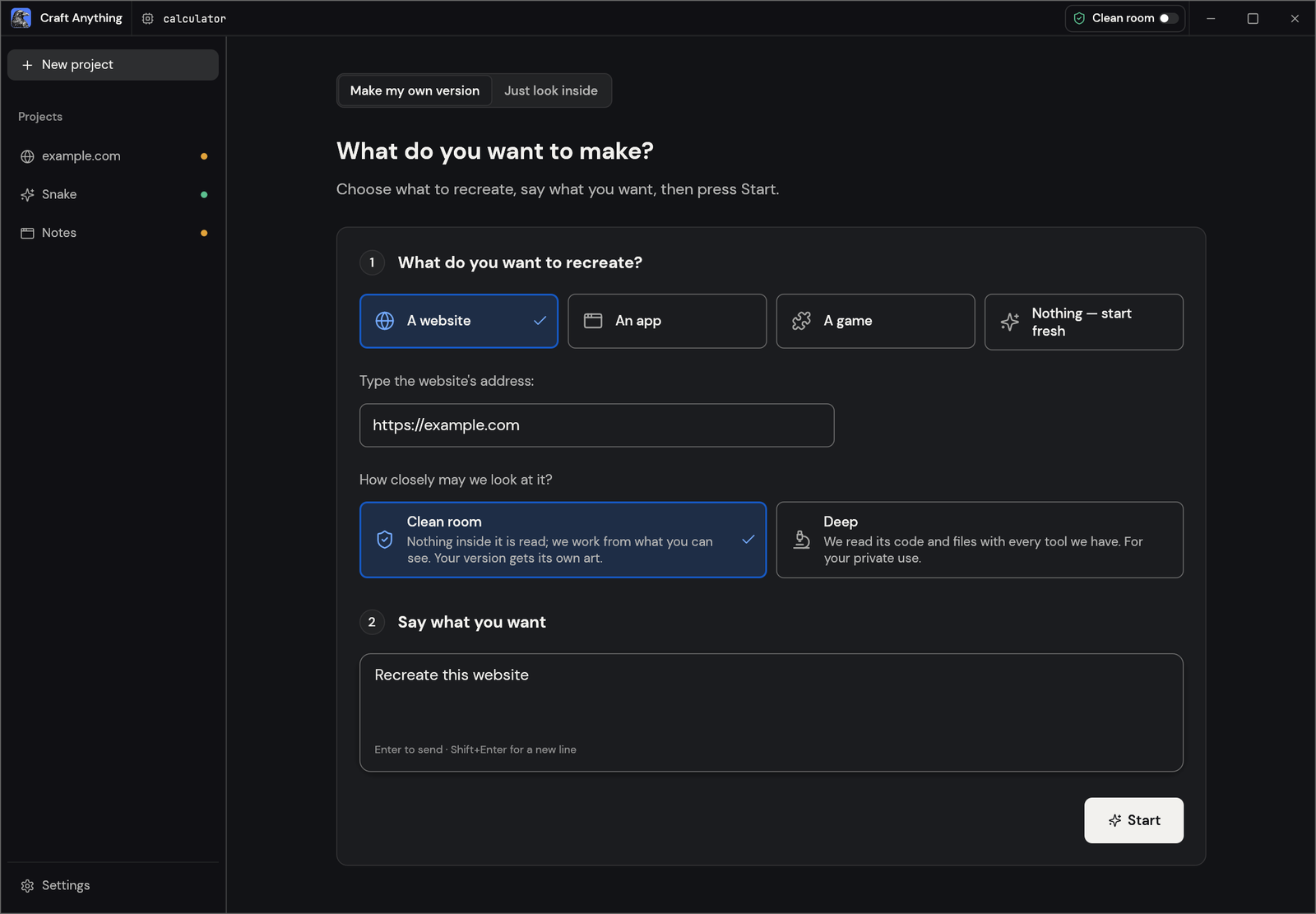
把 Craft Anything 指向一个目标,说清你要什么,按下 Start。它分四步走,遇到该你拍板的地方就用大白话问你:
1. **研究:** 检查原件:它在各种宽度下的页面、它的代码、它的文件、它怎么运行。
2. **构建:** 编码 agent 建一个新项目,用你的请求指定的语言、框架或引擎(没指定就用合理默认)。
3. **检查:** 把构建成果与原件比对,列出还不一致的地方。
4. **就绪:** 打开、试玩或预览结果,或者继续提要求让它接着收敛。
<table>
<tr>
<td width="50%" valign="top">
<img src="https://assets.kitploit.com/production/public/readmes/58798/1d16f7dd3e094b6340081dd0bf42595deef895c126f16723b966c66a7e846fef/91c1af30ea1c12032458e4fc5dfd46ff3d003d337f5c830245e9cf0fdb4a4e91-display-v1.webp" alt="Make 界面:选择要复刻的网站、应用或游戏,填入地址,选净室或深度模式,说出你要什么,按下 Start" width="100%"><br>
<sub><b>Make:</b>选择要复刻什么,说出你要什么,按下 Start。</sub>
</td>
<td width="50%" valign="top">
<img src="https://assets.kitploit.com/production/public/readmes/58798/3c877ef7e6b14efe9f87d47d7ba5e89242f42b3a8ca07c6a2970bca4b08103c3/076b2ddd0cf39bc7449f62b3af6f52e52571ee4c3c2f2879a1a6d576fdbe82b7-display-v1.webp" alt="一个做完的贪吃蛇项目,所有步骤都完成了,还有一个“试玩游戏”按钮" width="100%"><br>
<sub><b>就绪:</b>试玩游戏,或者在下面提改动要求。</sub>
</td>
</tr>
</table>
<a id="two-ways-to-use-it"></a>
## 两种用法
- **简单模式**(默认):“你想做什么?” 选一个网站、应用或游戏,描述它,按下 Start。项目页显示四个步骤(研究 → 构建 → 检查 → 就绪)、agent 正在做什么(用大白话)、提问卡和审批卡、结果有多像,以及打开结果或它所在文件夹的按钮。在底部的输入框里提改动要求。“只看里面”会打开一个目标供你提问,但不构建任何东西(需深度模式)。
- **进阶模式**:完整的工作台:所有工具(Ctrl/Cmd+K)、函数、字符串、伪 C、反汇编、十六进制、调用图、证据、未知项、任务、日志和 agent 控制台。
两种模式驱动同一个引擎。
<a id="clean-room-or-deep"></a>
## 净室还是深度
- **净室**(默认):绝不读取原件内部的任何东西——不读它的代码、文件或页面源码。Craft Anything 只依据你所能看到的来工作:你添加的图片、网站以访客身份呈现的样子(截图、可见文本、测量出的布局、颜色、字体与间距、展开的菜单),以及在你允许时截取的应用窗口画面。所有会往内部看的工具都会被拒绝,并告诉你如何开启深度模式。
- **深度**:使用全部工具,供你自己私下使用。程序的代码和文件由内置引擎读取(装了 Ghidra 时也会用它),网站的 JavaScript 会被读取、起始页面会被持续观察,构建方也可以使用全部这些能力。
在标题栏或设置里切换,或执行 `settings_set deep_mode true`,或单次 CLI 运行时加 `--deep`(或 `--clean-room`)。
<p align="center">
<img src="https://assets.kitploit.com/production/public/readmes/58798/ac7d74860103dd43bde604d323f2ac345dab4ed2f6652d22cd6446608465cfba/1ccae863fd4e0d197f49c849e98f9f7e5f2b0a0ab30a7414ffa0d503d4e14677-display-v1.webp" alt="进阶模式的工作台:函数列表、所选函数的伪 C、用工具调用回答问题的 agent,以及证据台账" width="100%">
<br>
<sub><b>进阶:</b>函数、伪 C、agent,以及每个答案背后的证据。</sub>
</p>
<a id="ai"></a>
## AI
构建需要你电脑上有一个已登录的编码 agent。**Claude Code** 是首选支持对象:Craft Anything 运行你自己那份未经改动的 `claude` 程序,它用你自己的登录;Craft Anything 从不查看也不接触你的账号,你对它的使用适用你与 Anthropic 自己的协议。原因与做法见 [docs/claude-code.md](https://github.com/storytold/craft-anything/blob/main/docs/claude-code.md)。Codex 适配器已存在,但还没在真实安装上验证过。提问和分析可选用 Anthropic、OpenAI、OpenRouter 以及本地 OpenAI 兼容服务(设置 → AI)。
<a id="built-for-agents"></a>
## 面向 agent
每个工具同时是一个 CLI 子命令和一个 MCP 工具,所以 agent 不用打开应用也能研究目标或跑完整个重建:
```sh
craft-anything-cli commands # every tool, by toolset
craft-anything-cli mcp # serve them to any MCP client
craft-anything-cli rebuild https://example.com "Recreate this website"
```
结果是带置信度、覆盖范围和局限性的证据记录;大结果先给摘要,再用 `core_evidence_browse` 分页读取。`craft-anything-cli setup` 把 Craft Anything 接到编码 agent 应用上。
<a id="under-the-hood"></a>
## 内部实现
一个纯 Rust 的逆向工程引擎,314 个工具(引擎里 298 个,其余来自 AI 与设置层),覆盖原生程序、.NET、Java、Android、Apple、Electron/JavaScript、网站、固件、抓包、数据库和游戏文件。它自带的解码器、反汇编器和反编译器无需任何外部程序即可工作;深度模式会全部用上,装了 Ghidra 时也会使用它。它支撑着桌面应用(egui)、CLI 和 MCP 服务器,其中一部分还能以 WebAssembly 跑在浏览器里。完整清单在 [docs/tools.md](https://github.com/storytold/craft-anything/blob/main/docs/tools.md)。
<a id="get-started"></a>
## 开始使用
需要 Rust **1.97 或更新**(有依赖要求它;`rustup update`)。在 Debian 或 Ubuntu 上,桌面应用还需要:
```sh
sudo apt-get install libxkbcommon-dev libwayland-dev libx11-dev libxrandr-dev libxi-dev libgl1-mesa-dev libgtk-3-dev
```
然后:
```sh
git clone https://github.com/storytold/craft-anything && cd craft-anything
cargo run --release -p craft-anything # the desktop app
cargo install --path apps/craft-anything-cli # the CLI, as `craft-anything-cli`
craft-anything-cli doctor # checks the install, coding agents and engines
```
构建需要你电脑上已登录一个编码 agent(见 [AI](#ai));`doctor` 会告诉你缺什么。从命令行重建(问题在终端里问):
```sh
craft-anything-cli rebuild https://example.com "Recreate this website"
craft-anything-cli rebuild - "A snake game in Rust" --rounds 1
craft-anything-cli rebuild https://example.com "Make the header blue" --continue-in "<project folder>"
craft-anything-cli rebuild - "Add a contact form" --project-folder "<your folder>" --existing edit
```
新项目放在 `Documents/Craft Anything`(可在设置 → 通用里改)。每个项目文件夹里有 `craft.json`(请求、目标、状态和历史)、`capture/`(从目标录到的内容)、`app/`(生成的项目)、`checks/`(每次与原件比对的结果)、`investigation.cany/`(证据)和 `inbox/`(待回答问题)。
项目也可以从你指定的文件夹开始(Start 下的“选择文件夹…”,或 `--project-folder`)。如果那里已经有文件,你要说明它们是什么:就是应用本身(构建方会就地修改),还是作为起点用的素材(应用会建在它们旁边的 `app/` 里);设置 → 通用可以记住你的选择。设置 → 通用还会列出其他文件夹里的项目;移除一个只是把它从列表里拿掉。
<a id="status"></a>
## 状态
> [!IMPORTANT]
> **状态:** Craft Anything 处于早期 alpha。今天能用的、部分可用的,以及接下来要做的:
>
> - **今天可用:** 桌面应用(简单与进阶模式)、CLI 和 MCP 服务器;以 Claude Code 作为构建方、面向网站/应用/游戏的
> 研究 → 构建 → 检查 → 收敛 流程;三种屏宽下的网站检查;Unity、Unreal 或 Godot 的游戏重建;带 Ghidra 的深度
> 模式;生成图片和 3D 模型(需自行选择开启,用你自己的 fal.ai 密钥);插件(MCP 服务器,以及开启 `wasm-plugins`
> 选项的构建中的 WASM 组件)。
> - **部分可用:** 用 API 密钥和其他编码 agent 构建(已实现,尚未真机跑通),应用和游戏的行为检查,少数引擎工具只用替身测过。
> - **接下来:** 第一次公开发布(Windows、macOS、Linux 和 FreeBSD 的安装包,以及浏览器查看器都已在 CI 里配好),然后是托管版。
>
> [docs/STATUS.md](https://github.com/storytold/craft-anything/blob/main/docs/STATUS.md) 有细节和每部分的验证方式,[docs/tool-status.md](https://github.com/storytold/craft-anything/blob/main/docs/tool-status.md) 是逐个工具的清单,
> [docs/ROADMAP.md](https://github.com/storytold/craft-anything/blob/main/docs/ROADMAP.md) 是逐项的计划。欢迎提 issue,或者到 [Discord](https://discord.gg/artcraft) 说哪里坏了。
**负责地使用。** 请在你拥有或获准检查的软件上使用 Craft Anything。它绝不绕过 DRM、登录或反作弊。重建是依据证据复现布局、风格与行为;agent 被要求不得复制 logo、照片或文本,除非你确认你拥有它们或已获授权。
<a id="downloads"></a>
## 下载
在 GitHub 上,[最新发布](https://github.com/storytold/craft-anything/releases/latest) 列出了下面所有构建,[全部发布](https://github.com/storytold/craft-anything/releases) 有更早的版本和它们的说明。文件名里的 `<ver>` 是版本号,`SHA256SUMS.txt` 列出每个文件的校验和。
### Windows
| 构建 | 安装包 | 便携版 |
|---|---|---|
| x64(64 位 Intel/AMD) | `craft-anything-<ver>-windows-x64.msi` | `craft-anything-<ver>-windows-x64-portable.zip` |
| arm64(骁龙及其他 ARM PC) | `craft-anything-<ver>-windows-arm64.msi` | `craft-anything-<ver>-windows-arm64-portable.zip` |
| x86(32 位) | `craft-anything-<ver>-windows-x86.msi` | `craft-anything-<ver>-windows-x86-portable.zip` |
安装包和可执行文件都有代码签名。便携版把设置放在应用旁边。
### macOS
| 构建 | 文件 | 说明 |
|---|---|---|
| 应用,通用版(Apple silicon + Intel) | `craft-anything-<ver>-macos-universal.dmg` | 已签名并公证 |
| 命令行工具,通用版 | `craft-anything-cli-<ver>-macos-universal.zip` | 已签名并公证 |
#### 检查 Mac 下载是否已签名并公证
每个 Mac 版本都用 Developer ID 证书签名,并通过 Apple 公证。想自己检查,请在终端运行以下命令(把 `<ver>` 换成版本号,路径换成你的):
```sh
# 磁盘映像:"accepted" 和 "source=Notarized Developer ID" 表示通过
spctl --assess --type open --context context:primary-signature -v "craft-anything-<ver>-macos-universal.dmg"
# 公证票据已附加:会输出 "The validate action worked!"
xcrun stapler validate "craft-anything-<ver>-macos-universal.dmg"
# 应用(打开磁盘映像后):签名必须验证通过
codesign --verify --deep --strict --verbose=2 "/Volumes/<disk image name>/Craft Anything.app"
spctl --assess --type execute --verbose "/Volumes/<disk image name>/Craft Anything.app"
# 命令行工具:独立程序无法携带票据,macOS 会在线上检查
codesign --verify --strict --verbose=2 ~/.local/bin/craft-anything-cli
codesign -dv --verbose=4 ~/.local/bin/craft-anything-cli 2>&1 | grep Authority
```
`Authority` 行应显示 "Developer ID Application" 证书。检查失败时不要运行该文件,请把输出和发布标签一起报告。
### Linux
| 格式 | x86_64 | aarch64(ARM64) | 说明 |
|---|---|---|---|
| AppImage | `craft-anything-<ver>-linux-x86_64.AppImage` | `craft-anything-<ver>-linux-aarch64.AppImage` | 随处可跑;用 [AppImageUpdate](https://github.com/AppImageCommunity/AppImageUpdate) 自我更新(`.zsync` 文件) |
| Flatpak | `craft-anything-<ver>-linux-x86_64.flatpak` | `craft-anything-<ver>-linux-aarch64.flatpak` | 沙箱运行;`flatpak install --user <file>` |
| Debian/Ubuntu | `craft-anything-<ver>-linux-x86_64.deb` | `craft-anything-<ver>-linux-aarch64.deb` | |
| Fedora/RHEL/openSUSE | `craft-anything-<ver>-linux-x86_64.rpm` | `craft-anything-<ver>-linux-aarch64.rpm` | |
| Tarball | `craft-anything-<ver>-linux-x86_64.tar.gz` | `craft-anything-<ver>-linux-aarch64.tar.gz` | 解压到任意位置 |
RISC-V(riscv64):`craft-anything-<ver>-linux-riscv64.tar.gz`,只有 tarball。
### FreeBSD
| 构建 | 文件 |
|---|---|
| x86_64 | `craft-anything-<ver>-freebsd-x86_64.tar.gz` |
### Web(WebAssembly)
| 构建 | 文件 | 说明 |
|---|---|---|
| 浏览器查看器 | `craft-anything-web-<ver>.zip` | 在浏览器里说明一个文件是什么(文件本身不离开浏览器);把这个文件夹放到任意静态 Web 服务器上即可([packaging/web/README.md](https://github.com/storytold/craft-anything/blob/main/packaging/web/README.md)) |
<br>
<p align="center">
<a href="https://discord.gg/artcraft"><img alt="加入 ArtCraft 的 Discord 社区" src="https://img.shields.io/badge/Join%20us%20on%20Discord-5865F2?style=for-the-badge&logo=discord&logoColor=white" height="40"></a>
</p>
<h3 align="center">来和我们一起做东西</h3>
<p align="center">
我们的 Discord 是各类创作者待的地方:画画的人、拍摄的人、绘图的人、剪片子的人、排版的人,
以及还在摸索自己喜欢做什么的人。分享你正在做的东西、求助、告诉我们哪里坏了,或者说说你希望
这些工具能做什么。不论你用什么媒介、入行多久,这里都欢迎你。
</p>
<p align="center">
<a href="https://discord.gg/artcraft"><b>discord.gg/artcraft</b></a> ·
<a href="https://getartcraft.com/">getartcraft.com</a> ·
<a href="https://getartcraft.com/apps">The Crafting Apps</a> ·
<a href="https://github.com/storytold/craft-anything">Craft Anything</a>
</p>
---
## The Craft App Suite
| | 应用 | 用来做什么 | 代码 | 了解更多 |
|:-:|---|---|---|---|
| <img src="https://assets.kitploit.com/production/public/readmes/58798/b4e7ae8d5e518184d4af10677c3e246c17002ba920f2f02d5344b2c26943e389/4c3b05f0b3612f5d28870b36a137db60cd08562a6874a625e4e67a99591c993e-display-v1.webp" alt="" width="32" height="32"> | **PhotoCraft** | 图像编辑:图层、蒙版、文字,以及真正的 PSD 文件 | [GitHub](https://github.com/storytold/photocraft) | [网站](https://getartcraft.com/apps/photocraft) |
| <img src="https://assets.kitploit.com/production/public/readmes/58798/8664c678fa215af8bc42a751f4654a6ed1539378278153beaf532016799a5870/ff36b32a1b1c5be8635fcb32e3049111bc2c4173d509f420ef0bf9aab4b7c3ee-display-v1.webp" alt="" width="32" height="32"> | **VectorCraft** | 矢量插画 | [GitHub](https://github.com/storytold/vectorcraft) | [网站](https://getartcraft.com/apps/vectorcraft) |
| <img src="https://assets.kitploit.com/production/public/readmes/58798/dd39cbd12103b4c70334acb6517ba21a32e9c4492f35e87c4c072b5664288918/4b7b4631d73ce5a2bf7435e48854e8b061fcf485bcb8878a0ff9ffedbe1886c0-display-v1.webp" alt="" width="32" height="32"> | **FilmCraft** | 视频剪辑、调色与声音 | [GitHub](https://github.com/storytold/filmcraft) | [网站](https://getartcraft.com/apps/filmcraft) |
| <img src="https://assets.kitploit.com/production/public/readmes/58798/974ba6bc470c723a58d86e2ec16e6fa5f4c7fa9006b3bb93db0e0a05faaeb460/7630b35db0bee0a381c84040efa30fc82b18085b08c4f5049d9c3ea2ef1d61f8-display-v1.webp" alt="" width="32" height="32"> | **LightCraft** | 照片库与 raw 冲图 | [GitHub](https://github.com/storytold/lightcraft) | [网站](https://getartcraft.com/apps/lightcraft) |
| <img src="https://assets.kitploit.com/production/public/readmes/58798/deb1a9f849549d3f0652fb6d3c30b6eb6ea54498eaea8c1007d901bbafe7067c/566ce63c450cc51b51b93eee3ea3873375ab4a8570c411c0ae2243dfe584d57f-display-v1.webp" alt="" width="32" height="32"> | **PdfCraft** | 阅读、整理与保护 PDF | [GitHub](https://github.com/storytold/pdfcraft) | [网站](https://getartcraft.com/apps/pdfcraft) |
| <img src="https://assets.kitploit.com/production/public/readmes/58798/6b77b1f0da42f8441000d3eaa4115b0dda2170b5922cc7a208725e4af55a04fa/700599f65308233054b8d24c63e069b207380e9a3d4073a1fcbd99e53a07acfc-display-v1.webp" alt="" width="32" height="32"> | **EffectCraft** | 动态图形与视觉特效 | [GitHub](https://github.com/storytold/effectcraft) | [网站](https://getartcraft.com/apps/effectcraft) |
| <img src="https://assets.kitploit.com/production/public/readmes/58798/7f918df1646d832a0740583009e96c8c2a87b425cb3aa1a0c317cc46275f60a1/a31c0bdc1563707da906c6ab383c5b634273fd35ac7f289326f3f86821bd1acb-display-v1.webp" alt="" width="32" height="32"> | **DesignCraft** | 页面排版与出版 | [GitHub](https://github.com/storytold/designcraft) | [网站](https://getartcraft.com/apps/designcraft) |
| <img src="https://assets.kitploit.com/production/public/readmes/58798/95143ef977aea91c94e5ce0eafa10bda4fd9517c4d2a50c4c76459eb7496279e/c02fa9d1750bc45445f051d20a65bd66c3a1d75e9bfd8c22a4cb0b66527bf673-display-v1.webp" alt="" width="32" height="32"> | **FigCraft** | 界面设计与原型 | [GitHub](https://github.com/storytold/figcraft) | [网站](https://getartcraft.com/apps/figcraft) |
| <img src="https://assets.kitploit.com/production/public/readmes/58798/4afafced857df9dbac4df8c8add2c0dc21ab9d2d9a7bcdcbb23feda84910c13a/a3dba2dbb395660aab3302a4f0e5963ad844de0e03252c1eb78e976c96f22ac2-display-v1.webp" alt="" width="32" height="32"> | **WordCraft** | 文字处理与文档 | [GitHub](https://github.com/storytold/wordcraft) | [网站](https://getartcraft.com/apps/wordcraft) |
| <img src="https://assets.kitploit.com/production/public/readmes/58798/b91bbf89680d702f8931d1a033465697ce814e2f62a9fdbadc4f4b76a1295dfe/8229f6ceb91b75b931953ed1939d9d7ec48daa8d73320e0d2d612e1ac82cf3cf-display-v1.webp" alt="" width="32" height="32"> | **SoundCraft** | 音频录制与编辑 | [GitHub](https://github.com/storytold/soundcraft) | [网站](https://getartcraft.com/apps/soundcraft) |
| <img src="https://assets.kitploit.com/production/public/readmes/58798/e38cec9053092960b1d320edddc4e0bbaf3af1dc9cbe094c014ce633b8db796e/eea2a3f67318824b693560a5fdde1a02587ea635a6d6f10d04bcf8f0db1bb325-display-v1.webp" alt="" width="32" height="32"> | **DeckCraft** | 演示文稿与幻灯片 | [GitHub](https://github.com/storytold/deckcraft) | [网站](https://getartcraft.com/apps/deckcraft) |
| <img src="https://assets.kitploit.com/production/public/readmes/58798/5db43e6371604060fb450a9af72f804f9e154e3a030ddbc61ea95a65302ed2e2/5ecc9d30e2759165bf19d1dc98aea1b706c39beeed722d7d1b4b85f3ef7ce99b-display-v1.webp" alt="" width="32" height="32"> | **CADCraft** | 计算机辅助设计 | [GitHub](https://github.com/storytold/cadcraft) | [网站](https://getartcraft.com/apps/cadcraft) |
| <img src="https://assets.kitploit.com/production/public/readmes/58798/ca40a583be820b1251dd00a175cfbe4edeed5d5b1c51036ed7bf53a19c8cfcad/0ffa0a3a230d9031c3fbd8bc44ec7e2837d9d92d54138601bf5907815779fcc2-display-v1.webp" alt="" width="32" height="32"> | **GridCraft** | 电子表格与数据 | [GitHub](https://github.com/storytold/gridcraft) | [网站](https://getartcraft.com/apps/gridcraft) |
| <img src="https://assets.kitploit.com/production/public/readmes/58798/39d17421579ace5dbe4705fb0a52cd6002d433ded7ba0ee2fdeb5d6d7cd16c8c/f03c48e72a5e01d89f1800ed872debda7d6241e2bdee090390d7c9570869be36-display-v1.webp" alt="" width="32" height="32"> | **TextureCraft** | 3D 贴图绘制 | [GitHub](https://github.com/storytold/texturecraft) | [网站](https://getartcraft.com/apps/texturecraft) |
| <img src="https://assets.kitploit.com/production/public/readmes/58798/362ab662563e21de18b4b0adfa862e819ebf784553308846b14cc33bdbda5143/365a337158da8987935f99507b9d174369e426ae1ac65a54640e257c989cca3c-display-v1.webp" alt="" width="32" height="32"> | **MaterialCraft** | 基于节点的程序化材质 | [GitHub](https://github.com/storytold/materialcraft) | [网站](https://getartcraft.com/apps/materialcraft) |
| <img src="https://assets.kitploit.com/production/public/readmes/58798/b18b257c97b6073bb900476ed323ca94f4c2b85933f0bf96e2c449e301091ee8/dbb2cd131998e7d923de6c199f7f525afc8690937be67eb44c71e7732907ddc7-display-v1.webp" alt="" width="32" height="32"> | **Craft Anything** | 看清任意软件是怎么做的,然后造一个自己的 | [GitHub](https://github.com/storytold/craft-anything) | [网站](https://getartcraft.com/apps/craft-anything) |
| <img src="https://assets.kitploit.com/production/public/readmes/58798/2aeb9fade606d3ad8edbc2fef0813b3f6461f692cd63a2f67d1bb13514381d87/783590c1b6e3cf94fb23d389897b50d1d3d9bf0fee1f1e4effa95730aa857113-display-v1.webp" alt="" width="32" height="32"> | **SolidCraft** | Tangency Labs 的参数化 3D CAD(社区应用) | [GitHub](https://github.com/tangency-labs/solidcraft) | |
<a id="license-and-credits"></a>
## 许可与致谢
Craft Anything 采用 [MIT](https://github.com/storytold/craft-anything/blob/main/LICENSE-MIT) 或 [Apache-2.0](https://github.com/storytold/craft-anything/blob/main/LICENSE-APACHE) 双许可,任你选择。
Copyright (c) 2026 ArtCraft Team and the Craft Anything contributors ([CONTRIBUTORS.md](https://github.com/storytold/craft-anything/blob/main/CONTRIBUTORS.md))。必需的声明在 [NOTICE](https://github.com/storytold/craft-anything/blob/main/NOTICE)。
随附的字体、图标、图片和其他资源各自保留其开源许可;每一项都在 [ATTRIBUTION.md](https://github.com/storytold/craft-anything/blob/main/ATTRIBUTION.md) 里列出了作者、来源和许可。
截图里展示的是为它们制作的示例项目:example.com、一个贪吃蛇游戏和一个小计算器程序。
[`docs/brand/`](https://github.com/storytold/craft-anything/blob/main/docs/brand) 里的 ArtCraft 名称、标志图形和 logo 是 ArtCraft Team 的商标,不在本许可范围内。
它们只能在未作修改的前提下,作为本仓库和 Craft Anything 的一部分使用,并须遵守
[`docs/brand/LICENSE-brand.txt`](https://github.com/storytold/craft-anything/blob/main/docs/brand/LICENSE-brand.txt)。分支和修改版必须移除它们。
<p align="center">
<a href="https://getartcraft.com/"><img alt="ArtCraft" src="https://raw.githubusercontent.com/storytold/craft-anything/main/docs/brand/artcraft-mark.svg" width="28"></a><br>
<sub>由 <a href="https://getartcraft.com/">ArtCraft</a> 团队与社区制作。</sub>
</p>
---
<sub>本页是 [README.md](https://github.com/storytold/craft-anything/blob/main/README.md) 的简体中文翻译。如有出入,以英文版为准。</sub>