 akha-security/akca
Evidence-oriented DAST scanner in Go that crawls web apps and APIs, then runs adaptive SQLi, XSS, RCE, SSRF, and auth checks with replayable proof.

Advanced Web Security Scanner
Discover endpoints. Test web applications. Inspect the evidence.



Installation · Usage · Workflow · Profiles · Coverage · Reports · Support · Features · Changelog
AKCA is an open-source, evidence-oriented Dynamic Application Security Testing (DAST) scanner written in Go. It combines HTTP and browser-assisted crawling, JavaScript analysis, API imports, adaptive active testing, passive inspection, and replayable evidence in one command-line workflow.
Many scanners crawl an application and then send a broad payload set to every discovered endpoint. That strategy can create unnecessary traffic, trigger defensive systems, and produce weak signals that require substantial manual triage. AKCA takes a more contextual approach: it first learns about the target, models the discovered attack surface, and then selects tests according to the technology stack, parameters, authentication state, WAF behavior, and available verification capabilities.
AKCA is designed to:
The goal is not to exhaust or overwhelm the target. It is to find real weaknesses with deliberate requests and useful evidence.
AKCA does not claim feature or detection parity with mature commercial platforms such as Acunetix, Invicti/Netsparker, or Burp Suite Professional. Those products are built by experienced teams over many years. AKCA is independently maintained by one developer in available personal time, inspired by established security tools and shaped by original ideas and community feedback. The current priority is a simple, useful, and transparent scanner. A graphical interface is planned when the engine is sufficiently stable and dependable.
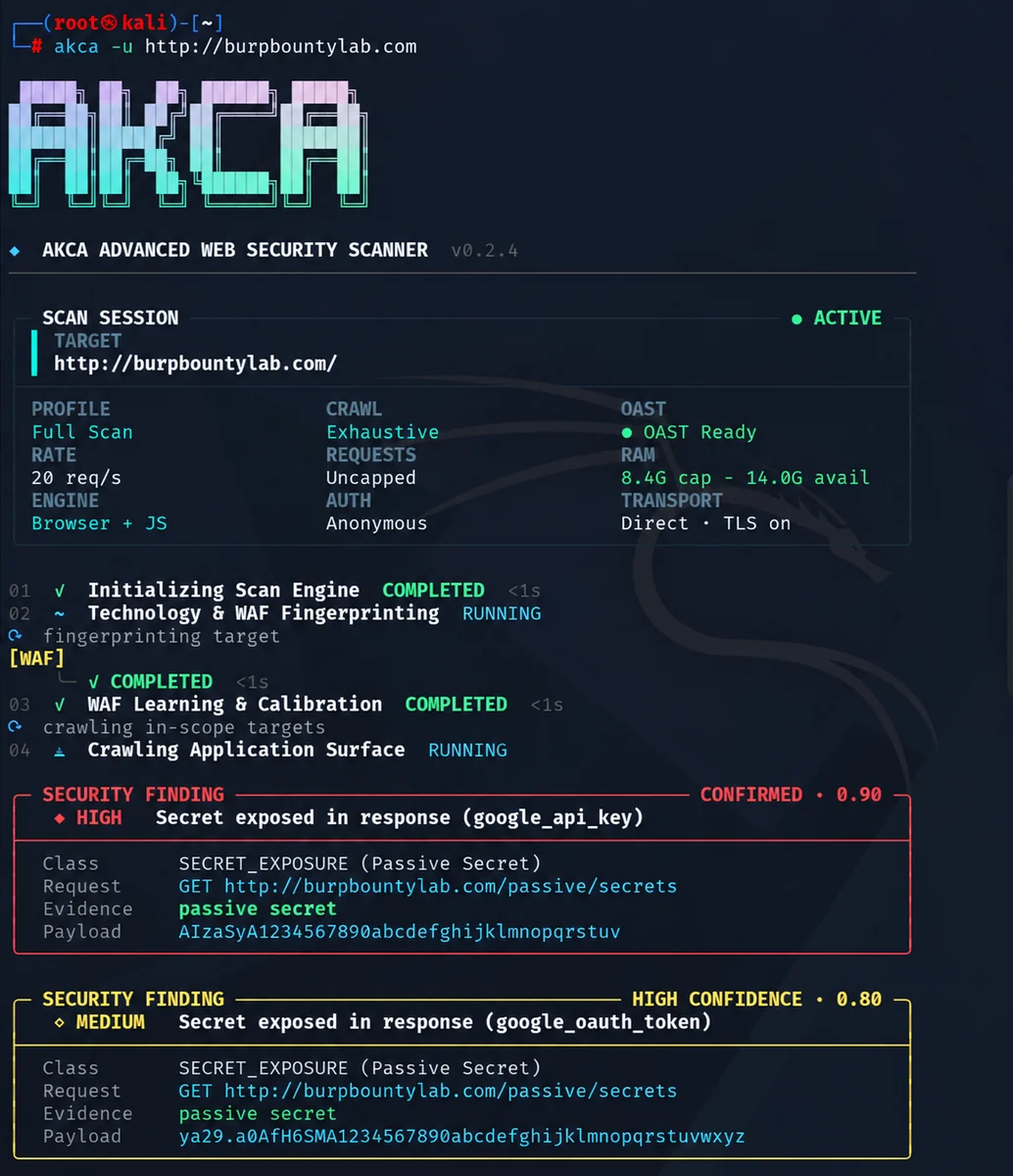
AKCA v0.2.8 scan session with live engine status, resource telemetry, and confirmed findings.
Requires Go 1.25 or newer.
go install github.com/akha-security/akca/engine/cmd/akca@latest
akca --version
@latest installs the newest tagged release, not an untagged commit on main. To test the current development branch, use @main. If an older binary still runs, compare command -v akca with go env GOBIN (or $(go env GOPATH)/bin) and refresh the shell command cache with hash -r. akca --version prints the embedded release build commit/date when available.
For the default Go installation, add the Go binary directory to your current terminal's PATH.
Linux / macOS
export PATH="$(go env GOPATH)/bin:$PATH"
Add that line to your shell configuration to keep it across sessions.
Windows PowerShell
$env:Path += ";$(go env GOPATH)\bin"
For future sessions, add the same directory to your user Path environment variable. If you configured GOBIN, use that directory instead.
Download your build from GitHub Releases. Releases include SHA256SUMS.txt and GitHub build-provenance attestations. Verify a downloaded binary with gh attestation verify <binary> -R akha-security/akca.
| Platform | Architecture | Asset |
|---|---|---|
| Linux | x64 / ARM64 | akca-linux-amd64 / akca-linux-arm64 |
| macOS | Intel / Apple Silicon | akca-darwin-amd64 / akca-darwin-arm64 |
| Windows | x64 | akca-windows-amd64.exe |
On Linux or macOS, make the downloaded file executable. For Linux x64:
chmod +x akca-linux-amd64
./akca-linux-amd64 --help
On Windows, rename the download to akca.exe and run .\akca.exe --help in PowerShell. The examples below assume akca is available on your PATH.
Browser-backed checks require Chrome, Chromium, or Edge.
Use AKCA only on systems you own or have permission to test. Replace the example URL with your authorized target.
akca -u https://example.com
The default profile is full. To save an HTML report:
akca -u https://example.com -f html -o report.html
Run SQL injection, XSS, and server-side injection checks, including SSTI:
akca -u https://example.com -m sql,xss,rce
Run passive checks:
akca -u https://example.com -m passive
Passive scans still send requests for discovery and inspection.
Supply a session cookie:
akca -u https://example.com -c "session=YOUR_SESSION_COOKIE"
Or an authorization header:
akca -u https://example.com -H "Authorization: Bearer YOUR_TOKEN"
Some authorization checks require additional identities or state configuration beyond a single session.
akca -u https://api.example.com --api-spec ./openapi.yaml -m api
Discovery supports OpenAPI/Swagger, RAML, Postman, HAR, GraphQL, WSDL, protobuf, and AsyncAPI inputs, including supported ZIP bundles. Testing coverage depends on the imported protocol and operation.
akca -u https://example.com -p http://127.0.0.1:8080
Run akca --help for all available options.
Use akca -h for concise everyday help, or akca --help for the complete option reference. Scan targets must be supplied explicitly with -u or --url.
Select a profile with -m, or combine several with commas.
