
Skip to content
KitploitKITPLOIT
ToolsExploitsBlog
Log in
Submit
ToolsExploitsBlog
Submit

Hacking, PenTest, and Cybersecurity Tools for Your Security Arsenal!

Kitploit is a directory of hacking, cybersecurity, and pentesting tools. Discover the latest project updates to find vulnerabilities, analyze systems, automate testing, and strengthen your security.

FeedsContactPrivacy© 2026 Kitploit

Tool Directory

Categories

View all categories
Loading categories
physmem2profit — Physmem2profit can be used to create a minidump of a target hosts' LSASS process by analysing physical memory remotely | Kitploit
Tools/GitHubGitHub/reverseclabs/physmem2profit
Memory ForensicsPassword AttacksData ExfiltrationPost-ExploitationDigital ForensicsPenetration TestingRed Teaming
GitHubreverseclabs/physmem2profit

physmem2profit

Physmem2profit can be used to create a minidump of a target hosts' LSASS process by analysing physical memory remotely

View Repository
42274474 years agoReviewed by Kitploit
Share
Website

Physmem2profit

Physmem2profit can be used to create a minidump of a target host's LSASS process by analysing physical memory remotely. The intention of this research is to propose an alternative approach to credential theft and create a modular framework that can be extended to support other drivers that can access physical memory. Physmem2profit generates a minidump (.dmp) of LSASS that can be further analyzed with Mimikatz. The tool does not require Cobalt Strike but should work fine over beacon with a SOCKS proxy.

The idea is illustrated below:
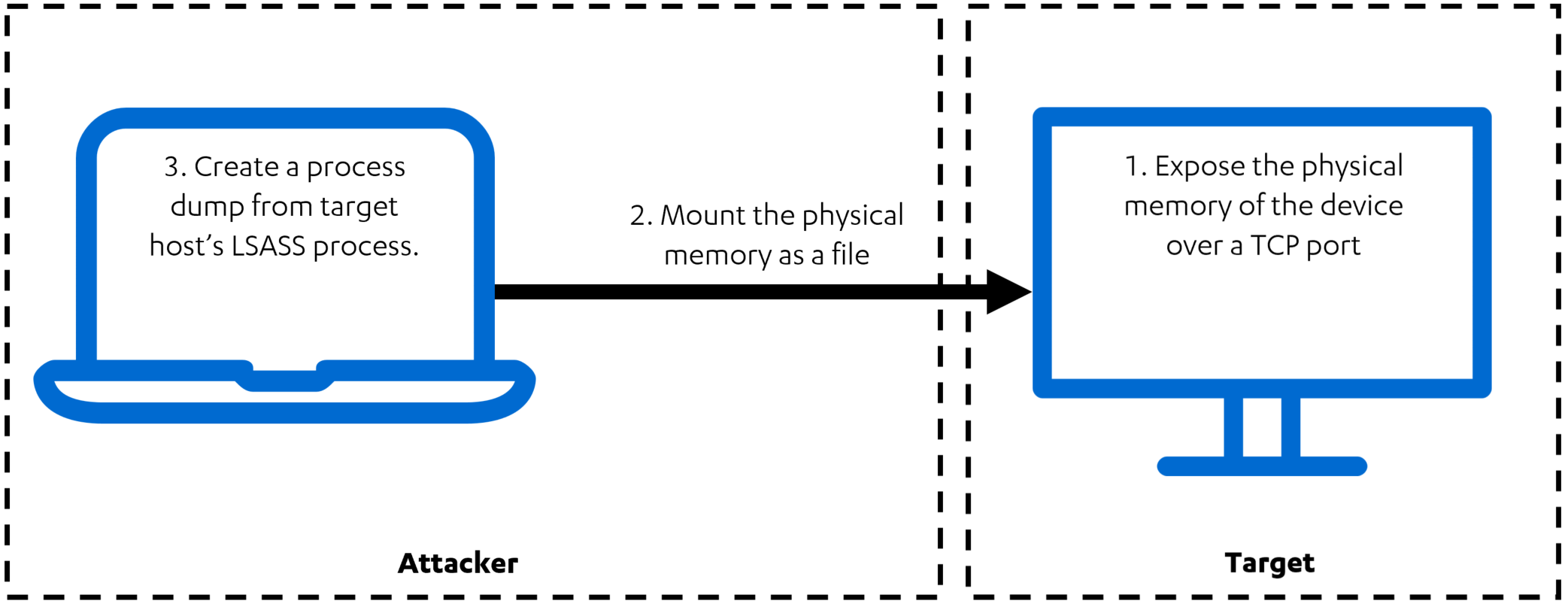
Overview of Physmem2profit

The tool has two components:

  1. The C# server component, physmem2profit.exe, executed on the target host
    • Loads the Winpmem driver and acts as a server, which exposes the physical RAM of the target host through a TCP port
  2. The client, physmem2profit Python module, executed on the attacking machine
    • When executed with --mode mount, connects to the target machine and mounts the physical RAM of the target as a raw file with the help of FUSE
    • When executed with --mode dump, calls various Rekall plugins to analyze the memory image and to generate a minidump of the LSASS process.
    • When executed with --mode all, performs both of the above actions. Connection with server will be closed when dump is complete.

Installation Instructions

  1. Clone the Physmem2profit Git repository: git clone --recurse-submodules https://github.com/FSecureLABS/physmem2profit.git
  2. For the server running on the target computer:
    1. Build physmem2profit/server/Physmem2profit.sln with Visual Studio
  3. For the client running on the attacking machine:
    1. bash physmem2profit/client/install.sh

Usage

  1. Run physmem2profit.exe [--ip IP] [-p PORT] [--hidden] [--verbose] on the target as admin.
    • You can download the signed Winpmem driver here. This driver needs to be present on the target host.
  2. Run source physmem2profit/client/.env/bin/activate on the attacking machine. This command will activate the virtualenv created by install.sh.
  3. Run cd physmem2profit/client and python3 physmem2profit --host HOST [--port PORT] [--mode MODE] [--driver DRIVER ] [--instal DRIVER_PATH_ON_TARGET] [--label LABEL_FOR_MEMORY_DUMP] on the attacking machine
    • physmem2profit.exe needs to be running on the target machine before you run this command.
    • This will write the LSASS minidump to output/[label]-[date]-lsass.dmp on the attacking machine.
  4. Copy the minidump to a Windows system and run mimikatz.exe "sekurlsa::minidump [label]-[date]-lsass.dmp" "sekurlsa::logonpasswords" "exit"

Credential Guard

Decrypting credentials protected by Credential Guard requires gaining access to the encryption key that is stored in the Secure World. For testing purposes, Physmem2profit supports retrieving data from the Secure World from VMware Fusion/Workstation snapshots (.vmem files). This allows credentials protected by Credential Guard to be decrypted with the help of Mimikatz.

Setting up a virtual machine for testing

  1. Create a Windows 10 virtual machine with VMware Fusion/Workstation. Join the virtual machine to a domain (Credential Guard does not protect local accounts)
  2. In the Advanced settings, Enable VBS (Virtualization Based Security)
  3. Deploy Credential Guard. An easy option is to use the Device Guard and Credential Guard hardware readiness tool
  4. Reboot
  5. Run msinfo32 to ensure Virtualization-based security Services Running says Credential Guard

Testing

  1. Log in to the virtual machine (with a domain account)
  2. Take a snapshot
  3. Run Physmem2profit against the .vmem file: python3 physmem2profit --mode dump --vmem /tmp/Win10-Snapshot1.vmem --label credential-guard-test
    • This will write the LSASS minidump to output/[label]-[date]-lsass.dmp. The minidump contains a special stream that holds the data from the Secure World, allowing Mimikatz to locate the encryption key.
    • The Secure World data is also stored to output/[label]-[date]-secure-world.raw.
    • If Rekall has problems parsing the .vmem file, Physmem2profit will recommend you to copy the .vmsn file and rename it to .vmss
  4. Copy the minidump to a Windows system and run mimikatz.exe "sekurlsa::minidump [label]-[date]-lsass.dmp" "sekurlsa::logonpasswords" "exit"

Future work

The support for bypassing Credential Guard by exploiting the S3 Resume firmware vulnerability, demonstated in our Disobey talk, is coming soon :).

More Information

Rethinking Credential Theft | a blog post explaining why this approach to credential theft was chosen.

Physmem2profit is developed by @b3arr0 and @TimoHirvonen.

Kudos for contributing:

  • Janusz Szmigielski for refactoring the code for the first release
  • Pawel Kurowski for refactoring the code for the first release
  • Grzegorz Rychlik for refactoring the code for the first release
Download Tool

Most Popular

View all →

Discover the most used tools by our community.

  • 1

    OsintHunter

    letox4/osinthunter

    🎯 The ultimate OSINT toolkit: investigation graph, confidence scoring, alias families, map, timeline and reports. 49 modules, 400+ sites, no API keys required.

    786
  • 2

    ghostlock-app

    yukonga/ghostlock-app

    GhostLock One-Tap Execution App (CVE-2026-43499)

    506
  • 3

    ARTEX

    baarai/artex

    LLM multi-agent autonomous penetration testing platform with planner/worker agents, asset and exploration graphs, MITM traffic recording, and vulnerability retesting.

    429
  • 4

    redforge

    cybersecurity91/redforge

    Browser-side red team toolkit with 102 offline tools for recon, payload generation, credential attacks, crypto, encoding and engagement reporting.

    345
  • 5

    CyberStrikeAI

    ed1s0nz/cyberstrikeai

    The system of action for AI-native cybersecurity—where intent becomes governed execution, evidence becomes operational memory, and every operation improves the next.

    262
  • 6

    looking-glass

    anonghosty/looking-glass

    CSIRT platform that ingests Shadowserver reports into MongoDB and replays them as interactive maps, analysis, findings, advisories and executive dashboards.

    256

Explore all tools

Browse our collection of tools

View all tools →





