
Skip to content
KitploitKITPLOIT
ToolsExploitsBlog
Log in
Submit
ToolsExploitsBlog
Submit

Hacking, PenTest, and Cybersecurity Tools for Your Security Arsenal!

Kitploit is a directory of hacking, cybersecurity, and pentesting tools. Discover the latest project updates to find vulnerabilities, analyze systems, automate testing, and strengthen your security.

FeedsContactPrivacy© 2026 Kitploit

Tool Directory

Categories

View all categories
Loading categories
engagement-mgr — Engagement Manager is a web application for tracking offensive security engagements. It features a modern UI, built with Next.js, Prisma, and PostgreSQL. | Kitploit
Tools/GitHubGitHub/leebaird/engagement-mgr
Defensive ToolsVulnerability AnalysisWeb SecurityPenetration TestingUtilities & FrameworksLearning & EducationRed TeamingIncident Response
GitHubleebaird/engagement-mgr

engagement-mgr

Engagement Manager is a web application for tracking offensive security engagements. It features a modern UI, built with Next.js, Prisma, and PostgreSQL.

View Repository
2631292 days agoReviewed by Kitploit

Most Popular

View all →

Discover the most used tools by our community.

Explore all tools

Browse our collection of tools

View all tools →
Share

Engagement Manager

Engagement Manager is a web application for tracking offensive security engagements. It features a modern UI, built with Next.js, Prisma, and PostgreSQL. The app includes a calendar, engagements, clients, contacts, findings, and operators.

License: MIT

  • Twitter Follow Lee Baird @discoverscripts
  • Twitter Follow Jay "L1ghtn1ng" Townsend @jay_townsend1
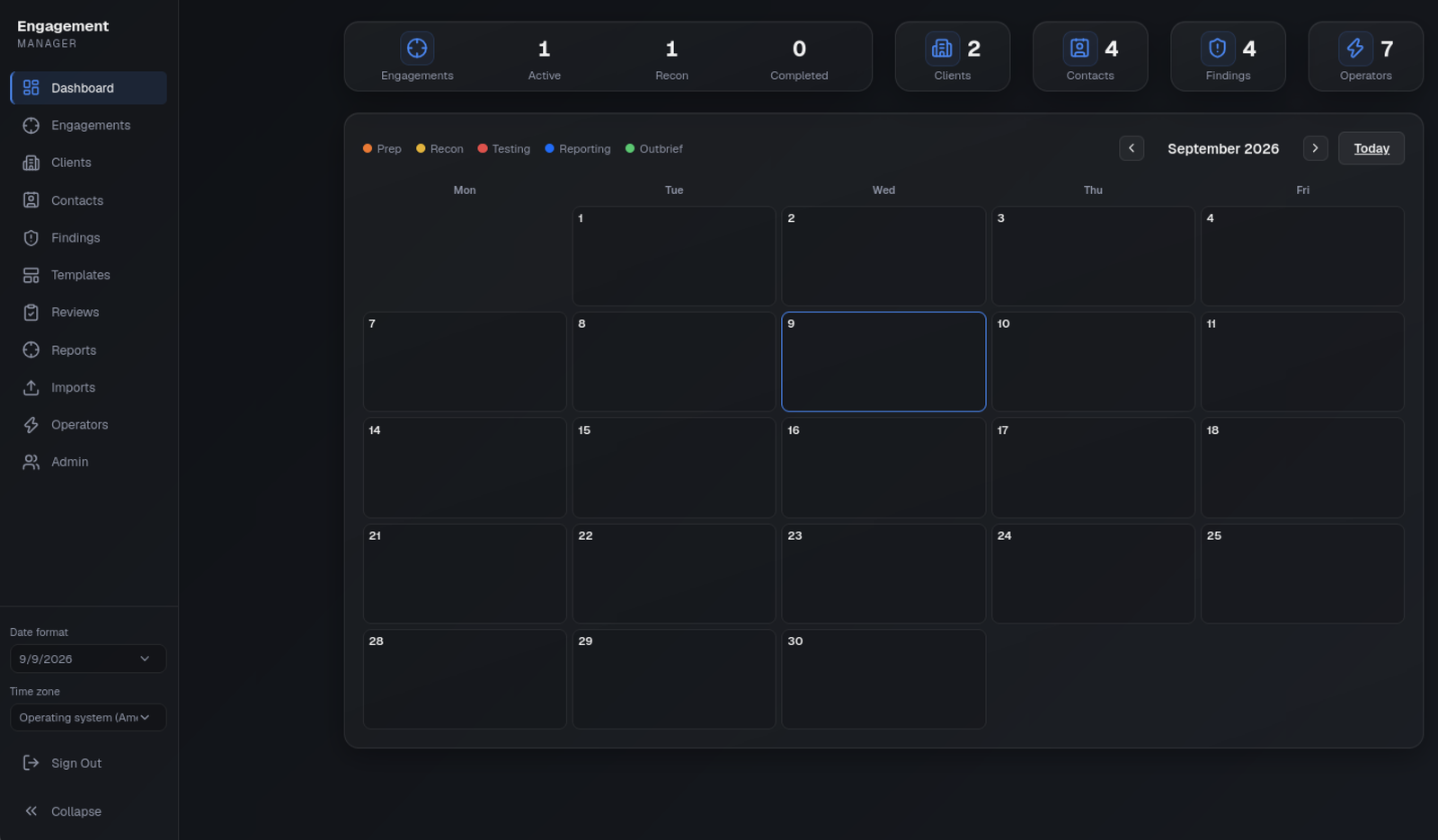
Screenshots

Dashboard

Table of contents

  • Screenshots
  • Writing findings and producing PDF reports
    • Reporting security and deployment
    • Verification
  • Prerequisites
  • Environment Configuration
  • Database Setup
    • Development
    • Production
  • Installation
    • Automated setup (Ubuntu)
      • Upgrade notes for hardened setup and backups
    • Manual setup
  • Running the Application
  • Production Deployment
    • Requirements
    • Deploy steps
    • Production checklist
  • Default Credentials
  • Server migration (Backup / Restore / Reset)
  • Implementation Plan & Architecture
    • Technology Stack
    • Database Schema
    • Adding New Fields
    • Security Architecture

Writing findings and producing PDF reports

  • Writing workspace: open a finding's Write & review link for Markdown editing and a safe preview. Private drafts save after 15 seconds of inactivity or on demand; they are stored on the server, not in browser local storage. Recover a draft explicitly after reopening. Conflicting saves preserve the editor's text and require comparison with the current revision. Text revisions can be inspected and restored; restoring does not restore deleted evidence.
  • Reusable templates: search approved wording by title, category or severity. Users can propose templates; administrators curate and approve them. Applying a template creates an independent engagement finding with empty observations, affected hosts and evidence, preventing accidental reuse of another engagement's proof.
  • Evidence: upload or paste up to four PNG/JPEG images together, add captions, and edit caption/order in the writing workspace. Images are decoded, stripped of metadata, resized to at most 2000 × 2000 pixels, and saved as PNG. Keep original forensic evidence separately if original bytes or metadata are required.
  • Review: send complete findings from Draft/Changes Requested to Ready. An assigned reviewer or administrator, other than the current author, can approve or request changes. Administrators assign reviewers. Text, evidence and restored-revision changes clear approval. The review queue, comments, readiness checklist and revision history support hand-off.
  • PDF reports: choose an engagement in Reports, write its executive summary, select/order findings and save settings. Draft PDFs are visibly marked. Only administrators can issue a final PDF, and every selected finding must be approved and pass readiness checks. Each issued version stores its PDF, explicit content snapshot and SHA-256 digest; later edits do not regenerate it. Deleting the parent engagement still deletes its reports through the existing lifecycle.
  • Scanner imports: preview an export, select findings, then confirm. Imports never execute scans or contact targets. Server-side fingerprinting skips matching findings in the same engagement; all new records start as Draft and must be checked by an operator.
Scanner/export familyAccepted export
Burp SuiteIssues XML, including the inert internal schema DTD
Nessus / TenableNessus v2 XML (.nessus)
NmapXML; open ports and their script output become informational observations, not inferred vulnerabilities
OpenVAS / GreenboneNative XML report or GMP get_reports_response
OWASP ZAPTraditional JSON report with sites and alerts
NucleiJSON Lines (-jsonl)
QualysScan-result XML (SCAN/IP structure), not the separate host-detection API format
Semgrep / CodeQL and other SARIF producersSARIF JSON runs, rules and results

Exports are limited to 2 MB and 500 findings per import, with per-user preview and confirmation rate limits. The application accepts at most 10,000 findings in total and 500 for one engagement across manual creation, templates and scanner imports. The global Findings list loads 100 rows per page, and engagement/report finding queries are capped by the same per-engagement limit. Unknown layouts fail visibly rather than silently being treated as a successful import. Scanner severities are suggestions: review their context before approval. Referenced URLs, HTML and embedded remote images are not fetched or executed.

Reports allow 1–100 findings, up to 100 evidence images (5 MB each, 20 MB total input), 500 pages and 25 MB output. Issuance is limited to 50 versions per engagement and 1 GB of issued PDFs across the application. Preview and issuance have per-user rate limits, and only one PDF render is admitted per application process at a time. Findings retain at most 1000 revisions and 500 comments; reaching a limit fails without overwriting history. DejaVu fonts and their redistribution license are included in assets/fonts; deployments must retain these assets (Next output tracing includes them).

Next.js Server Actions share a single 25mb body size limit (set in next.config.ts) for evidence uploads. Login uses a dedicated same-origin URL-encoded route with a 4 KB streaming limit before authentication or database work.

Reporting security and deployment

This preserves the existing shared authenticated workspace, not a new per-client tenancy model. All new pages, actions and PDF downloads check a current database-backed session. Drafts are scoped to their owner; review, template approval and issuance permissions are enforced server-side. Confidential PDF responses are private/no-store. Final PDFs contain only an explicit report field allowlist, never private drafts, review comments or unrelated engagements.

The implementation uses the OWASP Top 10:2025 checklist: access checks (A01), private responses and existing CSP/CSRF controls (A02), pinned dependencies and CI (A03), existing session/secret protections plus report integrity checks (A04/A08), inert Markdown/XML and parameterized database access (A05), bounded processing and independent review (A06), live session checks (A07), content-free audit events (A09), and transactional changes with cleanup on failure (A10). A digest detects accidental corruption; it is not a digital signature or protection from a database administrator. This is not a compliance certification. Production still requires HTTPS, protected database/backup storage and operational monitoring of audit output.

Download Tool