CVE-2021-36934
CVE-2021-36934 HiveNightmare vulnerability checker and workaround
Flow
The script has the following flow:
- Requires it to run with Administrator privileges
- Check Windows 10 version is affected by the vulnerability.
- IF affected by vulnerability:
- Show Windows version may be affected by the vulnerability message
- Check if the hive system files permissions are accessible by BUILTIN\Users
- IF it is vulnerable:
- Apply the workaround proposed by Microsoft https://msrc.microsoft.com/update-guide/vulnerability/CVE-2021-36934
- Check for Shadow Volume Copies
- IF it exist:
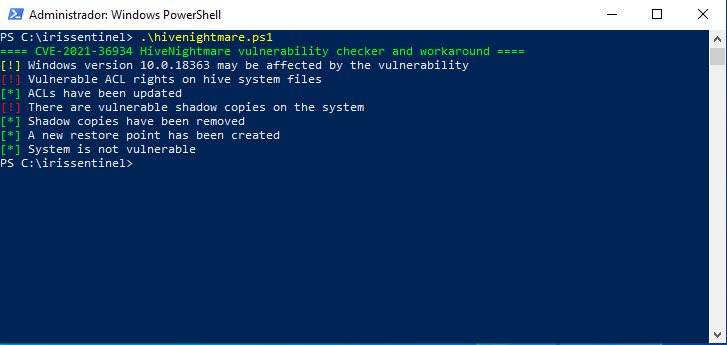
- Show the message: There are vulnerable shadow copies on the system
- Delete existing shadow volume copies and show the message: Shadow copies have been removed
- A new restore point is created with the name "Restorepoint for CVE-2021-36934 HiveNightmare" and show the message: A new restore point has been created
- If it does NOT exist:
- Show the message: No shadow copies found
- Show the message: System is not vulnerable
- If NOT vulnerable:
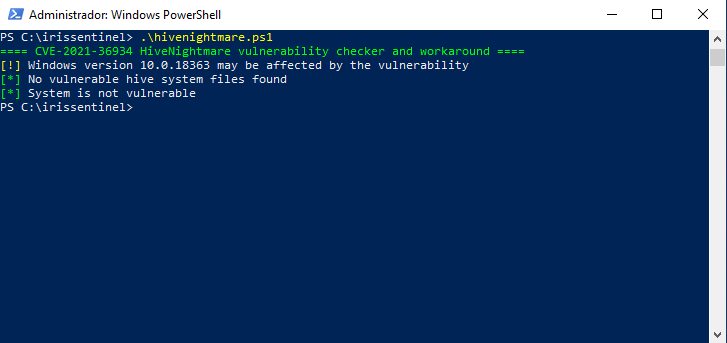
- Show the message: No vulnerable hive system files found
- Show the message: System is not vulnerable
- If NOT affected by vulnerability:
- Show the message: Operating System is not vulnerable
Considerations
- Once the script to fix the vulnerability has been run, it can be run again to see if it has been fixed.
- Workaround will apply only to affected systems.
- The script works correctly with any language setting
- Some EDR systems may detect this script as suspicious behavior and stop its execution, due to the shadow volume being deleted. It is recommended to add as an exception.
Outputs
If it is vulnerable and it has been fixed, we will get the following result:
If it is not vulnerable, we will get the following result:
 irissentinel/cve-2021-36934
