guettaf-hossam/superdiagnostictool
AI-powered Windows diagnostic & auto-repair tool using Google Gemini. Detect crashes, optimize performance, scan for malware, and generate PowerShell remediation scripts. Universal hardware support (1-128+ cores). Free & open-source.

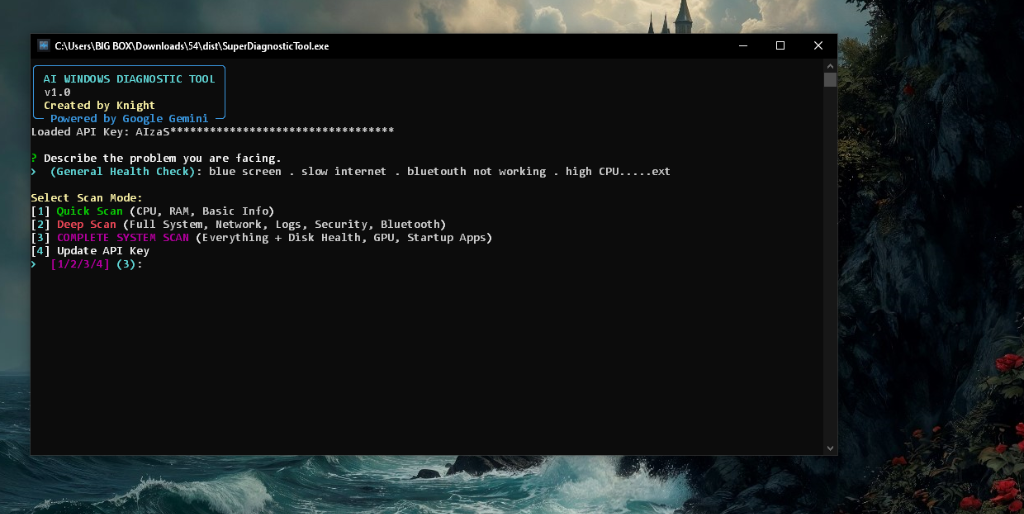
# SuperDiagnosticTool <p align="center"> <img src="https://assets.kitploit.com/production/public/readmes/11160/8b0da1a673733dc9731164bd4d4a3ecc6a137e583d070725852e8173311ef7fc.png" alt="SuperDiagnosticTool Icon" width="200"/> </p> <p align="center"> <strong>AI-Powered Windows Diagnostic & Remediation Tool</strong> </p> <p align="center"> <a href="https://github.com/Guettaf-hossam/SuperDiagnosticTool/releases"><img src="https://img.shields.io/github/v/release/Guettaf-hossam/SuperDiagnosticTool?style=flat-square" alt="Release"></a> <a href="https://github.com/Guettaf-hossam/SuperDiagnosticTool/blob/main/LICENSE"><img src="https://img.shields.io/badge/License-GPL%20v3.0-blue.svg?style=flat-square" alt="License"></a> <a href="https://github.com/Guettaf-hossam/SuperDiagnosticTool/stargazers"><img src="https://img.shields.io/github/stars/Guettaf-hossam/SuperDiagnosticTool?style=flat-square" alt="Stars"></a> </p> SuperDiagnosticTool collects real-time hardware telemetry, sends it to the Google Gemini API for analysis, and generates PowerShell remediation scripts to address detected issues. It includes multiple validation layers that a generated script must pass before the user is prompted to execute it. --- ## Screenshots <p align="center"> <img src="https://assets.kitploit.com/production/public/readmes/11160/eb10d4e2a86193e87d0face0e034418d7a5977df9057fb6fed97b0ea705e4442.png" alt="Main Interface" width="800"/> </p> *Main interface showing scan mode selection and problem description input* --- ## Key Features ### Universal Hardware Support - **Dynamic Scaling:** Automatically adapts to any CPU configuration (1-128+ cores) - **Hardware-Agnostic Logic:** Works on legacy systems (Intel Pentium) through high-end workstations (AMD Threadripper, Intel Xeon) - **Graceful Fallbacks:** Safe handling of unsupported hardware queries (CPU frequency, battery, swap memory) - **Low-Spec Optimized:** Lightweight execution to avoid resource pressure on constrained hardware ### Intelligent AI Analysis - **Google Gemini Integration:** AI-powered system analysis and diagnostics via the Gemini API - **Context-Aware Recommendations:** Correlates user-reported issues with collected system telemetry - **Security Auditing:** Scans for suspicious processes, resource leaks, and potential malware indicators - **Post-Fix Verification:** Generates completion reports distinguishing automated fixes from items requiring manual attention ### Multi-Layer Safety Architecture Scripts generated by Gemini pass through four sequential checks before the user is asked to approve execution: #### Validation Pipeline - **Knowledge Base Matching:** Cross-references AI solutions against a set of tested, known-good remediation patterns - **Dry-Run Simulation:** Previews all intended changes (services, files, registry) before any modification occurs - **Script Validation (`ScriptValidator`):** Three-level check — blacklist (hard block on destructive patterns), suspicious pattern detection (alias and obfuscation-aware), and risk scoring on a 0-100 scale - **Critical Path Interception (`CriticalPathInterceptor`):** Zero-trust gate that halts any script touching HKLM/HKCU registry keys or System32 paths until the user explicitly confirms #### Safety Limits - **System Restore Points:** Created automatically before any modification - **Pre/Post Execution Snapshots:** Full system state capture to detect and log every change made - **Rollback Generation:** Auto-generates a selective rollback script if execution fails - **Execution Logging:** Every action logged with timestamps to `%TEMP%\superdiagnostic_execution_*.log` #### PowerShell Execution - **Admin Privilege Verification:** Scripts check for elevation before proceeding - **Variable Sanitization:** Regex-based escaping preserves `$env:` variables without syntax errors - **Service Safety Checks:** Verifies service existence before any Start/Stop/Set operation - **Monitored Execution:** Scripts run via `subprocess.run` with a hard 5-minute timeout, full stdout/stderr capture, and automatic temp-file cleanup. This is direct host-level execution, not VM or container isolation. The validation layers above are the primary safety boundary. - **Error Handling:** PowerShell wrapper includes try/catch/finally blocks with per-line error reporting ### Comprehensive System Scanning - **Performance Metrics:** CPU usage (overall + per-core), memory breakdown, top resource consumers - **Network Intelligence:** Active interfaces, DNS configuration, Wi-Fi signal strength, connectivity tests - **Security Integrity:** Antivirus status, firewall profiles, Windows Update history - **Hardware Health:** Disk SMART status, GPU information, battery status (laptops) - **System Services:** Startup applications, failed services, critical event logs - **Process Auditing:** Identifies processes with unusual resource usage or file locations ### Human-Centric Reporting - **Professional HTML Reports:** Dark-themed, responsive diagnostic reports with visual metrics - **Past-Tense Completion Language:** Reports use `[FIXED]`, `[CLEANED]`, `[DISABLED]` tags to reflect completed actions - **Manual Attention Section:** Clearly separates automated fixes from items requiring user intervention - **Timestamped Archives:** All reports saved to `AI_Reports/` for historical tracking --- ## Quick Start ### Download **[Download SuperDiagnosticTool.exe](https://github.com/Guettaf-hossam/SuperDiagnosticTool/releases/latest)** — Standalone executable (no Python required) > The executable is unsigned. Windows SmartScreen will show a warning on first run. See [TRUST_GUIDE.md](https://github.com/guettaf-hossam/superdiagnostictool/blob/main/TRUST_GUIDE.md) for how to proceed. If you prefer to verify before running, build from source instead. ### Requirements - Windows 10 or Windows 11 - Administrator privileges (required for system telemetry and remediation) - Google Gemini API Key ([Get free key](https://aistudio.google.com/app/apikey)) ### First Run 1. Download and run `SuperDiagnosticTool.exe` 2. Enter your Google Gemini API key when prompted 3. Describe your system issue 4. Select scan mode (Quick / Deep / Complete) 5. Review the AI analysis and the generated remediation script 6. Approve execution or view the detailed HTML report --- ## Installation (For Developers) ### Prerequisites - Python 3.8 or higher - pip package manager ### Install Dependencies Create a virtual environment so the tool's dependencies stay isolated from other Python projects: ```bash python -m venv .venv ``` Activate it in Windows Command Prompt, then install the dependencies listed by the repository: ```bat .venv\Scripts\activate pip install -r requirements.txt ``` In PowerShell, activate the environment with: ```powershell .\.venv\Scripts\Activate.ps1 ``` If PowerShell blocks the activation script, open PowerShell as your user and run `Set-ExecutionPolicy -Scope CurrentUser RemoteSigned` once, then try the activation command again. ### Run from Source ```bash python super_diagnose_v2.py ``` To confirm that the source tree and dependencies are ready before starting a scan, run: ```bash python -m compileall src super_diagnose_v2.py ``` The command should finish without errors. The tool still requires Windows and administrator privileges when it is run, because several diagnostics use PowerShell and protected system information. --- ## Usage ### API Key Setup **Option A: Interactive Input (recommended for first-time use)** - The tool prompts for an API key on first run - Key is stored securely via Windows DPAPI (`keyring`) when available **Option B: Environment Variable** Command Prompt: ```bat set GEMINI_API_KEY=your_api_key_here ``` PowerShell: ```powershell $env:GEMINI_API_KEY = "your_api_key_here" ``` **Option C: Manual Key File** Create `gemini.key` in the tool directory: ``` your_api_key_here ``` ### Scan Modes | Mode | Scans | Use Case | |------|-------|----------| | **Quick Scan** | CPU, RAM, Basic Info | Fast performance check | | **Deep Scan** | System, Network, Security, Logs, Bluetooth, Processes | Comprehensive troubleshooting | | **Complete Scan** | All of the above + Disk Health, GPU, Startup Apps | Full system audit | ### Example Workflow ``` 1. Run the tool > SuperDiagnosticTool.exe 2. Describe your issue > High CPU usage and slow performance 3. Select scan mode > 3 (Complete System Scan) 4. Wait for AI analysis [Scanning system layers...] [Processing telemetry...] 5. Review the generated remediation script > Execute? (y/n) 6. View the HTML report > Open detailed report? (y/n) ``` --- ## Technical Details ### Code Architecture - Modular design — each diagnostic category is an isolated function - Comprehensive error handling with try/except blocks throughout - Hardware-agnostic queries with graceful fallbacks for unsupported features - Standard Python docstrings on all public classes and methods ### PowerShell Script Generation - Admin privilege verification before execution - Regex-based variable escaping to prevent syntax errors - Environment variables (`$env:TEMP`, `$env:PATH`) preserved correctly - Safe service management with existence checks before every operation ### Gemini AI Integration - Structured prompts with delimited sections (`[ANALYSIS_START]`, `[FIX_START]`) for reliable output parsing - Context-aware analysis using the collected system telemetry snapshot - Past-tense reporting convention for completed remediation actions --- ## Security & Privacy ### What stays on your machine - All system scanning and analysis runs locally. - No telemetry is stored on external servers by this tool. ### What is sent externally - To generate AI recommendations, a telemetry snapshot (CPU load, memory, process names, event log entries, network state) is transmitted to **Google's Gemini API**. - Your API key is included with every request to Google. - Review [Google's privacy policy](https://policies.google.com/privacy) for how this data is handled on their end. ### Other security properties - **API Key Storage:** Stored via Windows DPAPI (`keyring`) when available. Never committed to version control. - **Admin Transparency:** Every remediation script is displayed in full and requires explicit user approval before execution. - **Non-Destructive by Default:** Registry and file modifications require passing `CriticalPathInterceptor` and explicit user confirmation. - **Open Source:** Full source code available for independent review under GPL v3.0. See [SECURITY.md](https://github.com/guettaf-hossam/superdiagnostictool/blob/main/SECURITY.md) for additional security documentation. --- ## Troubleshooting ### "API Key Invalid" Error - Verify the key is correct and active at [Google AI Studio](https://aistudio.google.com/app/apikey) - Check for hidden whitespace or newline characters in the key - Ensure the key has Gemini API access enabled ### "Not Running as Administrator" - Right-click the executable and select "Run as Administrator" - Or allow the UAC prompt when the tool requests elevation ### "Module Not Found" Error (Python version) ```bash pip install --upgrade psutil google-generativeai rich ``` ### PowerShell Script Fails - Ensure Windows PowerShell 5.1 or later is installed - The generated script is saved to `AI_Reports/remediation.ps1` — review it manually for errors --- ## Building from Source ### Automated Builds (Recommended) The project uses GitHub Actions to build Windows executables on version tag push: 1. Push your changes to the main branch 2. Create and push a version tag: ```bash git tag -a v1.0.2 -m "Release notes" && git push origin v1.0.2 ``` 3. GitHub Actions builds the `.exe` and creates a release automatically 4. Download from the [Releases page](https://github.com/Guettaf-hossam/SuperDiagnosticTool/releases) See [`.github/workflows/release.yml`](https://github.com/guettaf-hossam/superdiagnostictool/blob/main/.github/workflows/release.yml) for the release workflow configuration. ### Manual Build (For Testing) ```bash pip install pyinstaller pip install -r requirements.txt python build.py ``` This creates `dist/SuperDiagnosticTool.exe` with embedded icon and dependencies. ### File Structure ``` SuperDiagnosticTool/ ├── super_diagnose_v2.py # Main entry point and diagnostic logic ├── build.py # PyInstaller build script ├── icon.ico # Application icon ├── .github/workflows/ │ └── release.yml # Automated build and release workflow ├── docs/ │ ├── icon.png │ └── screenshot_main.png ├── src/ │ ├── safety/ # Script validation and monitored execution │ │ ├── validator.py # ScriptValidator + CriticalPathInterceptor │ │ ├── sandbox.py # SandboxExecutor (monitored subprocess runner) │ │ ├── dry_run.py # DryRunSimulator │ │ ├── restore_point.py # RestorePointManager │ │ ├── enhanced_monitoring.py │ │ └── knowledge_base.py │ └── security/ # CredentialVault (DPAPI-backed key storage) ├── AI_Reports/ # Generated HTML reports and remediation scripts ├── README.md ├── SECURITY.md ├── TRUST_GUIDE.md ├── LICENSE # GPL-3.0 └── .gitignore ``` --- ## Disclaimer This tool generates and executes PowerShell scripts that modify system services, configurations, and registry values. Before approving any remediation script: - **Read the full script** — it is displayed before execution is allowed - **Backup critical data** before running automated remediation - **Test on a non-critical system** if the change scope is unclear The author is not responsible for system damage, data loss, or unintended consequences resulting from use of this tool. --- ## Contributing Contributions are welcome. To contribute: 1. Fork the repository 2. Create a feature branch (`git checkout -b feature/improvement`) 3. Commit your changes (`git commit -m 'Add improvement'`) 4. Push to the branch (`git push origin feature/improvement`) 5. Open a Pull Request --- ## License This project is licensed under the **GNU General Public License v3.0** — see the [LICENSE](https://github.com/guettaf-hossam/superdiagnostictool/blob/main/LICENSE) file for details. Copyright (C) 2026 GUETTAF HOUSSEM EDDINE --- ## Author **Guettaf Houssem Eddine** Electrotechnics Engineering Student Akli Mohand Oulhadj University, Bouira, Algeria Email: [email protected] GitHub: [@Guettaf-hossam](https://github.com/Guettaf-hossam) --- ## Acknowledgments - **Google Gemini AI** for system analysis capabilities - **psutil** for cross-platform system telemetry - **Rich** for terminal UI rendering --- <p align="center"> <strong>Version 1.0</strong> | Last Updated: August 2026 </p> <p align="center"> Akli Mohand Oulhadj University, Bouira, Algeria </p>