
Skip to content
KitploitKITPLOIT
ToolsExploitsBlog
Log in
Submit
ToolsExploitsBlog
Submit

Hacking, PenTest, and Cybersecurity Tools for Your Security Arsenal!

Kitploit is a directory of hacking, cybersecurity, and pentesting tools. Discover the latest project updates to find vulnerabilities, analyze systems, automate testing, and strengthen your security.

FeedsContactPrivacy© 2026 Kitploit

Tool Directory

Categories

View all categories
Loading categories
Tools/GitHubGitHub/0xdea/oneiromancer
Static AnalysisVulnerability AnalysisCode AnalysisReverse EngineeringUtilities & FrameworksAI-Assisted Reversing
GitHub0xdea/oneiromancer

oneiromancer

Reverse engineering assistant that uses a locally running LLM to aid with pseudocode analysis.

View RepositoryWebsite
1441110211h 44m agoReviewed by Kitploit
Share

oneiromancer

build doc

"A large fraction of the flaws in software development are due to programmers not fully understanding all the possible states their code may execute in." -- John Carmack

"Can it run Doom?" -- https://canitrundoom.org/

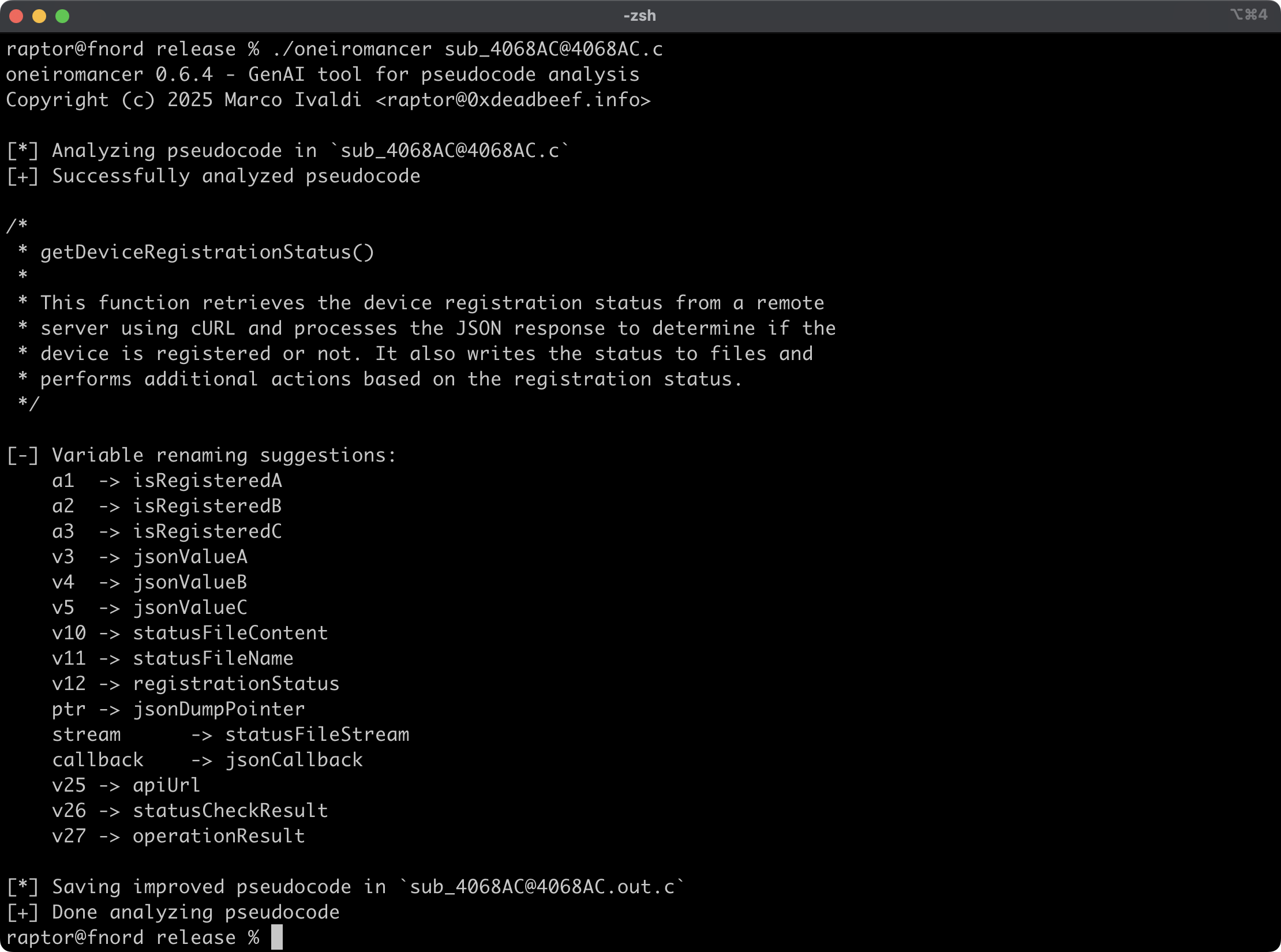
Oneiromancer is a reverse engineering assistant that uses a locally running LLM that has been fine-tuned for Hex-Rays pseudocode to aid with code analysis. It can analyze a function or a smaller code snippet, returning a high-level description of what the code does, a recommended name for the function, and variable renaming suggestions, based on the results of the analysis.
Features

  • Cross-platform support for the fine-tuned LLM aidapal based on mistral-7b-instruct.
  • Easy integration with the pseudocode extractor haruspex and popular IDEs.
  • Code description, recommended function name, and variable renaming suggestions are printed on the terminal.
  • Improved pseudocode of each analyzed function is saved in a separate file for easy inspection.
  • External crates can invoke analyze_code or analyze_file to analyze pseudocode and then process analysis results.

Article

  • https://hnsecurity.it/blog/aiding-reverse-engineering-with-rust-and-a-local-llm

See also

  • https://www.atredis.com/blog/2024/6/3/how-to-train-your-large-language-model
  • https://huggingface.co/AverageBusinessUser/aidapal
  • https://github.com/atredispartners/aidapal
  • https://plugins.hex-rays.com/atredispartners/aidapal

Installing

The easiest way to get the latest release is via crates.io:

cargo install oneiromancer --locked

To install as a library, run the following command in your project directory:

cargo add oneiromancer

Compiling

Alternatively, you can build from source:

git clone --depth 1 https://github.com/0xdea/oneiromancer
cd oneiromancer
cargo build --release --locked

Configuration

  1. Download and install Ollama.
  2. Download the fine-tuned weights and the Ollama modelfile from Hugging Face:
    wget https://huggingface.co/AverageBusinessUser/aidapal/resolve/main/aidapal-8k.Q4_K_M.gguf
    wget https://huggingface.co/AverageBusinessUser/aidapal/resolve/main/aidapal.modelfile
    
  3. Configure Ollama by running the following commands within the directory in which you downloaded the files:
    ollama create aidapal -f aidapal.modelfile
    ollama list
    

Usage

  1. Run oneiromancer as follows:
    export OLLAMA_BASEURL=custom_baseurl # if not set, the default will be used
    export OLLAMA_MODEL=custom_model # if not set, the default will be used
    oneiromancer <target_file>.c
    
  2. Find the improved pseudocode in <target_file>.out.c:
    vim <target_file>.out.c
    code <target_file>.out.c
    

[!TIP] For best results, submit one function at a time to be analyzed by the LLM.

Compatibility

Tested with Ollama 0.32.9 on:

  • Apple macOS Tahoe 26.5.2
  • Ubuntu Linux 24.04.2 LTS
  • Microsoft Windows 11 23H2

Credits

  • Chris Bellows (@AverageBusinessUser) at Atredis Partners for his fine-tuned LLM aidapal <3

Changelog

  • CHANGELOG.md

TODO

  • Improve output file handling with versioning and/or an output directory.
  • Implement other features of the IDAPython aidapal IDA Pro plugin (e.g., context).
  • Integrate with haruspex and idalib.
  • Implement a "minority report" protocol (i.e., make three queries and select the best responses).
  • Consider a refactor of variable renaming to prevent potential code corruption.
  • Investigate other use cases for the aidapal LLM and implement a modular architecture to plug in custom LLMs.

Download Tool

Most Popular

View all →

Discover the most used tools by our community.

  • 1

    OsintHunter

    letox4/osinthunter

    🎯 The ultimate OSINT toolkit: investigation graph, confidence scoring, alias families, map, timeline and reports. 49 modules, 400+ sites, no API keys required.

    786
  • 2

    ghostlock-app

    yukonga/ghostlock-app

    GhostLock One-Tap Execution App (CVE-2026-43499)

    506
  • 3

    ARTEX

    baarai/artex

    LLM multi-agent autonomous penetration testing platform with planner/worker agents, asset and exploration graphs, MITM traffic recording, and vulnerability retesting.

    429
  • 4

    redforge

    cybersecurity91/redforge

    Browser-side red team toolkit with 102 offline tools for recon, payload generation, credential attacks, crypto, encoding and engagement reporting.

    345
  • 5

    CyberStrikeAI

    ed1s0nz/cyberstrikeai

    The system of action for AI-native cybersecurity—where intent becomes governed execution, evidence becomes operational memory, and every operation improves the next.

    262
  • 6

    looking-glass

    anonghosty/looking-glass

    CSIRT platform that ingests Shadowserver reports into MongoDB and replays them as interactive maps, analysis, findings, advisories and executive dashboards.

    256

Explore all tools

Browse our collection of tools

View all tools →






