
Skip to content
KitploitKITPLOIT
ToolsExploitsBlog
Log in
Einreichen
ToolsExploitsBlog
Einreichen

Hacking-, PenTest- und Cybersicherheits-Tools für Ihr Sicherheitsarsenal!

Kitploit ist ein Verzeichnis von Hacking-, Cybersicherheits- und Pentesting-Tools. Entdecken Sie die neuesten Projekt-Updates, um Schwachstellen zu finden, Systeme zu analysieren, Tests zu automatisieren und Ihre Sicherheit zu stärken.

FeedsKontaktDatenschutz© 2026 Kitploit

Tool-Verzeichnis

Kategorien

Alle Kategorien anzeigen
Loading categories
HomeLab — GNS3 home lab documenting a segmented network with Cisco ASAv firewall, L3 core, DMZ, and an Active Directory domain for practicing networking, sysadmin, and offensive security. | Kitploit
Tools/GitHubGitHub/ko0ler/homelab
Network MappingVulnerability AnalysisSecurity VirtualizationNetwork SecurityPenetration TestingLearning & EducationRed TeamingLabs & Practice
GitHubko0ler/homelab

HomeLab

GNS3 home lab documenting a segmented network with Cisco ASAv firewall, L3 core, DMZ, and an Active Directory domain for practicing networking, sysadmin, and offensive security.

Repository anzeigen
122122vor 3 TagenNoch nicht geprüft
Teilen
Inhalt in der angeforderten Sprache nicht verfügbar. Englische Version wird angezeigt.

HomeLab - Network Documentation

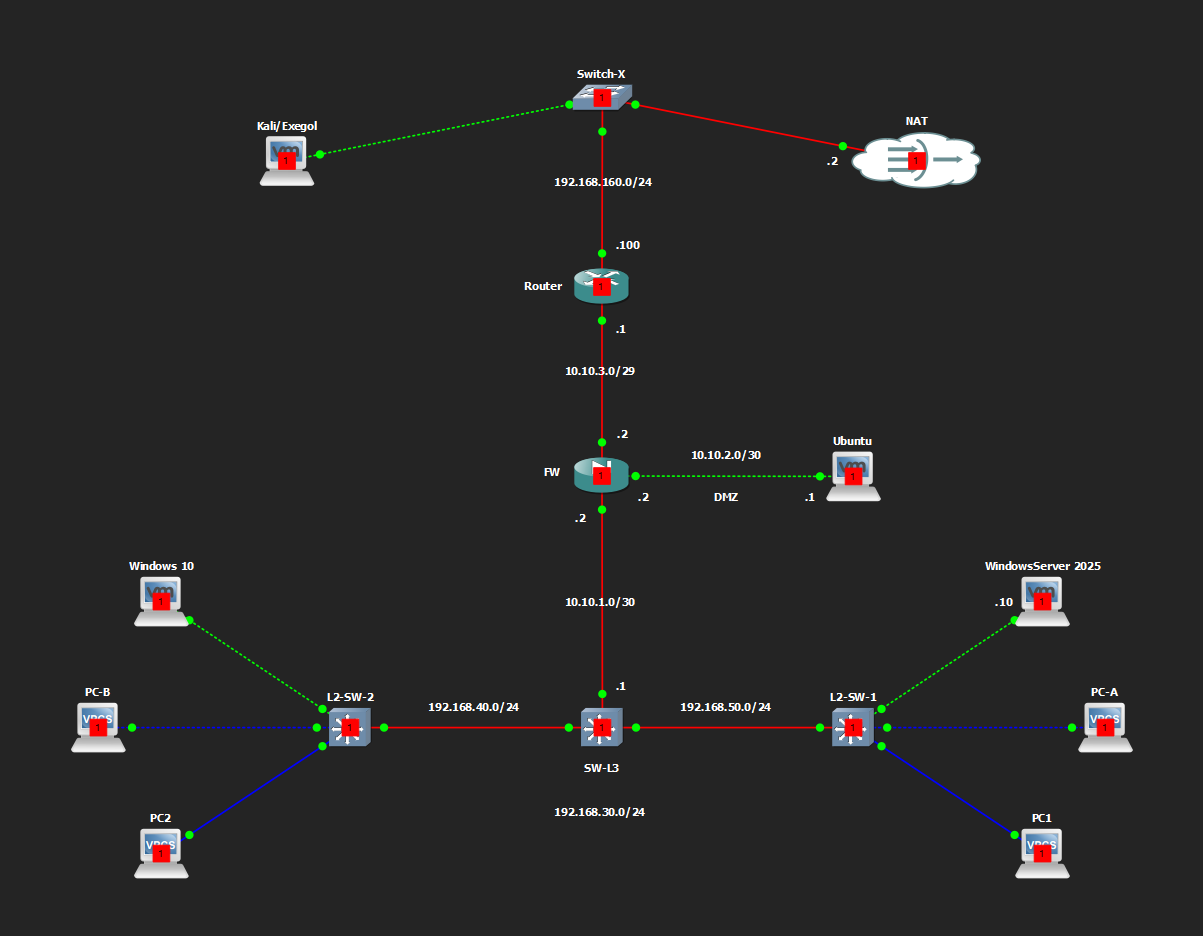
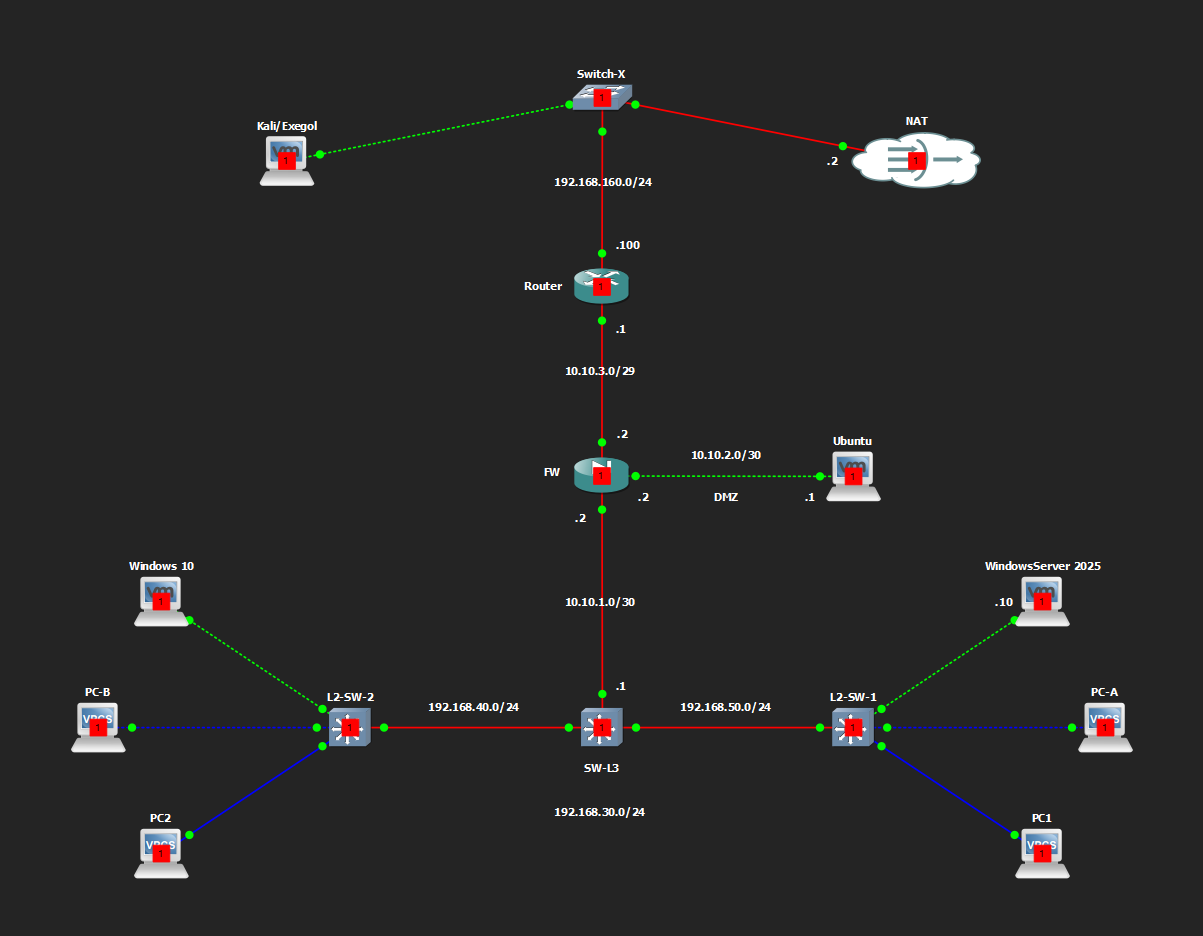
Topology

Overview

HomeLab is a GNS3 lab built on a single laptop (OMEN 16, i7-14650HX, 32 GB RAM, RTX 4060 8 GB) to practice networking, systems administration, and offensive security in one environment. It models a perimeter with a firewall (Cisco ASAv), a DMZ (Ubuntu Server), a routed core (SW-L3 + two access switches), and an Active Directory domain kooler.local running on Windows Server 2025. Attacker platforms (Kali, Exegol) sit on the untrusted outside segment alongside a NAT gateway to the internet. The number of assets, host types, and configured services is based on my host specs, so that the entire environment can run simultaneously without the PC sweating too much and the VMs get decent resources.

Note: This is a baseline setup to get started with, so customize as needed. Tools and concepts like server hardening, SIEM, EDR, C2 server, and LAN pivoting for further testing are left for you to implement, depending on what you want to train on. Only the global architecture will be documented over time and tracked in CHANGELOG.md. In addition, if the ASAv firewall is in evaluation mode like mine, the bandwidth is throttled and capped at 100 Kbps, which can affect network performance (external source → DMZ, inside → Internet). So I temporarily use an additional network adapter on the VMs (VMware NAT) for demanding network traffic like system updates or large software downloads. Take snapshots of components as you test and break stuff. Enjoy and grow!

⚠️ Disclaimer & Responsible Use

This repository documents a personal, isolated lab built for education and skills practice. By using anything in it, you agree to the following:

  • Authorized use only. Use the attack tooling and techniques described here only against systems you own or have explicit written permission to test. Never point them at third-party systems, networks, or services.
  • Keep the lab isolated. The lab contains intentionally vulnerable applications (DVWA, bWAPP, a default WordPress stack, httpbin) and a deliberately over-provisioned, misconfigured domain controller. Run it only on NAT or host-only networking. Never expose it to a shared network or the internet.
  • Lab credentials are throwaway. Use unique, lab-only passwords, change every default before use, and never reuse real credentials. No secrets are committed to this repo.
  • Review before applying. Configs and scripts are written for this specific topology and addressing plan. Read them before running them, especially on a machine or network you care about. Take a snapshot first.
  • Licensing is your responsibility. Cisco images (IOSv, IOSv L2, ASAv), Microsoft operating systems, and other third-party software are not included and remain subject to their own licenses and terms.
  • No warranty, no liability. Everything is provided "as is" under the MIT License, without warranty of any kind. The author is not responsible for damage, data loss, or legal consequences resulting from use or misuse of this material.

Quick Start

A condensed path to get the lab running. Details for each piece are in the sections below.

Prerequisites

  • Host: a machine able to run GNS3 plus several VMs at once. The reference build uses 32 GB RAM and a modern 14th-gen i7; 16 GB of RAM is fine if you leave some VMs turned off.
  • Software: GNS3 (server + GUI) and VMware Workstation. The VMs and the GNS3 nodes must be able to talk to each other (VMware NAT/host-only adapters).
  • Images (not included): Cisco IOSv, IOSv L2, and ASAv for GNS3; Kali (and optionally Exegol); Ubuntu Desktop; Windows Server 2025; Windows 10.

Repository layout

HomeLab/
├── Docs/
│   ├── Topology.png      # Topology diagram
│   └── CHANGELOG.md      # CHANGELOG
├── Configs/
│   ├── Appliance/        # Router, FW, SW-L3, L2-SW-1, L2-SW-2 configs
│   └── VM/
│       ├── Attack Host/  # Kali setup script + README
│       └── Ubuntu/       # DMZ target setup script + README
├── CONTRIBUTING.md
└── LICENSE

Steps

  1. Clone the repo
    git clone https://github.com/Ko0ler/HomeLab.git
    cd HomeLab
    
  2. Build the topology in GNS3. Recreate the nodes and links from Docs/Topology.png, using the addressing table below.
  3. Apply the appliance configs from Configs/Appliance/, in this order: SW-L3.cfg, L2-SW-1.cfg, L2-SW-2.cfg, Router.cfg, then FW.cfg. Open each file and review it first. Replace any value specific to your environment, then paste it into the node console.
  4. Prepare the VMs:
    • Attack host (Kali): run Configs/VM/Attack Host/InitialSetup.sh. See its README.
    • Target host (Ubuntu, DMZ): run Configs/VM/Ubuntu/InitialSetup.sh. See its README.
  5. Build the Active Directory side manually on the Windows Server 2025 VM (ADDS, ADCS, DHCP, DNS, MSSQL, domain kooler.local), then join the Windows 10 workstation. This part is not yet scripted.
  6. Verify connectivity before testing anything:
    # From the attack host: reach the published DMZ address
    ping -c 3 [DMZ_MAPPED_IP]
    curl -I http://[DMZ_MAPPED_IP]:[SERVICE_PORT]
    
    # From an inside host: reach the DMZ and the internet
    ping [DMZ_HOST_IP]
    ping [INTERNET_TEST_IP]
    
    On the ASA, show nameif, show xlate and show conn confirm interfaces, NAT, and active flows.
  7. Snapshot everything once it works, then start breaking things.

The ASAv bandwidth cap in evaluation mode (see the Note above) makes DMZ and internet traffic slow. This is expected, not a misconfiguration.

Network Topology & Addressing

Chain: Kali/Exegol + NAT (Switch-X) → Router → ASAv Firewall (with DMZ leg) → SW-L3 → L2-SW-1 / L2-SW-2 (VLANs).

SegmentSubnetNotes
Outside / untrusted192.168.160.0/24Switch-X: Kali/Exegol, NAT cloud; Router at .100
Router ↔ FW outside10.10.3.0/29Router .1, ASA outside .2, DMZ NAT .3
FW ↔ DMZ10.10.2.0/30ASA dmz .2, Ubuntu .1
FW ↔ SW-L3 (inside)10.10.1.0/30ASA inside .2, SW-L3 .1
VLAN 30 (VPCS)192.168.30.0/24PC-C, PC-D
VLAN 40 (Workstations)192.168.40.0/24behind L2-SW-2 — Windows 10, PC-B
VLAN 50 (Servers)192.168.50.0/24behind L2-SW-1 — Windows Server 2025 (DC01), PC-A
VLAN 100 (Management)192.168.100.0/24SVI present on SW-L3; trunked, not yet in ASA object group

Trunk links SW-L3 ↔ L2-SW-1/L2-SW-2 carry VLANs 30, 40, 50, 100 (native VLAN 999, dot1q).

Network Device Inventory

DeviceRolePlatformKey interfaces
RouterEdge router, NAT-side gatewayCisco IOSv 15.9Gi0/0 10.10.3.1/29 (to FW); Gi0/1 192.168.160.100/24 (to Switch-X)
FWPerimeter firewall, DMZCisco ASAv 9.22(1)1outside 10.10.3.2/29; dmz 10.10.2.2/30; inside 10.10.1.2/30
SW-L3Core L3 switch, inter-VLAN routingCisco IOSv L2 15.2Gi0/0 10.10.1.1/30 (to FW); Gi0/1-0/2 trunks to L2-SW-1/2; SVIs for VLAN 30/40/50/100; VTP server mode
L2-SW-1Access switchCisco IOSv L2 15.2VLAN 50 access ports (WinServer2025, PC-A); VTP client mode
L2-SW-2Access switchCisco IOSv L2 15.2VLAN 40 access ports (Windows 10, PC-B); VLAN 30 (PC-D); VTP client mode
Tool herunterladen

Beliebteste

Alle anzeigen →

Entdecken Sie die meistgenutzten Tools unserer Community.

  • 1

    OsintHunter

    letox4/osinthunter

    🎯 Das ultimative OSINT-Toolkit: Untersuchungsgraph, Konfidenzbewertung, Alias-Familien, Karte, Zeitleiste und Berichte. 49 Module, 400+ Websites, keine API-Schlüssel erforderlich.

    540
  • 2

    ghostlock-app

    yukonga/ghostlock-app

    GhostLock One-Tap Execution App (CVE-2026-43499)

    476
  • 3

    ARTEX

    baarai/artex

    LLM-basierte Multi-Agenten-Plattform für autonome Penetrationstests mit Planer-/Worker-Agenten, Asset- und Explorationsgraphen, MITM-Verkehrsaufzeichnung und Schwachstellen-Retesting.

    373
  • 4

    redforge

    cybersecurity91/redforge

    Browser-seitiges Red-Team-Toolkit mit 102 Offline-Tools für Recon, Payload-Generierung, Credential-Angriffe, Krypto, Encoding und Engagement-Reporting.

    322
  • 5

    estorides

    grisuno/estorides

    Aggregiert 99+ kostenlose OSINT-Quellen parallel, löst Entitäten in einen Knowledge Graph auf und exportiert STIX 2.1, MISP oder GraphML mit LLM-gestützter Analyse.

    278
  • 6

    CyberStrikeAI

    ed1s0nz/cyberstrikeai

    Das System der Handlung für KI-native Cybersicherheit – wo Absicht zu gesteuerter Ausführung wird, Beweise zu operativem Gedächtnis werden und jeder Einsatz den nächsten verbessert.

    251

Alle Tools erkunden

Durchsuchen Sie unsere Tool-Sammlung

Alle Tools anzeigen →






