projectdiscovery/httpx
أداة HTTP سريعة متعددة المسابر للاستطلاع وجمع المعلومات. تفحص TLS، CSP، الرؤوس، المكدس التقني، و CDN. تدعم المطابقات والمرشحات وإخراج JSON للاختبار الأمني الآلي.
<h1 align="center">
  <img src="https://assets.kitploit.com/production/public/readmes/405/4dc5206927fe161f6f2bb22d21326c0518dc3d5cb655fda1739b30b6bd29dec9.png" alt="httpx" width="200px">
  <br>
</h1>


<p align="center">
<a href="https://opensource.org/licenses/MIT"><img src="https://img.shields.io/badge/license-MIT-_red.svg"></a>
<a href="https://goreportcard.com/badge/github.com/projectdiscovery/httpx"><img src="https://goreportcard.com/badge/github.com/projectdiscovery/httpx"></a>
<a href="https://github.com/projectdiscovery/httpx/releases"><img src="https://img.shields.io/github/release/projectdiscovery/httpx"></a>
<a href="https://hub.docker.com/r/projectdiscovery/httpx"><img src="https://img.shields.io/docker/pulls/projectdiscovery/httpx.svg"></a>
<a href="https://twitter.com/pdiscoveryio"><img src="https://img.shields.io/twitter/follow/pdiscoveryio.svg?logo=twitter"></a>
<a href="https://discord.gg/projectdiscovery"><img src="https://img.shields.io/discord/695645237418131507.svg?logo=discord"></a>
</p>

<p align="center">
  <a href="#features">الميزات</a> •
  <a href="#installation-instructions">التثبيت</a> •
  <a href="#usage">الاستخدام</a> •
  <a href="https://docs.projectdiscovery.io/tools/httpx/">التوثيق</a> •
  <a href="#notes">ملاحظات</a> •
  <a href="https://discord.gg/projectdiscovery">انضم إلى Discord</a>
</p>


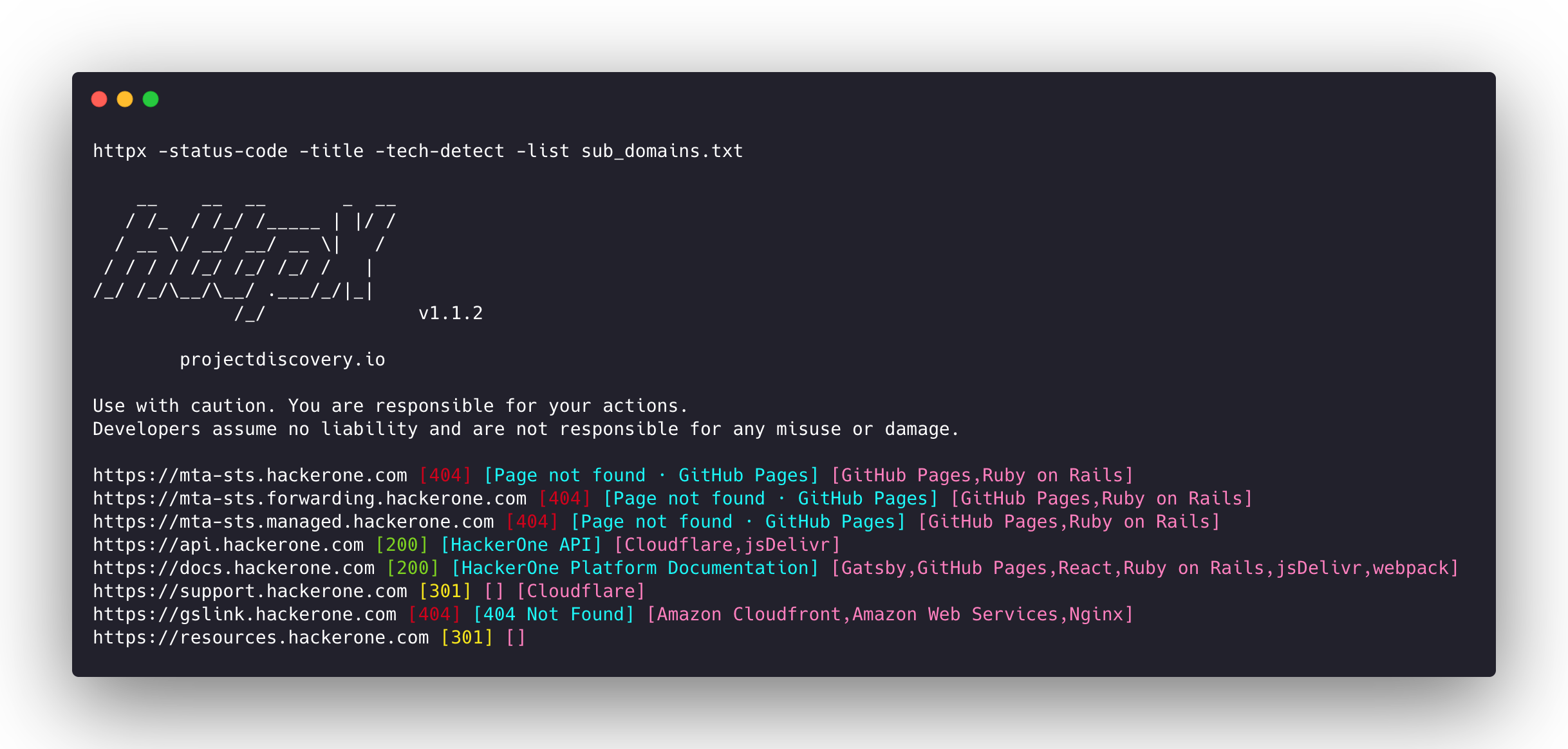
`httpx` هي مجموعة أدوات HTTP سريعة ومتعددة الأغراض تتيح تشغيل عدة فحوصات باستخدام مكتبة [retryablehttp](https://github.com/projectdiscovery/retryablehttp-go). وهي مصممة للحفاظ على موثوقية النتائج مع زيادة عدد الخيوط.

# الميزات

<h1 align="center">
  <img src="https://assets.kitploit.com/production/public/readmes/405/844a8c468c1b9ef257f46c2bf9f9efe0d2e5b1b676a3ac5be70918d44c9e7403.png" alt="httpx" width="700px">
  <br>
</h1>

 - قاعدة شيفرة بسيطة ومعيارية تسهّل المساهمة.
 - أعلام سريعة وقابلة للتهيئة بالكامل لفحص عناصر متعددة.
 - يدعم عدة فحوصات قائمة على HTTP.
 - تراجع تلقائي ذكي من https إلى http افتراضيًا.
 - يدعم المضيفين وعناوين URL وCIDR كمدخلات.
 - يتعامل مع الحالات الاستثنائية عبر إعادة المحاولة والتراجع وغيرها للتعامل مع WAFs.

### الفحوصات المدعومة

| الفحوصات        | الفحص الافتراضي | الفحوصات         | الفحص الافتراضي |
|-----------------|---------------|----------------|---------------|
| URL             | true          | IP             | true          |
| Title           | true          | CNAME          | true          |
| Status Code     | true          | Raw HTTP       | false         |
| Content Length  | true          | HTTP2          | false         |
| TLS Certificate | true          | HTTP Pipeline  | false         |
| CSP Header      | true          | Virtual host   | false         |
| Line Count      | true          | Word Count     | true          |
| Location Header | true          | CDN            | false         |
| Web Server      | true          | Paths          | false         |
| Web Socket      | true          | Ports          | false         |
| Response Time   | true          | Request Method | true          |
| Favicon Hash    | false         | Probe  Status  | false         |
| Body Hash       | true          | Header  Hash   | true          |
| Redirect chain  | false         | URL Scheme     | true          |
| JARM Hash       | false         | ASN            | false         |

# تعليمات التثبيت

يتطلب `httpx` **go >=1.26.10** للتثبيت بنجاح. نفّذ الأمر التالي للحصول على المستودع:

```sh
go install -v github.com/projectdiscovery/httpx/cmd/httpx@latest
```

لمعرفة المزيد حول تثبيت httpx، راجع https://docs.projectdiscovery.io/tools/httpx/install.

| :exclamation:  **إخلاء المسؤولية**  |
|---------------------------------|
| **هذا المشروع قيد التطوير النشط**. توقّع تغييرات كاسرة مع الإصدارات. راجع سجل التغييرات قبل التحديث. |
| بُني هذا المشروع في المقام الأول لاستخدامه كأداة CLI مستقلة. **قد يشكّل تشغيله كخدمة مخاطر أمنية.** يُوصى باستخدامه بحذر مع اتخاذ تدابير أمنية إضافية. |

# الاستخدام

```sh
httpx -h
```

سيعرض هذا المساعدة الخاصة بالأداة. إليك جميع المفاتيح التي تدعمها.


```console
httpx is a fast and multi-purpose HTTP toolkit that allows running multiple probes using the retryablehttp library.

Usage:
  ./httpx [flags]

Flags:
INPUT:
   -l, -list string              input file containing list of hosts to process
   -rr, -request string          file containing raw request
   -u, -target string[]          input target host(s) to probe
   -im, -input-mode string       mode of input file (burp)

PROBES:
   -sc, -status-code                      display response status-code
   -cl, -content-length                   display response content-length
   -ct, -content-type                     display response content-type
   -location                              display response redirect location
   -favicon                               display mmh3 hash for '/favicon.ico' file
   -hash string                           display response body hash (supported: md5,mmh3,simhash,sha1,sha256,sha512)
   -jarm                                  display jarm fingerprint hash
   -rt, -response-time                    display response time
   -lc, -line-count                       display response body line count
   -wc, -word-count                       display response body word count
   -title                                 display page title
   -bp, -body-preview                     display first N characters of response body (default 100)
   -server, -web-server                   display server name
   -td, -tech-detect                      display technology in use based on wappalyzer dataset
   -cff, -custom-fingerprint-file string  path to a custom fingerprint file for technology detection
   -kb, -knowledge-base                   enable knowledge base classification
   -method                                display http request method
   -ws, -websocket                        display server using websocket
   -ip                                    display host ip
   -cname                                 display host cname
   -extract-fqdn, -efqdn                  get domain and subdomains from response body and header in jsonl/csv output
   -asn                                   display host asn information
   -cdn                                   display cdn/waf in use (default true)
   -probe                                 display probe status

HEADLESS:
   -ss, -screenshot                 enable saving screenshot of the page using headless browser
   -system-chrome                   enable using local installed chrome for screenshot
   -ho, -headless-options string[]  start headless chrome with additional options
   -esb, -exclude-screenshot-bytes  enable excluding screenshot bytes from json output
   -ehb, -exclude-headless-body     enable excluding headless header from json output
   -no-screenshot-full-page         disable saving full page screenshot
   -st, -screenshot-timeout value   set timeout for screenshot in seconds (default 10s)
   -sid, -screenshot-idle value     set idle time before taking screenshot in seconds (default 1s)
   -jsc, -javascript-code string[]  execute JavaScript code after navigation

MATCHERS:
   -mc, -match-code string            match response with specified status code (-mc 200,302)
   -ml, -match-length string          match response with specified content length (-ml 100,102)
   -mlc, -match-line-count string     match response body with specified line count (-mlc 423,532)
   -mwc, -match-word-count string     match response body with specified word count (-mwc 43,55)
   -mfc, -match-favicon string[]      match response with specified favicon hash (-mfc 1494302000)
   -ms, -match-string string[]        match response with specified string (-ms admin)
   -mr, -match-regex string[]         match response with specified regex (-mr admin)
   -mcdn, -match-cdn string[]         match host with specified cdn provider (cloudfront, fastly, google, etc.)
   -mrt, -match-response-time string  match response with specified response time in seconds (-mrt '< 1')
   -mdc, -match-condition string      match response with dsl expression condition

EXTRACTOR:
   -er, -extract-regex string[]   display response content with matched regex
   -ep, -extract-preset string[]  display response content matched by a pre-defined regex (url,ipv4,mail)

FILTERS:
   -fc, -filter-code string               filter response with specified status code (-fc 403,401)
   -fpt, -filter-page-type string[]       filter response with specified page type (e.g. -fpt login,captcha,parked)
   -fep, -filter-error-page               [DEPRECATED: use -fpt] filter response with ML based error page detection
   -fd, -filter-duplicates                filter out near-duplicate responses (only first response is retained)
   -fl, -filter-length string             filter response with specified content length (-fl 23,33)
   -flc, -filter-line-count string        filter response body with specified line count (-flc 423,532)
   -fwc, -filter-word-count string        filter response body with specified word count (-fwc 423,532)
   -ffc, -filter-favicon string[]         filter response with specified favicon hash (-ffc 1494302000)
   -fs, -filter-string string[]           filter response with specified string (-fs admin)
   -fe, -filter-regex string[]            filter response with specified regex (-fe admin)
   -fcdn, -filter-cdn string[]            filter host with specified cdn provider (cloudfront, fastly, google, etc.)
   -frt, -filter-response-time string     filter response with specified response time in seconds (-frt '> 1')
   -fdc, -filter-condition string         filter response with dsl expression condition
   -strip                                 strips all tags in response. supported formats: html,xml (default html)
   -lof, -list-output-fields              list of fields to output (comma separated)
   -eof, -exclude-output-fields string[]  exclude output fields output based on a condition

RATE-LIMIT:
   -t, -threads int              number of threads to use (default 50)
   -rl, -rate-limit int          maximum requests to send per second (default 150)
   -rlm, -rate-limit-minute int  maximum number of requests to send per minute

MISCELLANEOUS:
   -pa, -probe-all-ips        probe all the ips associated with same host
   -p, -ports string[]        ports to probe (nmap syntax: eg http:1,2-10,11,https:80)
   -path string               path or list of paths to probe (comma-separated, file)
   -tls-probe                 send http probes on the extracted TLS domains (dns_name)
   -csp-probe                 send http probes on the extracted CSP domains
   -tls-grab                  perform TLS(SSL) data grabbing
   -pipeline                  probe and display server supporting HTTP1.1 pipeline
   -http2                     probe and display server supporting HTTP2
   -vhost                     probe and display server supporting VHOST
   -ldv, -list-dsl-variables  list json output field keys name that support dsl matcher/filter

UPDATE:
   -up, -update                 update httpx to latest version
   -duc, -disable-update-check  disable automatic httpx update check

OUTPUT:
   -o, -output string                     file to write output results
   -oa, -output-all                       filename to write output results in all formats
   -sr, -store-response                   store http response to output directory
   -srd, -store-response-dir string       store http response to custom directory
   -ob, -omit-body                        omit response body in output
   -csv                                   store output in csv format
   -csvo, -csv-output-encoding string     define output encoding
   -j, -json                              store output in JSONL(ines) format
   -irh, -include-response-header         include http response (headers) in JSON output (-json only)
   -irr, -include-response                include http request/response (headers + body) in JSON output (-json only)
   -irrb, -include-response-base64        include base64 encoded http request/response in JSON output (-json only)
   -include-chain                         include redirect http chain in JSON output (-json only)
   -store-chain                           include http redirect chain in responses (-sr only)
   -svrc, -store-vision-recon-cluster     include visual recon clusters (-ss and -sr only)
   -pr, -protocol string                  protocol to use (unknown, http11, http2, http3)
   -fepp, -filter-error-page-path string  path to store filtered error pages (default "filtered_error_page.json")
   -rdb, -result-db                       store results in database
   -rdbc, -result-db-config string        path to database config file
   -rdbt, -result-db-type string          database type (mongodb, postgres, mysql)
   -rdbcs, -result-db-conn string         database connection string (env: HTTPX_DB_CONNECTION_STRING)
   -rdbn, -result-db-name string          database name (default "httpx")
   -rdbtb, -result-db-table string        table/collection name (default "results")
   -rdbbs, -result-db-batch-size int      batch size for database inserts (default 100)
   -rdbor, -result-db-omit-raw            omit raw request/response data from database

CONFIGURATIONS:
   -config string                   path to the httpx configuration file (default $HOME/.config/httpx/config.yaml)
   -ptm, -page-type-model string    path to a local dit model for page classification (requires -kb or -fpt; skips model download)
   -r, -resolvers string[]          list of custom resolver (file or comma separated)
   -allow string[]                  allowed list of IP/CIDR's to process (file or comma separated)
   -deny string[]                   denied list of IP/CIDR's to process (file or comma separated)
   -sni, -sni-name string           custom TLS SNI name
   -random-agent                    enable Random User-Agent to use (default true)
   -auto-referer                    set the Referer header to the current URL
   -H, -header string[]             custom http headers to send with request
   -http-proxy, -proxy string       proxy (http|socks) to use (eg http://127.0.0.1:8080)
   -unsafe                          send raw requests skipping golang normalization
   -resume                          resume scan using resume.cfg
   -fr, -follow-redirects           follow http redirects
   -maxr, -max-redirects int        max number of redirects to follow per host (default 10)
   -fhr, -follow-host-redirects     follow redirects on the same host
   -rhsts, -respect-hsts            respect HSTS response headers for redirect requests
   -vhost-input                     get a list of vhosts as input
   -x string                        request methods to probe, use 'all' to probe all HTTP methods
   -body string                     post body to include in http request
   -s, -stream                      stream mode - start elaborating input targets without sorting
   -sd, -skip-dedupe                disable dedupe input items (only used with stream mode)
   -ldp, -leave-default-ports       leave default http/https ports in host header (eg. http://host:80 - https://host:443
   -ztls                            use ztls library with autofallback to standard one for tls13
   -no-decode                       avoid decoding body
   -tlsi, -tls-impersonate string    enable experimental client hello (ja3) tls impersonation (chrome, or ja3 full string)
   -no-stdin                        Disable Stdin processing
   -hae, -http-api-endpoint string  experimental http api endpoint
   -sf, -secret-file string         path to secret file for authentication

DEBUG:
   -health-check, -hc        run diagnostic check up
   -debug                    display request/response content in cli
   -debug-req                display request content in cli
   -debug-resp               display response content in cli
   -version                  display httpx version
   -stats                    display scan statistic
   -profile-mem string       optional httpx memory profile dump file
   -silent                   silent mode
   -v, -verbose              verbose mode
   -si, -stats-interval int  number of seconds to wait between showing a statistics update (default: 5)
   -mp, -metrics-port int    port to expose httpx metrics on (default 63636)
   -nc, -no-color            disable colors in cli output
   -tr, -trace               trace

OPTIMIZATIONS:
   -nf, -no-fallback                  display both probed protocol (HTTPS and HTTP)
   -nfs, -no-fallback-scheme          probe with protocol scheme specified in input
   -maxhr, -max-host-error int        max error count per host before skipping remaining path/s (default 30)
   -e, -exclude string[]              exclude host matching specified filter ('cdn', 'private-ips', cidr, ip, regex)
   -retries int                       number of retries
   -timeout int                       timeout in seconds (default 10)
   -delay value                       duration between each http request (eg: 200ms, 1s) (default -1ns)
   -rsts, -response-size-to-save int  max response size to save in bytes (default 50000000)
   -rstr, -response-size-to-read int  max response size to read in bytes (default 50000000)

CLOUD:
   -auth                           configure projectdiscovery cloud (pdcp) api key (default true)
   -ac, -auth-config string        configure projectdiscovery cloud (pdcp) api key credential file
   -pd, -dashboard                 upload / view output in projectdiscovery cloud (pdcp) UI dashboard
   -tid, -team-id string           upload asset results to given team id (optional)
   -aid, -asset-id string          upload new assets to existing asset id (optional)
   -aname, -asset-name string      assets group name to set (optional)
   -pdu, -dashboard-upload string  upload httpx output file (jsonl) in projectdiscovery cloud (pdcp) UI dashboard
```

# تشغيل httpx

للحصول على تفاصيل حول تشغيل httpx، راجع https://docs.projectdiscovery.io/tools/httpx/running.

### استخدام `httpx` كمكتبة
يمكن استخدام `httpx` كمكتبة من خلال إنشاء نسخة من بنية `Option` وتعبئتها بنفس الخيارات التي كانت ستُحدَّد عبر سطر الأوامر (CLI). بعد التحقق من صحتها، يجب تمرير البنية إلى نسخة runner (تُغلق في نهاية البرنامج) ويجب استدعاء الدالة `RunEnumeration`. يوجد مثال بسيط لكيفية القيام بذلك في مجلد [examples](https://github.com/projectdiscovery/httpx/blob/dev/examples).

### استخدام نموذج محلي لتصنيف الصفحات

بالنسبة للبيئات التي لا يمكنها الوصول إلى Hugging Face، وفّر ملف [dit model.json](https://huggingface.co/datasets/happyhackingspace/dit/resolve/main/model.json) على جهاز يمكن الوصول إليه وانسخه إلى بيئة الفحص. حدّده باستخدام `-page-type-model` (`-ptm`):

```bash
httpx -l hosts.txt -kb -json -ptm /opt/httpx/model.json
httpx -l hosts.txt -fpt error,parked -ptm /opt/httpx/model.json
```

يحدد المسار نموذجًا محليًا ويتجاوز الاكتشاف والتنزيل التلقائي للنموذج. يؤدي وجود نموذج مفقود أو غير قابل للقراءة، أو JSON نموذج غير صالح، إلى إيقاف التهيئة بدلًا من الرجوع إلى التنزيل. يظل التصنيف اختياريًا: استخدم `-kb` أو `-fpt` (كما يُدعم `-fep` المهجور). تعيين `-ptm` وحده لا يحمّل النموذج ولا يفعّل التصنيف. يمكن لمستخدمي المكتبة تعيين `Options.PageTypeModel` إلى جانب `KnowledgeBase` أو `OutputFilterPageType`. بدون مسار مخصص، يبقى سلوك اكتشاف النموذج وتنزيله الحالي دون تغيير.

يجب أن تجتاز النماذج الصريحة أيضًا فحص تصنيف الصفحة والنموذج قبل بدء الفحص أو تغيير فهارس المخرجات الموجودة. يتحقق هذا من قدرة النموذج على العمل، بدلًا من اعتماد كل جزء من محتوياته. يؤدي خطأ تصنيف لاحق إلى ترك تلك الاستجابة دون معلومات نوع الصفحة؛ تتوفر التشخيصات مع `-debug`.

## وصفات شائعة

فيما يلي أوامر عملية من سطر واحد لحالات الاستخدام الشائعة التي تستفيد من أوليات httpx القابلة للتركيب. يتم التحقق من هذه الوصفات في `runner/wellknown_recipes_test.go`.

استخدم `-mdc` مع مساعدات DSL مثل `contains(content_type, ...)` و`contains(body, ...)` لمطابقة بيانات وصفية للاستجابة ومحتوى الجسم. (`-mr`/`-ms` يطابقان الاستجابة الخام الكاملة؛ استخدم `-mdc` لمطابقة الحقول المهيكلة.)

### ملفات معروفة

**security.txt**
افحص وجود ملف [RFC 9116](https://www.rfc-editor.org/rfc/rfc9116.html) security.txt صالح في المسارات القياسية (`/.well-known/security.txt`، `/security.txt`):

```bash
echo target.com | httpx -path '/.well-known/security.txt,/security.txt' -mc 200 -mdc 'contains(content_type, "text/plain") && contains(body, "Contact:") && contains_any(body, "mailto:", "https://")'
```

- `-path` يختبر مسارًا أو مسارات مخصصة
- `-mc 200` يطابق استجابة HTTP 200
- `-mdc` يطابق باستخدام تعبيرات DSL على حقول الاستجابة مثل `content_type` و`body`

**robots.txt**

```bash
echo target.com | httpx -path '/robots.txt' -mc 200 -mdc 'contains(content_type, "text/plain")'
```

**sitemap.xml**

```bash
echo target.com | httpx -path '/sitemap.xml' -mc 200 -mdc 'contains_any(content_type, "application/xml", "text/xml") && contains(body, "<urlset")'
```

**humans.txt**

```bash
echo target.com | httpx -path '/humans.txt' -mc 200 -mdc 'contains(content_type, "text/plain")'
```

**ads.txt**

```bash
echo target.com | httpx -path '/ads.txt' -mc 200 -mdc 'contains(content_type, "text/plain") && contains(body, "google.com")'
```

### معرّفات URI المعروفة

**اكتشاف OpenID Connect** ([المواصفات](https://openid.net/specs/openid-connect-discovery-1_0.html))

```bash
echo target.com | httpx -path '/.well-known/openid-configuration' -mc 200 -mdc 'contains(content_type, "application/json") && contains(body, "\"issuer\"")'
```

**روابط Apple الشاملة**

```bash
echo target.com | httpx -path '/.well-known/apple-app-site-association,/.well-known/apple-app-site-association.json' -mc 200 -mdc 'contains(content_type, "application/json") && contains(body, "\"applinks\"")'
```

**روابط تطبيقات Android**

```bash
echo target.com | httpx -path '/.well-known/assetlinks.json' -mc 200 -mdc 'contains(content_type, "application/json") && contains(body, "\"android_app\"")'
```

**crossdomain.xml** (ملف سياسة Flash القديم)

```bash
echo target.com | httpx -path '/crossdomain.xml' -mc 200 -mdc 'contains_any(content_type, "application/xml", "text/xml") && contains(body, "cross-domain-policy")'
```

**معرّفات URI المعروفة الأخرى** ([سجل IANA](https://www.iana.org/assignments/well-known-uris/well-known-uris.xhtml)):

```bash
echo target.com | httpx -path '/.well-known/security.txt,/.well-known/change-password,/.well-known/openid-configuration' -mc 200
```

# ملاحظات

- بشكل افتراضي، يقوم `httpx` بالفحص باستخدام مخطط **HTTPS** ويعود إلى **HTTP** فقط إذا لم يكن **HTTPS** قابلاً للوصول.
- يمكن استخدام صادرات Burp Suite بصيغة XML كمدخلات باستخدام `-l burp-export.xml -im burp`
- يمكن تثبيت هدف على عنوان IP باستخدام سطر إدخال JSON، بتنسيق أسطر أهداف nuclei، مثل `curl --resolve` ولكن على كل منفذ من منافذ المضيف الخاص به:
  ```
  {"target": "https://app.example.com", "ip": "192.0.2.10"}
  {"target": "https://app.example.com", "ip": "192.0.2.11"}
  ```
  - كل اتصال باسم المضيف، بما في ذلك عمليات إعادة التوجيه، يذهب إلى عنوان IP الذي يبلغ عنه `host_ip` ويُظهره المخرجات. يُحتفظ باسم المضيف لترويسة Host وSNI ولا يُحلَّل. يمكن إدراج مضيف بعدة عناوين IP، والسطر الذي لا يحتوي على `ip` هو الهدف العادي.
  - تُتجاهل المفاتيح التي يستخدمها nuclei لاختيار القوالب، مثل `tags`، وأي مفتاح آخر يجعل السطر غير صالح. يُبلَّغ عن السطر غير الصالح ويُتخطى. يكون `input` الخاص بالنتيجة هو السطر بصيغة قياسية.
  - يقسّم `-u` قيمته على الفواصل، لذا مرّر مثل هذه الأسطر في ملف (`-l`) أو على stdin.
  - السطر الذي يحتوي على IP يوقف التشغيل مع `-proxy` و`-pr http2` و`-unsafe` و`-pipeline` و`-http2` و`-jarm` و`-screenshot` و`-vhost-input`، لأنها لا تتصل عبر عنوان IP أو، بالنسبة إلى HTTP/2، لا تشارك اتصالًا بين عناوين IP الخاصة بالمضيف. كما أن الوكيل المعيَّن عبر `HTTP_PROXY`/`HTTPS_PROXY` يحل اسم المضيف بنفسه، لذا يفشل الفحص عبره: أضف المضيفين المثبَّتين إلى `NO_PROXY`.
  - يفحص `-pa` كل عنوان IP لمضيف بالطريقة نفسها، لذا لا يمكن استخدامه مع `-proxy` أيضًا. تُحفظ عناوين IP الخاصة بالمضيف منفصلة: يحسب `-maxhr` إخفاقاتها ويخزّن `-sr` استجاباتها بشكل منفصل.
  - أسماء المضيفين التي يعثر عليها `-tls-probe` و`-csp-probe`، بما في ذلك المضيف المثبَّت، تُفحص كأهداف جديدة وتُحلَّل.
- يمكن استخدام العلامة `-no-fallback` لفحص وعرض نتيجة **HTTP** و**HTTPS** معًا.
- يمكن تعريف مخطط مخصص للمنافذ، على سبيل المثال `-ports http:443,http:80,https:8443`
- يدعم المحلّل المخصص بروتوكولات متعددة (**doh|tcp|udp**) بصيغة `protocol:resolver:port` (مثل `udp:127.0.0.1:53`)
- يمكن استخدام ملفات الأسرار للمصادقة القائمة على النطاق عبر `-sf secrets.yaml`. أنواع المصادقة المدعومة: `BasicAuth` و`BearerToken` و`Header` و`Cookie` و`Query`. مثال:
  ```yaml
  id: example-auth
  info:
    name: Example Auth Config
  static:
    - type: Header
      domains:
        - api.example.com
      headers:
        - key: X-API-Key
          value: secret-key-here
    - type: BasicAuth
      domains-regex:
        - ".*\\.internal\\.com$"
      username: admin
      password: secret
  ```
- يجب استخدام العلامات التالية لحالات استخدام محددة بدلاً من تشغيلها كإعداد افتراضي مع فحوصات أخرى:
   - `-ports`
   - `-path`
   - `-vhost`
   - `-screenshot`
   - `-csp-probe`
   - `-tls-probe`
   - `-favicon`
   - `-http2`
   - `-pipeline`
   - `-tls-impersonate`


# شكر وتقدير

ميزة الفحص مستوحاة من عمل [@tomnomnom/httprobe](https://github.com/tomnomnom/httprobe) ❤️


--------

<div align="center">

صُنع `httpx` بـ 💙 من قبل فريق [projectdiscovery](https://projectdiscovery.io) ويُوزَّع بموجب [MIT License](https://github.com/projectdiscovery/httpx/blob/dev/LICENSE.md).


<a href="https://discord.gg/projectdiscovery"><img src="https://assets.kitploit.com/production/public/readmes/405/d0624f94cb9ea6401be5a089bb694bc963c47fa82aa3b758c893e3b0bbfdf663.png" width="300" alt="Join Discord"></a>

</div>