# GuardDog
[](https://github.com/DataDog/guarddog/actions/workflows/checks.yml)
[](https://securityscorecards.dev/viewer/?uri=github.com/DataDog/guarddog)
[](https://www.bestpractices.dev/projects/12273)
<p align="center">
<img src="https://raw.githubusercontent.com/DataDog/guarddog/v3/docs/images/logo.png?raw=true" alt="GuardDog" width="300" />
</p>
GuardDog 是一个 CLI 工具,用于识别恶意的 PyPI 和 npm 包、Go 模块、Rust crates、RubyGems、GitHub Actions 或 VSCode 扩展。它通过对包源代码进行静态分析(通过 YARA 规则)并分析包元数据来检测供应链攻击。
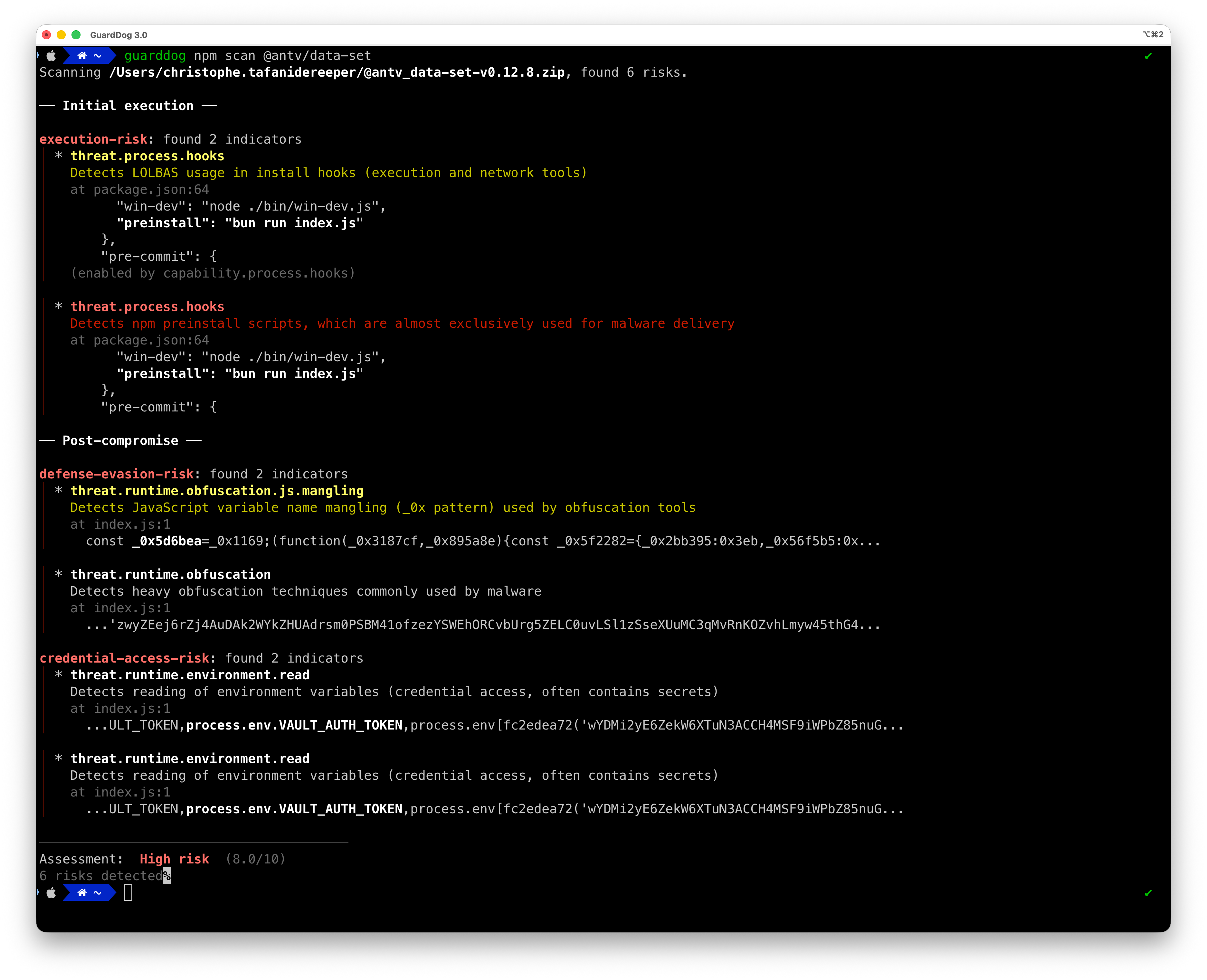
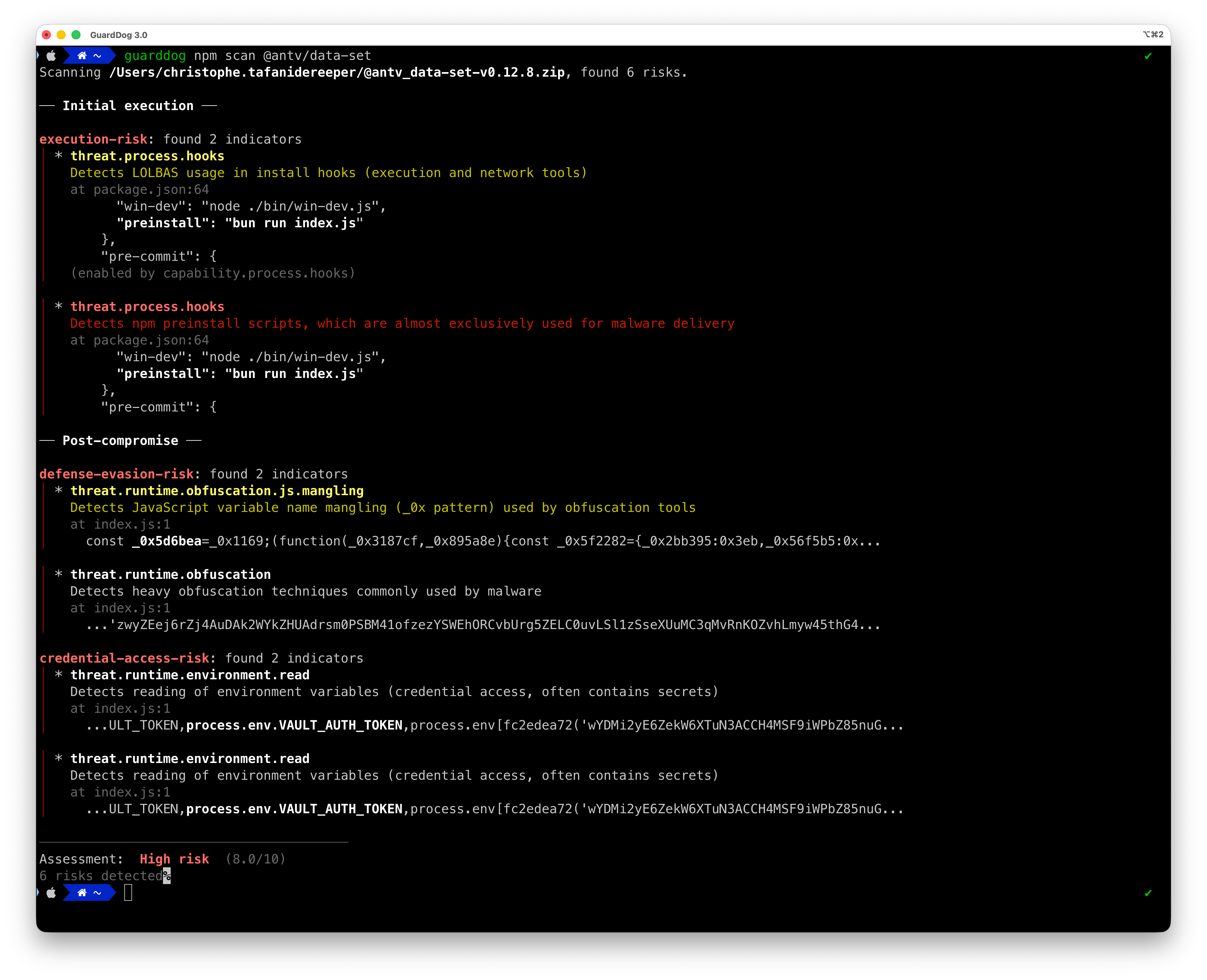
**GuardDog 的不同之处:** GuardDog 不只是列出可疑模式,而是关联发现结果,基于攻击链来识别真正的**风险**。一个包需要同时具备执行某项操作的能力(**capability**,例如网络访问)和威胁指标(**threat indicator**,例如可疑域名),并且二者出现在同一文件中,才会被标记为高风险。
它会下载并扫描以下来源的代码:
* NPM:[npmjs.org](https://www.npmjs.com/) 上托管的包
* PyPI:[PyPI.org](https://pypi.org/) 上托管的源文件(tar.gz)包
* Go:[GitHub.com](https://github.com) 上托管的仓库的 GoLang 源文件
* Rust:[crates.io](https://crates.io/) 上托管的 crates
* RubyGems:[rubygems.org](https://rubygems.org/) 上托管的 Gem 包
* GitHub Actions:[GitHub.com](https://github.com) 上托管的仓库的 JavaScript 源文件
* VSCode 扩展:[marketplace.visualstudio.com](https://marketplace.visualstudio.com/) 上托管的扩展(.vsix)包
## GuardDog 的工作原理
GuardDog 使用基于风险的检测模型(**risk-based detection model**),将代码能力与威胁指标关联起来:
1. **检测(Detection)**:规则识别**能力**(代码*可以*做什么)或**威胁**(可疑指标)
2. **关联(Correlation)**:在同一文件中发现的能力和威胁构成**风险**(跨文件匹配也会构成风险,但严重性会降级)
3. **评分(Scoring)**:根据攻击链的完整性和复杂程度对风险进行评分(0-10)
4. **报告(Reporting)**:包会获得严重性评级(低/中/高),并附有详细的风险明细
### 为什么采用这种方法?
传统的 SAST 工具会独立标记每一个可疑模式,导致告警疲劳。GuardDog 理解到:
- **仅有能力**并不代表恶意(网络库本就应该发出 HTTP 请求)
- **仅有威胁指标**可能是误报(测试夹具、文档)
- **能力 + 威胁同时出现**才表示真正的风险(代码可以*并且将会*执行恶意操作)
### 风险评分
包会根据四个因素获得 **0-10** 的评分:
| 因素 | 权重 | 描述 |
|--------|--------|-------------|
| **严重性** | 30% | 最高严重性的发现(低/中/高) |
| **攻击链** | 20% | 是否存在完整的攻击阶段(早期 → 中期/后期) |
| **特异性** | 30% | 模式对恶意软件与合法代码的特定程度 |
| **复杂程度** | 20% | 技术的高级程度 |
**评分标签:**
- **0**:未检测到风险
- **0.1-3**:低风险(单阶段威胁,特异性低)
- **3.1-7.5**:中风险(部分攻击链、元数据指标或单阶段代码发现)
- **7.6-10**:高风险(具有源代码证据的多阶段攻击链——几乎可以确定被入侵)
**攻击链阶段**(基于 MITRE ATT&CK):
- **早期**:初始访问、执行能力
- **中期**:持久化、防御规避、凭据访问
- **后期**:命令与控制、数据外泄、影响
---
### 查看适用于 GuardDog 的全新 Datadog Agent [集成](https://docs.datadoghq.com/integrations/guarddog/) 和 Cloud SIEM [内容包](https://app.datadoghq.com/security/siem/content-packs?query=guarddog)。
---
## 快速开始
### 安装
运行 GuardDog 最简单的方法是使用 [`uvx`](https://docs.astral.sh/uv/guides/tools/):
```sh
uvx guarddog pypi scan requests
```
要在本地安装:
```sh
uv tool install guarddog
# or
pip install guarddog
```
或者使用 Docker 镜像:
```sh
docker pull ghcr.io/datadog/guarddog
alias guarddog='docker run --rm ghcr.io/datadog/guarddog'
```
*注意:在 Windows 上,唯一支持的安装方法是 Docker。*
### 示例用法
```sh
# Scan the most recent version of the 'requests' package
guarddog pypi scan requests
# Scan a specific version of the 'requests' package
guarddog pypi scan requests --version 2.28.1
# Scan the 'request' package using 2 specific heuristics
guarddog pypi scan requests --rules exec-base64 --rules code-execution
# Scan the 'requests' package using all rules but one
guarddog pypi scan requests --exclude-rules exec-base64
# Scan a local package archive
guarddog pypi scan /tmp/triage.tar.gz
# Scan a local package directory
guarddog pypi scan /tmp/triage/
# Scan a package stored in S3 (a folder/prefix or a single archive object)
guarddog pypi scan s3://my-bucket/path/to/package/
guarddog pypi scan s3://my-bucket/path/to/package.tar.gz
# Scan every package referenced in a requirements.txt file of a local folder
guarddog pypi verify workspace/guarddog/requirements.txt
# Scan every package referenced in a requirements.txt file and output a sarif file - works only for verify
guarddog pypi verify --output-format=sarif workspace/guarddog/requirements.txt
# Output JSON to standard output - works for every command
guarddog pypi scan requests --output-format=json
# All the commands also work on npm, go, crates, rubygems
guarddog npm scan express
guarddog go scan github.com/DataDog/dd-trace-go
guarddog go verify /tmp/repo/go.mod
# Scan Rust crates
guarddog crates scan serde
guarddog crates verify /tmp/repo/Cargo.lock
# Scan RubyGems packages
guarddog rubygems scan rails
guarddog rubygems verify /tmp/repo/Gemfile.lock
# Additionally can support scanning GitHub actions that are implemented in JavaScript
guarddog github_action scan DataDog/synthetics-ci-github-action
guarddog github_action verify /tmp/repo/.github/workflows/main.yml
# Scan VSCode extensions from the marketplace
guarddog extension scan ms-python.python
# Scan a specific version of a VSCode extension
guarddog extension scan ms-python.python --version 2023.20.0
# Scan a local VSCode extension directory or VSIX archive
guarddog extension scan /tmp/my-extension/
# Run in debug mode
guarddog --log-level debug npm scan express
```
## 沙箱扫描
扫描包时,GuardDog 会在**内核级沙箱**内运行源代码分析(Linux 上通过 Landlock,macOS 上通过 Seatbelt,使用 [nono](https://github.com/always-further/nono-py))。该沙箱会阻止所有网络访问,并将文件系统操作限制为仅分析所需的路径。这可以防止恶意包在归档解压或扫描期间尝试执行代码。
默认情况下,沙箱是必需的:如果平台不支持,扫描将失败,而不是在无保护状态下运行。要无沙箱扫描,必须显式传递 `--no-sandbox` 参数:
```sh
# Default: require the sandbox, exit with an error if it's unavailable
guarddog pypi scan requests
# Explicitly disable the sandbox
guarddog pypi scan requests --no-sandbox
```
对于远程包,以下三个阶段以不同的权限级别运行:
1. **下载**和**元数据分析**在无沙箱状态下运行(需要网络访问)
2. **归档解压**在沙箱子进程中运行(网络被阻止,文件系统受限)
3. **源代码分析**(YARA)在应用沙箱后的主进程中运行(网络被阻止,文件系统仅限于解压的文件)
引入沙箱是为了缓解归档解压期间的路径遍历和代码执行漏洞(CVE-2022-23530、CVE-2022-23531、CVE-2026-22870、CVE-2026-22871)。
## 从 S3 扫描包
GuardDog 可以扫描存储在 S3 中的包,可以是文件夹/前缀或单个归档对象:
```sh
guarddog npm scan s3://my-bucket/path/to/package/
guarddog npm scan s3://my-bucket/path/to/package.tar.gz
```
这会使用您现有的 AWS 凭据(环境变量、`~/.aws`、SSO 或 IAM 角色)。GuardDog 在开始任何操作之前通过 STS 验证身份验证,如果找不到有效的凭据,则退出并报错。这些对象会同步到临时目录,像其他任何不受信任的内容一样在沙箱下扫描,之后从磁盘上删除。
## 规则
GuardDog 使用两种类型的检测规则,它们都参与基于风险的评分引擎:
* **源代码规则**(YARA):对包源代码进行静态分析,检测能力和威胁
* **元数据规则**(Python 检测器):分析包注册表元数据,检测供应链攻击指标
有关每个生态系统的完整规则列表,请参阅 **[RULES.md](https://github.com/datadog/guarddog/blob/v3/RULES.md)**。
有关编写新规则的指南,请参阅 **[WRITING_RULES.md](https://github.com/datadog/guarddog/blob/v3/WRITING_RULES.md)**。
## 在 GitHub Action 中运行 GuardDog
在 CI 流水线中集成 GuardDog 最简单的方法是利用 SARIF 输出格式,并将其上传到 GitHub 的[代码扫描](https://docs.github.com/en/code-security/code-scanning/automatically-scanning-your-code-for-vulnerabilities-and-errors/about-code-scanning)功能。
使用此功能,您可以获得:
* 基于 GuardDog 扫描输出自动评论您的拉取请求
* 直接在 GitHub UI 中内置误报管理
使用 GuardDog 的 GitHub Action 示例:
```yaml
name: GuardDog
on:
push:
branches:
- main
pull_request:
branches:
- main
permissions:
contents: read
jobs:
guarddog:
permissions:
contents: read # for actions/checkout to fetch code
security-events: write # for github/codeql-action/upload-sarif to upload SARIF results
name: Scan dependencies
runs-on: ubuntu-latest
steps:
- uses: actions/checkout@v4
- uses: astral-sh/setup-uv@v7
- run: uvx guarddog pypi verify requirements.txt --output-format sarif --exclude-rules repository_integrity_mismatch > guarddog.sarif
- name: Upload SARIF file to GitHub
uses: github/codeql-action/upload-sarif@v3
with:
category: guarddog-builtin
sarif_file: guarddog.sarif
```
## 开发
### 运行 GuardDog 的本地版本
* 确保 poetry 有一个 `python >=3.10` 的环境:`poetry env use 3.10.0`
* 安装依赖:`poetry install`
* 运行 guarddog:`poetry run guarddog`,或运行 `poetry shell` 然后执行 `guarddog`
### 单元测试
运行所有单元测试:`make test`
针对包元数据启发式规则运行单元测试:`make test-metadata-rules`(测试在[此处](https://github.com/DataDog/guarddog/tree/v3/tests/analyzer/metadata))。
### 基准测试
您可以在合法和恶意包上运行 GuardDog,以确定误报和漏报。请参阅 [./tests/samples](https://github.com/datadog/guarddog/blob/v3/tests/samples)
### 代码质量检查
运行类型检查器:
```shell
mypy --install-types --non-interactive guarddog
```
以及运行 linter:
```shell
flake8 guarddog --count --select=E9,F63,F7,F82 --show-source --statistics --exclude tests/analyzer/sourcecode,tests/analyzer/metadata/resources,evaluator/data
flake8 guarddog --count --max-line-length=120 --statistics --exclude tests/analyzer/sourcecode,tests/analyzer/metadata/resources,evaluator/data --ignore=E203,W503
```
### 通过环境变量配置
可以使用环境变量自定义 GuardDog 的行为:
#### 常规配置
| 环境变量 | 描述 | 默认值 |
|---------------------|-------------|---------------|
| `GUARDDOG_PARALLELISM` | 用于并行处理的线程数 | 可用 CPU 数 |
| `GUARDDOG_VERIFY_EXHAUSTIVE_DEPENDENCIES` | 分析所有可能的依赖版本(`true`/`false`) | `false` |
| `GUARDDOG_NPM_INCLUDE_DEV_DEPENDENCIES` | 在扫描 npm `package.json` 文件时包含 `devDependencies`(`true`/`false`);也可以通过 `guarddog npm verify --include-dev-dependencies` 在每次调用时切换 | `false` |
| `GUARDDOG_TOP_PACKAGES_CACHE_LOCATION` | 热门包缓存目录的位置 | `guarddog/analyzer/metadata/resources` |
| `GUARDDOG_YARA_EXT_EXCLUDE` | 要以逗号分隔的文件扩展名列表,用于从 YARA 扫描中排除 | `ini,md,rst,txt,lock,json,yaml,yml,toml,xml,html,csv,sql,pdf,doc,docx,ppt,pptx,xls,xlsx,odt,changelog,readme,makefile,dockerfile,pkg-info,d.ts` |
#### 元数据规则配置
| 环境变量 | 描述 | 默认值 |
|---------------------|-------------|---------------|
| `GUARDDOG_NEW_DEPENDENCY_RISK_THRESHOLD` | 在 `risky_new_dependency` 规则中,新引入的依赖项触发父包标记的最低风险评分 | `5.0` |
#### 归档解压安全限制
GuardDog 在解压包归档时实施多项安全检查,以防止压缩炸弹和文件描述符耗尽攻击:
| 环境变量 | 描述 | 默认值 |
|---------------------|-------------|---------------|
| `GUARDDOG_MAX_UNCOMPRESSED_SIZE` | 允许的最大未压缩大小(字节),防止磁盘空间耗尽 | 2147483648 (2 GB) |
| `GUARDDOG_MAX_COMPRESSION_RATIO` | 允许的最大压缩比(检测可疑压缩模式) | 100 (100:1) |
| `GUARDDOG_MAX_FILE_COUNT` | 归档中允许的最大文件数(防止文件描述符/inode 耗尽) | 100000 |
## 维护者
* [Sebastian Obregoso](https://www.linkedin.com/in/sebastianobregoso/)
* [Ian Kretz](https://github.com/ikretz)
* [Tesnim Hamdouni](https://github.com/tesnim5hamdouni)
## 作者
* [Ellen Wang](https://www.linkedin.com/in/ellen-wang-4bb5961a0/)
* [Christophe Tafani-Dereeper](https://github.com/christophetd)
## 致谢
灵感来源:
* [《Backstabber 的刀具收藏:开源软件供应链攻击综述》](https://arxiv.org/pdf/2005.09535)
* [《npm 供应链中的薄弱环节是什么?》](https://arxiv.org/pdf/2112.10165.pdf)
* [《npm 和 PyPI 注册表中常见威胁的调查》](https://arxiv.org/pdf/2108.09576.pdf)
* [《Python 恶意软件检测方法的基准比较》](https://arxiv.org/pdf/2209.13288.pdf)
* [《迈向衡量解释型语言包管理器上的供应链攻击》](https://arxiv.org/pdf/2002.01139)