
Skip to content
KitploitKITPLOIT
ToolsExploitsBlog
Log in
Submit
ToolsExploitsBlog
Submit

Hacking, PenTest, and Cybersecurity Tools for Your Security Arsenal!

Kitploit is a directory of hacking, cybersecurity, and pentesting tools. Discover the latest project updates to find vulnerabilities, analyze systems, automate testing, and strengthen your security.

FeedsContactPrivacy© 2026 Kitploit

Tool Directory

Categories

View all categories
Loading categories
cleanyourtv — Debloat any Android or Google TV over Wi-Fi and get an Apple TV-style home. | Kitploit

Tools/GitHubGitHub/gathin23/cleanyourtv
Android SecurityGeneral Purpose UtilitiesScripting & AutomationConfiguration AuditingMobile SecurityPrivacyHardware & IoT Security
GitHubgathin23/cleanyourtv

cleanyourtv

Debloat any Android or Google TV over Wi-Fi and get an Apple TV-style home.
View Repository
59.8k7.8k12h 24m agoReviewed by Kitploit
Share
Website

CleanYourTV. Your TV, minus the ads. Strip the bloatware from any Android TV or Google TV over Wi-Fi and replace the ad-filled home screen with a clean launcher that looks like an Apple TV. No root, no cable, nothing uninstalled, and a one-line restore.

Read in: עברית · 简体中文 · 正體中文 · Tiếng Việt · 日本語 · Italiano · Português · Nederlands · Deutsch · Українська · Türkçe · Oʻzbekcha · Français · Español · Ελληνικά

Stars Merged PRs Forks Contributors Support, buy me a coffee CleanYourTV on Product Hunt

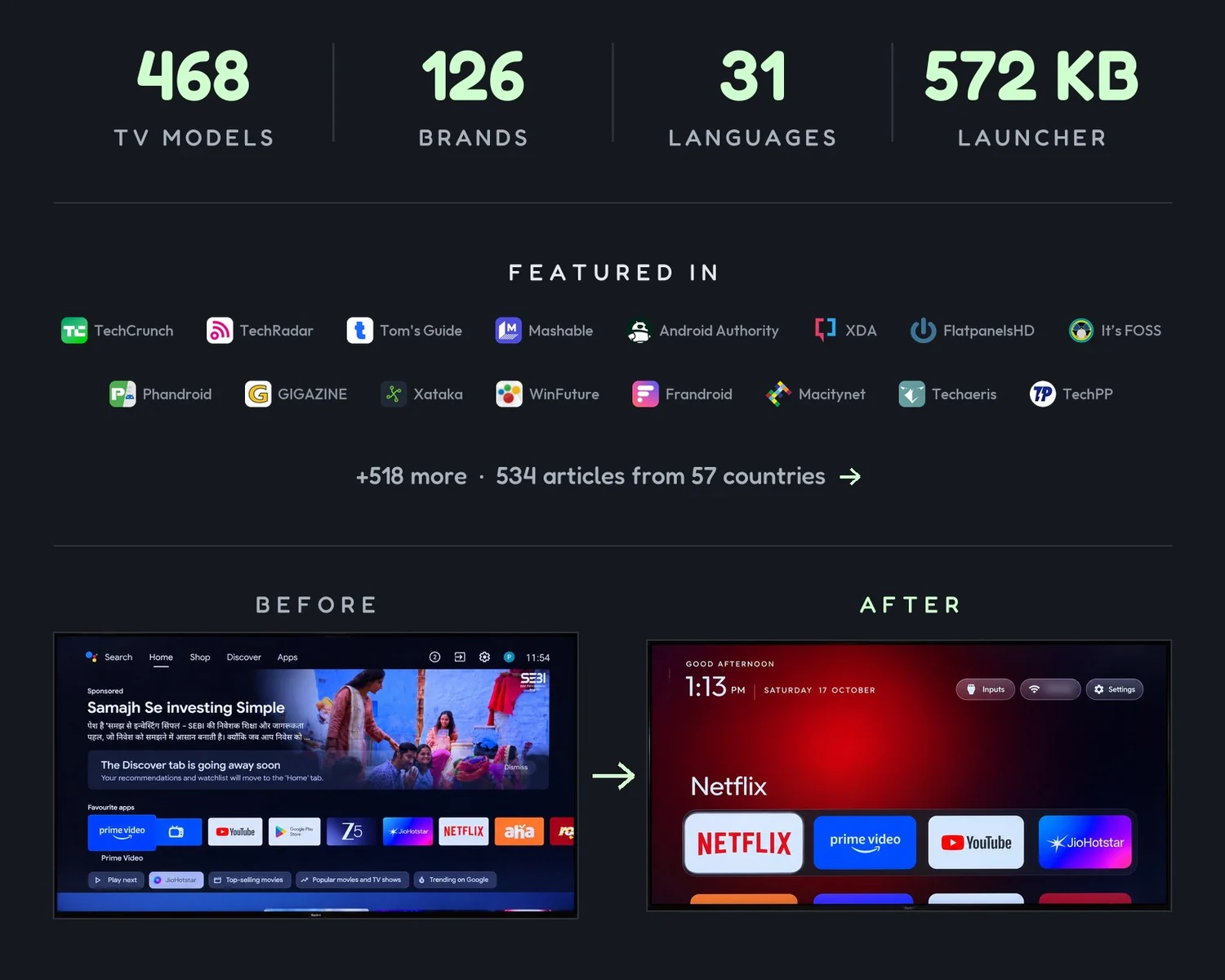
504 TV models · 138 brands · 31 languages · 572 KB launcher. Featured in TechCrunch, TechRadar, Tom's Guide, Mashable, Android Authority, XDA, FlatpanelsHD, It's FOSS, Phandroid, GIGAZINE, Xataka, WinFuture, Frandroid, Macitynet, Techaeris, TechPP and 530 more: 546 articles from 57 countries. Before: stock Google TV home with a sponsored ad. After: the Clean Your TV launcher. #1 trending repo of the week, Oct 19–25 2026, via trendshift.io.

Start here

You haveGo to
An Android TV or Google TVQuick start: a coding assistant does the work in about fifteen minutes.
A Samsung, LG, Roku, Vizio or Hisense VIDAA TVcleanyour.tv/not-android: CleanYourTV can't run there, but you can turn off the tracking with your remote.
A phone or laptop, no coding agentOne of the community apps for Android phones, Mac and Windows, made by independent developers.
Want to see it firstWhat you get: screenshots of the new home screen.

Official links: cleanyour.tv and this repo. Other domains using the name, such as cleanyourtv.com, are not run by this project (#1004). CleanYourTV publishes no app in any app store, and clean-your-tv.net is not ours either.

How it works · Quick start · What you get · Supported TVs · Doing it by hand · The launcher · Restoring · Firmware updates · Questions · Contributing

How it works

Android TVs have the same debug bridge as Android phones. Switch on USB debugging in the TV's developer options, allow your computer once, and the rest is standard Android tooling:

StepWhat happens
Back upThe list of installed packages and settings.
DisableThe manufacturer's telemetry, ad services, content rows and preloaded junk, with pm disable-user. Nothing is uninstalled, so a restore script can undo every step.
InstallA small native launcher, made the default home screen.

No root, no cable, nothing uninstalled, and a one-line restore if you change your mind.

The bloat differs by brand, so the prompt has your coding assistant discover it on your TV and ask before touching anything you might use.

Quick start

You haveDo this
A computerUse the prompt with a coding assistant: the three steps below.
A computer, no coding assistantRun the three steps yourself: the commands are in Doing it by hand.
A phone or laptop, no coding assistantPick one of the community apps: free, open-source apps built on these TV lists by independent developers.

The three steps below are written for a coding assistant: the computer needs to be on the same Wi-Fi as the TV, with a shell on it, plus Python 3, a JDK from 17 through 22, and Android SDK platform 34 with build-tools 34 (the assistant builds the launcher there). Without an assistant, Doing it by hand is the same job, run by you, and it has the install commands.

Any of these work: Claude Code (on 0G Private Computer or an Anthropic plan), Codex, Gemini CLI, Antigravity CLI or DeepSeek Harness.


Download Tool

Most Popular

View all →

Discover the most used tools by our community.

  • 1

    OsintHunter

    letox4/osinthunter

    🎯 The ultimate OSINT toolkit: investigation graph, confidence scoring, alias families, map, timeline and reports. 49 modules, 400+ sites, no API keys required.

    1.0k
  • 2

    ghostlock-app

    yukonga/ghostlock-app

    GhostLock One-Tap Execution App (CVE-2026-43499)

    590
  • 3

    looking-glass

    anonghosty/looking-glass

    CSIRT platform that ingests Shadowserver reports into MongoDB and replays them as interactive maps, analysis, findings, advisories and executive dashboards.

    383
  • 4

    ARTEX

    baarai/artex

    LLM multi-agent autonomous penetration testing platform with planner/worker agents, asset and exploration graphs, MITM traffic recording, and vulnerability retesting.

    322
  • 5

    CyberStrikeAI

    ed1s0nz/cyberstrikeai

    The system of action for AI-native cybersecurity—where intent becomes governed execution, evidence becomes operational memory, and every operation improves the next.

    309
  • 6

    redforge

    cybersecurity91/redforge

    Browser-side red team toolkit with 102 offline tools for recon, payload generation, credential attacks, crypto, encoding and engagement reporting.

    283

Explore all tools

Browse our collection of tools

View all tools →