
Skip to content
KitploitKITPLOIT
도구익스플로잇블로그
Log in
제출
도구익스플로잇블로그
제출

해킹, 침투 테스트 및 사이버 보안 도구를 당신의 보안 무기고에!

Kitploit은 해킹, 사이버 보안 및 침투 테스트 도구 디렉토리입니다. 최신 프로젝트 업데이트를 발견하여 취약점을 찾고, 시스템을 분석하고, 테스트를 자동화하고, 보안을 강화하세요.

피드문의개인정보© 2026 Kitploit

도구 디렉토리

카테고리

모든 카테고리 보기
Loading categories
도구/GitHubGitHub/purp1ew0lf/blue-team-notes
Memory ForensicsNetwork ForensicsMalware AnalysisDigital ForensicsLearning & EducationIncident ResponseCurated ResourcesLog Analysis
GitHubpurp1ew0lf/blue-team-notes

Blue-Team-Notes

블루 팀을 빼놓고 갈 거라고 생각하지 않았겠죠?

저장소 보기
1.8k247746일 전Kitploit 검토 완료
공유
요청한 언어로 콘텐츠를 사용할 수 없습니다. 영어 버전을 표시합니다.

Blue Team Notes

A collection of one-liners, small scripts, and some useful tips for blue team work.

I've included screenshots where possible so you know what you're getting.

Contact me

If you see a mistake, or have an easier way to run a command then you're welcome to hit me up on Twitter or commit an issue here.

If you want to contribute I'd be grateful for the command and a screenshot. I'll of course add you as a contributor

If you want to find me elsehwere, for reasons(?), searching 'Dray Agha' on the internets should find whatever it is you're looking for.

Did the Notes help?

I hope the Blue Team Notes help you catch an adversary, thwart an attack, or even just helps you learn. If you've benefited from the Blue Team Notes, would you kindly consider making a donation to one or two charities.

Donate as much or little money as you like, of course. I have some UK charities you could donate to: Great Ormond Street - Children's hospital, Cancer Research, and Feeding Britain - food charity

Table of Contents

  • Shell Style
  • Windows
    • OS Queries
    • Account Queries
    • Service Queries
    • Network Queries
    • Remoting Queries
    • Firewall Queries
    • SMB Queries
    • Process Queries
    • Recurring Task Queries
    • File Queries
    • Registry Queries
    • Driver Queries
    • DLL Queries
    • AV Queries
    • Log Queries
    • Powershell Tips
  • Linux
    • Bash History
    • Grep and Ack
    • Processes and Networks
    • Files
    • Bash Tips
  • macOS
    • Reading .plist files
    • Quarantine Events
    • Install History
    • Most Recently Used (MRU)
    • Audit Logs
    • Command line history
    • WHOMST is in the Admin group
    • Persistence locations
    • Transparency, Consent, and Control (TCC)
    • Built-In Security Mechanisms
  • Malware
    • Rapid Malware Analysis
    • Unquarantine Malware
    • Process Monitor
    • Hash Check Malware
    • Decoding Powershell
  • Honeypots
    • Basic Honeypots
  • Network Traffic
    • Capture Traffic
    • TShark
    • Extracting Stuff
    • PCAP Analysis IRL
  • Digital Forensics
    • Volatility
    • Quick Forensics
    • Chainsaw
    • Browser History
    • Which logs to pull in an incident
    • USBs
    • Reg Ripper
    • Winget

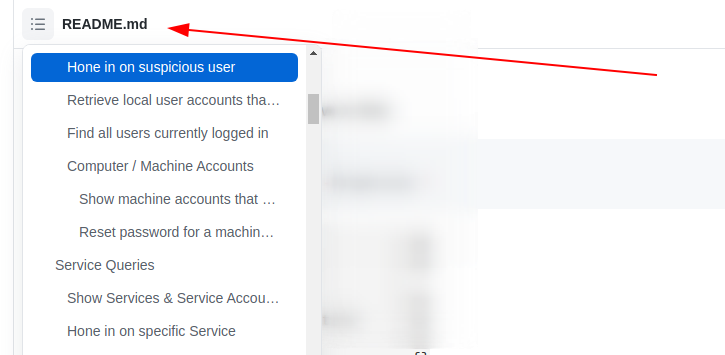
As you scroll along, it's easy to lose orientation. Wherever you are in the Blue Team Notes, if you look to the top-left of the readme you'll see a little icon. This is a small table of contents, and it will help you figure out where you are, where you've been, and where you're going
image

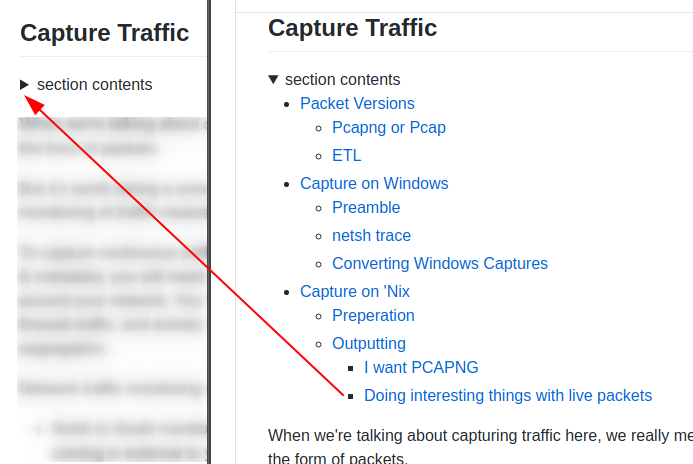
As you go through sections, you may notice the arrowhead that says 'section contents'. I have nestled the sub-headings in these, to make life a bit easier.
image


Shell Style

section contents
  • Give shell timestamp
    • CMD
    • Pwsh
    • Bash

Give shell timestamp

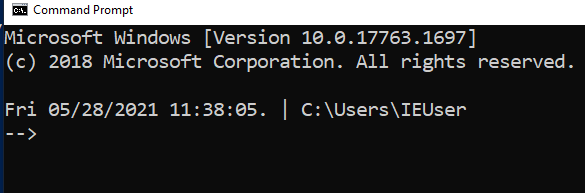
For screenshots during IR, I like to have the date, time, and sometimes the timezone in my shell

CMD

setx prompt $D$S$T$H$H$H$S$B$S$P$_--$g
:: all the H's are to backspace the stupid microsecond timestamp
:: $_ and --$g seperate the date/time and path from the actual shell
:: We make the use of the prompt command: https://docs.microsoft.com/en-us/windows-server/administration/windows-commands/prompt
:: setx is in fact the command line command to write variables to the registery
:: We are writing the prompt's new timestamp value in the cmd line into the reg so it stays, otherwise it would not stay in the cmdline when we closed it.
image

Pwsh

###create a powershell profile, if it doesnt exist already
New-Item $Profile -ItemType file –Force
##open it in notepad to edit
function prompt{ "[$(Get-Date)]" +" | PS "+ "$(Get-Location) > "}
##risky move, need to tighten this up. Change your execution policy or it won't
#run the profile ps1
#run as powershell admin
Set-ExecutionPolicy RemoteSigned

image

Bash

##open .bashrc
sudo nano .bashrc
#https://www.howtogeek.com/307701/how-to-customize-and-colorize-your-bash-prompt/
##date, time, colour, and parent+child directory only, and -> promptt
PS1='\[\033[00;35m\][`date  +"%d-%b-%y %T %Z"]` ${PWD#"${PWD%/*/*}/"}\n\[\033[01;36m\]-> \[\033[00;37m\]'
      ##begin purple  #year,month,day,time,timezone #show last 2 dir #next line, cyan,->prompt #back to normal white text
#restart the bash source
source ~/.bashrc

image

Windows

section contents
  • OS Queries
  • Account Queries
  • Service Queries
  • Network Queries
  • Remoting Queries
  • Firewall Queries
  • SMB Queries
  • Process Queries
  • Recurring Task Queries
  • File Queries
  • Registry Queries
  • Driver Queries
  • DLL Queries
  • Log Queries
  • Powershell Tips

I've generally used these Powershell queries with Velociraptor, which can query thousands of endpoints at once.


OS Queries

section contents
도구 다운로드

인기

모두 보기 →

커뮤니티에서 가장 많이 사용되는 도구를 찾아보세요.

  • 1

    OsintHunter

    letox4/osinthunter

    🎯 궁극의 OSINT 툴킷: 조사 그래프, 신뢰도 점수 산정, 별칭 패밀리, 지도, 타임라인 및 보고서. 49개 모듈, 400개 이상 사이트, API 키 불필요.

    614
  • 2

    ghostlock-app

    yukonga/ghostlock-app

    # GhostLock 원탭 실행 앱 (CVE-2026-43499)

    476
  • 3

    ARTEX

    baarai/artex

    LLM 멀티 에이전트 자율 침투 테스트 플랫폼으로, 플래너/워커 에이전트, 자산 및 탐색 그래프, MITM 트래픽 기록, 취약점 재테스트 기능을 제공합니다.

    389
  • 4

    redforge

    cybersecurity91/redforge

    브라우저 측 레드 팀 툴킷으로, 정찰, 페이로드 생성, 자격 증명 공격, 암호화, 인코딩 및 참여 보고를 위한 102개의 오프라인 도구를 제공합니다.

    334
  • 5

    CyberStrikeAI

    ed1s0nz/cyberstrikeai

    AI 네이티브 사이버보안을 위한 행동 체계—의도가 통제된 실행이 되고, 증거가 운영 메모리가 되며, 모든 운영이 다음 운영을 개선하는 곳.

    257
  • 6

    antifox

    antifox-ai/antifox

    정찰, 공격 표면 탐색, 익스플로잇 검증, 증거 기반 보고서 전달을 수행하는 AI 멀티 에이전트 자율 침투 테스트 플랫폼입니다.

    247

모든 도구 탐색

도구 컬렉션을 둘러보세요

모든 도구 보기 →