
Skip to content
KitploitKITPLOIT
ツールエクスプロイトブログ
Log in
提出
ツールエクスプロイトブログ
提出

ハッキング、侵入テスト、サイバーセキュリティツールをあなたのセキュリティアーセナルに!

Kitploitはハッキング、サイバーセキュリティ、ペネトレーションテストのツールディレクトリです。最新のプロジェクトアップデートを見つけて、脆弱性の発見、システム分析、テストの自動化、セキュリティの強化を行いましょう。

フィードお問い合わせプライバシー© 2026 Kitploit

ツールディレクトリ

カテゴリ

すべてのカテゴリを見る
Loading categories
0 — Open-source cybersecurity harness to build and deploy sovereign, persistent AI security agents (sentinels) that continuously find, prove and fix security risks. Web UI, CLI, CI and MCP. | Kitploit
ツール/GitHubGitHub/0sec-labs/0
Static AnalysisVulnerability ScannersVulnerability AnalysisFuzzingPenetration TestingDevSecOpsBinary AnalysisRed TeamingAI Security
GitHub0sec-labs/0

0

Open-source cybersecurity harness to build and deploy sovereign, persistent AI security agents (sentinels) that continuously find, prove and fix security risks. Web UI, CLI, CI and MCP.


1.5k2011947時間2分前Kitploit レビュー済み
リポジトリを見るウェブサイト
共有
要求された言語のコンテンツは利用できません。英語版を表示しています。

0security

Sovereign AI security agents

By the Swiss Applied AI & Cybersecurity Research Lab

Backed by Y Combinator

Latest release MIT or Apache-2.0 license GitHub stars

0security is software infrastructure to deploy sovereign, persistent AI security agents that find and fix security risks across any tech stack, work with any model, and run anywhere.


Documentation Security research Install locally Enterprise

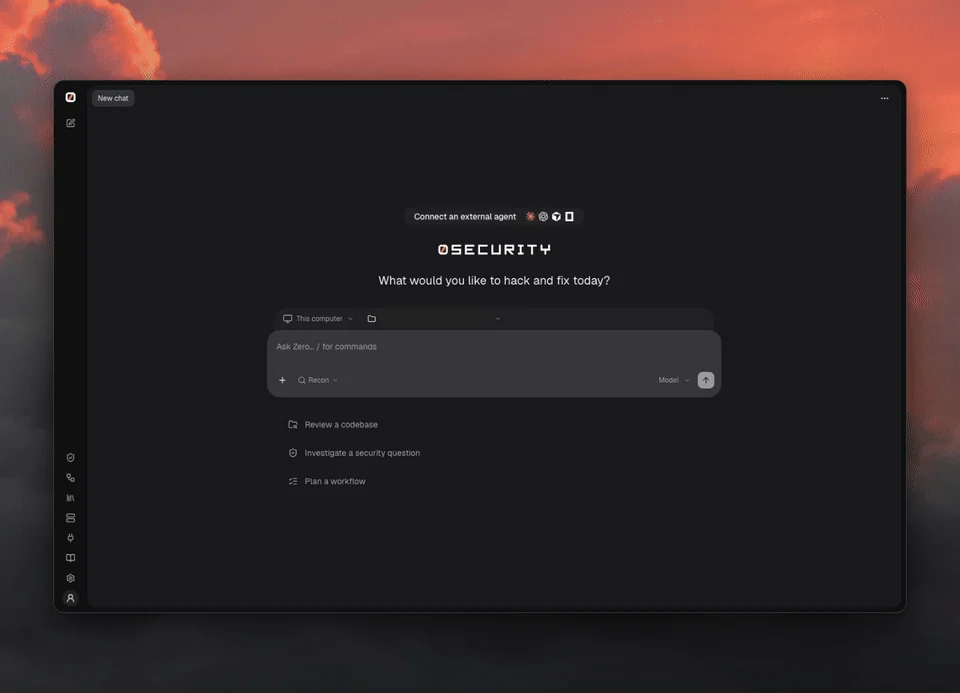
0 web UI: review a demo API, watch the investigation, then open findings with suggested fixes and verification

Quick start

curl -fsSL https://raw.githubusercontent.com/0sec-labs/0security/main/install.sh | bash
0

Prefer the terminal?

export OPENAI_API_KEY="your-api-key"
0 threads send new "Review ./your-repo for security problems"
0 findings list

Any supported provider works: set its key instead (Anthropic, OpenRouter, DeepSeek and more, see Models), or connect one in the browser with 0.

Windows, Docker and source installs
  • Windows (experimental): download 0-windows-x64.exe from Releases.
  • Docker: docker run --rm ghcr.io/0sec-labs/0security:latest --help. See the Docker guide.
  • Source: Node.js 24+ and pnpm, then pnpm install --frozen-lockfile && pnpm build.
  • install.sh supports Apple Silicon macOS and x64/ARM64 Linux. Set INSTALL_DIR to change the location.

Only point 0 at systems you own or are authorized to test.
What can you do with 0?

  • Talk to a security agent about a folder on your computer or a remote Computer, in a Thread
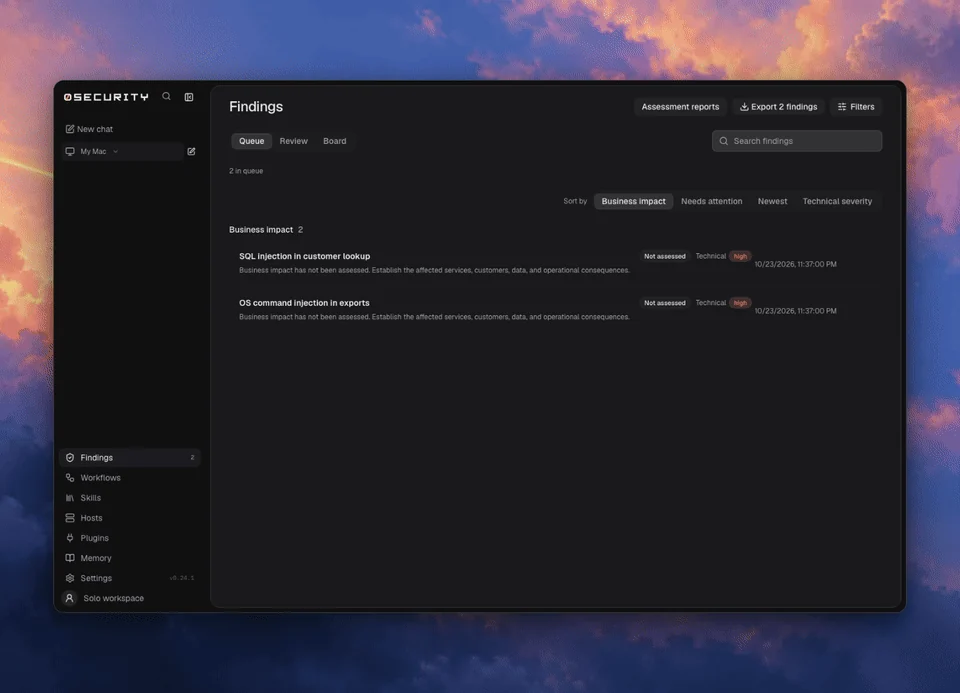
  • Review findings on a board, with source evidence, and export them
  • Verify fixes: a finding is marked Verified by or Not verified
  • Build persistent security agents: Sentinels are standing threads that wake on a schedule or on every pull request, with skills, memory and automations written as prompts
  • Keep memory as plain notes that every thread can read
  • Extend it with extensions and skills

0 findings: review the queue, organize the board, and inspect source evidence

Why 0?

  • Open source: MIT or Apache-2.0, built in the open
  • Private: runs on your computer, in your CI or in a container, and only the context you send to your chosen model leaves it
  • Flexible: any provider key or local OpenAI-compatible server, from the CLI, CI or a coding agent
  • Evidence first: every finding links to its source evidence
  • Verified: a finding says whether it was verified, and by what
  • Proven in public: disclosed vulnerabilities and upstream fixes, including in the Linux kernel

Coding agents

0 sentinels run <id> --task "Review this pull request" --yes

See the command reference.

Learn more

  • Documentation
  • Models and providers
  • Extensions and MCP
  • Command reference
  • Security research
  • Enterprise

Contributing

0 is built in the open. Huge thanks to everyone who has filed a bug, fixed a doc or sent a patch.

  • Report bugs in issues
  • Improve the docs
  • Write an extension or a skill
  • Found a vulnerability in 0? See SECURITY.md

Start with the contributing guide. Run pnpm install and pnpm dev to work on the engine. Open an issue before large changes.


Contributors to 0sec-labs/0security

License

MIT OR Apache-2.0. Public disclosures and upstream fixes.

ツールをダウンロード

人気

すべて見る →

コミュニティで最も使われているツールを見つけましょう。

  • 1

    OsintHunter

    letox4/osinthunter

    🎯 究極のOSINTツールキット:調査グラフ、信頼度スコアリング、エイリアスファミリー、マップ、タイムライン、レポート。49個のモジュール、400以上のサイト、APIキー不要。

    755
  • 2

    ghostlock-app

    yukonga/ghostlock-app

    GhostLock ワンタップ実行アプリ(CVE-2026-43499)

    510
  • 3

    ARTEX

    baarai/artex

    プランナー/ワーカーエージェント、資産グラフと探索グラフ、MITMトラフィック記録、脆弱性の再テストを備えたLLMマルチエージェント自律ペネトレーションテストプラットフォーム。

    415
  • 4

    redforge

    cybersecurity91/redforge

    ブラウザ側のレッドチームツールキット。偵察、ペイロード生成、認証情報攻撃、暗号、エンコーディング、エンゲージメントレポート向けの102のオフラインツールを備えています。

    343
  • 5

    antifox

    antifox-ai/antifox

    偵察、攻撃対象領域の探索、エクスプロイト検証、証拠に基づくレポート提供を実行するAIマルチエージェント自律ペネトレーションテストプラットフォーム。

    259
  • 6

    CyberStrikeAI

    ed1s0nz/cyberstrikeai

    AIネイティブなサイバーセキュリティのためのアクションシステム。意図がガバナンスされた実行に変わり、証拠が運用記憶となり、すべての操作が次の操作を改善する。

    258

すべてのツールを探索

ツールコレクションを閲覧

すべてのツールを見る →