
Skip to content
KitploitKITPLOIT
StrumentiExploitsBlog
Log in
Invia
StrumentiExploitsBlog
Invia

Strumenti di Hacking, PenTest e Cybersecurity per il tuo Arsenale di Sicurezza!

Kitploit è una directory di strumenti di hacking, cybersecurity e pentesting. Scopri gli ultimi aggiornamenti dei progetti per trovare vulnerabilità, analizzare sistemi, automatizzare i test e rafforzare la tua sicurezza.

FeedContattoPrivacy© 2026 Kitploit

Directory degli strumenti

Categorie

Vedi tutte le categorie
Loading categories
SudoStamp — Approve sudo on a Linux workstation with a fingerprint on your Android phone. LAN only; the ECDSA key never leaves the phone's TEE and speaks the ssh-agent protocol to pam_rssh. | Kitploit
Strumenti/GitLabGitLab/ritwick7/sudostamp
Android SecurityAuthentication & AuthorizationPrivilege EscalationCryptographyMobile SecurityHardware SecurityIdentity & Access Management (IAM)Authentication
GitLabritwick7/sudostamp

SudoStamp

Approve sudo on a Linux workstation with a fingerprint on your Android phone. LAN only; the ECDSA key never leaves the phone's TEE and speaks the ssh-agent protocol to pam_rssh.

621 giorno faNon ancora revisionato
Condividi
Vedi Repository
Contenuto non disponibile nella lingua richiesta. Visualizzazione della versione inglese.

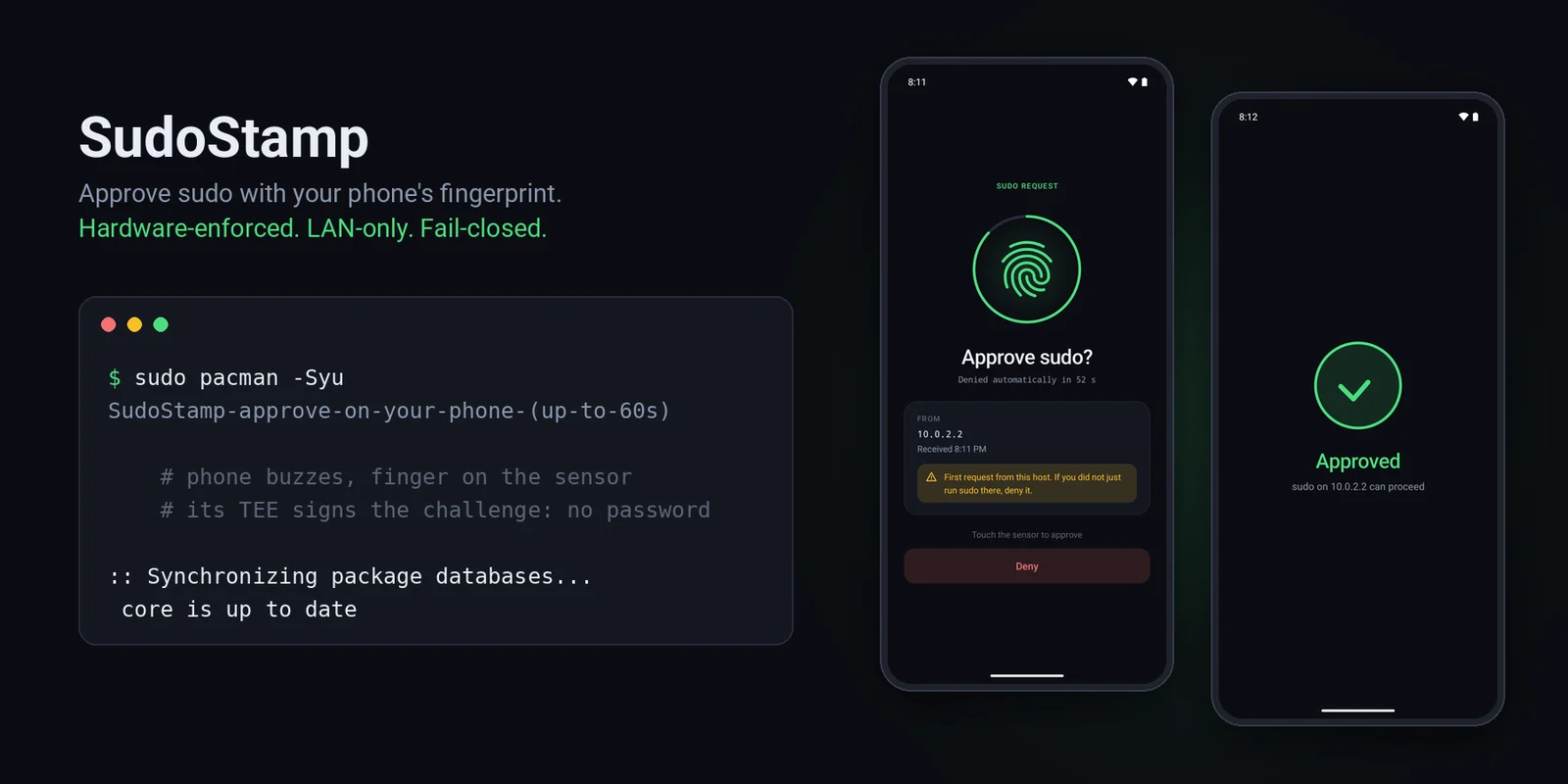
A terminal running sudo pacman -Syu next to a phone asking "Approve sudo?" and then showing "Approved"

pipeline status MIT licence Android 11+ Zero runtime dependencies Release APK about 110 KB Host side: pam_rssh site tip

SudoStamp

Approve sudo on your Linux machine by touching your Android phone's fingerprint sensor.

Type sudo, your phone buzzes, you touch the sensor, the command runs. No password typed, nothing in the cloud: the phone answers over your LAN, and the fingerprint is enforced by the phone's secure hardware (TEE / StrongBox), not by app code. If anything goes wrong (phone off, out of range, you tap Deny, 60 seconds pass) sudo simply falls back to your ordinary password prompt. It can make sudo more convenient; it cannot lock you out.
What it looks like

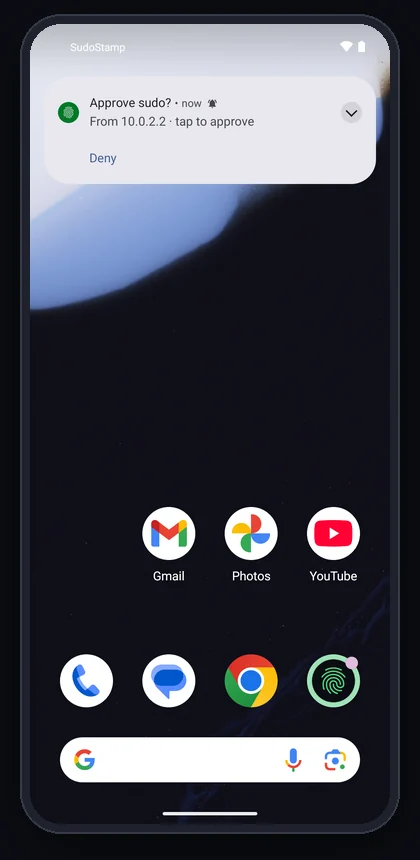
Notification: Approve sudo? From 10.0.2.2 · tap to approve, with a Deny button
1. sudo on the host
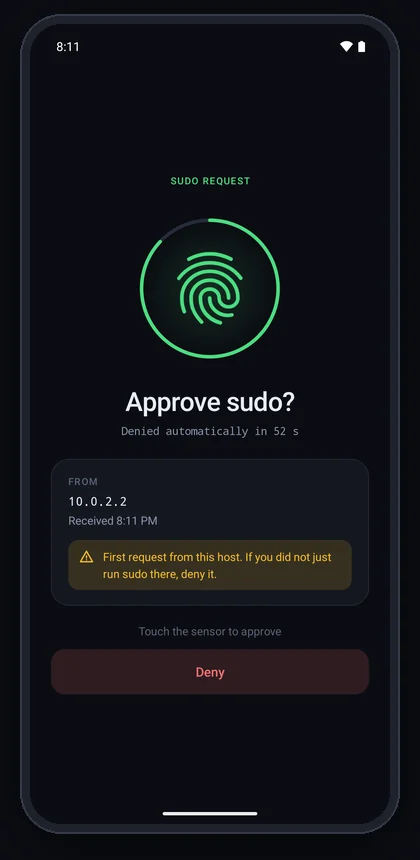
The phone pops up who is asking. Deny works right from here.
Approval screen with a countdown ring, the requesting host, a first-request warning and a Deny button
2. Tap it
A countdown, the host and time, a warning for never-seen hosts. Then the system fingerprint prompt.
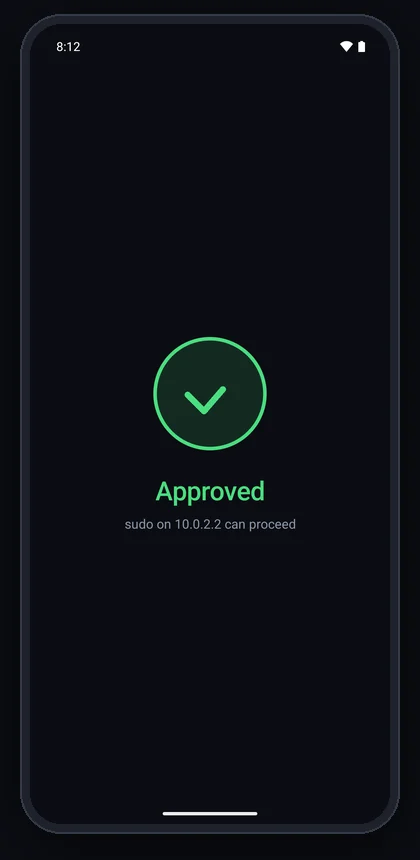
Approved: sudo on 10.0.2.2 can proceed
3. Touch the sensor
The TEE signs, sudo proceeds, the app closes itself.
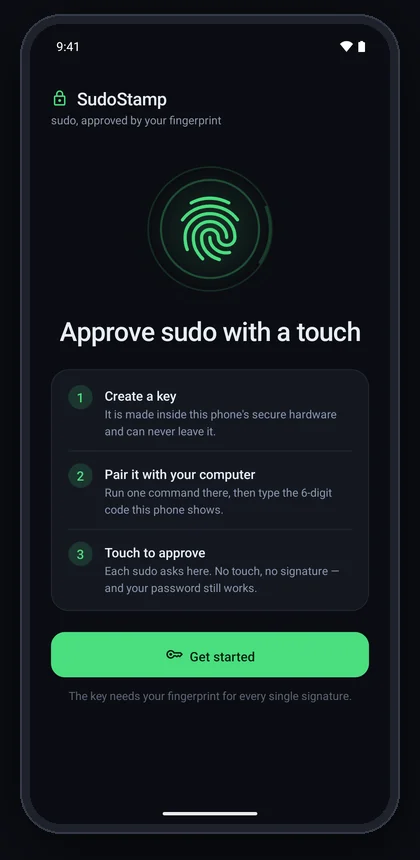
Onboarding: Approve sudo with a touch, three steps, Get started
First run
Three steps and one button. Offers fingerprint enrollment if the phone has none.
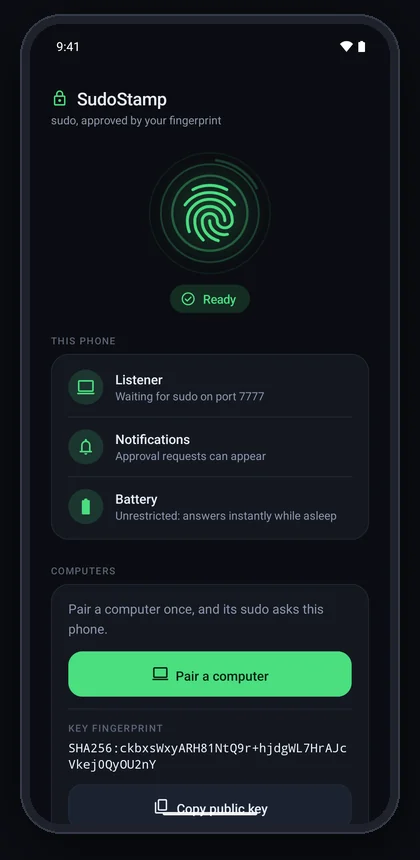
Setup screen: Ready, with Listener, Notifications and Battery checks all green
Setup
A live checklist: listener, notifications, battery, Do Not Disturb. "Ready" only when all pass.
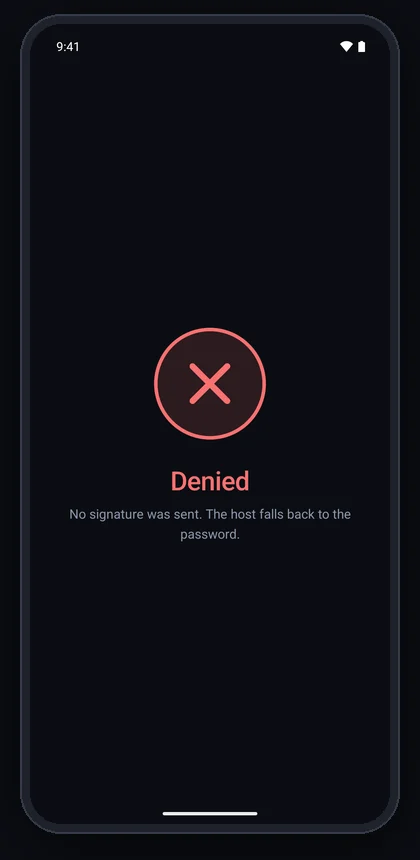
Denied: No signature was sent. The host falls back to the password.
Denied or timed out
No signature leaves the phone; the host asks for the password.

Screenshots from a Pixel 7 emulator (hence 10.0.2.2, the emulator's host). The system fingerprint sheet that appears over step 2 is a secure window and does not show in screenshots.

How it works

sudo on the host
  -> PAM: pam_rssh (third-party) dials the phone over the LAN, as an ssh-agent
  -> phone: "Approve sudo on edith?"                      (notification)
  -> tap -> BiometricPrompt -> fingerprint
  -> the phone's TEE signs pam_rssh's fresh 32-byte challenge, with the key it made for edith
  -> pam_rssh verifies against the pinned public key -> sudo proceeds

Why it can be trusted

  • The phone app only signs; it never decides. PAM integration, signature verification and fail-closed behaviour are pam_rssh's, an existing, maintained module. The one helper of ours on the authentication path (a 4-second reachability check) can only make sudo fall back to the password sooner, never grant anything.
  • The biometric is a hardware gate. The Android Keystore key is created with setUserAuthenticationParameters(0, AUTH_BIOMETRIC_STRONG): a fresh strong biometric for every signature, enforced inside the TEE (or StrongBox). Malware on the phone cannot sign without your finger either, and the key cannot be exported.
  • The computer checks that the key is in hardware. When it pairs, the phone's secure hardware signs a certificate chain saying where the new key lives; setup verifies it against Google's attestation roots (kept in this repository) and prints Key attested: StrongBox or TEE. It does not take the phone's word for it.
  • One key per computer. The phone makes a separate key for every computer it pairs with, and the approval names the computer that key belongs to. A device that never paired cannot even make the phone ask.
  • It signs nothing but sudo challenges. The agent refuses any payload that is not exactly pam_rssh's 32-byte challenge, so the keys are useless as SSH-login or git-signing oracles.
  • Zero third-party runtime dependencies in the app: platform APIs only.

SECURITY.md has the full threat model, including what it does not protect against. docs/DESIGN.md has the design and the reasoning behind it.

Review status. SudoStamp was written with an AI assistant and has been through an AI-run security audit, whose findings are fixed in 1.4.0 — but no human security professional has reviewed it yet. It sits in front of sudo: read SECURITY.md before you rely on it. Reviews are very welcome.

Requirements

  • Phone: Android 11+ (API 30, where per-use biometric keys became expressible) with a Class 3 ("strong") fingerprint sensor.
  • Host: any of the platforms below. The installer brings pam_rssh with it: a package where one exists, otherwise built from a pinned, verified commit.


Scarica lo strumento

Più Popolari

Vedi tutti →

Scopri gli strumenti più utilizzati dalla nostra community.

  • 1

    OsintHunter

    letox4/osinthunter

    🎯 Il toolkit OSINT definitivo: grafo di indagine, punteggio di affidabilità, famiglie di alias, mappa, timeline e report. 49 moduli, oltre 400 siti, nessuna chiave API richiesta.

    591
  • 2

    ghostlock-app

    yukonga/ghostlock-app

    # App di esecuzione con un tocco GhostLock (CVE-2026-43499)

    481
  • 3

    ARTEX

    baarai/artex

    Piattaforma di penetration testing autonoma multi-agente basata su LLM con agenti planner/worker, grafi di asset e di esplorazione, registrazione del traffico MITM e retesting delle vulnerabilità.

    389
  • 4

    redforge

    cybersecurity91/redforge

    Toolkit red team lato browser con 102 strumenti offline per ricognizione, generazione di payload, attacchi alle credenziali, crittografia, codifica e reportistica dell'engagement.

    332
  • 5

    CyberStrikeAI

    ed1s0nz/cyberstrikeai

    Il sistema d'azione per la cybersecurity nativa AI—dove l'intento diventa esecuzione governata, le evidenze diventano memoria operativa, e ogni operazione migliora la successiva.

    255
  • 6

    antifox

    antifox-ai/antifox

    Piattaforma multi-agente di penetration testing autonoma basata sull'IA che esegue ricognizione, scoperta della superficie d'attacco, validazione dello sfruttamento e consegna di report supportati da evidenze.

    247

Esplora tutti gli strumenti

Sfoglia la nostra collezione di strumenti

Vedi tutti gli strumenti →