
Skip to content
KitploitKITPLOIT
StrumentiBlog
Invia
StrumentiBlog
Invia

Strumenti di Hacking, PenTest e Cybersecurity per il tuo Arsenale di Sicurezza!

Kitploit è una directory di strumenti di hacking, cybersecurity e pentesting. Scopri gli ultimi aggiornamenti dei progetti per trovare vulnerabilità, analizzare sistemi, automatizzare i test e rafforzare la tua sicurezza.

··Feed·Contatto·Privacy·© 2026 Kitploit

Directory degli strumenti

Categorie

Vedi tutte le categorie
Loading categories
super-tart-vphone-writeup — Guida per costruire un iPhone virtuale utilizzando componenti VPHONE600AP dal firmware PCC di Apple, con patch del firmware, modifica della bootchain e debug del kernel per la ricerca sulla sicurezza di iOS. | Kitploit
Strumenti/GitHubGitHub/wh1te4ever/super-tart-vphone-writeup
Sicurezza iOSAnalisi delle VulnerabilitàExploitReverse EngineeringDebuggerPenetration TestingSicurezza MobileSicurezza Hardware e IoTAnalisi del Firmware

Più Popolari

Vedi tutti →

Scopri gli strumenti più utilizzati dalla nostra community.

Esplora tutti gli strumenti

Sfoglia la nostra collezione di strumenti

Vedi tutti gli strumenti →
Condividi
Binary Exploitation
GitHubwh1te4ever/super-tart-vphone-writeup

super-tart-vphone-writeup

Guida per costruire un iPhone virtuale utilizzando componenti VPHONE600AP dal firmware PCC di Apple, con patch del firmware, modifica della bootchain e debug del kernel per la ricerca sulla sicurezza di iOS.

Vedi Repository
1.2k1685 mesi faRevisionato da Kitploit

Building virtual iPhone using VPHONE600AP component of recently released PCC firmware

Ringraziamenti Speciali / Riconoscimenti

  • dlevi309 (Hanno fornito idee per l'interazione tattile sull'iPhone virtuale)
  • khanhduytran0, 34306, asdfugil, verygenericname (Hanno fornito altre idee per la costruzione dell'iPhone virtuale, inclusi Cryptex, attivazione del dispositivo, avvio da Ramdisk, ecc.)
  • ma4the, Mard, SwallowS (Test per verificare se funziona bene in altri ambienti)

Motivazione

Verso la fine del 2024, Apple ha iniziato a introdurre Private Cloud Compute, sostenendo di aprire un nuovo orizzonte per la privacy dell'IA basata sul cloud. Poi, verso la fine del 2025, sono apparse alcune notizie interessanti: Apple aveva aggiunto di recente componenti relativi a vphone600ap al firmware PCC, a partire da cloudOS 26.

Fonte: https://x.com/matteyeux/status/2006339694783848660/photo/1

Fonte: https://x.com/matteyeux/status/2006339694783848660/photo/1

"Macchina virtuale per l'ambiente di ricerca iPhone"?

Si tratta di una mossa pianificata da Apple per costruire e distribuire un ambiente iPhone virtuale per altri ricercatori di sicurezza in futuro, o è stato semplicemente un errore? Considerando che il kernel di build DEVELOPMENT/KASAN è stato scoperto una volta negli OTA di iOS 15.0 beta a 15.1 beta3 nel 2021, la possibilità di un lapsus non può essere esclusa. All'epoca, il kernel è rimasto incluso per circa 4 mesi, approssimativamente da giugno a ottobre 2021.

Poi, intorno a gennaio di quest'anno, è stato pubblicato un tweet che mostrava un iPhone virtuale in fase di avvio utilizzando questi componenti relativi a vphone600ap.

Fonte: https://x.com/_inside/status/2008951845725548783
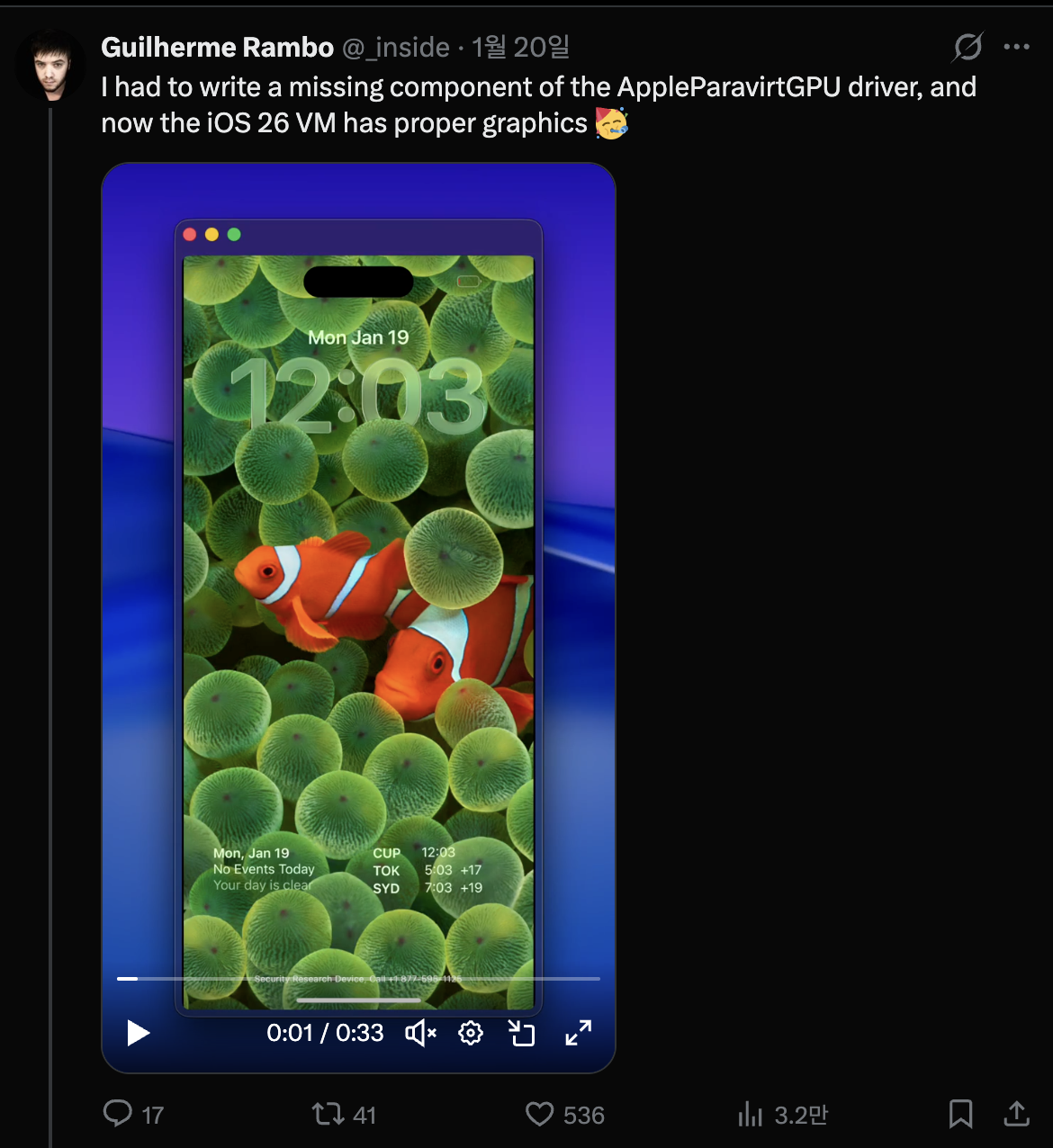
Fonte: https://x.com/_inside/status/2008951845725548783

Screenshot 2026-02-24 at 7.39.03 PM.png

Da quello che ho visto, quasi tutto funzionava davvero in modo elegante. Rispetto al progetto QEMUAppleSilicon(Inferno) che avevo visto in precedenza, funziona molto più rapidamente e fluentemente. Inoltre, sembrava addirittura supportare l'accelerazione Metal. Alla fine, completamente affascinato, mi sono tuffato e ho iniziato a costruire il mio iPhone virtuale il 31 gennaio.

Screenshot 2026-02-24 at 7.46.41 PM.png

Modificare super-tart per avviare l'iPhone virtuale

Il progetto di riferimento è security-pcc. Corrisponde al codice sorgente del binario /System/Library/SecurityResearch/usr/bin/vrevm. Un punto interessante è che utilizza metodi privati forniti da Virtualization.framework. Nella macchina virtuale utilizzata per la ricerca PCC, si può vedere che ISA e PlatformVersion sono specificati esplicitamente durante il processo di inizializzazione del modello hardware.
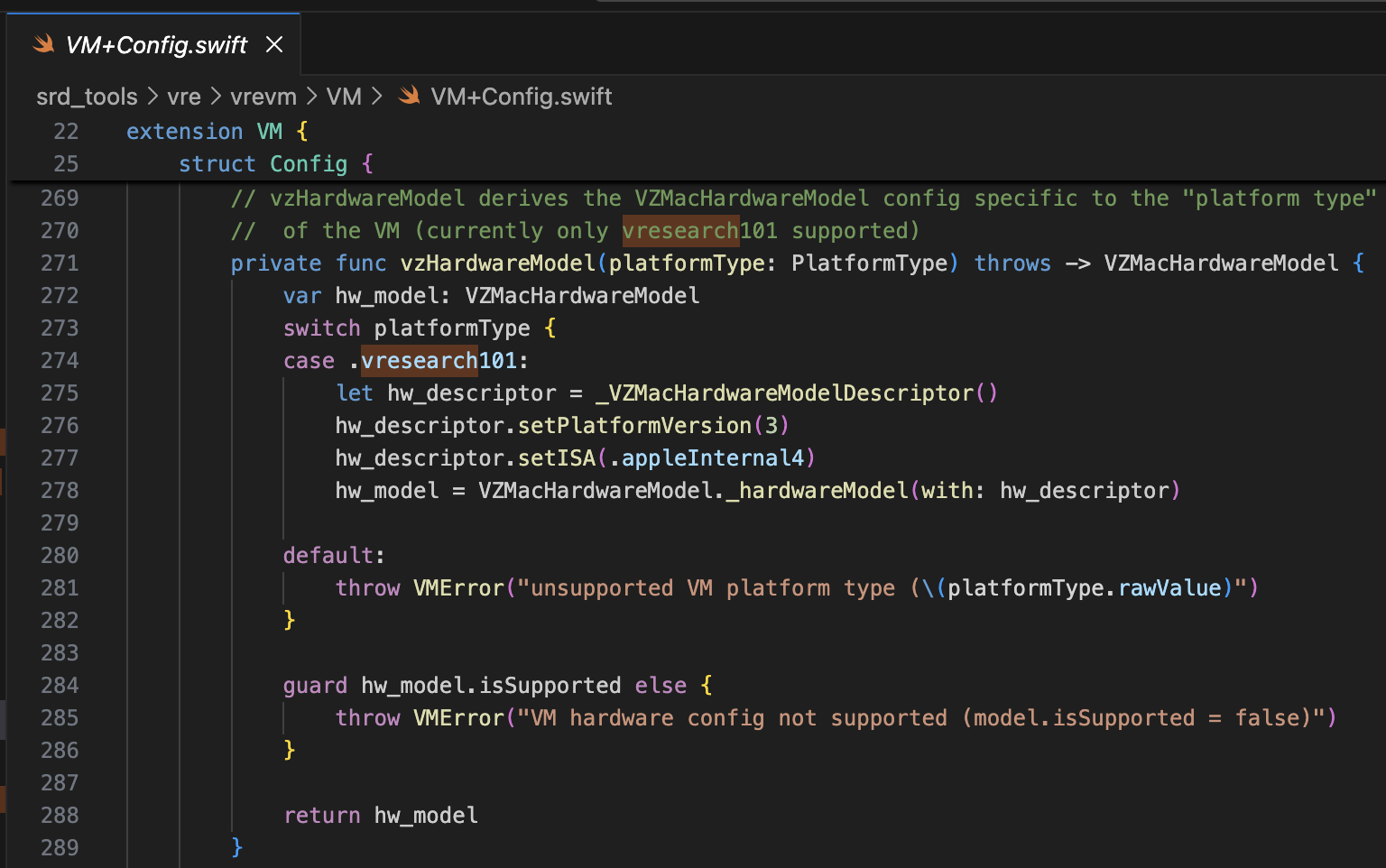
Screenshot 2026-02-24 at 8.27.01 PM.png

Per il bootrom, viene utilizzato AVPBooter.vresearch1.bin (/System/Library/Frameworks/Virtualization.framework/Resources/AVPBooter.vresearch1.bin)
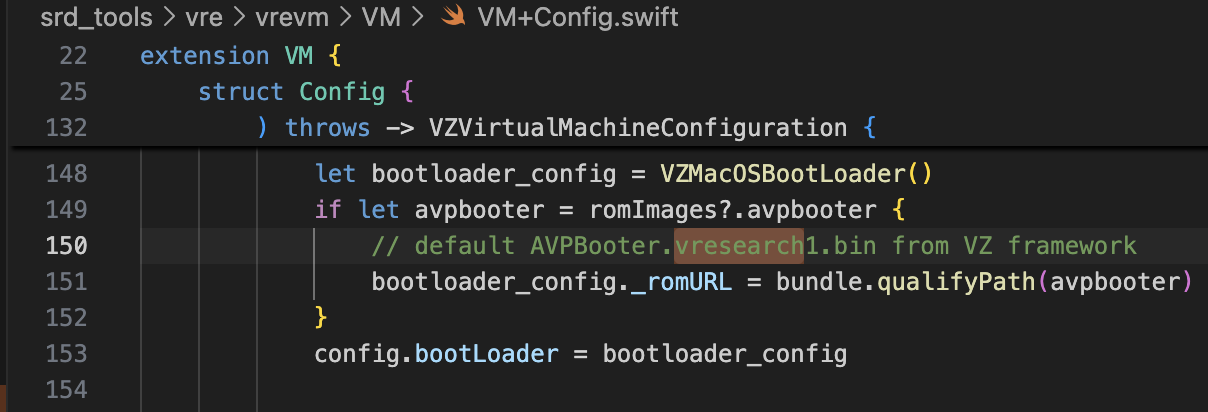
Screenshot 2026-02-24 at 8.32.08 PM.png

e per il SEPROM (avpsepbooter), viene utilizzato AVPSEPBooter.vresearch1.bin, che carica separatamente un file SEPStorage che funziona in modo simile a AuxiliaryStorage. (/System/Library/Frameworks/Virtualization.framework/Versions/A/Resources/AVPSEPBooter.vresearch1.bin)

Un altro punto interessante è che se si guarda il codice per impostare la risoluzione, è impostata su 1290x2796, che corrisponde ai dispositivi iPhone 14 Pro Max, 15 Plus, 15 Pro Max e 16 Plus.
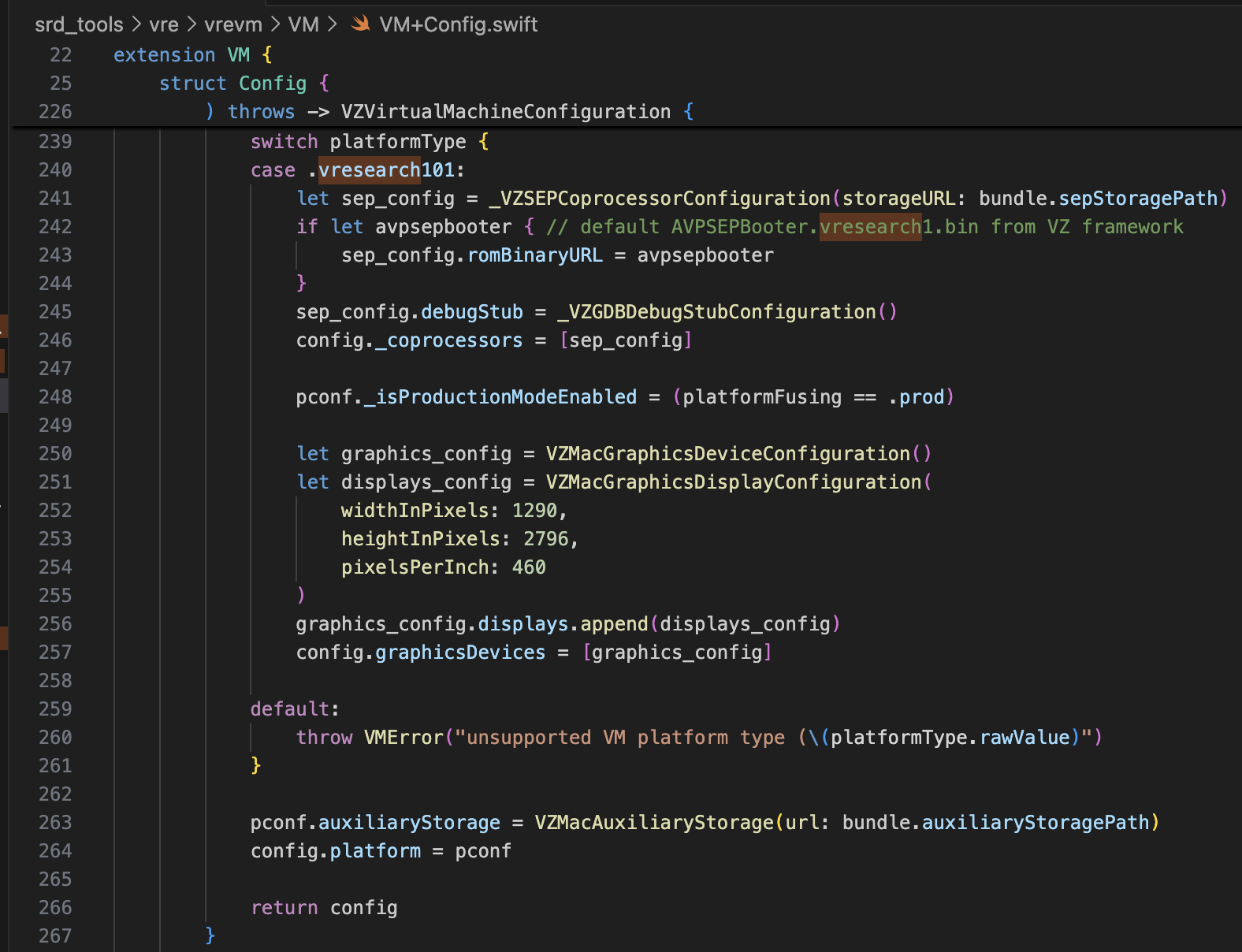
Screenshot 2026-02-24 at 8.34.11 PM.png

Con solo queste informazioni, dovrebbe essere più che sufficiente per modificare super-tart per avviare l'iPhone virtuale. Ho apportato le modifiche come mostrato di seguito.

  • /Sources/tart/VM.swift```swift ... class VM: NSObject, VZVirtualMachineDelegate, ObservableObject { ... // vzHardwareModel derives the VZMacHardwareModel config specific to the "platform type" // of the VM (currently only vresearch101 supported) static private func vzHardwareModel_VRESEARCH101() throws -> VZMacHardwareModel { var hw_model: VZMacHardwareModel

    guard let hw_descriptor = _VZMacHardwareModelDescriptor() else { fatalError("Failed to create hardware descriptor") } hw_descriptor.setPlatformVersion(3) // .appleInternal4 = 3 hw_descriptor.setBoardID(0x90) hw_descriptor.setISA(2) hw_model = VZMacHardwareModel._hardwareModel(withDescriptor: hw_descriptor)

    guard hw_model.isSupported else { fatalError("VM hardware config not supported (model.isSupported = false)") }

    return hw_model }

    static func craftConfiguration( diskURL: URL, nvramURL: URL, romURL: URL, sepromURL: URL? = nil, vmConfig: VMConfig, network: Network = NetworkShared(), additionalStorageDevices: [VZStorageDeviceConfiguration], directorySharingDevices: [VZDirectorySharingDeviceConfiguration], serialPorts: [VZSerialPortConfiguration], suspendable: Bool = false, nested: Bool = false, audio: Bool = true, clipboard: Bool = true, sync: VZDiskImageSynchronizationMode = .full, caching: VZDiskImageCachingMode? = nil ) throws -> VZVirtualMachineConfiguration { let configuration: VZVirtualMachineConfiguration = .init()

    // Boot loader let bootloader = try vmConfig.platform.bootLoader(nvramURL: nvramURL) Dynamic(bootloader)._setROMURL(romURL) configuration.bootLoader = bootloader

    // SEP ROM let homeURL = FileManager.default.homeDirectoryForCurrentUser var sepstoragePath = homeURL.appendingPathComponent(".tart/vms/vphone/SEPStorage").path let sepstorageURL = URL(fileURLWithPath: sepstoragePath) let sep_config = Dynamic._VZSEPCoprocessorConfiguration(storageURL: sepstorageURL) if let sepromURL { // default AVPSEPBooter.vresearch1.bin from VZ framework sep_config.romBinaryURL = sepromURL } sep_config.debugStub = Dynamic._VZGDBDebugStubConfiguration(port: 8001) configuration._setCoprocessors([sep_config.asObject])

    // Some vresearch101 config let pconf = VZMacPlatformConfiguration() pconf.hardwareModel = try vzHardwareModel_VRESEARCH101()

    let serial = Dynamic._VZMacSerialNumber.initWithString("AAAAAA1337") let identifier = Dynamic.VZMacMachineIdentifier._machineIdentifierWithECID(0x1111111111111111, serialNumber: serial.asObject) pconf.machineIdentifier = identifier.asObject as! VZMacMachineIdentifier

    pconf._setProductionModeEnabled(true) var auxiliaryStoragePath = homeURL.appendingPathComponent(".tart/vms/vphone/nvram.bin").path let auxiliaryStorageURL = URL(fileURLWithPath: auxiliaryStoragePath) pconf.auxiliaryStorage = VZMacAuxiliaryStorage(url: auxiliaryStorageURL)

    if #available(macOS 14, *) { let keyboard = VZUSBKeyboardConfiguration() configuration.keyboards = [keyboard] }

    if #available(macOS 14, *) { let touch = _VZUSBTouchScreenConfiguration() configuration._setMultiTouchDevices([touch]) } ... configuration.platform = pconf

root@kitploit:~
# Modifica del firmware

Il progetto di riferimento è [vma2pwn](https://github.com/nick-botticelli/vma2pwn). Specificamente per la versione 12.0.1, avvia una macchina virtuale Mac con quasi l'intera catena di avvio modificata.

Diamo prima un'occhiata allo script [prepare.sh](https://github.com/nick-botticelli/vma2pwn/blob/main/prepare.sh). Esso estrae i componenti del firmware, come il bootloader e il kernel compressi in formato IM4P, in formato RAW e applica patch alle istruzioni/dati ad indirizzi specifici hardcoded. RestoreRamdisk è il filesystem root utilizzato durante il ripristino del firmware, e AVPBooter è il BootROM utilizzato nella macchina virtuale.

In sintesi, estrae i singoli file inclusi nel firmware e applica patch ai controlli di integrità per consentire il ripristino di firmware personalizzato, oppure modifica i parametri boot-args per facilitare la visualizzazione dei log relativi all'avvio.

Infine, [vma2pwn.sh](https://github.com/nick-botticelli/vma2pwn/blob/main/vma2pwn.sh) è responsabile del ripristino del firmware personalizzato. Lo fa entrando prima in modalità DFU. Qui, la macchina virtuale utilizza qualcosa chiamato super-tart. Questa è una versione della macchina virtuale tart esistente con funzionalità aggiuntive come un bootrom personalizzato, output seriale, modalità DFU e debug GDB. (Nota: SIP/AMFI devono essere disabilitati affinché funzioni.)

L'ho usato in modo molto utile recentemente mentre [studiavo le vulnerabilità 1-day del kernel XNU (CVE-2021-30937, CVE-2021-30955)](https://github.com/wh1te4ever/xnu_1day_practice). È fantastico perché supporta il debugging live del kernel.

## Costruire un firmware personalizzato

Ho mescolato i componenti di cloudOS 26.1 (23B85) e iOS 26.1 (iPhone17,3; 23B85), uh,,, ma... non ricordo i dettagli esatti. Per essere precisi, ho dovuto mescolare correttamente i componenti relativi a iPhone 16 e vphone per creare il firmware personalizzato, ma ho dimenticato esattamente quali ho finito per mescolare. Da quello che ricordo:

- BuildManifest.plist:
Ho modificato gli elementi del dizionario sotto la chiave Manifest. L'ho configurato in modo che durante il processo di ripristino vengano utilizzati SystemVolume, SystemVolumeCanonicalMetadata, OS, StaticTrustCache, RestoreTrustCache e RestoreRamDisk del modello iPhone 16 (iOS 26.1). Il resto è stato impostato per utilizzare file relativi a vphone dal firmware PCC.
- Restore.plist:
Credo di aver aggiunto proprietà relative a DeviceMap o SupportedProductTypes, oppure cambiato l'elemento SystemRestoreImageFileSystems.

I file seguenti sono il risultato finale della mia miscela.

[Restore.plist](https://github.com/wh1te4ever/super-tart-vphone-writeup/blob/HEAD/contents/Restore.plist)

[BuildManifest.plist](https://github.com/wh1te4ever/super-tart-vphone-writeup/blob/HEAD/contents/BuildManifest.plist)

- get_fw.py (Partial)```python
...

# 3. Import things from cloudOS
# kernelcache
os.system("cp 399b664dd623358c3de118ffc114e42dcd51c9309e751d43bc949b98f4e31349_extracted/kernelcache.* iPhone17,3_26.1_23B85_Restore")
# agx, all_flash, ane, dfu, pmp...
os.system("cp 399b664dd623358c3de118ffc114e42dcd51c9309e751d43bc949b98f4e31349_extracted/Firmware/agx/* iPhone17,3_26.1_23B85_Restore/Firmware/agx")
os.system("cp 399b664dd623358c3de118ffc114e42dcd51c9309e751d43bc949b98f4e31349_extracted/Firmware/all_flash/* iPhone17,3_26.1_23B85_Restore/Firmware/all_flash")
os.system("cp 399b664dd623358c3de118ffc114e42dcd51c9309e751d43bc949b98f4e31349_extracted/Firmware/ane/* iPhone17,3_26.1_23B85_Restore/Firmware/ane")
os.system("cp 399b664dd623358c3de118ffc114e42dcd51c9309e751d43bc949b98f4e31349_extracted/Firmware/dfu/* iPhone17,3_26.1_23B85_Restore/Firmware/dfu")
os.system("cp 399b664dd623358c3de118ffc114e42dcd51c9309e751d43bc949b98f4e31349_extracted/Firmware/pmp/* iPhone17,3_26.1_23B85_Restore/Firmware/pmp")
# sptm, txm, etc...
os.system("cp 399b664dd623358c3de118ffc114e42dcd51c9309e751d43bc949b98f4e31349_extracted/Firmware/*.im4p iPhone17,3_26.1_23B85_Restore/Firmware")

# 4. TODO: parse what things needed from BuildManifest.plist, Restore.plist in cloudOS 26.1
# It will be really complicated, so import things from already parse completed
os.system("sudo cp custom_26.1/BuildManifest.plist iPhone17,3_26.1_23B85_Restore")
os.system("sudo cp custom_26.1/Restore.plist iPhone17,3_26.1_23B85_Restore")

os.system("echo 'Done, grabbed all needed components for restoring'")

Patch di AVPBooter.vresearch1.bin

Ho fatto riferimento a quel post. È necessario applicare una patch a image4_validate_property_callback per poter caricare un bootloader personalizzato in seguito. Utilizza semplicemente la funzione "Text-search (slow!)" in IDA Pro per cercare "0x4447" e applica una patch all'epilogo della funzione corrispondente in modo che restituisca sempre 0.

image.png

Modifica e compilazione di libirecovery

Prima di ripristinare il firmware, sono state necessarie alcune modifiche per supportare il modello vresearch101ap. Una volta compilato, il ripristino del firmware diventa possibile utilizzando lo strumento idevicerestore.

https://github.com/wh1te4ever/libirecovery

Screenshot 2026-02-24 at 9.52.14 PM.png

Applicare patch ai componenti del firmware

Similmente ad AVPBooter, i bootloader utilizzati per il ripristino, iBSS e iBEC, sono stati patchati per bypassare la verifica della firma. Ho anche abilitato l'output del log seriale in modo che, se ci fossero problemi di avvio, la causa possa essere identificata immediatamente.

Come vedrai in seguito, è necessario bypassare la verifica SSV (Signed System Volume) per caricare un Cryptex arbitrario. Questa operazione viene eseguita nell'LLB, che viene caricato quando si avvia in modalità normale anziché in modalità DFU, e la verifica viene talvolta eseguita anche nel kernel.

Inoltre, ho applicato una patch al TXM in modo che, anche se un binario/libreria non è registrato nel Trustcache, venga riconosciuto come se lo fosse.

  • patch_fw.py (Contenuto parziale, Parte 1)```python

Patch iBSS

patch image4_validate_property_callback

patch(0x9D10, 0xd503201f) #nop patch(0x9D14, 0xd2800000) #mov x0, #0

Patch iBEC

patch image4_validate_property_callback

patch(0x9D10, 0xd503201f) #nop patch(0x9D14, 0xd2800000) #mov x0, #0

patch boot-args with "serial=3 -v debug=0x2014e %s"

patch(0x122d4, 0xd0000082) #adrp x2, #0x12000 patch(0x122d8, 0x9101c042) #add x2, x2, #0x70 patch(0x24070, "serial=3 -v debug=0x2014e %s")

Patch LLB

patch image4_validate_property_callback

patch(0xA0D8, 0xd503201f) #nop patch(0xA0DC, 0xd2800000) #mov x0, #0

patch boot-args with "serial=3 -v debug=0x2014e %s"

patch(0x12888, 0xD0000082) #adrp x2, #0x12000 patch(0x1288C, 0x91264042) #add x2, x2, #0x990 patch(0x24990, "serial=3 -v debug=0x2014e %s")

make possible load edited rootfs (needed to command snaputil -n later)

patch(0x2BFE8, 0x1400000b) patch(0x2bca0, 0xd503201f) patch(0x2C03C, 0x17ffff6a) patch(0x2fcec, 0xd503201f) patch(0x2FEE8, 0x14000009)

some unknown patch, bypass panic

patch(0x1AEE4, 0xd503201f) #nop

6. Grab & Patch TXM

Patch TXM for make running binary which is not registered in trustcache

TXM [Error]: CodeSignature: selector: 24 | 0xA8 | 0x30 | 1

Some trace: FFFFFFF01702B018->sub_FFFFFFF0170306E4->sub_FFFFFFF01703059C->sub_FFFFFFF01703037C->sub_FFFFFFF017030164->sub_FFFFFFF01702EC70 (base: 0xFFFFFFF017004000)

patch(0x2c1f8, 0xd2800000) #FFFFFFF0170301F8 patch(0x2bef4, 0xd2800000) #FFFFFFF01702FEF4 patch(0x2c060, 0xd2800000) #FFFFFFF017030060

7. Grab & patch kernelcache

========= Bypass SSV =========

_apfs_vfsop_mount: Prevent panic "Failed to find the root snapshot. Rooting from the live fs ..."

patch(0x2476964, 0xd503201f) #FFFFFE000947A964

_authapfs_seal_is_broken: Prevent panic "root volume seal is broken ..."

patch(0x23cfde4, 0xd503201f) #FFFFFE00093D3DE4

_bsd_init: Prevent panic "rootvp not authenticated after mounting ..."

patch(0xf6d960, 0xd503201f) #FFFFFE0007F71960 ...

root@kitploit:~
Dopo aver convertito nel formato RAW e averlo patchato, è necessario riconvertirlo in IM4P.
Nel caso del kernel o di TXM, esiste una struttura PAYP, quindi è stato necessario preservare tale struttura.
Di seguito il codice che converte IM4P → RAW → IM4P usando gli strumenti [pyimg4](https://pypi.org/project/pyimg4/), [img4tool](https://github.com/tihmstar/img4tool), [img4](https://github.com/xerub/img4lib).

- patch_fw.py (Contenuto parziale, Parte 2)```python
...

# Patch iBSS
if not os.path.exists("iPhone17,3_26.1_23B85_Restore/Firmware/dfu/iBSS.vresearch101.RELEASE.im4p.bak"):
    os.system("cp iPhone17,3_26.1_23B85_Restore/Firmware/dfu/iBSS.vresearch101.RELEASE.im4p iPhone17,3_26.1_23B85_Restore/Firmware/dfu/iBSS.vresearch101.RELEASE.im4p.bak")
os.system("tools/img4 -i iPhone17,3_26.1_23B85_Restore/Firmware/dfu/iBSS.vresearch101.RELEASE.im4p.bak -o iBSS.vresearch101.RELEASE")
... # patch things from raw
os.system("tools/img4tool -c iPhone17,3_26.1_23B85_Restore/Firmware/dfu/iBSS.vresearch101.RELEASE.im4p -t ibss iBSS.vresearch101.RELEASE")

# Patch iBEC
if not os.path.exists("iPhone17,3_26.1_23B85_Restore/Firmware/dfu/iBEC.vresearch101.RELEASE.im4p.bak"):
    os.system("cp iPhone17,3_26.1_23B85_Restore/Firmware/dfu/iBEC.vresearch101.RELEASE.im4p iPhone17,3_26.1_23B85_Restore/Firmware/dfu/iBEC.vresearch101.RELEASE.im4p.bak")
os.system("tools/img4 -i iPhone17,3_26.1_23B85_Restore/Firmware/dfu/iBEC.vresearch101.RELEASE.im4p.bak -o iBEC.vresearch101.RELEASE")
... # patch things from raw
os.system("tools/img4tool -c iPhone17,3_26.1_23B85_Restore/Firmware/dfu/iBEC.vresearch101.RELEASE.im4p -t ibec iBEC.vresearch101.RELEASE")

# Patch LLB
if not os.path.exists("iPhone17,3_26.1_23B85_Restore/Firmware/all_flash/LLB.vresearch101.RESEARCH_RELEASE.im4p.bak"):
    os.system("cp iPhone17,3_26.1_23B85_Restore/Firmware/all_flash/LLB.vresearch101.RESEARCH_RELEASE.im4p iPhone17,3_26.1_23B85_Restore/Firmware/all_flash/LLB.vresearch101.RESEARCH_RELEASE.im4p.bak")
os.system("tools/img4 -i iPhone17,3_26.1_23B85_Restore/Firmware/all_flash/LLB.vresearch101.RESEARCH_RELEASE.im4p.bak -o LLB.vresearch101.RESEARCH_RELEASE")
... # patch things from raw
os.system("tools/img4tool -c iPhone17,3_26.1_23B85_Restore/Firmware/all_flash/LLB.vresearch101.RESEARCH_RELEASE.im4p -t illb LLB.vresearch101.RESEARCH_RELEASE")

# 6. Grab & Patch TXM
if not os.path.exists("iPhone17,3_26.1_23B85_Restore/Firmware/txm.iphoneos.research.im4p.bak"):
    os.system("cp iPhone17,3_26.1_23B85_Restore/Firmware/txm.iphoneos.research.im4p iPhone17,3_26.1_23B85_Restore/Firmware/txm.iphoneos.research.im4p.bak")
os.system("pyimg4 im4p extract -i iPhone17,3_26.1_23B85_Restore/Firmware/txm.iphoneos.research.im4p.bak -o txm.raw")
... # patch things from raw
#create im4p
os.system("pyimg4 im4p create -i txm.raw -o txm.im4p -f trxm --lzfse")
# preserve payp structure
txm_im4p_data = Path('iPhone17,3_26.1_23B85_Restore/Firmware/txm.iphoneos.research.im4p.bak').read_bytes()
payp_offset = txm_im4p_data.rfind(b'PAYP')
if payp_offset == -1:
    print("Couldn't find payp structure !!!")
    sys.exit()

with open('txm.im4p', 'ab') as f:
    f.write(txm_im4p_data[(payp_offset-10):])

payp_sz = len(txm_im4p_data[(payp_offset-10):])
print(f"payp sz: {payp_sz}")

txm_im4p_data = bytearray(open('txm.im4p', 'rb').read())
txm_im4p_data[2:5] = (int.from_bytes(txm_im4p_data[2:5], 'big') + payp_sz).to_bytes(3, 'big')
open('txm.im4p', 'wb').write(txm_im4p_data)
os.system("mv txm.im4p iPhone17,3_26.1_23B85_Restore/Firmware/txm.iphoneos.research.im4p")

# 7. Grab & patch kernelcache
if not os.path.exists("iPhone17,3_26.1_23B85_Restore/kernelcache.research.vphone600.bak"):
    os.system("cp iPhone17,3_26.1_23B85_Restore/kernelcache.research.vphone600 iPhone17,3_26.1_23B85_Restore/kernelcache.research.vphone600.bak")
os.system("pyimg4 im4p extract -i iPhone17,3_26.1_23B85_Restore/kernelcache.research.vphone600.bak -o kcache.raw")
... # patch things from raw
#create im4p
os.system("pyimg4 im4p create -i kcache.raw -o krnl.im4p -f krnl --lzfse")

# preserve payp structure
kernel_im4p_data = Path('iPhone17,3_26.1_23B85_Restore/kernelcache.research.vphone600.bak').read_bytes()
payp_offset = kernel_im4p_data.rfind(b'PAYP')
if payp_offset == -1:
    print("Couldn't find payp structure !!!")
    sys.exit()

with open('krnl.im4p', 'ab') as f:
    f.write(kernel_im4p_data[(payp_offset-10):])

payp_sz = len(kernel_im4p_data[(payp_offset-10):])
print(f"payp sz: {payp_sz}")

kernel_im4p_data = bytearray(open('krnl.im4p', 'rb').read())
kernel_im4p_data[2:5] = (int.from_bytes(kernel_im4p_data[2:5], 'big') + payp_sz).to_bytes(3, 'big')
open('krnl.im4p', 'wb').write(kernel_im4p_data)

os.system("mv krnl.im4p iPhone17,3_26.1_23B85_Restore/kernelcache.research.vphone600")
...

Ripristino del firmware

Una volta che tutto è pronto, mettiamo la macchina virtuale in modalità DFU e proviamo a ripristinarla.

Di seguito è riportata una schermata del panico che si verifica se il SEP non è configurato correttamente. Se lo configuri correttamente, dovrebbe superare questo punto senza problemi.

image.png

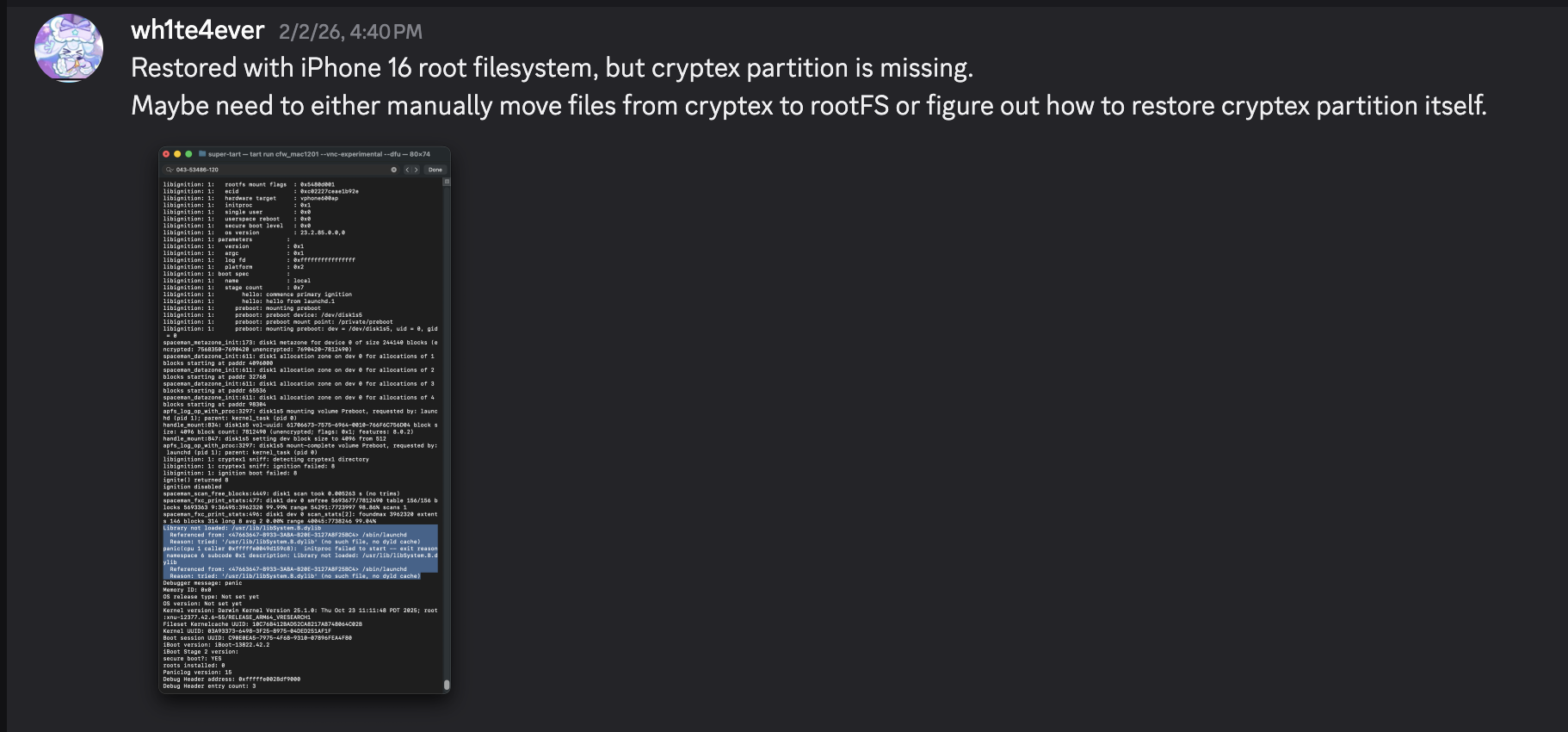
Dopo il completamento del ripristino, si riavvia automaticamente. Tuttavia, si verifica un panico nel processo launchd perché manca la libreria /usr/lib/libSystem.B.dylib. Questa libreria si trova all'interno della dyld_shared_cache sulla partizione Cryptex, e per qualche motivo la partizione Cryptex non è stata ripristinata. Come soluzione temporanea, è necessario creare un SSH Ramdisk per modificare il file system di root e iniettare i file necessari. Questo è esattamente il motivo per cui era necessaria la patch relativa alla verifica SSV.

Screenshot 2026-02-24 at 10.24.33 PM.png

image.png

Risoluzione del problema di avvio avviando con SSH Ramdisk

Proverò a risolvere il problema di avvio utilizzando il ramdisk usato in https://github.com/verygenericname/SSHRD_Script.

Per caricare e avviare componenti come il bootloader o il kernel utilizzando lo strumento irecovery in modalità DFU, è necessaria un'immagine IMG4, che richiede un file IM4M. Pertanto, ho prima recuperato il file shsh usando lo strumento idevicerestore, e poi l'ho convertito in un file IM4M.```bash idevicerestore -e -y ./iPhone17,3_26.1_23B85_Restore -t

mv shsh/[ECID]-iPhone99,11-26.1.shsh shsh/[ECID]-iPhone99,11-26.1.shsh.gz

gunzip shsh/[ECID]-iPhone99,11-26.1.shsh.gz

...

pyimg4 im4m extract -i shsh/[ECID]-iPhone99,11-26.1.shsh -o vphone.im4m

root@kitploit:~
Quindi, usando quel file IM4M, ho generato diversi file IMG4 per ciascuno dei componenti del firmware utilizzati, come iBSS, iBEC e il devicetree.```python
# 1. Grab & Patch iBSS 
if not os.path.exists("iPhone17\\,3_26.1_23B85_Restore/Firmware/dfu/iBSS.vresearch101.RELEASE.im4p.bak"):
    os.system("cp iPhone17\\,3_26.1_23B85_Restore/Firmware/dfu/iBSS.vresearch101.RELEASE.im4p iPhone17\\,3_26.1_23B85_Restore/Firmware/dfu/iBSS.vresearch101.RELEASE.im4p.bak")
os.system("tools/img4 -i iPhone17\\,3_26.1_23B85_Restore/Firmware/dfu/iBSS.vresearch101.RELEASE.im4p.bak -o iBSS.vresearch101.RELEASE")
... # patch things from raw
os.system("tools/img4tool -c iBSS.vresearch101.RELEASE.im4p -t ibss iBSS.vresearch101.RELEASE")
os.system("tools/img4 -i iBSS.vresearch101.RELEASE.im4p -o ./Ramdisk/iBSS.vresearch101.RELEASE.img4 -M ./vphone.im4m")

# 2. Grab & Patch iBEC
if not os.path.exists("iPhone17\\,3_26.1_23B85_Restore/Firmware/dfu/iBEC.vresearch101.RELEASE.im4p.bak"):
    os.system("cp iPhone17\\,3_26.1_23B85_Restore/Firmware/dfu/iBEC.vresearch101.RELEASE.im4p iPhone17\\,3_26.1_23B85_Restore/Firmware/dfu/iBEC.vresearch101.RELEASE.im4p.bak")
os.system("tools/img4 -i iPhone17\\,3_26.1_23B85_Restore/Firmware/dfu/iBEC.vresearch101.RELEASE.im4p -o iBEC.vresearch101.RELEASE")
... # patch things from raw
os.system("tools/img4tool -c iBEC.vresearch101.RELEASE.im4p -t ibec iBEC.vresearch101.RELEASE")
os.system("tools/img4 -i iBEC.vresearch101.RELEASE.im4p -o Ramdisk/iBEC.vresearch101.RELEASE.img4 -M vphone.im4m")

# 3. Grab SPTM
os.system("tools/img4 -i iPhone17\\,3_26.1_23B85_Restore/Firmware/sptm.vresearch1.release.im4p -o Ramdisk/sptm.vresearch1.release.img4 -M vphone.im4m -T sptm")

# 4. Grab devicetree
os.system("tools/img4 -i iPhone17\\,3_26.1_23B85_Restore/Firmware/all_flash/DeviceTree.vphone600ap.im4p -o Ramdisk/DeviceTree.vphone600ap.img4 -M vphone.im4m -T rdtr")

# 5. Grab sep
os.system("tools/img4 -i iPhone17\\,3_26.1_23B85_Restore/Firmware/all_flash/sep-firmware.vresearch101.RELEASE.im4p -o Ramdisk/sep-firmware.vresearch101.RELEASE.img4 -M vphone.im4m -T rsep")

# 6. Grab & Patch TXM
if not os.path.exists("iPhone17\\,3_26.1_23B85_Restore/Firmware/txm.iphoneos.release.im4p.bak"):
    os.system("cp iPhone17\\,3_26.1_23B85_Restore/Firmware/txm.iphoneos.release.im4p iPhone17\\,3_26.1_23B85_Restore/Firmware/txm.iphoneos.release.im4p.bak")
os.system("pyimg4 im4p extract -i iPhone17\\,3_26.1_23B85_Restore/Firmware/txm.iphoneos.release.im4p.bak -o txm.raw")
... # patch things from raw
#create im4p
os.system("pyimg4 im4p create -i txm.raw -o txm.im4p -f trxm --lzfse")
# preserve payp structure
txm_im4p_data = Path('iPhone17,3_26.1_23B85_Restore/Firmware/txm.iphoneos.release.im4p.bak').read_bytes()
payp_offset = txm_im4p_data.rfind(b'PAYP')
if payp_offset == -1:
    print("Couldn't find payp structure !!!")
    sys.exit()

with open('txm.im4p', 'ab') as f:
    f.write(txm_im4p_data[(payp_offset-10):])

payp_sz = len(txm_im4p_data[(payp_offset-10):])
print(f"payp sz: {payp_sz}")

txm_im4p_data = bytearray(open('txm.im4p', 'rb').read())
txm_im4p_data[2:5] = (int.from_bytes(txm_im4p_data[2:5], 'big') + payp_sz).to_bytes(3, 'big')
open('txm.im4p', 'wb').write(txm_im4p_data)

# sign
os.system("pyimg4 img4 create -p txm.im4p -o Ramdisk/txm.img4 -m vphone.im4m")

# 7. Grab & patch kernelcache
if not os.path.exists("iPhone17\\,3_26.1_23B85_Restore/kernelcache.research.vphone600.bak"):
    os.system("cp iPhone17\\,3_26.1_23B85_Restore/kernelcache.research.vphone600 iPhone17\\,3_26.1_23B85_Restore/kernelcache.research.vphone600.bak")
os.system("pyimg4 im4p extract -i iPhone17\\,3_26.1_23B85_Restore/kernelcache.research.vphone600.bak -o kcache.raw")
... # patch things from raw

#create im4p
os.system("pyimg4 im4p create -i kcache.raw -o krnl.im4p -f rkrn --lzfse")

# preserve payp structure
kernel_im4p_data = Path('iPhone17,3_26.1_23B85_Restore/kernelcache.research.vphone600.bak').read_bytes()
payp_offset = kernel_im4p_data.rfind(b'PAYP')
if payp_offset == -1:
    print("Couldn't find payp structure !!!")
    sys.exit()

with open('krnl.im4p', 'ab') as f:
    f.write(kernel_im4p_data[(payp_offset-10):])

payp_sz = len(kernel_im4p_data[(payp_offset-10):])
print(f"payp sz: {payp_sz}")

kernel_im4p_data = bytearray(open('krnl.im4p', 'rb').read())
kernel_im4p_data[2:5] = (int.from_bytes(kernel_im4p_data[2:5], 'big') + payp_sz).to_bytes(3, 'big')
open('krnl.im4p', 'wb').write(kernel_im4p_data)

# sign
os.system("pyimg4 img4 create -p krnl.im4p -o Ramdisk/krnl.img4 -m vphone.im4m")

# 8. Grab ramdisk & build custom ramdisk
os.system("pyimg4 im4p extract -i iPhone17,3_26.1_23B85_Restore/043-53775-129.dmg -o ramdisk.dmg")
os.system("mkdir SSHRD")
os.system("sudo hdiutil attach -mountpoint SSHRD ramdisk.dmg -owners off")
os.system("sudo hdiutil create -size 254m -imagekey diskimage-class=CRawDiskImage -format UDZO -fs APFS -layout NONE -srcfolder SSHRD -copyuid root ramdisk1.dmg")
os.system("sudo hdiutil detach -force SSHRD")
os.system("sudo hdiutil attach -mountpoint SSHRD ramdisk1.dmg -owners off")

... #remove unneccessary files for expand space

#resign all things preserving ents
target_path= [
    "SSHRD/usr/local/bin/*", "SSHRD/usr/local/lib/*",
    "SSHRD/usr/bin/*", "SSHRD/bin/*",
    "SSHRD/usr/lib/*", "SSHRD/sbin/*", "SSHRD/usr/sbin/*", "SSHRD/usr/libexec/*"
]
for pattern in target_path:
    for path in glob.glob(pattern):
        if os.path.isfile(path) and not os.path.islink(path):
            if "Mach-O" in subprocess.getoutput(f"file \"{path}\""):
                os.system(f"tools/ldid_macosx_arm64 -S -M -Cadhoc \"{path}\"")

#8-2. Grab & build custom ramdisk's trustcache while building custom ramdisk
os.system("pyimg4 im4p extract -i iPhone17,3_26.1_23B85_Restore/Firmware/043-53775-129.dmg.trustcache -o trustcache.raw")
os.system("tools/trustcache_macos_arm64 create sshrd.tc SSHRD")
os.system("pyimg4 im4p create -i sshrd.tc -o trustcache.im4p -f rtsc")
# sign
os.system("pyimg4 img4 create -p trustcache.im4p -o Ramdisk/trustcache.img4 -m vphone.im4m")
#8-2. end

os.system("sudo hdiutil detach -force SSHRD")
os.system("sudo hdiutil resize -sectors min ramdisk1.dmg")
# sign
os.system("pyimg4 im4p create -i ramdisk1.dmg -o ramdisk1.dmg.im4p -f rdsk")
os.system("pyimg4 img4 create -p ramdisk1.dmg.im4p -o Ramdisk/ramdisk.img4 -m vphone.im4m")

Una volta create tutte le immagini IMG4, carichiamole una per una e avviamo con il Ramdisk.

  • boot_rd.sh```bash #!/bin/zsh irecovery -f Ramdisk/iBSS.vresearch101.RELEASE.img4 irecovery -f Ramdisk/iBEC.vresearch101.RELEASE.img4 irecovery -c go

sleep 1; irecovery -f Ramdisk/sptm.vresearch1.release.img4 irecovery -c firmware

irecovery -f Ramdisk/txm.img4 irecovery -c firmware

irecovery -f Ramdisk/trustcache.img4 irecovery -c firmware irecovery -f Ramdisk/ramdisk.img4 irecovery -c ramdisk irecovery -f Ramdisk/DeviceTree.vphone600ap.img4 irecovery -c devicetree irecovery -f Ramdisk/sep-firmware.vresearch101.RELEASE.img4 irecovery -c firmware irecovery -f Ramdisk/krnl.img4 irecovery -c bootx

root@kitploit:~
Quindi vedrai la faccia del Creeper di Minecraft nella terza finestra da sinistra, come mostrato di seguito.
Se controlli il menu USB nell'app Informazioni di Sistema e vedi "iPhone Research...",
ora puoi accedere alla shell dell'iPhone virtuale usando lo strumento [iproxy](https://github.com/libimobiledevice/libusbmuxd/blob/master/tools/iproxy.c). (`iproxy 2222 22 &`)

![image.png](https://assets.kitploit.com/production/public/readmes/12192/85efc44a2cadf64fa0ee4858541766fd9c9b2b46977b4e9c415d0812e6965d10.png)

Per modificare il file system di root, rinomina lo snapshot.```python
ssh [email protected] -p2222
#pw: alpine

mount_apfs -o rw /dev/disk1s1 /mnt1

snaputil -l /mnt1
# (then will output will be printed with hash, result may be differ)
com.apple.os.update-8AAB8DBA5C8F1F756928411675F4A892087B04559CFB084B9E400E661ABAD119

snaputil -n <com.apple.os.update-hash> orig-fs /mnt1

umount /mnt1

exit

Decriptare il file AEA utilizzando lo strumento ipsw per creare un file dmg, montarlo e quindi trasferire i file dalla partizione Cryptex alla macchina virtuale. Oltre al trasferimento dei file, erano necessarie patch specifiche. Per comodità, ho aggiunto tre processi specifici da avviare all'avvio: bash, dropbear e trollvnc.

seputil aveva un problema per cui non riusciva a trovare correttamente il file gigalocker, quindi l'ho patchato per cercare sempre AA.gl. Inoltre, ho patchato launchd_cache_loader per garantire che il file /System/Library/xpc/launchd.plist modificato venga caricato correttamente.```python ... ========= INSTALL CRYPTEX(SystemOS, AppOS) =========

Grab and Decrypt Cryptex(SystemOS) AEA

key = subprocess.check_output("ipsw fw aea --key iPhone17,3_26.1_23B85_Restore/043-54303-126.dmg.aea", shell=True, text=True).strip() print(f"key: {key}") os.system(f"aea decrypt -i iPhone17,3_26.1_23B85_Restore/043-54303-126.dmg.aea -o CryptexSystemOS.dmg -key-value '{key}'")

Grab Cryptex(AppOS)

os.system(f"cp iPhone17,3_26.1_23B85_Restore/043-54062-129.dmg CryptexAppOS.dmg")

Mount CryptexSystemOS

os.system("mkdir CryptexSystemOS") os.system("sudo hdiutil attach -mountpoint CryptexSystemOS CryptexSystemOS.dmg -owners off")

Mount CryptexAppOS

os.system("mkdir CryptexAppOS") os.system("sudo hdiutil attach -mountpoint CryptexAppOS CryptexAppOS.dmg -owners off")

Prepare

remote_cmd("/sbin/mount_apfs -o rw /dev/disk1s1 /mnt1")

remote_cmd("/bin/rm -rf /mnt1/System/Cryptexes/App") remote_cmd("/bin/rm -rf /mnt1/System/Cryptexes/OS")

remote_cmd("/bin/mkdir -p /mnt1/System/Cryptexes/App") remote_cmd("/bin/chmod 0755 /mnt1/System/Cryptexes/App") remote_cmd("/bin/mkdir -p /mnt1/System/Cryptexes/OS") remote_cmd("/bin/chmod 0755 /mnt1/System/Cryptexes/OS")

send Cryptex files to device

print("Copying cryptexs to vphone! Will take about 3 mintues...") os.system("tools/sshpass -p 'alpine' scp -q -r -ostricthostkeychecking=false -ouserknownhostsfile=/dev/null -o StrictHostKeyChecking=no -P 2222 CryptexSystemOS/. '[email protected]:/mnt1/System/Cryptexes/OS'") os.system("tools/sshpass -p 'alpine' scp -q -r -ostricthostkeychecking=false -ouserknownhostsfile=/dev/null -o StrictHostKeyChecking=no -P 2222 CryptexAppOS/. '[email protected]:/mnt1/System/Cryptexes/App'")

Thanks nathan for idea

/System/Library/Caches/com.apple.dyld -> /System/Cryptexes/OS/System/Library/Caches/com.apple.dyld/

remote_cmd("/bin/ln -sf ../../../System/Cryptexes/OS/System/Library/Caches/com.apple.dyld /mnt1/System/Library/Caches/com.apple.dyld")

/System/DriverKit/System/Library/dyld -> /System/Cryptexes/OS/System/DriverKit/System/Library/dyld

remote_cmd("/bin/ln -sf ../../../../System/Cryptexes/OS/System/DriverKit/System/Library/dyld /mnt1/System/DriverKit/System/Library/dyld")

========= PATCH SEPUTIL =========

remove if already exist

os.system("rm custom_26.1/seputil 2>/dev/null") os.system("rm custom_26.1/seputil.bak 2>/dev/null")

backup seputil before patch

file_path = "/mnt1/usr/libexec/seputil.bak" if not check_remote_file_exists(file_path): print(f"Created backup {file_path}") remote_cmd("/bin/cp /mnt1/usr/libexec/seputil /mnt1/usr/libexec/seputil.bak")

grab seputil

os.system("tools/sshpass -p 'alpine' scp -q -o StrictHostKeyChecking=no -o UserKnownHostsFile=/dev/null -P 2222 [email protected]:/mnt1/usr/libexec/seputil.bak ./custom_26.1") os.system("mv custom_26.1/seputil.bak custom_26.1/seputil")

patch seputil; prevent error "seputil: Gigalocker file (/mnt7/XXXXXXXX-XXXX-XXXX-XXXX-XXXXXXXXXXXX.gl) doesn't exist: No such file or directory"

fp = open("custom_26.1/seputil", "r+b") patch(0x1B3F1, "AA") fp.close()

sign

os.system("tools/ldid_macosx_arm64 -S -M -Ksigncert.p12 -Icom.apple.seputil custom_26.1/seputil")

send to apply

os.system("tools/sshpass -p 'alpine' scp -q -r -ostricthostkeychecking=false -ouserknownhostsfile=/dev/null -o StrictHostKeyChecking=no -P 2222 custom_26.1/seputil '[email protected]:/mnt1/usr/libexec/seputil'") remote_cmd("/bin/chmod 0755 /mnt1/usr/libexec/seputil")

clean

os.system("rm custom_26.1/seputil 2>/dev/null")

Change gigalocker filename to AA.gl

remote_cmd("/sbin/mount_apfs -o rw /dev/disk1s3 /mnt3") remote_cmd("/bin/mv /mnt3/*.gl /mnt3/AA.gl")

... # ========= INSTALL AppleParavirtGPUMetalIOGPUFamily =========

========= INSTALL iosbinpack64 =========

Send to rootfs

os.system("tools/sshpass -p 'alpine' scp -q -r -ostricthostkeychecking=false -ouserknownhostsfile=/dev/null -o StrictHostKeyChecking=no -P 2222 jb/iosbinpack64.tar '[email protected]:/mnt1'")

Unpack

remote_cmd("/usr/bin/tar --preserve-permissions --no-overwrite-dir -xvf /mnt1/iosbinpack64.tar -C /mnt1") remote_cmd("/bin/rm /mnt1/iosbinpack64.tar")

Setup initial dropbear after normal boot

''' /iosbinpack64/bin/mkdir -p /var/dropbear /iosbinpack64/bin/cp /iosbinpack64/etc/profile /var/profile /iosbinpack64/bin/cp /iosbinpack64/etc/motd /var/motd '''

========= PATCH launchd_cache_loader (patch required if modifying /System/Library/xpc/launchd.plist) =========

remove if already exist

os.system("rm custom_26.1/launchd_cache_loader 2>/dev/null") os.system("rm custom_26.1/launchd_cache_loader.bak 2>/dev/null")

backup launchd_cache_loader before patch

file_path = "/mnt1/usr/libexec/launchd_cache_loader.bak" if not check_remote_file_exists(file_path): print(f"Created backup {file_path}") remote_cmd("/bin/cp /mnt1/usr/libexec/launchd_cache_loader /mnt1/usr/libexec/launchd_cache_loader.bak")

grab launchd_cache_loader

os.system("tools/sshpass -p 'alpine' scp -q -o StrictHostKeyChecking=no -o UserKnownHostsFile=/dev/null -P 2222 [email protected]:/mnt1/usr/libexec/launchd_cache_loader.bak ./custom_26.1") os.system("mv custom_26.1/launchd_cache_loader.bak custom_26.1/launchd_cache_loader")

patch to apply launchd_unsecure_cache=1

fp = open("custom_26.1/launchd_cache_loader", "r+b") patch(0xB58, 0xd503201f) fp.close()

sign

os.system("tools/ldid_macosx_arm64 -S -M -Ksigncert.p12 -Icom.apple.launchd_cache_loader custom_26.1/launchd_cache_loader")

send to apply

os.system("tools/sshpass -p 'alpine' scp -q -r -ostricthostkeychecking=false -ouserknownhostsfile=/dev/null -o StrictHostKeyChecking=no -P 2222 custom_26.1/launchd_cache_loader '[email protected]:/mnt1/usr/libexec/launchd_cache_loader'") remote_cmd("/bin/chmod 0755 /mnt1/usr/libexec/launchd_cache_loader")

clean

os.system("rm custom_26.1/launchd_cache_loader 2>/dev/null")

========= MAKE RUN bash, dropbear, trollvnc automatically when boot =========

Send plist to /System/Library/LaunchDaemons

os.system("tools/sshpass -p 'alpine' scp -q -r -ostricthostkeychecking=false -ouserknownhostsfile=/dev/null -o StrictHostKeyChecking=no -P 2222 jb/LaunchDaemons/bash.plist '[email protected]:/mnt1/System/Library/LaunchDaemons'") os.system("tools/sshpass -p 'alpine' scp -q -r -ostricthostkeychecking=false -ouserknownhostsfile=/dev/null -o StrictHostKeyChecking=no -P 2222 jb/LaunchDaemons/dropbear.plist '[email protected]:/mnt1/System/Library/LaunchDaemons'") os.system("tools/sshpass -p 'alpine' scp -q -r -ostricthostkeychecking=false -ouserknownhostsfile=/dev/null -o StrictHostKeyChecking=no -P 2222 jb/LaunchDaemons/trollvnc.plist '[email protected]:/mnt1/System/Library/LaunchDaemons'") remote_cmd("/bin/chmod 0644 /mnt1/System/Library/LaunchDaemons/bash.plist") remote_cmd("/bin/chmod 0644 /mnt1/System/Library/LaunchDaemons/dropbear.plist") remote_cmd("/bin/chmod 0644 /mnt1/System/Library/LaunchDaemons/trollvnc.plist")

Edit /System/Library/xpc/launchd.plist

remove if already exist

os.system("rm custom_26.1/launchd.plist 2>/dev/null") os.system("rm custom_26.1/launchd.plist.bak 2>/dev/null")

backup launchd.plist before patch

file_path = "/mnt1/System/Library/xpc/launchd.plist.bak" if not check_remote_file_exists(file_path): print(f"Created backup {file_path}") remote_cmd("/bin/cp /mnt1/System/Library/xpc/launchd.plist /mnt1/System/Library/xpc/launchd.plist.bak")

grab launchd.plist

os.system("tools/sshpass -p 'alpine' scp -q -o StrictHostKeyChecking=no -o UserKnownHostsFile=/dev/null -P 2222 [email protected]:/mnt1/System/Library/xpc/launchd.plist.bak ./custom_26.1") os.system("mv custom_26.1/launchd.plist.bak custom_26.1/launchd.plist")

Inject bash, dropbear, trollvnc to launchd.plist

os.system("plutil -convert xml1 custom_26.1/launchd.plist")

1. bash

target_file = 'custom_26.1/launchd.plist' source_file = 'jb/LaunchDaemons/bash.plist' insert_key = '/System/Library/LaunchDaemons/bash.plist'

with open(target_file, 'rb') as ft, open(source_file, 'rb') as fs: target_data = plistlib.load(ft) source_data = plistlib.load(fs)

target_data.setdefault('LaunchDaemons', {})[insert_key] = source_data

with open(target_file, 'wb') as f: plistlib.dump(target_data, f, sort_keys=False)

2. dropbear

source_file = 'jb/LaunchDaemons/dropbear.plist' insert_key = '/System/Library/LaunchDaemons/dropbear.plist'

with open(target_file, 'rb') as ft, open(source_file, 'rb') as fs: target_data = plistlib.load(ft) source_data = plistlib.load(fs)

target_data.setdefault('LaunchDaemons', {})[insert_key] = source_data

with open(target_file, 'wb') as f: plistlib.dump(target_data, f, sort_keys=False)

3. trollvnc

source_file = 'jb/LaunchDaemons/trollvnc.plist' insert_key = '/System/Library/LaunchDaemons/trollvnc.plist'

with open(target_file, 'rb') as ft, open(source_file, 'rb') as fs: target_data = plistlib.load(ft) source_data = plistlib.load(fs)

target_data.setdefault('LaunchDaemons', {})[insert_key] = source_data

with open(target_file, 'wb') as f: plistlib.dump(target_data, f, sort_keys=False)

send to apply

os.system("tools/sshpass -p 'alpine' scp -q -r -ostricthostkeychecking=false -ouserknownhostsfile=/dev/null -o StrictHostKeyChecking=no -P 2222 custom_26.1/launchd.plist '[email protected]:/mnt1/System/Library/xpc'") remote_cmd("/bin/chmod 0644 /mnt1/System/Library/xpc/launchd.plist")

clean

os.system("rm custom_26.1/launchd.plist 2>/dev/null")

========= End of MAKE RUN bash, dropbear, trollvnc automatically when boot =========

... remote_cmd("/sbin/halt") ...

root@kitploit:~
# Primo tentativo di avvio

Il processo di avvio dovrebbe funzionare correttamente ora, ma quando si tenta di proseguire oltre la schermata nera di configurazione, si verifica un respring e non si va oltre.

![image.png](https://assets.kitploit.com/production/public/readmes/12192/0c83d9ac19f4310482d591218a5a501e3e632cf7e1bb166fad6b29915c043490.png)

![image.png](https://assets.kitploit.com/production/public/readmes/12192/81098ce1af2d8558b868db3073e644e43a3f09580fb64010a03fdb7d0f63f9b9.png)

# Implementazione di Metal

Quando si verifica con un programma personalizzato chiamato MetalTest, mostra che Metal non è supportato.```python
#import <stdio.h>
#import <Metal/Metal.h>
#import <Foundation/Foundation.h>

int main(int argc, char *argv[], char *envp[]) {
    id<MTLDevice> device = MTLCreateSystemDefaultDevice();
    NSLog(@"device: %@", device);

    if (device) {
        NSLog(@"Metal Device Create Success: %@", [device name]);
    } else {
        NSLog(@"Metal Not Supported!");
    }

    return 0;
}
  • Risultato dell'esecuzione```python -bash-4.4# ./MetalTest 2026-02-08 22:49:02.293 MetalTest[633:9434] device: (null) 2026-02-08 22:49:02.294 MetalTest[633:9434] Metal Not Supported! -bash-4.4# sysctl kern.version kern.version: Darwin Kernel Version 25.1.0: Thu Oct 23 11:11:48 PDT 2025; root:xnu-12377.42.6~55/RELEASE_ARM64_VRESEARCH1
root@kitploit:~
Normalmente, l'output avrebbe dovuto assomigliare al risultato qui sotto.```python
seo@seos-Virtual-Machine Desktop % sysctl kern.version
kern.version: Darwin Kernel Version 25.0.0: Mon Aug 25 21:17:21 PDT 2025; root:xnu-12377.1.9~3/RELEASE_ARM64_VMAPPLE
seo@seos-Virtual-Machine Desktop % ./MetalTest        
2026-02-08 23:16:56.846 MetalTest[682:5810] device: <AppleParavirtDevice: 0x102c48fe0>
    name = Apple Paravirtual device
2026-02-08 23:16:56.847 MetalTest[682:5810] Metal Device Create Success: Apple Paravirtual device
seo@seos-Virtual-Machine Desktop % 

Controllando con ioreg -l, come puoi vedere, il kernel riconosceva effettivamente AppleParavirtGPU.

image.png

Quando si verifica su un iPad 7ª generazione con iOS 16.6.1, chiamare la funzione MTLCreateSystemDefaultDevice accede internamente al driver IOGPU attraverso una libreria specifica chiamata AGXMetalA10. Questa libreria AGXMetalA10 si trova in /System/Library/Extensions.

Qui mi è venuto un pensiero improvviso: non ci sarebbero anche librerie GPU/Metal utilizzate per l'iPhone virtuale?

image.png

Controllando lo stesso percorso nella macchina virtuale PCC, si scopre che lì esistono 7 file.

Ho preso /System/Library/Extensions/AppleParavirtGPUMetalIOGPUFamily.bundle usato in PCC e l'ho inserito direttamente nell'iPhone virtuale. (Ho usato il SSH Ramdisk per questo.)

image.png

Rieseguendo MetalTest, la funzione MTLCreateSystemDefaultDevice ora funziona correttamente.

image.png

Tuttavia, poiché un file dylib specifico non esiste nella dsc (dyld shared cache) del modello iPhone 16, ho dovuto eseguire separatamente reverse engineering e implementarlo dalla dsc del PCC.

  • /System/Library/Extensions/AppleParavirtGPUMetalIOGPUFamily.bundle/libAppleParavirtCompilerPluginIOGPUFamily.dylib

Screenshot 2026-02-25 at 1.19.40 PM.png

image.png

Secondo Tentativo di Avvio

Una volta implementato, ora lo schermo di configurazione appare con uno sfondo. Poiché non sono riuscito a implementare correttamente il pulsante Home, ho risolto con una soluzione temporanea controllando tramite iproxy/VNC.

image.png

Compatibilità

È compatibile solo con Mac Apple Silicon, e i dispositivi/versioni confermati funzionanti sono i seguenti:

  • Apple M3, 16GB RAM, Sequoia 15.7.4
  • Apple M1 Pro, 32GB RAM, Tahoe 26.3

Prevedo che probabilmente funzionerà su qualsiasi target che supporti pccvre.

Fonte: https://security.apple.com/documentation/private-cloud-compute/vresetup

Fonte: https://security.apple.com/documentation/private-cloud-compute/vresetup

Abilitazione dell'Interazione Touch su Sequoia

A differenza della versione Tahoe 26, l'interazione touch non è possibile utilizzando solo l'oggetto VZVirtualMachineView, quindi è stato necessario sovrascrivere le funzioni degli eventi del mouse.

ScreenSharingVNC.swift

Progetto SRC

  • https://github.com/wh1te4ever/super-tart-vphone
Scarica lo strumento

// Display let graphics_config = VZMacGraphicsDeviceConfiguration() let displays_config = VZMacGraphicsDisplayConfiguration( widthInPixels: 1179, heightInPixels: 2556, pixelsPerInch: 460 ) graphics_config.displays.append(displays_config) configuration.graphicsDevices = [graphics_config] ...