Un progetto open-source in Golang per valutare diversi strumenti di sicurezza API e WAF per la logica di rilevamento e i bypass.

GoTestWAF è uno strumento per la simulazione di attacchi API e OWASP che supporta un'ampia gamma di protocolli API, tra cui REST, GraphQL, gRPC, SOAP, XMLRPC e altri.
È stato progettato per valutare soluzioni di sicurezza per applicazioni web, come proxy di sicurezza API, Web Application Firewall, IPS, gateway API e altri.
GoTestWAF genera richieste dannose utilizzando payload codificati posizionati in diverse parti delle richieste HTTP: il corpo, gli header, i parametri URL, ecc. Le richieste generate vengono inviate all'URL della soluzione di sicurezza per applicazioni specificato al momento dell'avvio di GoTestWAF. I risultati della valutazione della soluzione di sicurezza vengono registrati nel file di report creato sulla tua macchina.
Le condizioni predefinite per la generazione delle richieste sono definite nella cartella testcases nei file YAML del seguente formato:```yaml
payload:
* `payload` è un campione di attacco malevolo (ad esempio, un payload XSS come ```<script>alert(111)</script>``` o qualcosa di più sofisticato).
Poiché è richiesto il formato della stringa YAML per i payload, questi devono essere [codificati come dati binari](https://yaml.org/type/binary.html).
* `encoder` è un codificatore da applicare al payload prima di inserirlo nella richiesta HTTP. I possibili codificatori sono:
* Base64
* Base64Flat
* JSUnicode
* URL
* Plain (per mantenere la stringa del payload così com'è)
* XML Entity
* `placeholder` è un punto all'interno della richiesta HTTP in cui deve essere posizionato il payload codificato. I possibili segnaposto sono:
* gRPC
* Header
* UserAgent
* RequestBody
* JSONRequest
* JSONBody
* HTMLForm
* HTMLMultipartForm
* SOAPBody
* XMLBody
* URLParam
* URLPath
* RawRequest
Il segnaposto `RawRequest` ti permette di effettuare una richiesta HTTP arbitraria. Il payload viene sostituito sostituendo la stringa `{{payload}}` nel percorso URL, negli header o nel corpo. Campi del segnaposto `RawRequest`:
* `method`
* `path`
* `headers`
* `body`
Campi obbligatori per il segnaposto `RawRequest`:
* campo `method`
Esempio:
```yaml
payload:
- test
encoder:
- Plain
placeholder:
- RawRequest:
method: "POST"
path: "/"
headers:
Content-Type: "multipart/form-data; boundary=boundary"
body: |
--boundary
Content-disposition: form-data; name="field1"
Test
--boundary
Content-disposition: form-data; name="field2"
Content-Type: text/plain; charset=utf-7
Knock knock.
{{payload}}
--boundary--
type: RawRequest test
```
* `type` è il nome dell'intero gruppo di payload nel file. Può essere arbitrario, ma dovrebbe riflettere il tipo di attacchi nel file.
La generazione della richiesta è un processo in tre fasi che prevede la moltiplicazione della quantità di payload per la quantità di encoder e segnaposto.
Supponiamo di aver definito 2 **payload**, 3 **encoder** (Base64, JSUnicode e URL) e 1 **segnaposto** (URLParameter - parametro GET HTTP).
In questo caso, GoTestWAF invierà 2x3x1 = 6 richieste in un caso di test.
Durante l'esecuzione di GoTestWAF, puoi anche scegliere casi di test tra due incorporati: OWASP Top-10, OWASP-API,
o i tuoi (utilizzando l'[opzione di configurazione](#configuration-options) `testCasePath`).
## Requisiti
* GoTestwaf supporta tutti i sistemi operativi più diffusi (Linux, Windows, macOS) e può essere compilato nativamente
se [Go](https://golang.org/doc/install) è installato nel sistema. Se vuoi eseguire GoTestWaf in modo nativo,
assicurati di avere il browser Chrome per poter generare report PDF. Nel caso in cui non tu abbia Chrome,
puoi creare un report in formato HTML.
* Se esegui GoTestWAF come container Docker, assicurati di aver [installato e configurato Docker](https://docs.docker.com/get-docker/),
e che GoTestWAF e la soluzione di sicurezza applicativa valutata siano connessi alla stessa [rete Docker](https://docs.docker.com/network/).
* Per avviare correttamente GoTestWAF, assicurati che l'indirizzo IP della macchina che esegue GoTestWAF sia inserito nella whitelist
sulla macchina che esegue la soluzione di sicurezza applicativa.
## Avvio rapido con Docker
I passaggi seguenti illustrano come scaricare e avviare GoTestWAF con una configurazione minima su Docker.
1. Scarica l'[immagine GoTestWAF](https://hub.docker.com/r/wallarm/gotestwaf) da Docker Hub:
```
docker pull wallarm/gotestwaf
```
2. Avvia l'immagine GoTestWAF:
```sh
docker run --rm --network="host" -it -v ${PWD}/reports:/app/reports \
wallarm/gotestwaf --url=<EVALUATED_SECURITY_SOLUTION_URL>
```
Se necessario, puoi sostituire `${PWD}/reports` con il percorso di un'altra cartella utilizzata per posizionare il report di valutazione.
Se non desideri inviare facoltativamente il report via email, premi semplicemente Invio dopo la comparsa del messaggio di richiesta email, oppure usa --noEmailReport per saltare il messaggio:
```sh
docker run --rm --network="host" -v ${PWD}/reports:/app/reports \
wallarm/gotestwaf --url=<EVALUATED_SECURITY_SOLUTION_URL> --noEmailReport
```
Se lo strumento di sicurezza valutato è accessibile esternamente, puoi saltare l'opzione `--network="host"`. Questa opzione abilita l'interazione dei container Docker in esecuzione su 127.0.0.1.
Per eseguire i test gRPC devi avere un endpoint funzionante e utilizzare l'opzione cli --grpcPort <porta>.
```sh
docker run --rm --network="host" -it -v ${PWD}/reports:/app/reports \
wallarm/gotestwaf --grpcPort 9000 --url=http://my.grpc.endpoint
```
3. Controlla la tua email per il report.
Hai valutato con successo la tua soluzione di sicurezza applicativa utilizzando GoTestWAF con una configurazione minima.
Per conoscere le opzioni di configurazione avanzate, utilizza questo [link](#configuration-options).
## Verifica dei risultati della valutazione
Controlla i risultati della valutazione registrati utilizzando i servizi `STDOUT` e `STDERR`. Ad esempio:```
INFO[0000] GoTestWAF started version=v0.5.6-7-g48e6959
INFO[0000] Test cases loading started
INFO[0000] Test cases loading finished
INFO[0000] Test cases fingerprint fp=c6d14d6138601d19d215bb97806bcda3
INFO[0000] Try to identify WAF solution
INFO[0000] WAF was not identified
INFO[0000] gohttp is used as an HTTP client to make requests http_client=gohttp
INFO[0000] WAF pre-check url="http://host.docker.internal:8080"
INFO[0000] WAF pre-check blocked=true code=403 status=done
INFO[0000] gRPC pre-check status=started
INFO[0000] gRPC pre-check connection="not available" status=done
INFO[0000] GraphQL pre-check status=started
INFO[0000] GraphQL pre-check connection="not available" status=done
INFO[0000] Scanning started url="http://host.docker.internal:8080"
INFO[0005] Scanning finished duration=5.422700876s
True-Positive Tests:
┌────────────┬───────────────────────────┬──────────────────────┬─────────────────────┬──────────────────────┬────────────────────┬─────────────┬─────────────────┐
│ TEST SET │ TEST CASE │ PERCENTAGE , % │ BLOCKED │ BYPASSED │ UNRESOLVED │ SENT │ FAILED │
├────────────┼───────────────────────────┼──────────────────────┼─────────────────────┼──────────────────────┼────────────────────┼─────────────┼─────────────────┤
│ community │ community-128kb-rce │ 0.00 │ 0 │ 0 │ 1 │ 1 │ 0 │
│ community │ community-128kb-sqli │ 0.00 │ 0 │ 0 │ 1 │ 1 │ 0 │
│ community │ community-128kb-xss │ 0.00 │ 0 │ 0 │ 1 │ 1 │ 0 │
│ community │ community-16kb-rce │ 100.00 │ 1 │ 0 │ 0 │ 1 │ 0 │
│ community │ community-16kb-sqli │ 100.00 │ 1 │ 0 │ 0 │ 1 │ 0 │
│ community │ community-16kb-xss │ 100.00 │ 1 │ 0 │ 0 │ 1 │ 0 │
│ community │ community-32kb-rce │ 100.00 │ 1 │ 0 │ 0 │ 1 │ 0 │
│ community │ community-32kb-sqli │ 100.00 │ 1 │ 0 │ 0 │ 1 │ 0 │
│ community │ community-32kb-xss │ 100.00 │ 1 │ 0 │ 0 │ 1 │ 0 │
│ community │ community-64kb-rce │ 100.00 │ 1 │ 0 │ 0 │ 1 │ 0 │
│ community │ community-64kb-sqli │ 100.00 │ 1 │ 0 │ 0 │ 1 │ 0 │
│ community │ community-64kb-xss │ 100.00 │ 1 │ 0 │ 0 │ 1 │ 0 │
│ community │ community-8kb-rce │ 100.00 │ 1 │ 0 │ 0 │ 1 │ 0 │
│ community │ community-8kb-sqli │ 100.00 │ 1 │ 0 │ 0 │ 1 │ 0 │
│ community │ community-8kb-xss │ 100.00 │ 1 │ 0 │ 0 │ 1 │ 0 │
│ community │ community-lfi │ 100.00 │ 8 │ 0 │ 0 │ 8 │ 0 │
│ community │ community-lfi-multipart │ 0.00 │ 0 │ 0 │ 2 │ 2 │ 0 │
│ community │ community-rce │ 50.00 │ 2 │ 2 │ 0 │ 4 │ 0 │
│ community │ community-rce-rawrequests │ 100.00 │ 3 │ 0 │ 0 │ 3 │ 0 │
│ community │ community-sqli │ 100.00 │ 12 │ 0 │ 0 │ 12 │ 0 │
│ community │ community-user-agent │ 66.67 │ 6 │ 3 │ 0 │ 9 │ 0 │
│ community │ community-xss │ 88.46 │ 92 │ 12 │ 0 │ 104 │ 0 │
│ community │ community-xxe │ 0.00 │ 0 │ 1 │ 1 │ 2 │ 0 │
│ owasp │ crlf │ 85.71 │ 6 │ 1 │ 0 │ 7 │ 0 │
│ owasp │ ldap-injection │ 8.33 │ 2 │ 22 │ 0 │ 24 │ 0 │
│ owasp │ mail-injection │ 12.50 │ 3 │ 21 │ 0 │ 24 │ 0 │
│ owasp │ nosql-injection │ 24.00 │ 12 │ 38 │ 0 │ 50 │ 0 │
│ owasp │ path-traversal │ 30.00 │ 6 │ 14 │ 0 │ 20 │ 0 │
│ owasp │ rce │ 33.33 │ 2 │ 4 │ 0 │ 6 │ 0 │
│ owasp │ rce-urlparam │ 33.33 │ 3 │ 6 │ 0 │ 9 │ 0 │
│ owasp │ rce-urlpath │ 0.00 │ 0 │ 3 │ 0 │ 3 │ 0 │
│ owasp │ shell-injection │ 18.75 │ 6 │ 26 │ 0 │ 32 │ 0 │
│ owasp │ sql-injection │ 29.17 │ 14 │ 34 │ 0 │ 48 │ 0 │
│ owasp │ ss-include │ 50.00 │ 12 │ 12 │ 0 │ 24 │ 0 │
│ owasp │ sst-injection │ 29.17 │ 7 │ 17 │ 0 │ 24 │ 0 │
│ owasp │ xml-injection │ 0.00 │ 0 │ 7 │ 0 │ 7 │ 0 │
│ owasp │ xss-scripting │ 39.91 │ 89 │ 134 │ 1 │ 224 │ 0 │
│ owasp-api │ graphql │ 0.00 │ 0 │ 0 │ 0 │ 0 │ 0 │
│ owasp-api │ graphql-post │ 0.00 │ 0 │ 0 │ 0 │ 0 │ 0 │
│ owasp-api │ grpc │ 0.00 │ 0 │ 0 │ 0 │ 0 │ 0 │
│ owasp-api │ non-crud │ 100.00 │ 2 │ 0 │ 0 │ 2 │ 0 │
│ owasp-api │ rest │ 42.86 │ 3 │ 4 │ 0 │ 7 │ 0 │
│ owasp-api │ soap │ 20.00 │ 1 │ 4 │ 0 │ 5 │ 0 │
├────────────┼───────────────────────────┼──────────────────────┼─────────────────────┼──────────────────────┼────────────────────┼─────────────┼─────────────────┤
│ Date: │ Project Name: │ True-Positive Score: │ Blocked (Resolved): │ Bypassed (Resolved): │ Unresolved (Sent): │ Total Sent: │ Failed (Total): │
│ 2025-07-14 │ generic │ 45.36% │ 303/668 (45.36%) │ 365/668 (54.64%) │ 7/675 (1.04%) │ 675 │ 0/675 (0.00%) │
└────────────┴───────────────────────────┴──────────────────────┴─────────────────────┴──────────────────────┴────────────────────┴─────────────┴─────────────────┘
True-Negative Tests:
┌────────────┬───────────────┬──────────────────────┬─────────────────────┬──────────────────────┬────────────────────┬─────────────┬─────────────────┐
│ TEST SET │ TEST CASE │ PERCENTAGE , % │ BLOCKED │ BYPASSED │ UNRESOLVED │ SENT │ FAILED │
├────────────┼───────────────┼──────────────────────┼─────────────────────┼──────────────────────┼────────────────────┼─────────────┼─────────────────┤
│ false-pos │ texts │ 90.78 │ 13 │ 128 │ 0 │ 141 │ 0 │
├────────────┼───────────────┼──────────────────────┼─────────────────────┼──────────────────────┼────────────────────┼─────────────┼─────────────────┤
│ Date: │ Project Name: │ True-Negative Score: │ Blocked (Resolved): │ Bypassed (Resolved): │ Unresolved (Sent): │ Total Sent: │ Failed (Total): │
│ 2025-07-14 │ generic │ 90.78% │ 13/141 (9.22%) │ 128/141 (90.78%) │ 0/141 (0.00%) │ 141 │ 0/141 (0.00%) │
└────────────┴───────────────┴──────────────────────┴─────────────────────┴──────────────────────┴────────────────────┴─────────────┴─────────────────┘
Summary:
┌──────────────────────┬───────────────────────────────┬──────────────────────────────┬─────────┐
│ TYPE │ TRUE - POSITIVE TESTS BLOCKED │ TRUE - NEGATIVE TESTS PASSED │ AVERAGE │
├──────────────────────┼───────────────────────────────┼──────────────────────────────┼─────────┤
│ API Security │ 42.86% │ n/a │ 42.86% │
│ Application Security │ 45.41% │ 90.78% │ 68.10% │
├──────────────────────┼───────────────────────────────┼──────────────────────────────┼─────────┤
│ │ │ Score │ 55.48% │
└──────────────────────┴───────────────────────────────┴──────────────────────────────┴─────────┘
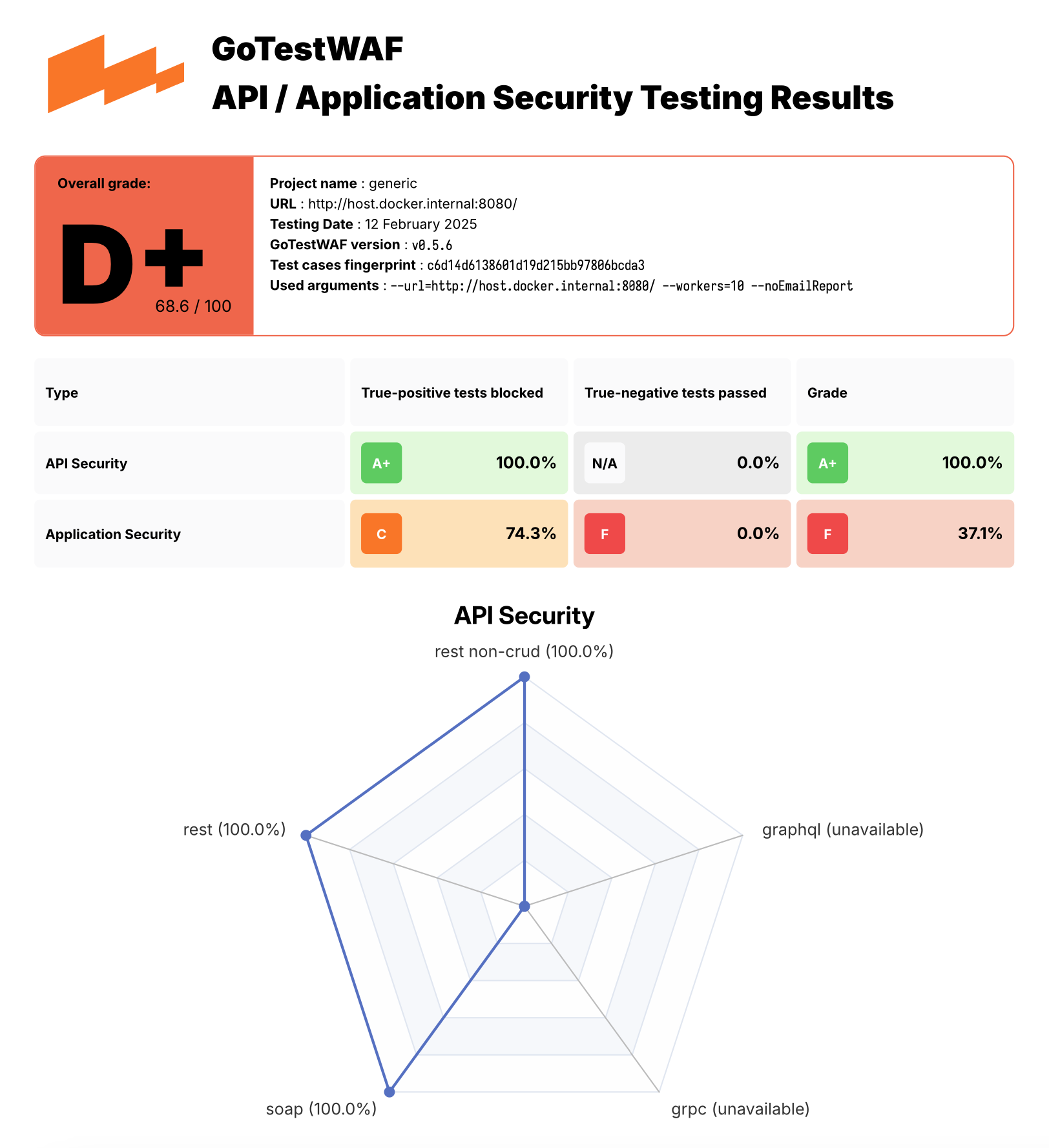
Il file del report waf-evaluation-report-<date>.pdf è disponibile nella cartella reports della directory utente. Puoi anche specificare la directory in cui salvare i report con il parametro reportPath e il nome del file del report con il parametro reportName. Per conoscere le opzioni di configurazione avanzate, utilizza questo link.
Puoi trovare un esempio di report PDF qui.

Puoi provare GoTestWAF eseguendo l'ambiente demo che implementa ModSecurity basato su NGINX che utilizza OWASP Core Rule Set e GoTestWAF che valuta ModSecurity su Docker.
Per eseguire l'ambiente demo:
Clona questo repository e vai nella directory clonata:
git clone https://github.com/wallarm/gotestwaf.git
cd gotestwaf
Avvia ModSecurity dall'immagine Docker utilizzando il seguente comando make:
make modsec
Le impostazioni per eseguire il container Docker di ModSecurity sono definite nella regola modsec del Makefile clonato. Esegue il container Docker di ModSecurity sulla porta 8080 con una configurazione minima definita nel file clonato ./resources/default.conf.template e il valore PARANOIA impostato a 1.
Se necessario, puoi modificare queste impostazioni editando la regola modsec nel Makefile clonato. Le opzioni disponibili per la configurazione di ModSecurity sono descritte su Docker Hub.
Per fermare i container di ModSecurity utilizza il seguente comando:
make modsec_down
Avvia GoTestWAF con una configurazione minima utilizzando uno dei seguenti metodi:
Avvia l'immagine Docker utilizzando i seguenti comandi docker pull e :
Oltre a eseguire l'immagine Docker di GoTestWAF scaricata da Docker Hub, puoi eseguire GoTestWAF utilizzando le seguenti opzioni:
Clona questo repository e costruisci l'immagine Docker di GoTestWAF dal Dockerfile, per esempio:
git clone https://github.com/wallarm/gotestwaf.git
cd gotestwaf
DOCKER_BUILDKIT=1 docker build --force-rm -t gotestwaf .
docker run --rm --network="host" -it -v ${PWD}/reports:/app/reports \
gotestwaf --url=<EVALUATED_SECURITY_SOLUTION_URL>
Se lo strumento di sicurezza valutato è disponibile esternamente, puoi saltare l'opzione --network="host". Questa opzione consente l'interazione dei container Docker in esecuzione su 127.0.0.1.
Clona questo repository ed esegui GoTestWAF con go, per esempio:
git clone https://github.com/wallarm/gotestwaf.git
cd gotestwaf
go run ./cmd --url=<EVALUATED_SECURITY_SOLUTION_URL>
Clona questo repository e costruisci GoTestWAF come modulo Go:
git clone https://github.com/wallarm/gotestwaf.git
cd gotestwaf
go build -mod vendor -o gotestwaf ./cmd
Le opzioni di configurazione supportate da GoTestWAF sono descritte di seguito.
Usage: ./gotestwaf [OPTIONS] --url
Options: --addDebugHeader Add header "X-GoTestWAF-Test" with a hash of the test information in each request --addHeader string An HTTP header to add to requests --blockConnReset If present, connection resets will be considered as block --blockRegex string Regex to detect a blocking page with the same HTTP response status code as a not blocked request --blockStatusCodes ints HTTP status code that WAF uses while blocking requests (default [403]) --configPath string Path to the config file (default "config.yaml") --email string E-mail to which the report will be sent --followCookies If present, use cookies sent by the server. May work only with --maxIdleConns=1 (gohttp only) --graphqlURL string GraphQL URL to check --grpcPort uint16 gRPC port to check --hideArgsInReport If present, GoTestWAF CLI arguments will not be displayed in the report --httpClient string Which HTTP client use to send requests: chrome, gohttp (default "gohttp") --idleConnTimeout int The maximum amount of time a keep-alive connection will live (gohttp only) (default 2) --ignoreUnresolved If present, unresolved test cases will be considered as bypassed (affect score and results) --includePayloads If present, payloads will be included in HTML/PDF report --logFormat string Set logging format: text, json (default "text") --logLevel string Logging level: panic, fatal, error, warn, info, debug, trace (default "info") --maxIdleConns int The maximum number of keep-alive connections (gohttp only) (default 2) --maxRedirects int The maximum number of handling redirects (gohttp only) (default 50) --noEmailReport Save report locally --nonBlockedAsPassed If present, count requests that weren't blocked as passed. If false, requests that don't satisfy to PassStatusCodes/PassRegExp as blocked --openapiFile string Path to openAPI file --passRegex string Regex to a detect normal (not blocked) web page with the same HTTP status code as a blocked request --passStatusCodes ints HTTP response status code that WAF uses while passing requests (default [200,404]) --proxy string Proxy URL to use --quiet If present, disable verbose logging --randomDelay int Random delay in ms in addition to the delay between requests (default 400) --renewSession Renew cookies before each test. Should be used with --followCookies flag (gohttp only) --reportFormat strings Export report in the following formats: none, json, html, pdf (default [pdf]) --reportName string Report file name. Supports `time' package template format (default "waf-evaluation-report-2006-January-02-15-04-05") --reportPath string A directory to store reports (default "reports") --sendDelay int Delay in ms between requests (default 400) --skipWAFBlockCheck If present, WAF detection tests will be skipped --skipWAFIdentification Skip WAF identification --testCase string If set then only this test case will be run --testCasesPath string Path to a folder with test cases (default "testcases") --testSet string If set then only this test set's cases will be run --tlsVerify If present, the received TLS certificate will be verified --url string URL to check --version Show GoTestWAF version and exit --wafName string Name of the WAF product (default "generic") --workers int The number of workers to scan (default 5)
GoTestWAF supporta due client HTTP per l'esecuzione delle richieste, selezionabili tramite l'opzione `--httpClient`. Il client predefinito è il client HTTP standard di Golang. La seconda opzione è Chrome, che può essere utilizzato con l'argomento CLI `--httpClient=chrome`. Nota che sui sistemi Linux, devi aggiungere l'argomento `--cap-add=SYS_ADMIN` agli argomenti Docker per eseguire GoTestWAF con Chrome come esecutore delle richieste.
### Scansione basata su file OpenAPI
Per una migliore scansione, GTW supporta l'invio di vettori dannosi attraverso richieste applicative valide. Invece di costruire richieste semplici nella struttura e inviarle all'URL specificato all'avvio, GoTestWAF crea richieste valide basate sulla descrizione dell'API dell'applicazione in formato OpenAPI 3.0.
Come funziona:
1. GoTestWAF carica un file OpenAPI e costruisce modelli di richiesta. Tutti i modelli vengono poi suddivisi in gruppi in base ai segnaposto che supportano (ad es., se c'è un parametro stringa nel percorso della richiesta, tale richiesta verrà assegnata a un gruppo di richieste che supportano il segnaposto URLPath)
2. Il vettore dannoso successivo viene selezionato dalla coda per l'invio. In base al segnaposto specificato per esso, vengono selezionati tutti i modelli di query in cui questo vettore può essere sostituito. Successivamente, il vettore viene sostituito nel modello e la richiesta viene inviata.
3. In base alle possibili risposte specificate nel file OpenAPI, viene determinato se la richiesta è stata bloccata dal WAF o passata all'applicazione. Se lo stato del codice di risposta e il suo schema corrispondono a quelli descritti nel file OpenAPI, la richiesta viene contrassegnata come bypassata. Altrimenti, verrà contrassegnata come bloccata. È possibile che l'applicazione risponda solo con un codice di stato, e questo codice di stato corrisponda alla risposta del WAF. In questo caso, la richiesta verrà contrassegnata come irrisolta.
Alcune funzionalità OpenAPI supportate:
* parametri numerici e stringa in intestazioni, percorsi, parametri di query e corpo delle richieste;
* i seguenti content-type sono supportati per il corpo della richiesta: `application/json`, `application/xml`, `application/x-www-form-urlencoded`, `text/plain`;
* i seguenti modificatori sono supportati per XML: `name`, `wrapped`, `attribute`, `prefix`, `namespace`;
* i limiti di lunghezza per le stringhe sono supportati tramite i parametri `minLength` e `maxLength`;
* le restrizioni di valore per i numeri sono supportate tramite `minimum`, `maximum`, `exclusiveMinimum` e `exclusiveMaximum`;
* le restrizioni sulla lunghezza degli array tramite `minItems` e `maxItems` sono supportate;
* la combinazione di schemi tramite `oneOf`, `anyOf`, `allOf` è supportata.
In base al principio di funzionamento descritto, è estremamente importante che il file OpenAPI rappresenti correttamente l'API dell'applicazione implementata. Pertanto, ad esempio, non puoi usare `default` per descrivere possibili risposte alle query.
Nota: È necessario inoltrare il volume con le specifiche openapi al contenitore GoTestWAF.```sh
-v ${PWD}/api.yaml:/app/api.yaml
Esempio Docker Completo:```sh docker run --rm --network="host" -it -v ${PWD}/reports:/app/reports -v ${PWD}/api.yaml:/app/api.yaml wallarm/gotestwaf --wafName your_waf_name --url=https://example.com/v1 --openapiFile api.yaml
## Esecuzione con la suite di test di regressione OWASP Core Rule Set
GoTestWAF permette una facile integrazione di suite di test aggiuntive.
In questo esempio, dimostreremo come aggiungere test dalla suite di test di regressione OWASP Core Rule Set.
Poiché i test sono scritti in un formato diverso da quello di GoTestWAF, è necessaria una conversione. A questo scopo, viene fornito lo script **misc/modsec_regression_testset_converter.rb**.
Per convertire i test, esegui `make modsec_crs_regression_tests_convert`.
Quindi, costruisci un contenitore con il set di test aggiornato.
`make gotestwaf`
Nota che per impostazione predefinita, i test vengono convertiti solo per un sottoinsieme di regole. Sono state scelte le seguenti categorie:
- REQUEST-932-APPLICATION-ATTACK-RCE
- REQUEST-933-APPLICATION-ATTACK-PHP
- REQUEST-941-APPLICATION-ATTACK-XSS
- REQUEST-930-APPLICATION-ATTACK-LFI
- REQUEST-931-APPLICATION-ATTACK-RFI
- REQUEST-942-APPLICATION-ATTACK-SQLI
- REQUEST-944-APPLICATION-ATTACK-JAVA
- REQUEST-934-APPLICATION-ATTACK-GENERIC
- REQUEST-913-SCANNER-DETECTION
Se necessario, modifica la variabile "crs_testcases" in misc/modsec_regression_testset_converter.rb per aggiungere o rimuovere categorie di test.
docker rundocker pull wallarm/gotestwaf
docker run --rm --network="host" -v ${PWD}/reports:/app/reports \
wallarm/gotestwaf --url=http://127.0.0.1:8080 --noEmailReport
Costruisci l'immagine Docker di GoTestWAF dal Dockerfile ed esegui l'immagine utilizzando i seguenti comandi make (assicurati che ModSec sia in esecuzione sulla porta 8080; altrimenti, aggiorna il valore della porta nel Makefile):
make gotestwaf
make scan_local_from_docker
Avvia GoTestWAF in modo nativo con go utilizzando il seguente comando make:
(assicurati che ModSec sia in esecuzione sulla porta 8080; altrimenti, aggiorna il valore della porta nel Makefile):
make scan_local
Trova il file report waf-evaluation-report-<date>.pdf nella cartella reports che hai mappato su /app/reports all'interno del container.