
ffuf v2.2.1
Fuzzer web veloce scritto in Go

ffuf - Fuzz Faster U Fool
Un veloce web fuzzer scritto in Go.
Installazione
-
Scarica un binario precompilato dalla pagina delle release, estrai ed esegui!
oppure
-
Se sei su Windows con Scoop, ffuf può essere installato con:
scoop install ffufoppure
-
Se sei su Windows con Winget, ffuf può essere installato con:
winget install ffuf.ffufoppure
-
Se sei su macOS con homebrew, ffuf può essere installato con:
brew install ffufoppure
-
Se hai un compilatore Go recente installato:
go install github.com/ffuf/ffuf/v2@latest(lo stesso comando funziona per l'aggiornamento)oppure
-
git clone https://github.com/ffuf/ffuf ; cd ffuf ; go get ; go build
- Ffuf dipende da Go 1.20 o superiore.
- Una build Go da un checkout mostra
git-<date>-<commit>invece del tag. Una build locale non è una release ufficiale anche quando ci si trova su un tag, e le informazioni di build incorporate di Go ci danno il commit ma non il nome del tag — quindi mostriamo il commit esatto da cui è stato costruito. I binari versionati autorevoli sono quelli sulla pagina delle release.
Esempio di utilizzo
Gli esempi di utilizzo qui sotto mostrano solo i compiti più semplici che puoi realizzare usando ffuf.
La documentazione più approfondita che illustra molte funzionalità con molti esempi è disponibile nel wiki di ffuf su https://github.com/ffuf/ffuf/wiki
Per una documentazione più estesa, con esempi di utilizzo reale e suggerimenti, assicurati di dare un'occhiata all'ottima guida: "Everything you need to know about FFUF" di Michael Skelton (@codingo).
Puoi anche esercitarti con le tue scansioni ffuf contro un host live con diverse lezioni e casi d'uso, localmente usando il container Docker https://github.com/adamtlangley/ffufme o contro la versione hosted live su http://ffuf.me creata da Adam Langley @adamtlangley.
Scoperta tipica di directory
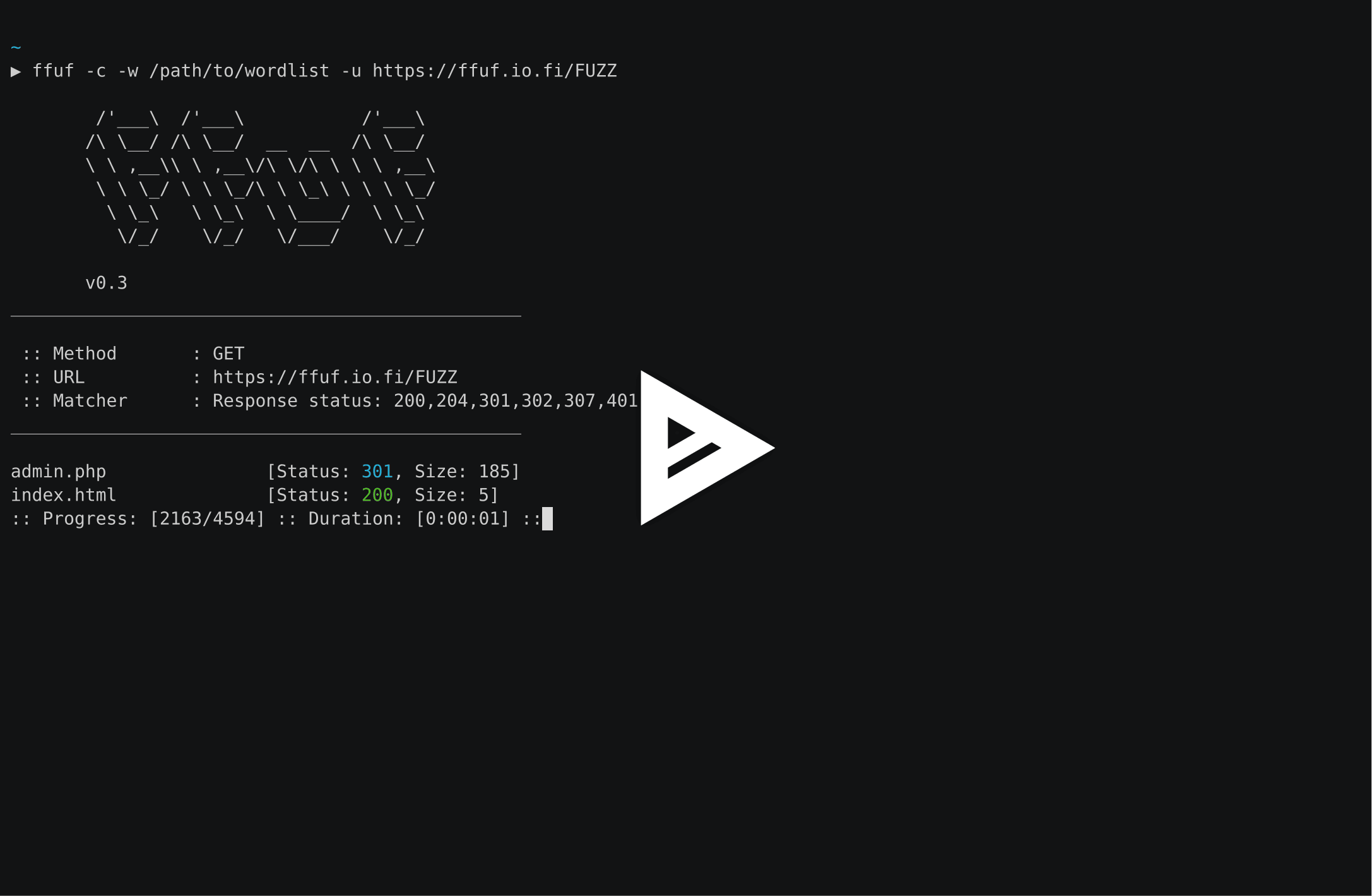
Utilizzando la parola chiave FUZZ alla fine dell'URL (-u):
ffuf -w /path/to/wordlist -u https://target/FUZZ
Scoperta di virtual host (senza record DNS)
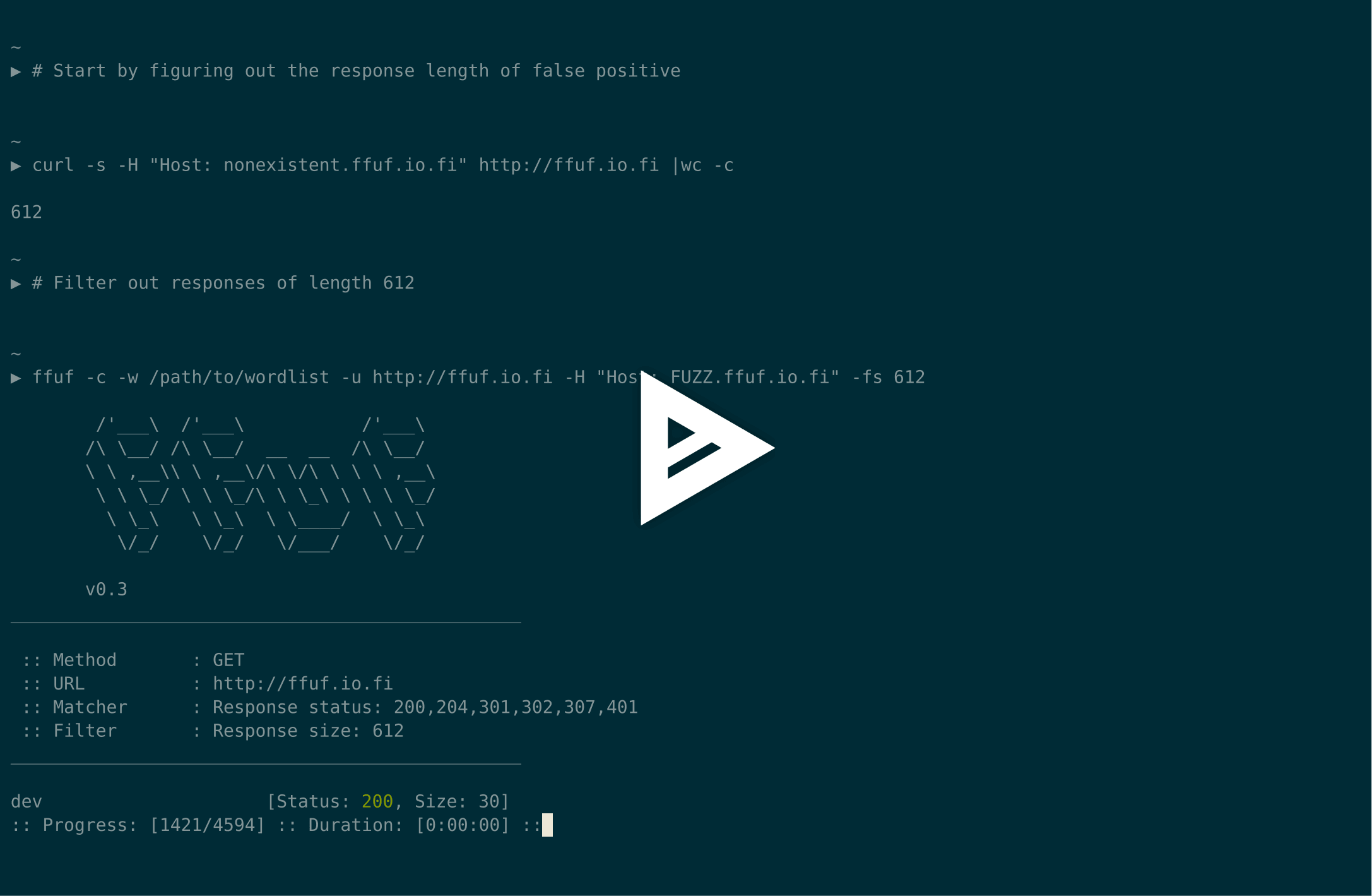
Supponendo che la dimensione della risposta del virtualhost predefinito sia 4242 byte, possiamo filtrare tutte le risposte di quella dimensione (-fs 4242) mentre fuzziamo l'header Host:
ffuf -w /path/to/vhost/wordlist -u https://target -H "Host: FUZZ" -fs 4242
Fuzzing di parametri GET
Il fuzzing dei nomi dei parametri GET è molto simile alla scoperta di directory e funziona definendo la parola chiave FUZZ come parte dell'URL. Questo assume anche una dimensione della risposta di 4242 byte per un nome di parametro GET non valido.
ffuf -w /path/to/paramnames.txt -u https://target/script.php?FUZZ=test_value -fs 4242
Se il nome del parametro è noto, i valori possono essere fuzzati allo stesso modo. Questo esempio assume un valore di parametro errato che restituisce codice di risposta HTTP 401.
ffuf -w /path/to/values.txt -u https://target/script.php?valid_name=FUZZ -fc 401
Fuzzing di dati POST
Questa è un'operazione molto semplice, ancora una volta utilizzando la parola chiave FUZZ. Questo esempio fuzza solo una parte della richiesta POST. Stiamo di nuovo filtrando le risposte 401.
ffuf -w /path/to/postdata.txt -X POST -d "username=admin\&password=FUZZ" -u https://target/login.php -fc 401
Tempo massimo di esecuzione
Se non vuoi che ffuf venga eseguito indefinitamente, puoi usare -maxtime. Questo ferma l'intero processo dopo un certo tempo (in secondi).
ffuf -w /path/to/wordlist -u https://target/FUZZ -maxtime 60
Quando si lavora con la ricorsione, puoi controllare il maxtime per job usando -maxtime-job. Questo fermerà il job corrente dopo un certo tempo (in secondi) e continuerà con il successivo. Nuovi job vengono creati quando la funzionalità di ricorsione rileva una sottodirectory.
ffuf -w /path/to/wordlist -u https://target/FUZZ -maxtime-job 60 -recursion -recursion-depth 2
È anche possibile combinare entrambi i flag per limitare il tempo massimo di esecuzione per job e il tempo complessivo. Se non usi la ricorsione, entrambi i flag si comportano allo stesso modo.
Utilizzo di un mutator esterno per produrre casi di test
Per questo esempio, fuzzeremo dati JSON inviati tramite POST. Radamsa viene usato come mutator.
Quando si usa --input-cmd, ffuf mostrerà le corrispondenze come posizioni. Questo stesso valore di posizione sarà disponibile per il chiamato come variabile d'ambiente $FFUF_NUM. Useremo questo valore di posizione come seed per il mutator. I file example1.txt e example2.txt contengono payload JSON validi. Stiamo facendo match di tutte le risposte, ma filtrando il codice di risposta 400 - Bad request:
ffuf --input-cmd 'radamsa --seed $FFUF_NUM example1.txt example2.txt' -H "Content-Type: application/json" -X POST -u https://ffuf.io.fi/FUZZ -mc all -fc 400
Ovviamente non è molto efficiente chiamare il mutator per ogni payload, quindi possiamo anche pre-generare i payload, sempre usando Radamsa come esempio:
# Generate 1000 example payloads
radamsa -n 1000 -o %n.txt example1.txt example2.txt
# This results into files 1.txt ... 1000.txt
# Now we can just read the payload data in a loop from file for ffuf
ffuf --input-cmd 'cat $FFUF_NUM.txt' -H "Content-Type: application/json" -X POST -u https://ffuf.io.fi/ -mc all -fc 400
File di configurazione
Quando si esegue ffuf, controlla prima se esiste un file di configurazione predefinito. Il percorso predefinito per un file ffufrc è $XDG_CONFIG_HOME/ffuf/ffufrc. Puoi configurare una o più opzioni in questo file, e verranno applicate su ogni job ffuf successivo. Un esempio di file ffufrc si trova qui.
Una descrizione più dettagliata sulle posizioni dei file di configurazione si trova nel wiki: https://github.com/ffuf/ffuf/wiki/Configuration
Le opzioni di configurazione fornite sulla riga di comando sovrascrivono quelle caricate dal file ffufrc predefinito.
Nota: questo non si applica ai flag CLI che possono essere forniti più di una volta. Un esempio di questo è il flag -H (header). In questo caso, i valori -H forniti sulla riga di comando verranno aggiunti a quelli del file di configurazione.
Inoltre, nel caso in cui desideri utilizzare un gruppo di file di configurazione per diversi casi d'uso, puoi farlo definendo il percorso del file di configurazione usando il flag -config della riga di comando che prende il percorso del file di configurazione come parametro.
Utilizzo
Per definire il caso di test per ffuf, usa la parola chiave FUZZ in qualsiasi parte dell'URL (-u), degli header (-H), o dei dati POST (-d).
Fuzz Faster U Fool - v2.1.0
HTTP OPTIONS:
-H Header `"Name: Value"`, separated by colon. Multiple -H flags are accepted.
-X HTTP method to use
-b Cookie data `"NAME1=VALUE1; NAME2=VALUE2"` for copy as curl functionality.
-cc Client cert for authentication. Client key needs to be defined as well for this to work
-ck Client key for authentication. Client certificate needs to be defined as well for this to work
-d POST data
-http2 Use HTTP2 protocol (default: false)
-ignore-body Do not fetch the response content. (default: false)
-r Follow redirects (default: false)
-raw Do not encode URI (default: false)
-recursion Scan recursively. Only FUZZ keyword is supported, and URL (-u) has to end in it. (default: false)
-recursion-depth Maximum recursion depth. (default: 0)
-recursion-strategy Recursion strategy: "default" for a redirect based, and "greedy" to recurse on all matches (default: default)
-replay-proxy Replay matched requests using this proxy.
-sni Target TLS SNI, does not support FUZZ keyword
-timeout HTTP request timeout in seconds. (default: 10)
-u Target URL
-x Proxy URL (SOCKS5 or HTTP). For example: http://127.0.0.1:8080 or socks5://127.0.0.1:8080
GENERAL OPTIONS:
-V Show version information. (default: false)
-ac Automatically calibrate filtering options (default: false)
-acc Custom auto-calibration string. Can be used multiple times. Implies -ac
-ach Per host autocalibration (default: false)
-ack Autocalibration keyword (default: FUZZ)
-acs Custom auto-calibration strategies. Can be used multiple times. Implies -ac
-c Colorize output. (default: false)
-config Load configuration from a file
-json JSON output, printing newline-delimited JSON records (default: false)
-maxtime Maximum running time in seconds for entire process. (default: 0)
-maxtime-job Maximum running time in seconds per job. (default: 0)
-noninteractive Disable the interactive console functionality (default: false)
-p Seconds of `delay` between requests, or a range of random delay. For example "0.1" or "0.1-2.0"
-rate Rate of requests per second (default: 0)
-s Do not print additional information (silent mode) (default: false)
-sa Stop on all error cases. Implies -sf and -se. (default: false)
-scraperfile Custom scraper file path
-scrapers Active scraper groups (default: all)
-se Stop on spurious errors (default: false)
-search Search for a FFUFHASH payload from ffuf history
-sf Stop when > 95% of responses return 403 Forbidden (default: false)
-t Number of concurrent threads. (default: 40)
-v Verbose output, printing full URL and redirect location (if any) with the results. (default: false)
MATCHER OPTIONS:
-mc Match HTTP status codes, or "all" for everything. (default: 200-299,301,302,307,401,403,405,500)
-ml Match amount of lines in response
-mmode Matcher set operator. Either of: and, or (default: or)
-mr Match regexp
-ms Match HTTP response size
-mt Match how many milliseconds to the first response byte, either greater or less than. EG: >100 or <100
-mw Match amount of words in response
FILTER OPTIONS:
-fc Filter HTTP status codes from response. Comma separated list of codes and ranges
-fl Filter by amount of lines in response. Comma separated list of line counts and ranges
-fmode Filter set operator. Either of: and, or (default: or)
-fr Filter regexp
-fs Filter HTTP response size. Comma separated list of sizes and ranges
-ft Filter by number of milliseconds to the first response byte, either greater or less than. EG: >100 or <100
-fw Filter by amount of words in response. Comma separated list of word counts and ranges
INPUT OPTIONS:
-D DirSearch wordlist compatibility mode. Used in conjunction with -e flag. (default: false)
-e Comma separated list of extensions. Extends FUZZ keyword.
-enc Encoders for keywords, eg. 'FUZZ:urlencode b64encode'
-ic Ignore wordlist comments (default: false)
-input-cmd Command producing the input. --input-num is required when using this input method. Overrides -w.
-input-num Number of inputs to test. Used in conjunction with --input-cmd. (default: 100)
-input-shell Shell to be used for running command
-mode Multi-wordlist operation mode. Available modes: clusterbomb, pitchfork, sniper (default: clusterbomb)
-request File containing the raw http request
-request-proto Protocol to use along with raw request (default: https)
-w Wordlist file path and (optional) keyword separated by colon. eg. '/path/to/wordlist:KEYWORD'
OUTPUT OPTIONS:
-debug-log Write all of the internal logging to the specified file.
-o Write output to file
-od Directory path to store matched results to.
-of Output file format. Available formats: json, ejson, html, md, csv, ecsv (or, 'all' for all formats) (default: json)
-or Don't create the output file if we don't have results (default: false)
EXAMPLE USAGE:
Fuzz file paths from wordlist.txt, match all responses but filter out those with content-size 42.
Colored, verbose output.
ffuf -w wordlist.txt -u https://example.org/FUZZ -mc all -fs 42 -c -v
Fuzz Host-header, match HTTP 200 responses.
ffuf -w hosts.txt -u https://example.org/ -H "Host: FUZZ" -mc 200
Fuzz POST JSON data. Match all responses not containing text "error".
ffuf -w entries.txt -u https://example.org/ -X POST -H "Content-Type: application/json" \
-d '{"name": "FUZZ", "anotherkey": "anothervalue"}' -fr "error"
Fuzz multiple locations. Match only responses reflecting the value of "VAL" keyword. Colored.
ffuf -w params.txt:PARAM -w values.txt:VAL -u https://example.org/?PARAM=VAL -mr "VAL" -c
More information and examples: https://github.com/ffuf/ffuf
Modalità interattiva
Premendo ENTER durante l'esecuzione di ffuf, il processo viene messo in pausa e l'utente viene portato in una modalità interattiva simile a una shell:
entering interactive mode
type "help" for a list of commands, or ENTER to resume.
> help
available commands:
afc [value] - append to status code filter
fc [value] - (re)configure status code filter
afl [value] - append to line count filter
fl [value] - (re)configure line count filter
afw [value] - append to word count filter
fw [value] - (re)configure word count filter
afs [value] - append to size filter
fs [value] - (re)configure size filter
aft [value] - append to time filter
ft [value] - (re)configure time filter
rate [value] - adjust rate of requests per second (active: 0)
queueshow - show job queue
queuedel [number] - delete a job in the queue
queueskip - advance to the next queued job
restart - restart and resume the current ffuf job
resume - resume current ffuf job (or: ENTER)
show - show results for the current job
savejson [filename] - save current matches to a file
help - you are looking at it
>
in questa modalità, i filtri possono essere riconfigurati, la coda gestita e lo stato corrente salvato su disco.
Quando si (ri)configurano i filtri, vengono applicati postumi e tutte le corrispondenze false positive in memoria che sarebbero state filtrate dai nuovi filtri vengono cancellate.
Il nuovo stato delle corrispondenze può essere stampato con il comando show che stamperà tutte le corrispondenze come se fossero state trovate da ffuf.
Poiché le corrispondenze "negative" non vengono memorizzate in memoria, rilassare i filtri purtroppo non può riportare indietro le corrispondenze perse. Per questo tipo di scenario, l'utente può usare il comando restart, che resetta lo stato e riavvia il job corrente dall'inizio.
Contribuire
Segnalazioni di bug, richieste di funzionalità e pull request sono benvenute. Vedi CONTRIBUTING.md per iniziare, e la sezione Contribuire del wiki per la documentazione sull'architettura e i test.
Licenza
ffuf è rilasciato sotto licenza MIT. Vedi LICENSE.