
Skip to content
KitploitKITPLOIT
उपकरणएक्सप्लॉइटब्लॉग
Log in
जमा करें
उपकरणएक्सप्लॉइटब्लॉग
जमा करें

हैकिंग, पेनटेस्ट और साइबर सुरक्षा उपकरण आपके सुरक्षा शस्त्रागार के लिए!

Kitploit हैकिंग, साइबर सुरक्षा और पेंटेस्टिंग टूल्स की एक निर्देशिका है। कमजोरियों को खोजने, सिस्टम का विश्लेषण करने, परीक्षण को स्वचालित करने और अपनी सुरक्षा को मजबूत करने के लिए नवीनतम प्रोजेक्ट अपडेट खोजें।

फ़ीडसंपर्कगोपनीयता© 2026 Kitploit

टूल निर्देशिका

श्रेणियाँ

सभी श्रेणियाँ देखें
Loading categories
cve-intel — Local CVE triage engine aggregating 25 sources (NVD, EPSS, CISA KEV, OSV, Shodan) into 0-100 risk scores, with CLI, REST API, MCP server and on-device AI explanations. | Kitploit
उपकरण/GitHubGitHub/fazmin/cve-intel
Indicator of Compromise (IOC) ManagementOSINT (Open Source Intelligence)Vulnerability ScannersThreat Feeds & AggregatorsVulnerability AnalysisInformation GatheringDevSecOpsThreat IntelligenceSupply Chain SecurityIncident ResponseAI Security
149101211 दिन पहलेKitploit द्वारा समीक्षित
साझा करें
GitHub
fazmin/cve-intel

cve-intel

Local CVE triage engine aggregating 25 sources (NVD, EPSS, CISA KEV, OSV, Shodan) into 0-100 risk scores, with CLI, REST API, MCP server and on-device AI explanations.

रिपॉजिटरी देखें
अनुरोधित भाषा में सामग्री उपलब्ध नहीं है। अंग्रेज़ी संस्करण दिखाया जा रहा है।

CVE Intel

Know which vulnerabilities matter, and what to do about them.
A private desktop app for vulnerability triage and scanning, written in native Rust, with a CLI, REST API and MCP server for developers and AI agents,
and a fleet mode that watches every server you run from one place.
42 MCP tools, 46 data sources, SBOMs in and out, on-device AI.

Rust Tauri 2 MCP compatible License: MIT OR Apache-2.0

What it is · Getting started · Features · Fleet mode · Install · Local AI · Data sources · Developer notes · Citing
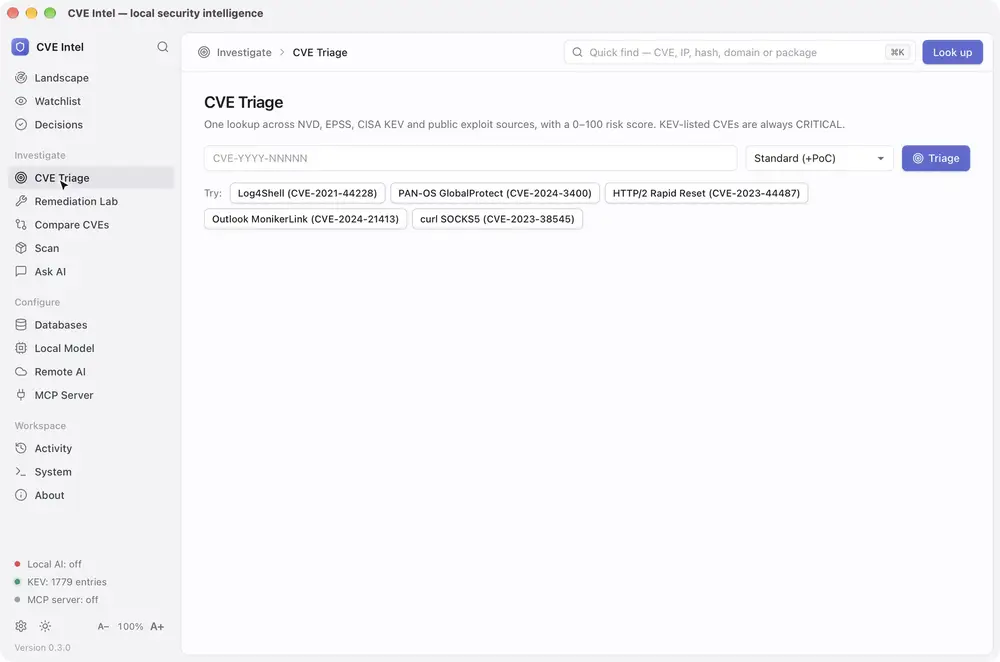
Sped-up screen recording of CVE Intel on macOS: triage of CVE-2024-6387 and its How to fix it card, then the Remediation Lab: the plan for openssh on Ubuntu 22.04 with Ubuntu's own build first, ticking the fix and opening its runbook, ticking Ubuntu's mitigation instead and watching the SSVC decision move from Attend to Track, saving that as a decision and finding it in the ledger, then PAN-OS 10.2.8 with its hotfix and workaround, RHEL 8 as not affected, log4j-core, and Plan fix from a scan of lodash 4.17.20

Sped-up demo on macOS (video, or the full-length recording): from a triage result to a remediation plan for what you run, its runbook, a mitigation tried in What if and saved as a decision, and Plan fix from a scan. A second demo, of the landscape, decisions, scans and the watchlist, is under Features.

What is CVE Intel?

Every known software vulnerability gets a public ID, such as CVE-2024-3400. For each one, security, IT and development teams face the same question: does this affect us, and do we fix it now or can it wait? Answering it usually means checking NVD, CISA, FIRST, GitHub and vendor advisories by hand, one browser tab at a time.

Why it matters now

CVE publication keeps rising (48,185 in 2025, 20.6% more than 2024, and over 86,000 by 27 October 2026), and in April 2026 NIST said the National Vulnerability Database cannot keep up, so it will enrich CVEs in CISA's Known Exploited Vulnerabilities (KEV) catalog, federal-use software and critical software first, and move its unenriched backlog from before 1 March 2026 to "Not Scheduled". Meanwhile, Mandiant's M-Trends 2026 estimates the mean time to exploit at −7 days, so exploitation routinely begins before a patch is released, and exploits were the most common initial infection vector for the sixth year running (32% of intrusions).

What it does

Give CVE Intel a CVE ID, a project folder, a lockfile or SBOM, a container image, the software on this computer, your own domains, or a suspicious IP address, file hash or domain. It queries up to 46 public sources, including CISA KEV, FIRST's EPSS and ENISA's EU Vulnerability Database alongside NVD, and returns what the vulnerability is, a risk score from 0 to 100, whether attackers are already using it, the evidence behind each signal and what to do next. It also shows what changed this week across those sources, and watches the vendors, products and packages you run.

  • 46 data sources for vulnerability, exploit, network and threat intelligence, listed under Data sources. Many need no API key.
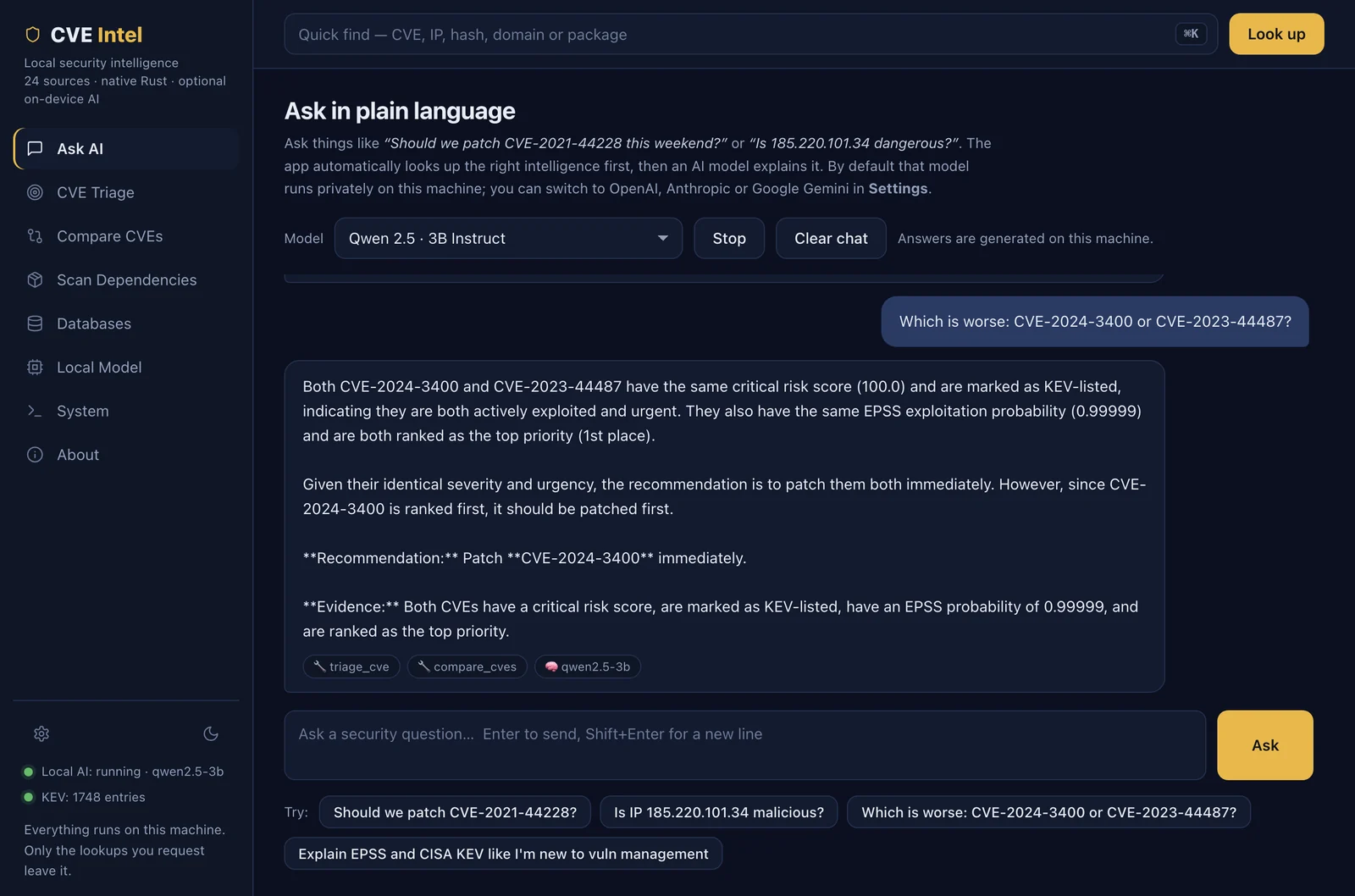
  • 42 MCP tools for AI agents and coding assistants. The same program is also a command line and a REST API (see Developer notes).
  • SBOMs in and out. It reads CycloneDX and SPDX SBOMs along with lockfiles, and Save SBOM (or scan deps . --format cyclonedx) writes any scan as a CycloneDX 1.5 SBOM with the findings, their risk signals and your recorded decisions.
  • Local. There is no CVE Intel account or hosted service. Lookups go straight from your computer to the public sources, and the AI assistant runs on a local model unless you choose a remote provider. Fleet mode runs on a server you own.

It is for security analysts, IT and operations teams, developers checking their dependencies, and anyone learning vulnerability management.

One machine or a whole fleet

The desktop app checks the computer it runs on and whatever you give it. To watch your servers as well, run fleet mode: a small agent on each machine sends what is installed there to a CVE Intel server you run. That server checks every machine when its software changes and again every day, records what became new, riskier or fixed, and answers which of our machines have this CVE? The desktop app's Fleet view shows it all from your own computer.
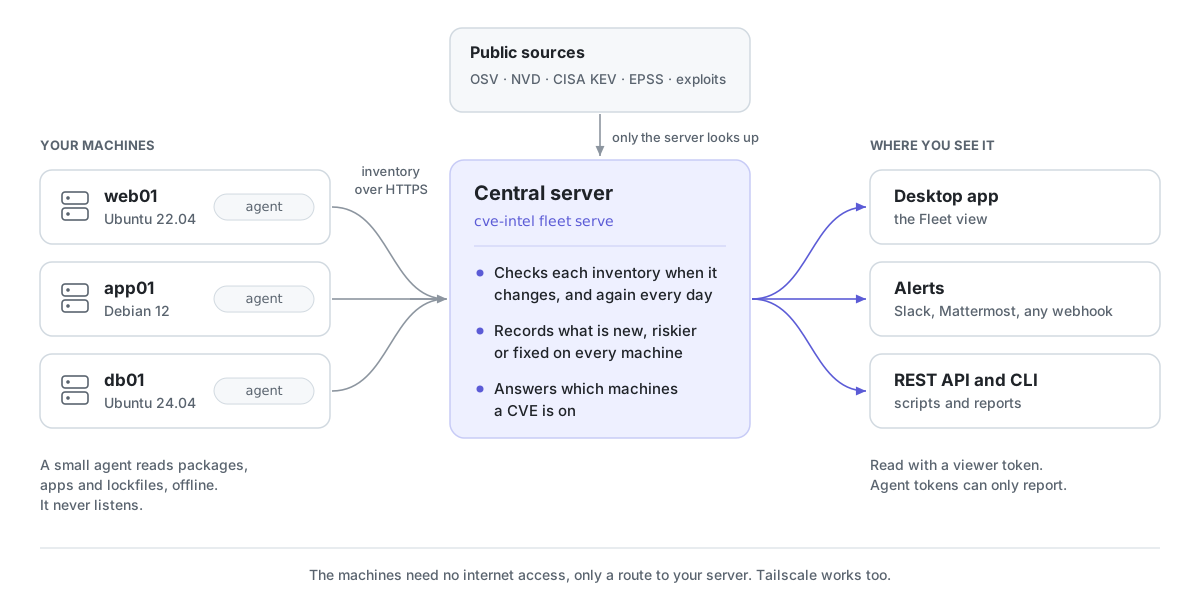
How fleet mode works: an agent on each machine (web01 on Ubuntu 22.04, app01 on Debian 12, db01 on Ubuntu 24.04) reads its packages, apps and lockfiles offline and sends the inventory over HTTPS to your central server, cve-intel fleet serve. Only the server looks the software up in the public sources (OSV, NVD, CISA KEV, EPSS and exploit feeds). It checks each inventory when it changes and every day, records what is new, riskier or fixed, and answers which machines a CVE is on. The desktop app's Fleet view, webhook alerts to Slack, Mattermost or anything else, and the REST API and command line read the results with a viewer token. Agents never listen, and the machines need no internet access, only a route to your server.

Fleet mode under Features has screenshots and a demo, and the fleet guide shows how to set it up.

What it helps you do

टूल डाउनलोड करें

सबसे लोकप्रिय

सभी देखें →

हमारे समुदाय द्वारा सबसे अधिक उपयोग किए जाने वाले उपकरण खोजें।

  • 1

    OsintHunter

    letox4/osinthunter

    🎯 अंतिम OSINT टूलकिट: जाँच ग्राफ़, विश्वास स्कोरिंग, उपनाम परिवार, मानचित्र, टाइमलाइन और रिपोर्ट। 49 मॉड्यूल, 400+ साइटें, किसी API कुंजी की आवश्यकता नहीं।

    755
  • 2

    ghostlock-app

    yukonga/ghostlock-app

    # घोस्टलॉक वन-टैप निष्पादन ऐप (CVE-2026-43499)

    510
  • 3

    ARTEX

    baarai/artex

    प्लानर/वर्कर एजेंट, एसेट और एक्सप्लोरेशन ग्राफ़, MITM ट्रैफ़िक रिकॉर्डिंग, और भेद्यता पुनःपरीक्षण के साथ LLM मल्टी-एजेंट स्वायत्त पेनेट्रेशन टेस्टिंग प्लेटफ़ॉर्म।

    415
  • 4

    redforge

    cybersecurity91/redforge

    ब्राउज़र-साइड रेड टीम टूलकिट, जिसमें रेकॉन, पेलोड जनरेशन, क्रेडेंशियल हमलों, क्रिप्टो, एन्कोडिंग और एंगेजमेंट रिपोर्टिंग के लिए 102 ऑफ़लाइन टूल्स हैं।

    343
  • 5

    antifox

    antifox-ai/antifox

    AI मल्टी-एजेंट स्वायत्त पेनेट्रेशन टेस्टिंग प्लेटफ़ॉर्म जो रेकॉन, अटैक-सरफ़ेस डिस्कवरी, एक्सप्लॉइटेशन वैलिडेशन और साक्ष्य-आधारित रिपोर्ट डिलीवरी संचालित करता है।

    259
  • 6

    CyberStrikeAI

    ed1s0nz/cyberstrikeai

    AI-मूल साइबरसुरक्षा के लिए कार्रवाई की प्रणाली—जहाँ इरादा नियंत्रित निष्पादन बन जाता है, साक्ष्य परिचालन स्मृति बन जाता है, और हर ऑपरेशन अगले को बेहतर बनाता है।

    258

सभी उपकरण खोजें

हमारे उपकरणों का संग्रह ब्राउज़ करें

सभी उपकरण देखें →








