
chisel v1.13.0
HTTP पर SSH एन्क्रिप्शन के साथ तेज़ TCP/UDP टनल, जो रिवर्स पोर्ट फ़ॉरवर्डिंग, SOCKS5 प्रॉक्सी और क्लाइंट प्रमाणीकरण का समर्थन करता है, सुरक्षित नेटवर्क ट्रैवर्सल और फ़ायरवॉल से बचने के लिए।
Chisel


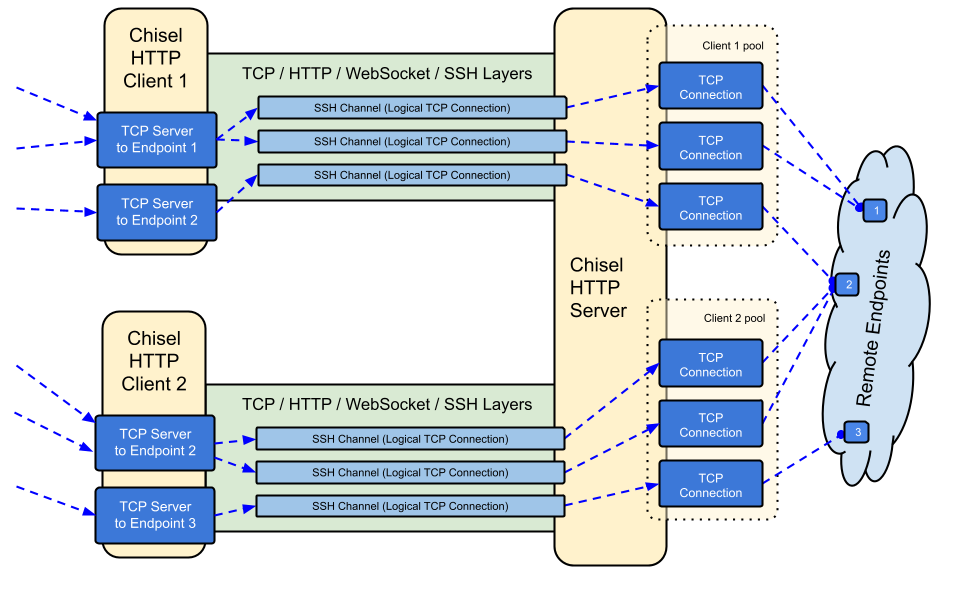
Chisel एक तेज़ TCP/UDP टनल है, जो HTTP के ऊपर ट्रांसपोर्ट होती है और SSH के माध्यम से सुरक्षित की जाती है। एक ही executable में क्लाइंट और सर्वर दोनों शामिल हैं। Go (golang) में लिखा गया। Chisel मुख्य रूप से फ़ायरवॉल से गुज़रने के लिए उपयोगी है, हालाँकि इसका उपयोग आपके नेटवर्क में एक सुरक्षित endpoint प्रदान करने के लिए भी किया जा सकता है।
विषय-सूची
विशेषताएँ
- उपयोग में आसान
- प्रदर्शनकारी*
- SSH प्रोटोकॉल (via
crypto/ssh) का उपयोग करके एन्क्रिप्टेड कनेक्शन - प्रमाणित कनेक्शन; users config फ़ाइल के साथ प्रमाणित क्लाइंट कनेक्शन, fingerprint matching के साथ प्रमाणित सर्वर कनेक्शन।
- क्लाइंट exponential backoff के साथ स्वतः पुनः कनेक्ट होता है (
--min/max-retry-intervalके माध्यम से समायोज्य); keepalive pings का समय समाप्त हो जाता है, इसलिए चुपचाप मृत कनेक्शन (sleep/wake, NAT timeouts, सर्वर रीस्टार्ट) का पता लगाया जाता है और उन्हें पुनः स्थापित किया जाता है - क्लाइंट एक TCP कनेक्शन पर कई tunnel endpoints बना सकते हैं
- क्लाइंट वैकल्पिक रूप से SOCKS या HTTP CONNECT proxies से गुज़र सकते हैं
- रिवर्स पोर्ट फ़ॉरवर्डिंग (कनेक्शन सर्वर से होकर और क्लाइंट से बाहर जाते हैं)
- सर्वर वैकल्पिक रूप से एक रिवर्स प्रॉक्सी के रूप में भी कार्य कर सकता है
- सर्वर वैकल्पिक रूप से SOCKS5 कनेक्शन की अनुमति देता है (नीचे गाइड देखें)
- क्लाइंट वैकल्पिक रूप से एक reversed port forward से SOCKS5 कनेक्शन की अनुमति देते हैं
- stdio पर क्लाइंट कनेक्शन जो
ssh -o ProxyCommandका समर्थन करता है, जिससे HTTP के ऊपर SSH प्रदान होता है
इंस्टॉल
बाइनरीज़


नवीनतम रिलीज़ देखें या अभी curl https://i.jpillora.com/chisel! | bash के साथ डाउनलोड और इंस्टॉल करें
बाइनरीज़ नवीनतम Go रिलीज़ के साथ बनाई गई हैं, जो न्यूनतम OS संस्करण निर्धारित करती है: Windows 10 / Server 2016, macOS 12, Linux kernel 3.2, FreeBSD 12.2. पुराने सिस्टम (जैसे Windows 7) के लिए, release v1.8.1 या उससे पहले का उपयोग करें।
Docker


docker run --rm -it jpillora/chisel --help
Images मल्टी-आर्क हैं और Docker Hub (jpillora/chisel) और GitHub Container Registry (ghcr.io/jpillora/chisel) दोनों पर प्रकाशित हैं।
Fedora
यह पैकेज Fedora समुदाय द्वारा अनुरक्षित किया जाता है। यदि आपको RPM के उपयोग से संबंधित समस्याएँ आती हैं, तो कृपया इस issue tracker का उपयोग करें।
sudo dnf -y install chisel
स्रोत
$ go install github.com/jpillora/chisel@latest
डेमो
आप कुछ ही मिनटों में अपना खुद का डेमो सर्वर चला सकते हैं (पुराना Heroku डेमो Heroku के मुफ़्त टियर के साथ चला गया)। example/fly.toml इस chisel server को fly.io के मुफ़्त भत्ते पर तैनात करता है:
$ chisel server --port $PORT --backend http://example.com
# listens on $PORT, proxies normal web requests to http://example.com
इसे example/ डायरेक्टरी से fly launch --copy-config के साथ डिप्लॉय करें, फिर सर्वर के साथ चल रही किसी भी सेवा तक टनल करें, जैसे:
$ chisel client https://<your-app>.fly.dev 3000
# connects to your chisel server,
# tunnels your localhost:3000 to the server's localhost:3000
अपने ऐप के URL को ब्राउज़र में विज़िट करने पर सर्वर का डिफ़ॉल्ट बैकएंड प्रॉक्सी हिट होता है और example.com की एक कॉपी दिखाता है।
उपयोग
$ chisel --help

  Usage: chisel [command] [--help]

  Version: X.Y.Z

  Commands:
    server - runs chisel in server mode
    client - runs chisel in client mode

  Read more:
    https://github.com/jpillora/chisel
$ chisel server --help

  Usage: chisel server [options]

  Options:

    --host, Defines the HTTP listening host – the network interface
    (defaults the environment variable HOST and falls back to 0.0.0.0).

    --port, -p, Defines the HTTP listening port (defaults to the environment
    variable PORT and falls back to port 8080).

    --key, (deprecated use --keygen and --keyfile instead)
    An optional string to seed the generation of a ECDSA public
    and private key pair. All communications will be secured using this
    key pair. Share the subsequent fingerprint with clients to enable detection
    of man-in-the-middle attacks (defaults to the CHISEL_KEY environment
    variable, otherwise a new key is generate each run).

    --keygen, A path to write a newly generated PEM-encoded SSH private key file.
    If users depend on your --key fingerprint, you may also include your --key to
    output your existing key. Use - (dash) to output the generated key to stdout.

    --keyfile, An optional path to a PEM-encoded SSH private key. When
    this flag is set, the --key option is ignored, and the provided private key
    is used to secure all communications. (defaults to the CHISEL_KEY_FILE
    environment variable). Since ECDSA keys are short, you may also set keyfile
    to the inline key string itself, exactly as printed by --keygen (a base64
    string with a "ck-" prefix); no extra base64 encoding is needed.