
 ztgrace/mole
Framework for identifying and exploiting out-of-band (OOB) application vulnerabilities with a custom DNS/token server, Burp Suite extension, and notification plugins for automated security testing.

A framework for identifying and exploiting out-of-band (OOB) vulnerabilities.
Python >= 3.6
virtualenv -p /usr/bin/python3 venv
source venv/bin/activate
./venv/bin/pip3 install -r requirements.txt
git submodule update --init --recursive
Set an API key in config.yml (must be the same for the client and server)
You'll need to configure the DNS records in your registrar to point to your mole server. Minimally, you'll need an A record for the name server and an NS record configured.
Mole can be configured to host other configuration options.
Mailgun requires DNS entries to enable the service: https://help.mailgun.com/hc/en-us/articles/203637190-How-Do-I-Add-or-Delete-a-Domain-
Currently Mole does not support TLS natively. To implement TLS, use a reverse proxy such as nginx to terminate the TLS connection and forward traffic to the Mole server.
The Burp Suite Extension requires a separate Python 2.7 virtual environment due to the latest version of Jython only supporting 2.7. Below are the instructions for setting up the virtual environment and configuring the Extension.
virtualenv -p /usr/bin/python2.7 burp_venvsource ./burp_venv/bin/activate./burp_venv/bin/pip -r requirementsburp_venv/lib/python2.7/site-packages that was created in steps 1-3.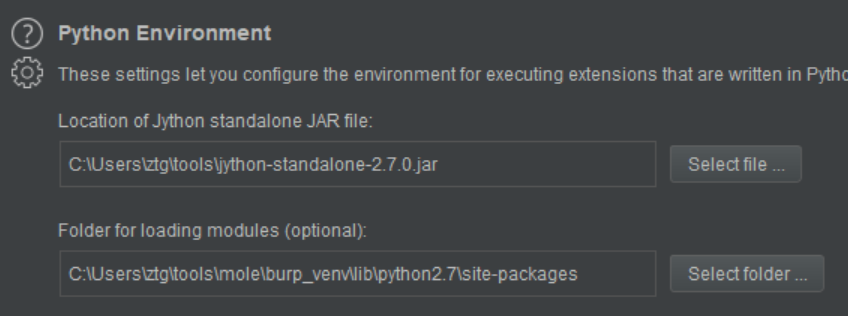
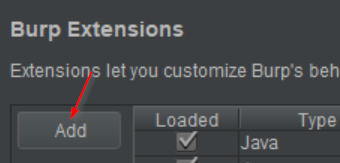
Python and select the mole_burp_extension.py file from the mole project directory.

domain - Your custom domain
length - Length of the tokens (default 5)
The token character set is ascii upper & lower, and digits. The length can be modified to meet needs such as constrained space for a payload. The number of tokens per length is listed below.
ssl - Configure payloads for https vs http
``server` - domain or IP of the Mole token server
default_tags - list of default tags to add to all tokens. Useful for per-project/client tokens.
api_key - API key used to authenticate requests to the mole API
dns_addr - IP address used to respond to DNS queries
db_conn - SQLAlchemy database URL. Default is a SQLite db in the root directory sqlite:///mole.db
static_responses - list of DNS static response key/value pairs
web_port - configure the listening web port
dns_port -configure the listening dns port
All notifications have an enabled flag that determines whether or not to trigger the notification on an interaction. Each notification plugin has its own configuration items.
mailgun - configure domain, to, from, and api_key to enable mailgun email notifications
slack - token and channel
webhook - generic POST webhook
I'm sure there are many, please create a new issue and fill out the template as best as you can for quick triage.






