Skip to content
KitploitKITPLOIT
ToolsExploitsBlog
Log in
Submit
ToolsExploitsBlog
Submit

Hacking, PenTest, and Cybersecurity Tools for Your Security Arsenal!

Kitploit is a directory of hacking, cybersecurity, and pentesting tools. Discover the latest project updates to find vulnerabilities, analyze systems, automate testing, and strengthen your security.

FeedsContactPrivacy© 2026 Kitploit

Tool Directory

Categories

View all categories
Loading categories
Tools/GitHubGitHub/yukselberkay/pmanager
Password CrackingEncryption/Decryption ToolsCryptographyAuthentication
GitHubyukselberkay/pmanager

pmanager

Store and retrieve your passwords from a secure offline database. Check if your passwords has leaked previously to prevent targeted password reuse attacks.

View Repository
3434127 days agoReviewed by Kitploit
Share

Pmanager

GitHub release

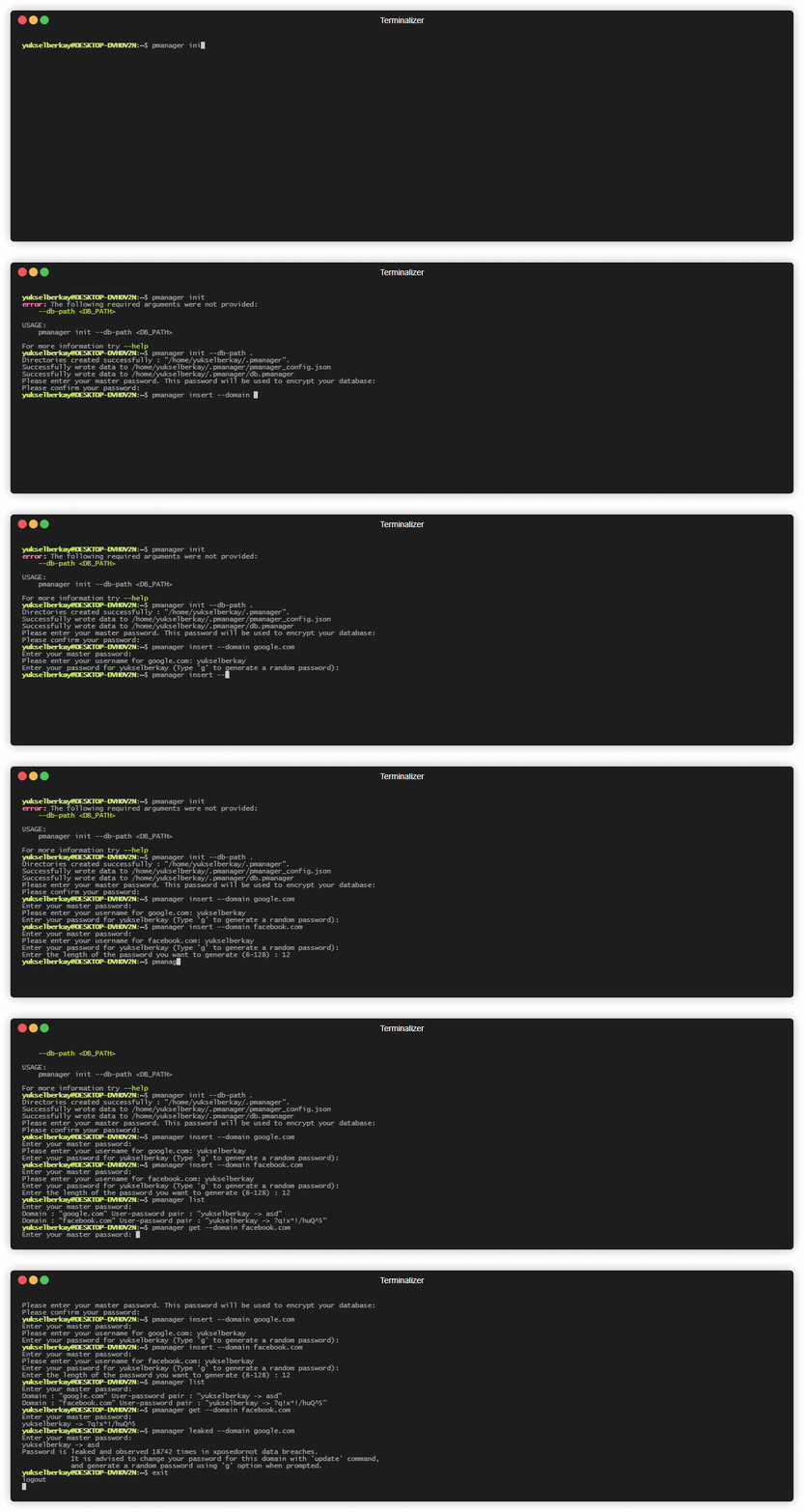
Demo

demo

Description

Store and retrieve your passwords from a secure offline database. Check if your passwords has leaked previously to prevent targeted password reuse attacks.
Why develop another password manager ?

  • This project was initially born from my desire to learn Rust.
  • I was tired of using the clunky GUI of keepassxc.
  • I wanted to learn more about cryptography.
  • For fun. :)

Features

  • Secure password storage with state of the art cryptographic algorithms.
    • Argon2id (64 MiB, 3 iterations, 4 lanes) with a random per-database salt for key derivation to make it harder for attacker to conduct brute force attacks.
    • Aes-gcm256 with a fresh random nonce on every save for database encryption. The file header (format version, key derivation parameters, salt and nonce) is authenticated too.
    • The decrypted database only ever lives in memory and is wiped after use, nothing is written to temporary files.
    • Database and config files are only readable by your user, and are replaced atomically so a crash can not corrupt them.
    • Passwords copied to the clipboard are excluded from clipboard history/cloud sync where the OS supports it, and are cleared after 10 seconds or on Ctrl-C.
  • Custom encrypted key-value database which ensures data integrity.(Read the blog post I wrote about it here.)
  • Easy to install and to use. Does not require connection to an external service for its core functionality.
  • Check if your passwords are leaked before to avoid targeted password reuse attacks.
    • This works by hashing your password with keccak-512 and sending the first 10 digits to XposedOrNot.

Installation

Pmanager depends on "pkg-config" and "libssl-dev" packages on ubuntu. Simply install them with

sudo apt install pkg-config libssl-dev -y

Download the binary file according to your current OS from releases, and add the binary location to PATH environment variable and you are good to go.

Building from source

Ubuntu & WSL

sudo apt update -y && sudo apt install curl 
curl --proto '=https' --tlsv1.2 -sSf https://sh.rustup.rs | sh
sudo apt install build-essential -y
sudo apt install pkg-config libssl-dev libxcb-render0-dev libxcb-shape0-dev libxcb-xfixes0-dev git -y
git clone https://github.com/yukselberkay/pmanager
cd pmanager
make install

Windows

  • Follow the instructions here to install Rust. -> https://www.rust-lang.org/tools/install
  • Then install git for Windows. -> https://gitforwindows.org/
git clone https://github.com/yukselberkay/pmanager
cd pmanager
cargo build --release

Mac

git clone https://github.com/yukselberkay/pmanager
cd pmanager
cargo build --release

Upgrading from 0.9.7 or older

Databases created by pmanager 0.9.7 and older use a fixed salt and a fixed encryption nonce, which seriously weakens their protection. Version 0.10.0 introduces a new database format and refuses to open old databases until they are migrated:

pmanager migrate

Your entries are converted to the new format, and you can optionally choose a new master password at the same time. The old file is kept next to the database as db.pmanager.v1.bak. Since it is still protected by the old scheme, delete it once you have checked that everything works. The migration also removes the temporary files that older versions could leave behind in your temp directory.

Documentation

Firstly the database needs to be initialized using "init" command.

Init

# Initializes the database in the home directory.
pmanager init --db-path ~

Insert

# Insert a new user and password pair to the database. The password is copied to the clipboard afterwards.
pmanager insert --domain github.com

Get

# Get a specific record by domain. This command will first copy username and then password to clipboard.
pmanager get --domain github.com

Clip

# Copy only the password of a record to clipboard.
pmanager clip --domain github.com

List

# List every record in the database.
pmanager list

Update

# Update a record by domain. Press enter to keep the current username or password.
pmanager update --domain github.com

Delete

# Deletes a record associated with domain from the database.
pmanager delete --domain github.com

Leaked

# Check if a password in your database is leaked before.
pmanager leaked --domain github.com

Migrate

# Upgrade a database created by pmanager 0.9.7 or older to the current format.
pmanager migrate
pmanager 0.10.0

USAGE:
    pmanager <SUBCOMMAND>

OPTIONS:
    -h, --help       Print help information
    -V, --version    Print version information

SUBCOMMANDS:
    clip      Copy password to clipboard by domain
    delete    Delete a key value pair from database
    get       Copy username and then password to clipboard by domain
    help      Print this message or the help of the given subcommand(s)
    init      Initialize pmanager
    insert    Insert a user password pair associated with a domain to database
    leaked    Check if a password associated with your domain is leaked
    list      Lists every record in the database
    migrate   Upgrade a database created by pmanager 0.9.7 or older to the current, more secure format
    update    Update a record from database

Download Tool

Most Popular

View all →

Discover the most used tools by our community.

  • 1

    OsintHunter

    letox4/osinthunter

    🎯 The ultimate OSINT toolkit: investigation graph, confidence scoring, alias families, map, timeline and reports. 49 modules, 400+ sites, no API keys required.

    871
  • 2

    ghostlock-app

    yukonga/ghostlock-app

    GhostLock One-Tap Execution App (CVE-2026-43499)

    548
  • 3

    ARTEX

    baarai/artex

    LLM multi-agent autonomous penetration testing platform with planner/worker agents, asset and exploration graphs, MITM traffic recording, and vulnerability retesting.

    383
  • 4

    redforge

    cybersecurity91/redforge

    Browser-side red team toolkit with 102 offline tools for recon, payload generation, credential attacks, crypto, encoding and engagement reporting.

    361
  • 5

    looking-glass

    anonghosty/looking-glass

    CSIRT platform that ingests Shadowserver reports into MongoDB and replays them as interactive maps, analysis, findings, advisories and executive dashboards.

    305
  • 6

    CyberStrikeAI

    ed1s0nz/cyberstrikeai

    The system of action for AI-native cybersecurity—where intent becomes governed execution, evidence becomes operational memory, and every operation improves the next.

    280

Explore all tools

Browse our collection of tools

View all tools →