
Skip to content
KitploitKITPLOIT
ToolsBlog
Submit
ToolsBlog
Submit

Hacking, PenTest, and Cybersecurity Tools for Your Security Arsenal!

Kitploit is a directory of hacking, cybersecurity, and pentesting tools. Discover the latest project updates to find vulnerabilities, analyze systems, automate testing, and strengthen your security.

··Feeds·Contact·Privacy·© 2026 Kitploit

Tool Directory

Categories

View all categories
Loading categories
die-in-browser — Static binary analysis with Detect It Easy — 100% in your browser, no uploads. | Kitploit
Tools/GitHubGitHub/xoreaxlmbdx/die-in-browser
Static AnalysisHash AnalysisReverse EngineeringMalware AnalysisBinary AnalysisFirmware Analysis
GitHubxoreaxlmbdx/die-in-browser

die-in-browser

Static binary analysis with Detect It Easy — 100% in your browser, no uploads.
View Repository
65329 days agoReviewed by Kitploit

Most Popular

View all →

Discover the most used tools by our community.

Explore all tools

Browse our collection of tools

View all tools →
Share
Website

die-in-browser

Static binary analysis with Detect It Easy — 100% in your browser, no uploads.

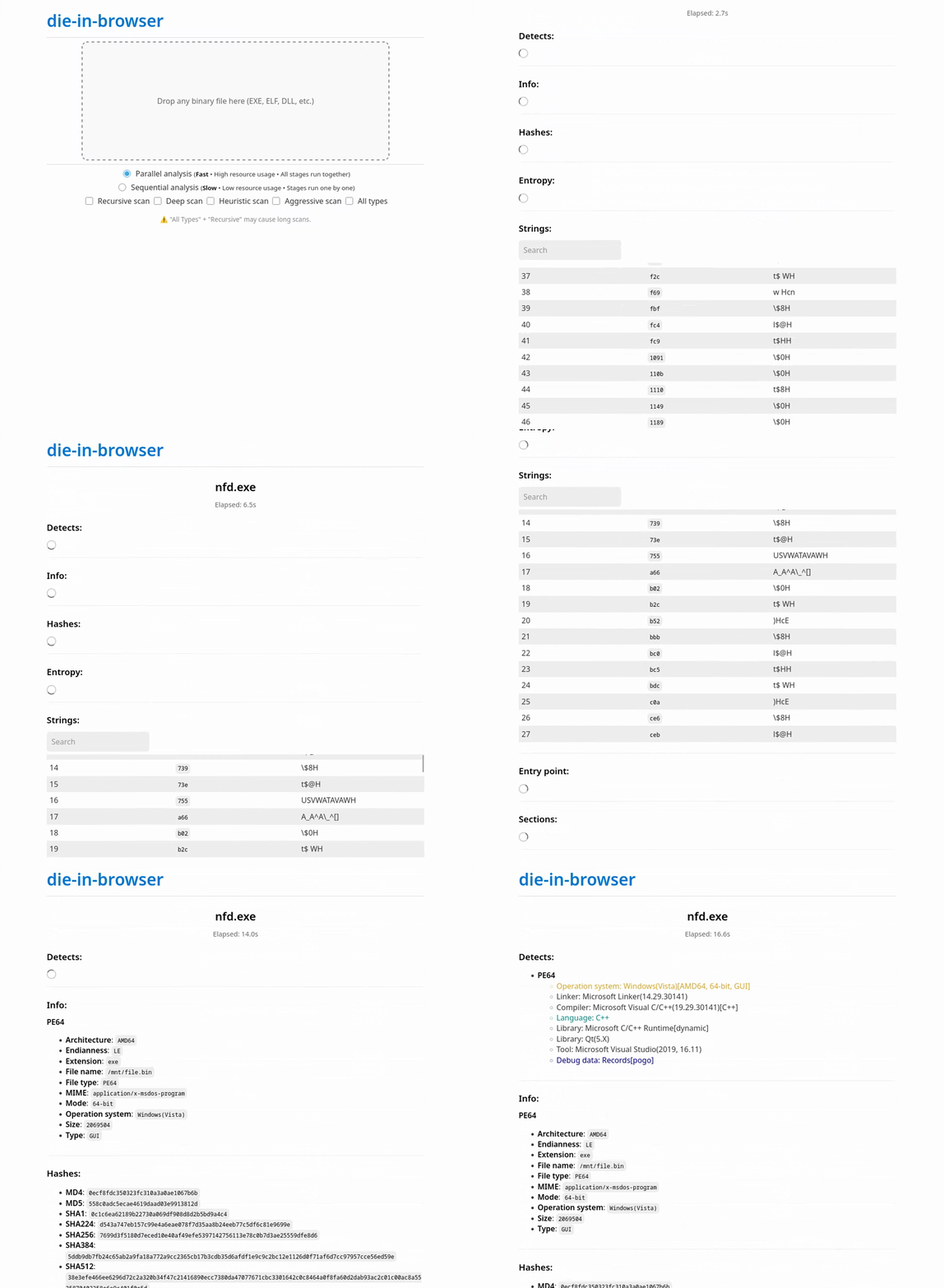
🔍 What is this?

This project runs Detect It Easy (DIE) — a powerful static binary analyzer — entirely inside your browser using the v86 emulator.

  • ✅ No file uploads: binaries are processed locally.
  • ✅ Full analysis: all detections, entry point, sections (in PE file), hashes, entropy, strings.

Built with:

  • Buildroot 2025.11 – minimal Linux system for the guest OS;
  • v86 – x86 emulator in JavaScript/WebAssembly;
  • Detect It Easy 3.21 (diec) – console version of DIE for headless analysis;
  • Docker – for reproducible builds;

🚀 Try it now

👉 Live Demo

📂 Source Code – demo source code

⚠️ Everything runs in your browser — the initial load includes a ~17 MB emulator state file. Also, large binaries may take longer to analyze.

📦 Use as a Library

You can embed this analyzer directly into your own web app.

Option 1: Use prebuilt assets

Download everything you need from the Releases page:

  • v86.wasm, libv86.js
  • seabios.bin
  • Compressed emulator state (v86state.bin.zst)

💡 The v86state.bin.zst file contains a full snapshot of the Linux system with DIE preinstalled and is approximately 17 MB in size.

Option 2: Build it yourself

Follow the instructions in the next section.

Then:

  1. Place the files in your project directory.
  2. Put die.js in the same folder.

📌 See the library/ folder for usage example and full API docs.

🛠️ Build from source

Prerequisites: Docker with BuildKit enabled.

root@kitploit:~
git clone https://github.com/xoreaxlmbdx/die-in-browser.git
cd die-in-browser
./build.sh

The build output will appear in ./build/ and includes:

  • v86.wasm, libv86.js
  • seabios.bin
  • licenses.tar.gz
  • buildroot-state.bin.zst (compressed emulator snapshot)

🙌 Acknowledgements

  • v86 emulator — copy/v86;
  • Detect It Easy — horsicq/Detect-It-Easy;
  • Buildroot config — humphd/browser-vm;
  • Buildroot;

📝 License

MIT — free to use and modify.

📄 The build includes a licenses.tar.gz archive (generated by Buildroot) that contains license texts for all components used in the guest system.

Download Tool