
Skip to content
KitploitKITPLOIT
ToolsExploitsBlog
Log in
Submit
ToolsExploitsBlog
Submit

Hacking, PenTest, and Cybersecurity Tools for Your Security Arsenal!

Kitploit is a directory of hacking, cybersecurity, and pentesting tools. Discover the latest project updates to find vulnerabilities, analyze systems, automate testing, and strengthen your security.

FeedsContactPrivacy© 2026 Kitploit

Tool Directory

Categories

View all categories
Loading categories
Tools/GitHubGitHub/viralmaniar/in-spectre-meltdown
Vulnerability ScannersVulnerability AnalysisExploitationHardware Security
GitHubviralmaniar/in-spectre-meltdown

In-Spectre-Meltdown

View Repository
9537238 years agoReviewed by Kitploit

About

This tool allows to check speculative execution side-channel attacks that affect many modern processors and operating systems designs. CVE-2017-5754 (Meltdown) and CVE-2017-5715 (Spectre) allows unprivileged processes to steal secrets from privileged processes. These attacks present 3 different ways of attacking data protection measures on CPUs enabling attackers to read data they shouldn't be able to. This tool is originally based on Microsoft: https://support.microsoft.com/en-us/help/4073119/protect-against-speculative-execution-side-channel-vulnerabilities-in

Share

In-Spectre-Meltdown

This tool allows to check speculative execution side-channel attacks that affect many modern processors and operating systems designs. CVE-2017-5754 (Meltdown) and CVE-2017-5715 (Spectre) allows unprivileged processes to steal secrets from privileged processes. These attacks present 3 different ways of attacking data protection measures on CPUs enabling attackers to read data they shouldn't be able to.

This tool is originally based on Microsoft: https://support.microsoft.com/en-us/help/4073119/protect-against-speculative-execution-side-channel-vulnerabilities-in

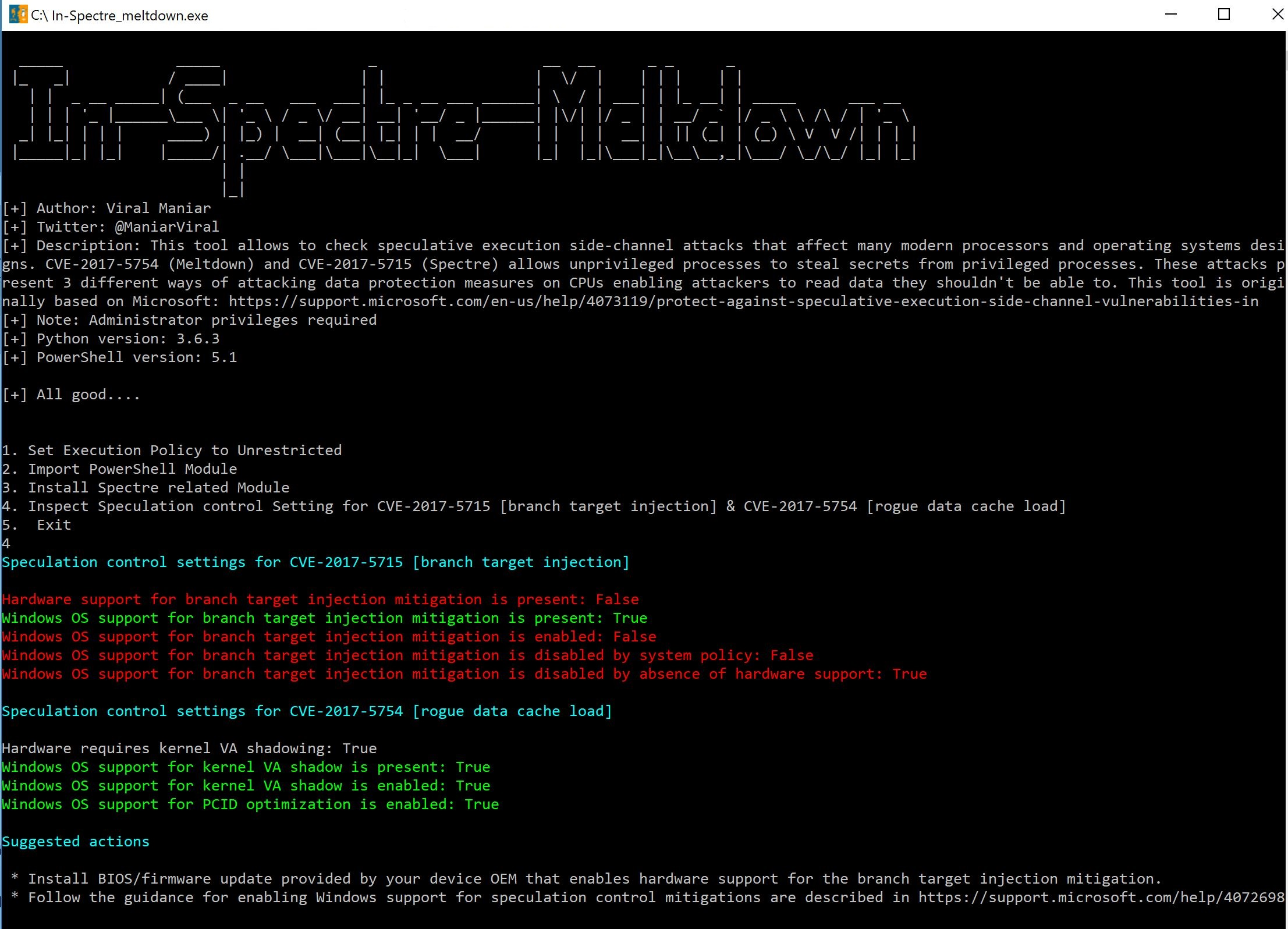
image

Please note:

This solution has been tested successfully using Python 3.6.3 & PowerShell version 5.1.

How do I use this?

  • Run the python code or download the executable from the releases section and run it as an administrator user.
  • Press Number 1, 2, 3 & 4 in sequence to see the results.
  • Press 1: Sets the execution policy to unrestricted.
  • Press 2: Imports necessary PowerShell modules
  • Press 3: Installs Spectre related modules within PowerShell
  • Press 4: Inspects control settings for Spectre & Meltdown and displays result
  • Press 5: Exit from the program

Do I need to run the executable as administrator?

  • Yes, Right click on the "In-Spectre_meltdown.exe" and run as administrator to get the results.

Questions?

Twitter: https://twitter.com/maniarviral
LinkedIn: https://au.linkedin.com/in/viralmaniar

Download Tool

Most Popular

View all →

Discover the most used tools by our community.

  • 1

    OsintHunter

    letox4/osinthunter

    🎯 The ultimate OSINT toolkit: investigation graph, confidence scoring, alias families, map, timeline and reports. 49 modules, 400+ sites, no API keys required.

    891
  • 2

    ghostlock-app

    yukonga/ghostlock-app

    GhostLock One-Tap Execution App (CVE-2026-43499)

    547
  • 3

    ARTEX

    baarai/artex

    LLM multi-agent autonomous penetration testing platform with planner/worker agents, asset and exploration graphs, MITM traffic recording, and vulnerability retesting.

    369
  • 4

    redforge

    cybersecurity91/redforge

    Browser-side red team toolkit with 102 offline tools for recon, payload generation, credential attacks, crypto, encoding and engagement reporting.

    366
  • 5

    looking-glass

    anonghosty/looking-glass

    CSIRT platform that ingests Shadowserver reports into MongoDB and replays them as interactive maps, analysis, findings, advisories and executive dashboards.

    309
  • 6

    CyberStrikeAI

    ed1s0nz/cyberstrikeai

    The system of action for AI-native cybersecurity—where intent becomes governed execution, evidence becomes operational memory, and every operation improves the next.

    282

Explore all tools

Browse our collection of tools

View all tools →






