 synacktiv/ipspinner
IPSpinner works as a local proxy that redirects requests through external services.

IPSpinner is a local proxy which can be used to redirect all incoming requests through different chosen providers. The purpose is to create a pass-through proxy that rotates the source IP address of each request. As an example, running a bruteforce operation through IPSpinner will help to avoid being caught because the server will receive the requests from hundreds of different IP addresses.
IPSpinner currently supports AWS (API Gateway), Azure (Cloud Shell) and GitHub (GitHub Actions).
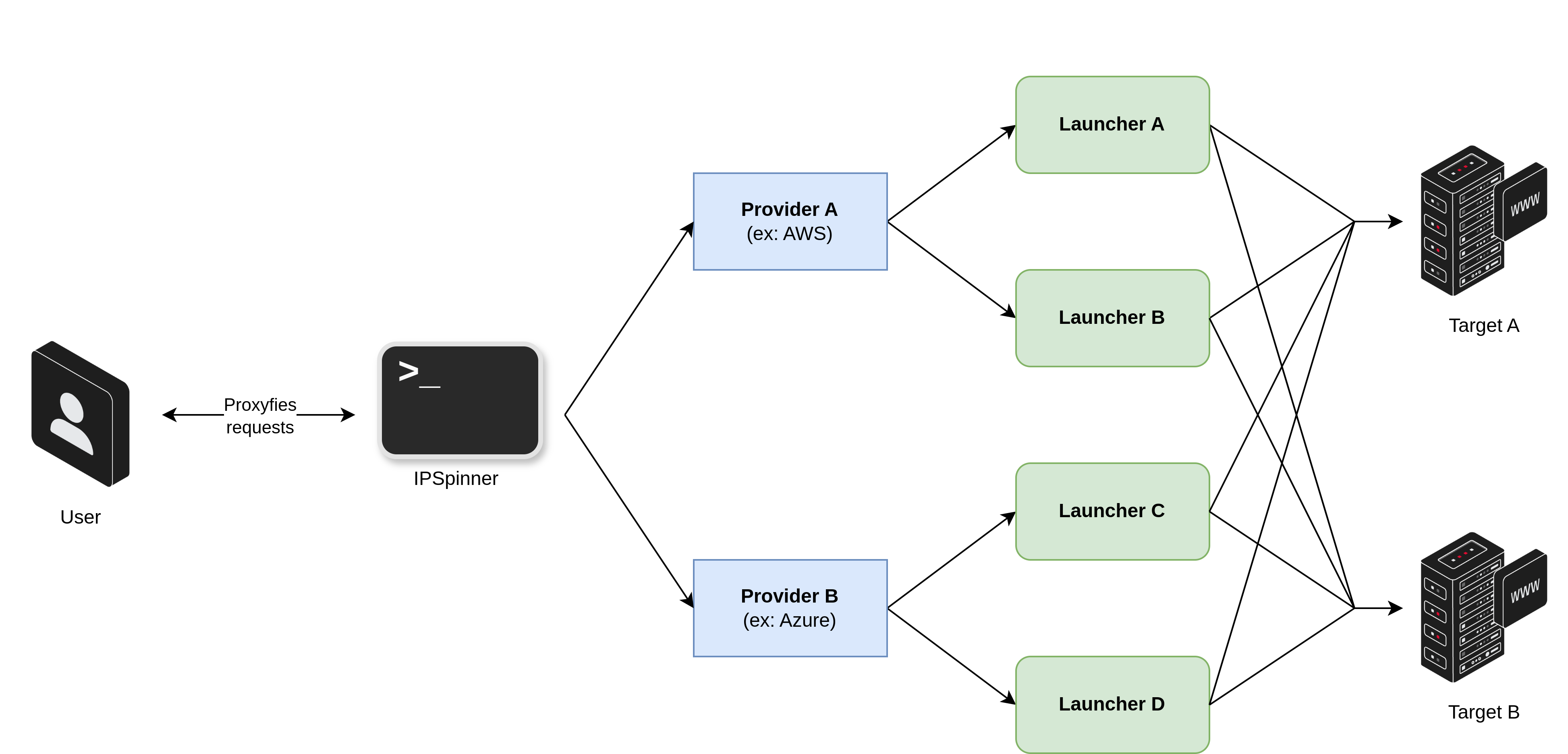 Figure 1: IPSpinner - Overall diagram
IPSpinner works as a local proxy that redirects requests through external services. For this purpose, IPSpinner leverages providers and launchers.
A provider corresponds to a cloud provider or an online service provider (AWS, Azure, GitHub, etc.), which offers different services, so called launchers, that can be used to relay user's requests (AWS API Gateway, GitHub Actions, Azure Cloud Shells, etc.).
Thus, in order to launch IPSpinner, the user will have to provide credentials for the providers he wants to use and additional configurations for the launchers. Multiple launcher types can be used at the same time, IPSpinner will choose randomly one of the available ones for each request.
Moreover, IPSpinner implements a preload feature. Some launchers can be preloaded to avoid the reconfiguration delay in the case a new host is seen by the proxy. For these launcher, the preload procedure is recommended but not mandatory. For the others, no preloading is necessary.
IPSpinner can leverage AWS API Gateway for sending requests. This implementation is based on FireProx, which creates a REST API Gateway to redirect incoming requests. FireProx has therefore been adapted to handle multiple hosts per API Gateway and to implement new features. To sum up, when IPSpinner receives a request, it selects or creates the right API Gateway instance and sends towards the request. Then, it gathers the response and returns it to the user. Thus, the targeted server has received the request from the API Gateway and not directly from the user. As API Gateway rotates its outgoing IP for each request, IPSpinner uses this feature to make IP address rotating.
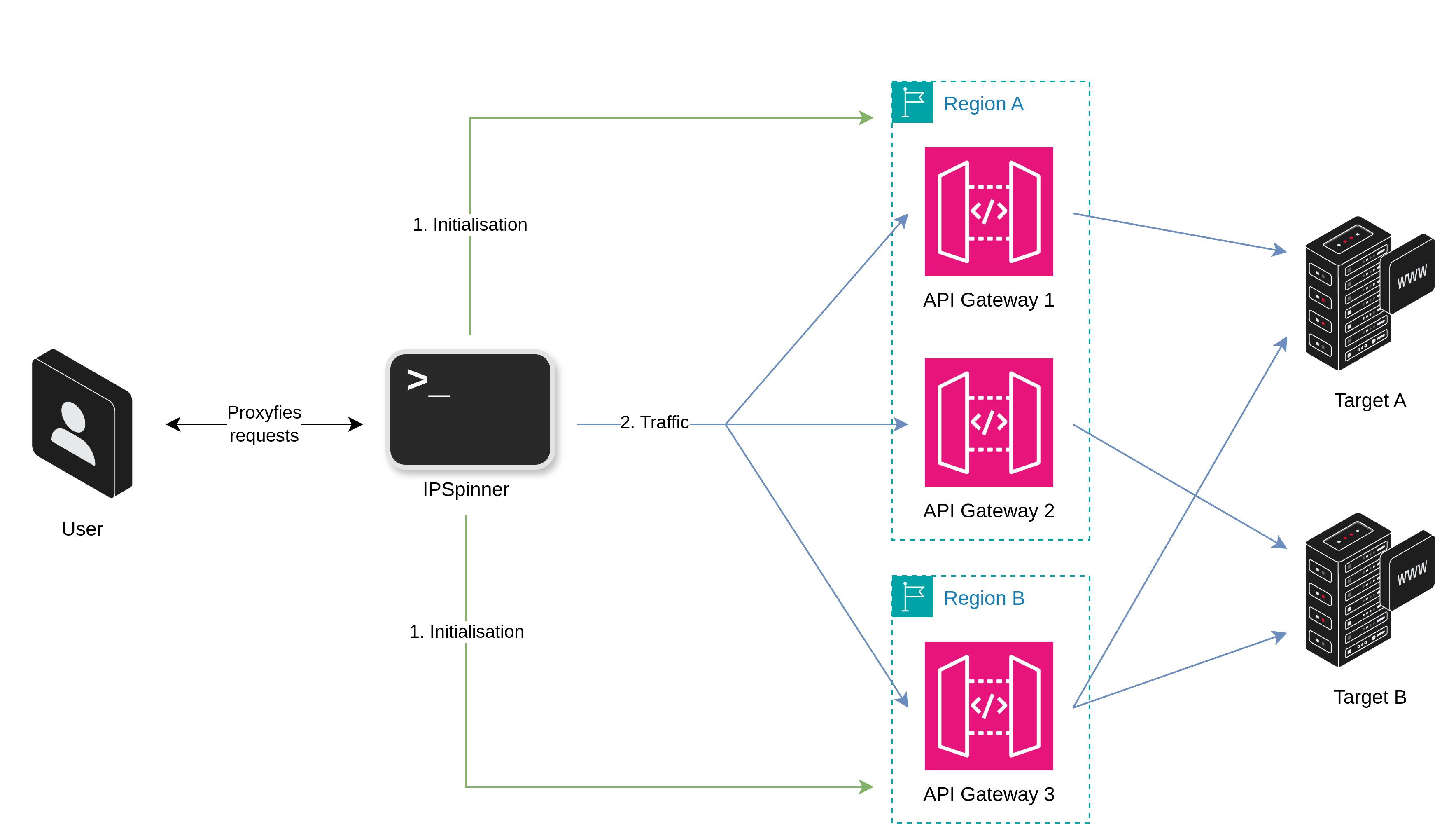 Figure 2: AWS API Gateway - Overall diagram
The next graph, made in October 2024, shows the number of unique IP addresses available per AWS region according to the number of requests sent. Most of the regions offer more than 100 IP addresses and multiple regions can be used at the same time, allowing the user to proxifies his requests through thousands of worldwide addresses.
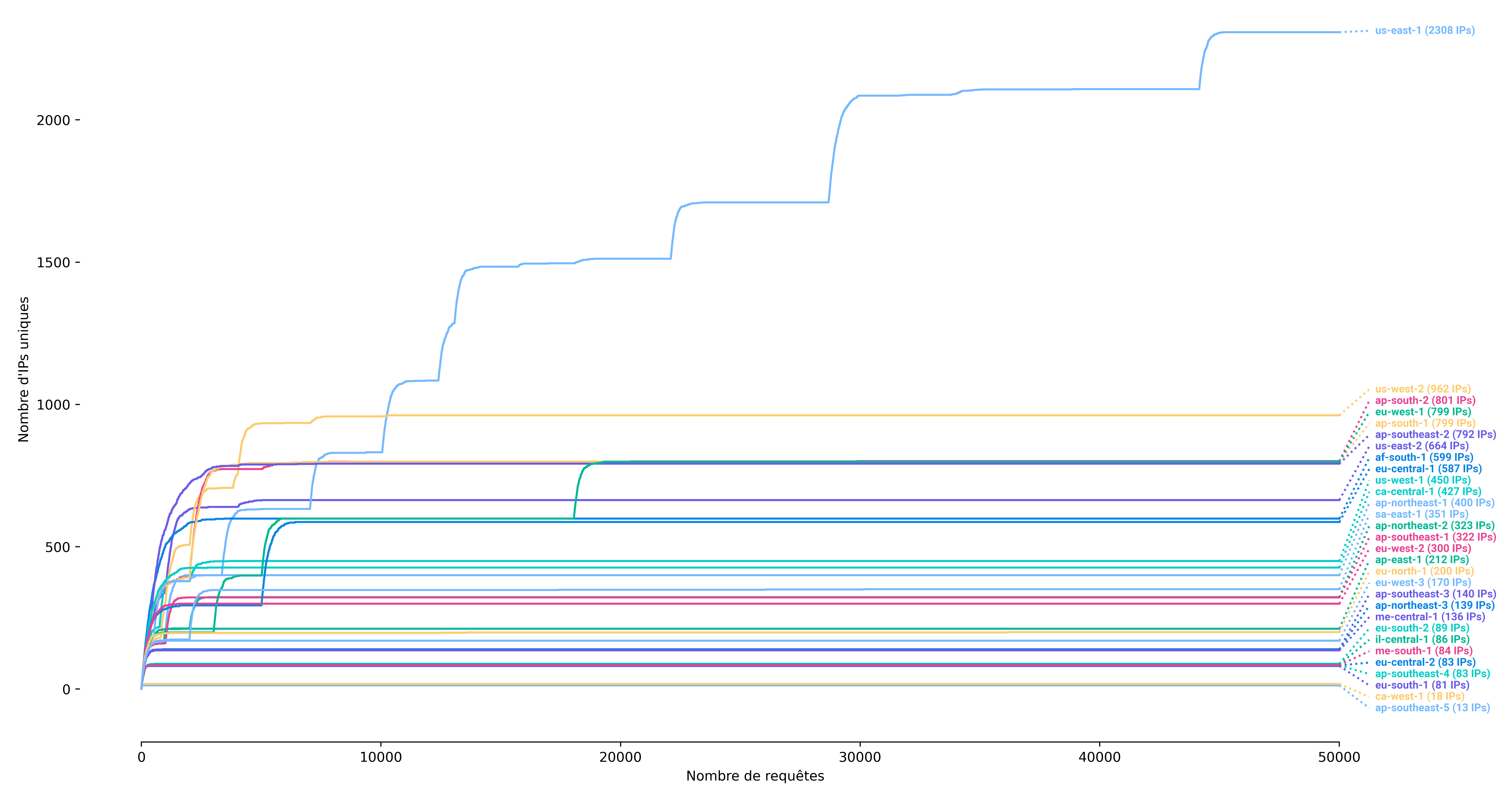 Figure 3: AWS API Gateway - Available IP addresses per region
Finally, the Figure 4 shows, with a logarithmic green color level, how many addresses are available per country. It demonstrates that the user has the possibility to falsify his source IP address with addresses on any continent.
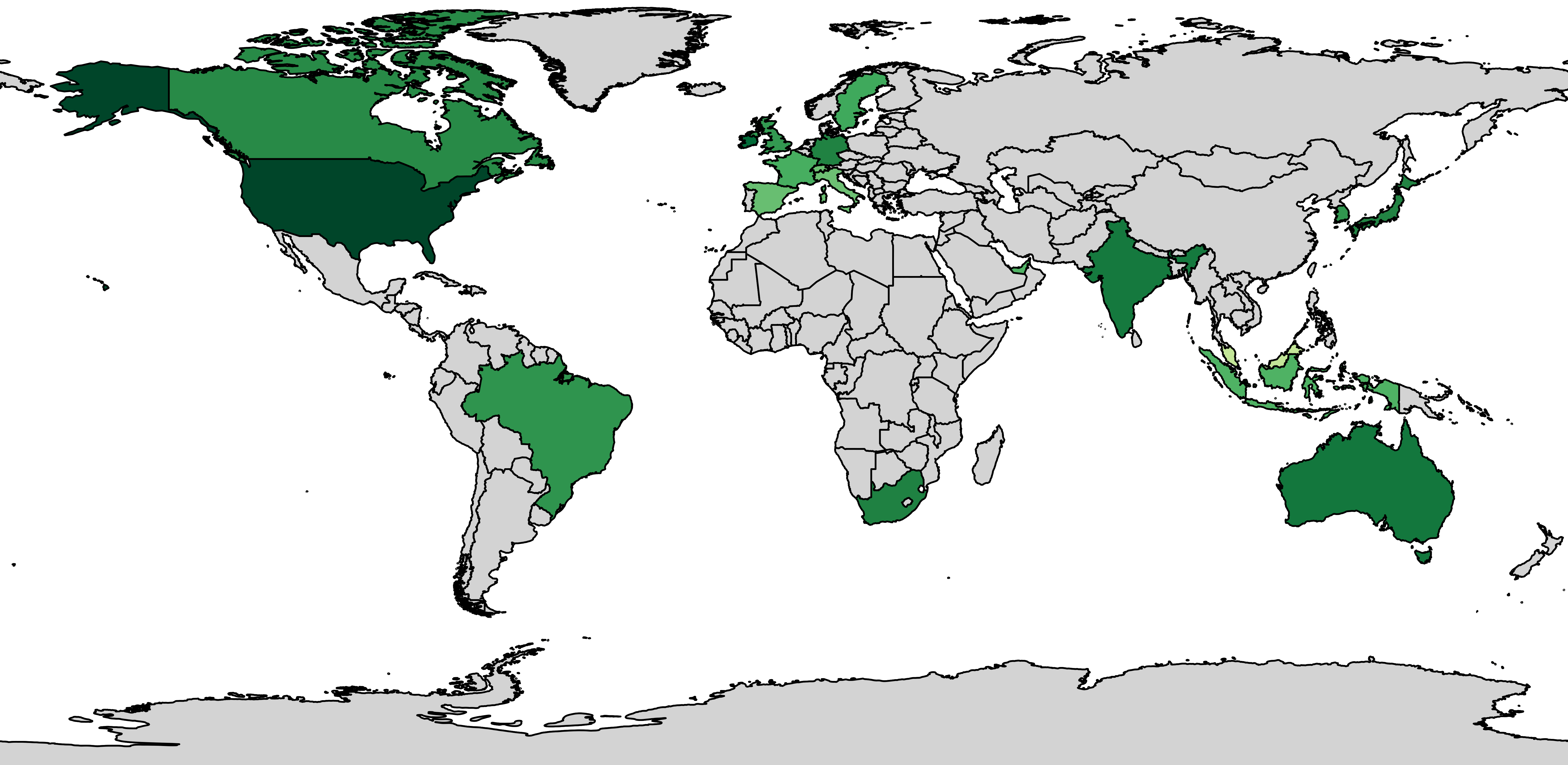 Figure 4: AWS API Gateway - IP addresses per country
IPSpinner implements a rotation feature that reguarly deletes and renews created FireProx instances. As the following graph shows, rotating a FireProx instance may deliver a new subset of IP. However, each AWS region has a limited set of IP and therefore at some point, rotations will not deliver new IPs.
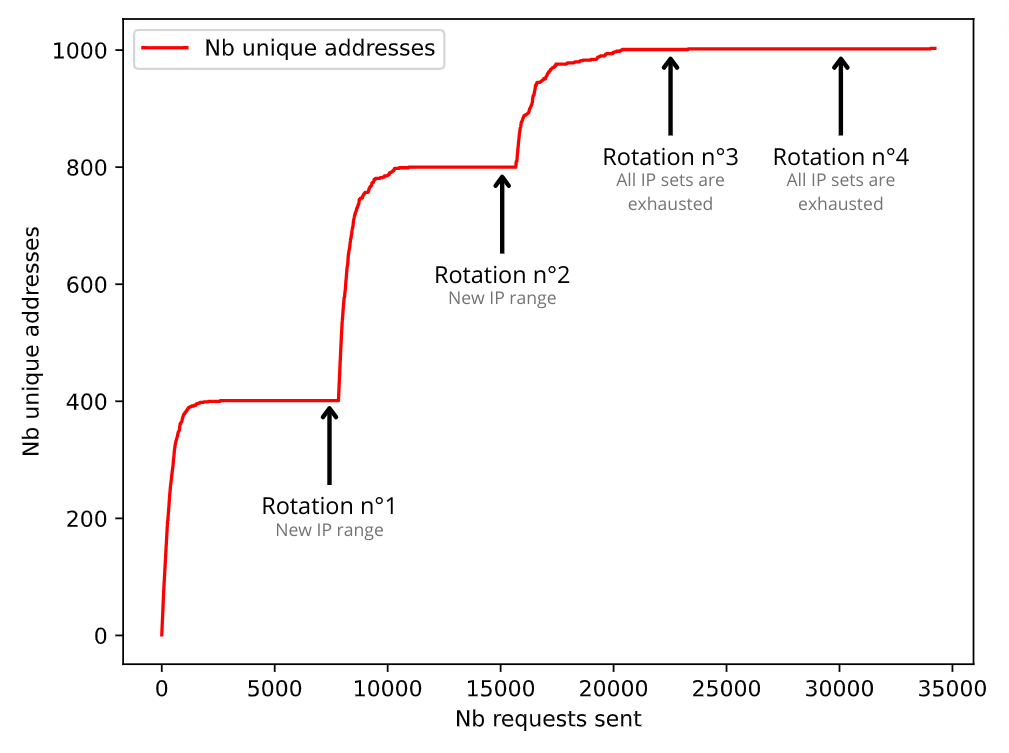 Figure 5: AWS API Gateway - Rotating process
This launcher implements a preloading procedure. As said before, it is not mandatory, but can prevent some reconfiguration delays or synchronisation errors during the first seconds after being reconfigured.
Moreover, API Gateways set by default a X-Forwarded-For header, which cannot be deleted but can be overrided. Thus, the user can specify in the IPSpinner configuration an IP address range from which an random IP will be chosen for each request (IPv4 or IPv6 range).
IPSpinner leverages Azure Cloud Shell to send requests. An Azure Cloud Shell is an interactive, authenticated, browser-accessible terminal for managing Azure resources. Cloud Shell runs on a temporary host provided on a per-session, per-user basis.
Thus, IPSpinner uses several Azure users for whom a Cloud Shell session is prepared. Then, each request will be redirected to an initialised Cloud Shell, before being renewed to reset its IP address.
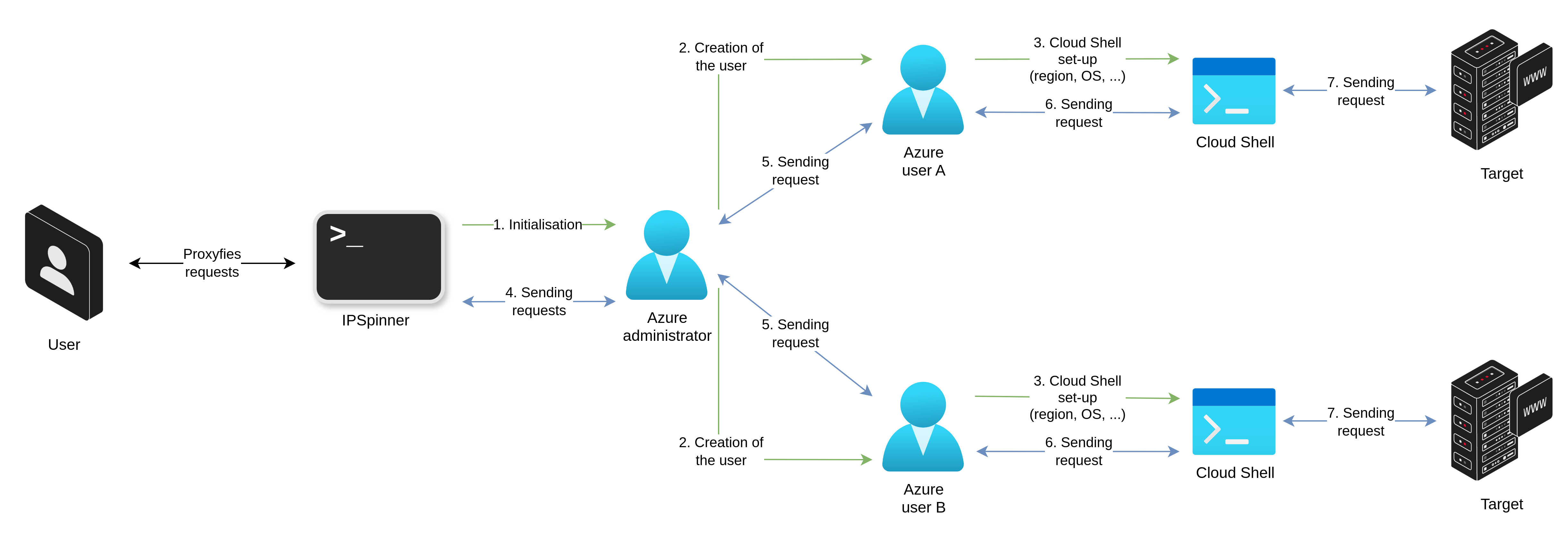 Figure 6: Azure Cloud Shell - Overall diagram
As the following graph shows, the different regions available to deploy Cloud Shells sessions each offer dozens of IP addresses. The user can configure multiple regions at the same time to increase his IP pool.
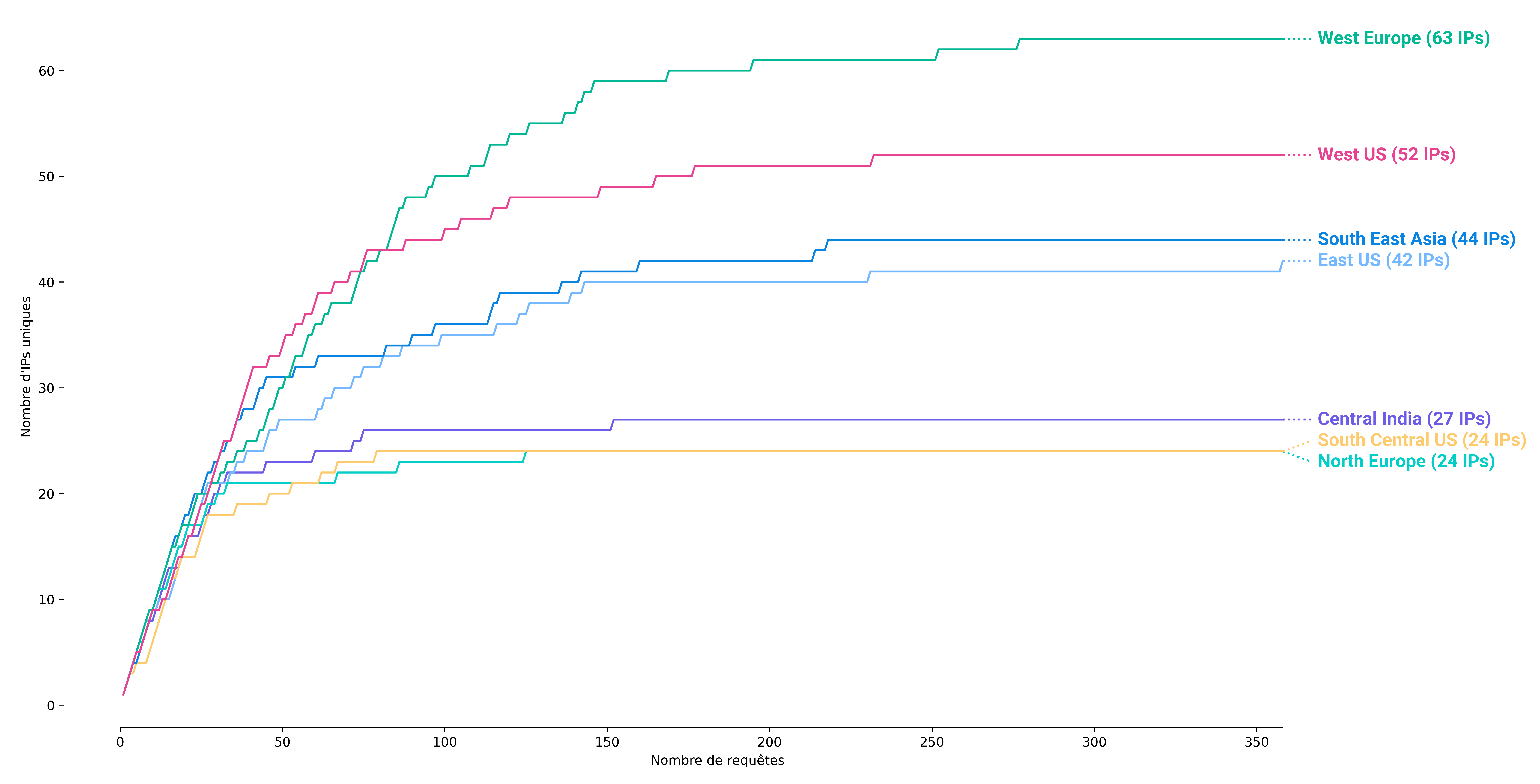 Figure 7: Azure Cloud Shell - Available IP addresses per region
However, IP addresses are more concentrated than for AWS API Gateway. As the following map illustrates, most of them are located in the US, in Europe and in India.






