
Skip to content
KitploitKITPLOIT
ToolsExploitsBlog
Log in
Submit
ToolsExploitsBlog
Submit

Hacking, PenTest, and Cybersecurity Tools for Your Security Arsenal!

Kitploit is a directory of hacking, cybersecurity, and pentesting tools. Discover the latest project updates to find vulnerabilities, analyze systems, automate testing, and strengthen your security.

FeedsContactPrivacy© 2026 Kitploit

Tool Directory

Categories

View all categories
Loading categories
CVE-2026-98260-Xiaomi-17-Pro-Max — One-click root for Xiaomi 17 Pro Max (popsicle) via CVE-2026-98260 kernel UAF: staged privilege escalation, uid 0 verification, and KernelSU late-load in a single scripted workflow. | Kitploit
Tools/GitHubGitHub/starriv/cve-2026-98260-xiaomi-17-pro-max
Android SecurityPrivilege EscalationPersistence MechanismsExploitationMobile App PentestingReverse EngineeringPost-ExploitationMobile SecurityPayload Development
Share
GitHubstarriv/cve-2026-98260-xiaomi-17-pro-max

CVE-2026-98260-Xiaomi-17-Pro-Max

One-click root for Xiaomi 17 Pro Max (popsicle) via CVE-2026-98260 kernel UAF: staged privilege escalation, uid 0 verification, and KernelSU late-load in a single scripted workflow.

View Repository
31103 days agoReviewed by Kitploit

CVE-2026-98260-Xiaomi-17-Pro-Max

Xiaomi 17 Pro Max (popsicle) temporary root · KernelSU jailbreak mode

⚠️ For devices you own and are authorized to use only. Root reduces device security and may affect warranty, Play Integrity, and banking apps; a failed exploit has a very small chance of causing a kernel panic reboot. Use at your own risk.

Supported targets

ItemValue
Device / codename / modelXiaomi 17 Pro Max / popsicle / 2509FPN0BC
OSHyperOS 4, Android 17 (verified OS4.0.4.0.XPBCNXM / OS4.0.5.0.XPBCNXM / OS4.0.6.0.XPBCNXM, identical kernel string)
Kernel6.12.69-android16-6-g43b5ab7e247d-abogki558343811-4k
Page size / architecture4 KiB / aarch64
StatusVerified on real device (root + KernelSU jailbreak mode)

The script validates the kernel verbatim against uname -r and whitelists the system build number (OS4.0.4.0.XPBCNXM / OS4.0.5.0.XPBCNXM / OS4.0.6.0.XPBCNXM); do not use it on other models/kernels.

Demo

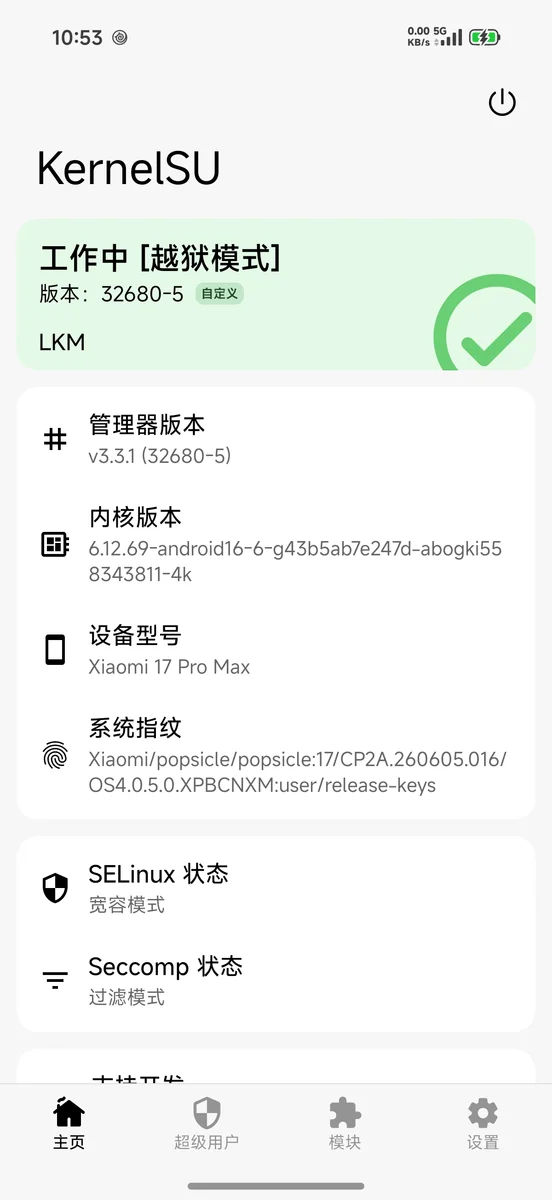
The KernelSU manager shows Working [Jailbreak mode] on this device (LKM late-load):
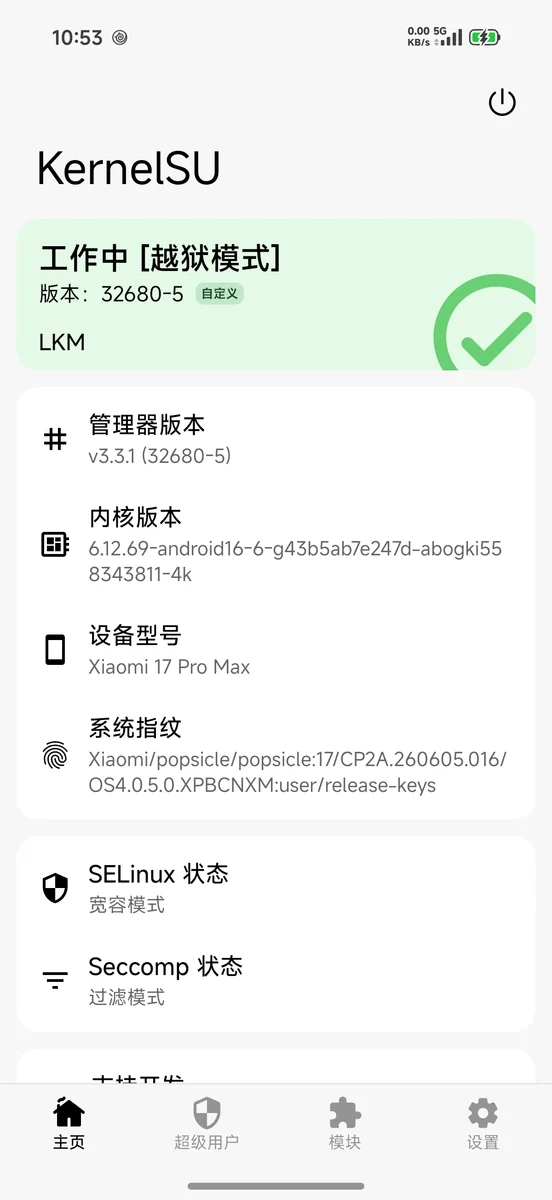
KernelSU Working [Jailbreak mode]

Requirements

Host

  • macOS or Linux
  • adb (Android platform-tools), with USB debugging authorized on the phone
  • curl, python3, unzip
  • Optional: Android NDK (only needed to recompile the device-side binary)

Phone

  • Xiaomi 17 Pro Max, with OS / kernel matching the table above
  • Developer options + USB debugging enabled, host authorized
  • No pre-existing root required, no Bootloader unlock required

Network

  • On the first run, KernelSU v3.3.1's LKM / manager / ksud will be pulled from GitHub into assets/ksu/

Quick start

Choose either method. Most people use Method A (let AI run it for you).

Method A: Let AI run it for you (recommended)

  1. Connect the phone and confirm adb devices shows device (not unauthorized).
  2. Open this repository directory as the workspace in DeepSeek Harness and create a new session.
  3. Paste the entire prompt from docs/AI-PORTING.md.
  4. Fill in the four "target device" lines at the top of the prompt (model / build number / uname -r / whether already rooted).
  5. Send. The AI will first do Phase 0 read-only reconnaissance and give you the "device fact table + portability conclusion" for confirmation, then proceed in phases after confirmation.

The AI reuses the scripts already verified in this repository (check.sh / root.sh / load-ksu.sh) and will not rewrite the exploit code; it is responsible for verifying the target, executing in phases, interpreting failures, and recording results.

Method B: Manual execution

./scripts/run.sh

Run in sequence: environment self-check → if the current boot has no root, retry CVE-2026-98260 across reboots (default maximum of 8 boots) → verify uid 0 → install and load KernelSU jailbreak mode → print final status.

Common parameters:

./scripts/run.sh --check-only        # 只自检,不动手机
./scripts/run.sh --no-ksu            # 只要 root,不装 KernelSU
./scripts/run.sh --no-reboot         # 只在当前 boot 试一次,不重启
./scripts/run.sh --boots 12          # 最多允许 12 次开机尝试
./scripts/run.sh --serial <序列号>   # 多设备时指定

CVE exploitation depends on page reclaim timing, and the success rate is probabilistic; run.sh may restart the phone multiple times (each failure requires a full reboot), which is normal behavior.

Running Steps (Step by Step)

1. Connect the Phone

adb devices      # 显示 device(不是 unauthorized)

2. Environment Self-Check

./scripts/check.sh

Expected output contains: OK: target and environment gates look usable.

3. Gaining root (three-stage exploitation)

./scripts/root.sh --escalate     # 当前 boot 试一次
# 或
./scripts/autoretry.sh 8         # 跨重启自动重试(推荐,run.sh 内部也用它)

On success:

adb shell /data/local/tmp/pc98260-su -c 'id'   # uid=0(root)

4. Loading KernelSU (Jailbreak Mode)

./scripts/load-ksu.sh

The manager should display Working [Jailbreak Mode].

5. Verification

adb shell su -c 'id; getenforce'
adb shell su -c '/data/adb/ksud debug info'    # 应含 late_load: true

Notes

  1. Temporary root: root and the kernelsu module are only valid for this boot session; after a reboot, just run ./scripts/run.sh again.
  2. One chance per boot: if a stage fails, it leaves behind a PARKED zombie and the script stops; do not kill it manually, the only way to clean up is a full reboot.
  3. Multiple reboots may be needed: page reclaim hits are probabilistic, failure is the norm, just try a few more times.
  4. No partition writes: boot / init_boot / vbmeta / system are never touched, and the Bootloader stays locked.
  5. SELinux: it is briefly set to Permissive during exploitation; once KernelSU is ready, the script switches it back to Enforcing.
  6. Do not install Magisk: Magisk requires patching boot/init_boot or unlocking the BL, which conflicts with this approach; use only KernelSU.
  7. Detection risk: the kernel becomes tainted from loading an unsigned LKM, so banking / Play Integrity-style checks may fail.
  8. Data risk: there is a very small chance that exploitation failure causes a kernel panic and reboot, potentially losing unsaved data; back up important data first.
  9. OTA: if a system update fixes CVE-2026-98260, this approach stops working. You can first disable system updates to pin it: ./scripts/privacy-clean.sh apply --only ota (uninstalls com.android.updater + turns off the update switch; to roll back use restore, or pm install-existing --user 0 com.android.updater).

Directory Structure

Download Tool

Most Popular

View all →

Discover the most used tools by our community.

  • 1

    OsintHunter

    letox4/osinthunter

    🎯 The ultimate OSINT toolkit: investigation graph, confidence scoring, alias families, map, timeline and reports. 49 modules, 400+ sites, no API keys required.

    938
  • 2

    ghostlock-app

    yukonga/ghostlock-app

    GhostLock One-Tap Execution App (CVE-2026-43499)

    556
  • 3

    redforge

    cybersecurity91/redforge

    Browser-side red team toolkit with 102 offline tools for recon, payload generation, credential attacks, crypto, encoding and engagement reporting.

    352
  • 4

    ARTEX

    baarai/artex

    LLM multi-agent autonomous penetration testing platform with planner/worker agents, asset and exploration graphs, MITM traffic recording, and vulnerability retesting.

    343
  • 5

    looking-glass

    anonghosty/looking-glass

    CSIRT platform that ingests Shadowserver reports into MongoDB and replays them as interactive maps, analysis, findings, advisories and executive dashboards.

    336
  • 6

    CyberStrikeAI

    ed1s0nz/cyberstrikeai

    The system of action for AI-native cybersecurity—where intent becomes governed execution, evidence becomes operational memory, and every operation improves the next.

    291

Explore all tools

Browse our collection of tools

View all tools →





