
Skip to content
KitploitKITPLOIT
ToolsExploitsBlog
Log in
Submit
ToolsExploitsBlog
Submit

Hacking, PenTest, and Cybersecurity Tools for Your Security Arsenal!

Kitploit is a directory of hacking, cybersecurity, and pentesting tools. Discover the latest project updates to find vulnerabilities, analyze systems, automate testing, and strengthen your security.

FeedsContactPrivacy© 2026 Kitploit

Tool Directory

Categories

View all categories
Loading categories
DLLHijackingScanner — This is a PoC for bypassing UAC using DLL hijacking and abusing the "Trusted Directories" verification. | Kitploit
Tools/GitHubGitHub/secuproject/dllhijackingscanner
Privilege EscalationVulnerability ScannersExploitation
GitHubsecuproject/dllhijackingscanner

DLLHijackingScanner

This is a PoC for bypassing UAC using DLL hijacking and abusing the "Trusted Directories" verification.

View Repository
Share
28351435 years agoReviewed by Kitploit

UAC bypass - DLL hijacking

Description

This is a PoC for bypassing UAC using DLL hijacking and abusing the "Trusted Directories" verification.

Summary

  • Generate Header from CSV
    • Arguments
  • Generate the list of vulnerable PE and DLL
    • DLLHijacking.exe
    • Log file
    • Execution
    • Result
  • test.dll
  • Sources

Generate Header from CSV

The python script CsvToHeader.py can be used to generate a header file. By default it will use the CSV file dll_hijacking_candidates.csv that can be found here: dll_hijacking_candidates.csv.

The script will check for each portable executable(PE) the following condition:

  • If the PE exists in the file system.
  • In the manifest of the PE, if the requestedExecutionLevel is set to one of the following values:
    • asInvoker
    • highestAvailable
    • requireAdministrator
  • In the manifest if the autoElevate is set to true:
    <autoElevate>true</autoElevate>
    
  • If the user specified the -c argument, the script will check if the DLL to hijack is in the list of DLLs imported form PE table.

Arguments

> python .\CsvToHeader.py -h
usage: CsvToHeader.py -f [DLL_PATH] -c

CsvToHeader can be used to generate a header file from a CSV.

optional arguments:
  -h, --help      show this help message and exit
  -f  [DLL_PATH]  Path of the csv to convert (default="dll_hijacking_candidates.csv")
  -c              Enable import dll in PE (default=False)
  -v, --version   Show program's version number and exit

To generate the header file you can use the following command:

python CsvToHeader.py > dll_hijacking_candidates.h

Generate the list of vulnerable PE and DLL

The files that will be used are DLLHijacking.exe and test.dll.

DLLHijacking.exe

DLLHijacking.exe is the file that will be used to generate the list of vulnerable PE. It will perform the following steps:

  1. CreateFakeDirectory

    Function that create a directory in C:\windows \system32.

  2. Copy Files in the new directory

    • from C:\windows\system32\[TARGET.EXE] to C:\windows \system32\[TARGET.EXE]
    • from [CUSTOM_DLL_PATH] to C:\windows \system32\[TARGET.DLL]
  3. Trigger

    Run the executable from C:\windows \system32\[TARGET.EXE]

  4. CleanUpFakeDirectory

    Function that delete the directory created in step 1 and files from step 2.

  5. CheckExploit

    Check the content of the file C:\ProgramData\exploit.txt to see if the exploit was successful.

Log file

DLLHijacking.exe will always generate a log file exploitable.log with the following content:

  • 0 or 1 to indicates whether the exploit was able to bypass the UAC.
  • The executable name
  • The dll name

E.g.

1,computerdefaults.exe,PROPSYS.dll
0,computerdefaults.exe,Secur32.dll

Execution

Command to run:

DLLHijacking.exe [DLL_PATH]

if no argument is passed, the script will use the DLL test.dll which is stored in the resouce of DLLHijacking.exe.

Result

Tested on Windows 10 Pro (10.0.19043 N/A Build 19043).
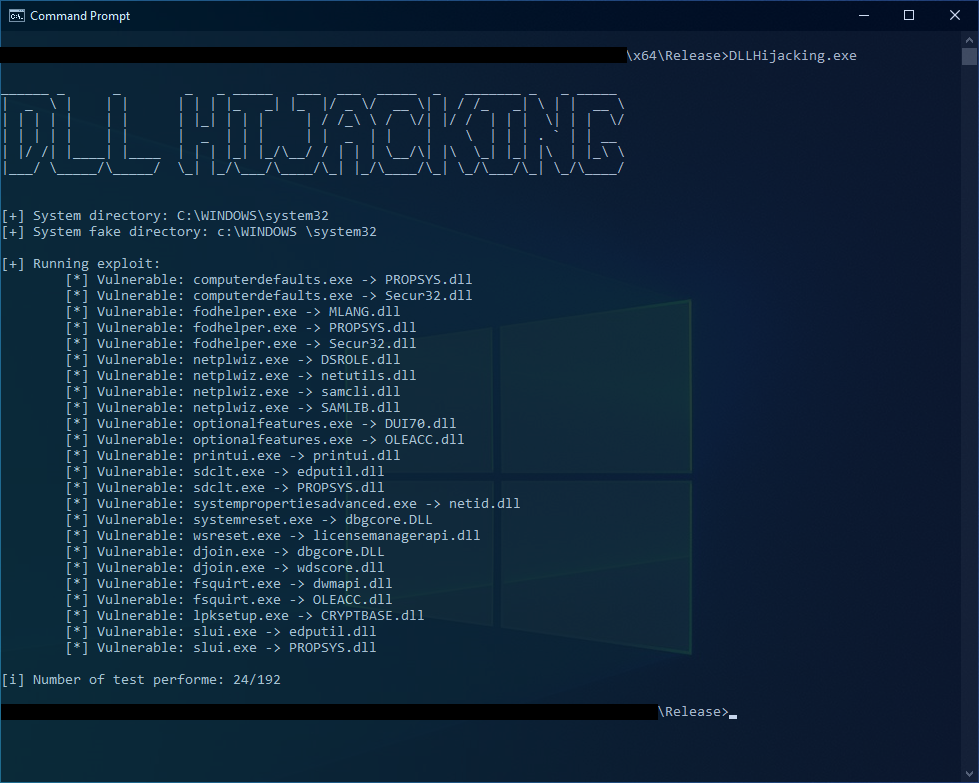
ExploitResult

test.dll

test.dll is a simple dynamic library that will be use to see if the exploit is successfully. The DLL will create a file C:\ProgramData\exploit.txt with the following content:

  • 0 or 1 to indicates whether the exploit was able to bypass the UAC.
  • The executable name
  • The DLL name

This file will be deleted once the exploit is complete.

Sources:

  • https://www.wietzebeukema.nl/blog/hijacking-dlls-in-windows
  • https://github.com/wietze/windows-dll-hijacking/
  • https://github.com/wietze/windows-dll-hijacking/blob/master/dll_hijacking_candidates.csv
  • https://medium.com/tenable-techblog/uac-bypass-by-mocking-trusted-directories-24a96675f6e

Legal Disclaimer:

This project is made for educational and ethical testing purposes only. Usage of this software for attacking targets without prior mutual consent is illegal. 
It is the end user's responsibility to obey all applicable local, state and federal laws. 
Developers assume no liability and are not responsible for any misuse or damage caused by this program.

Download Tool

Most Popular

View all →

Discover the most used tools by our community.

  • 1

    OsintHunter

    letox4/osinthunter

    🎯 The ultimate OSINT toolkit: investigation graph, confidence scoring, alias families, map, timeline and reports. 49 modules, 400+ sites, no API keys required.

    891
  • 2

    ghostlock-app

    yukonga/ghostlock-app

    GhostLock One-Tap Execution App (CVE-2026-43499)

    547
  • 3

    ARTEX

    baarai/artex

    LLM multi-agent autonomous penetration testing platform with planner/worker agents, asset and exploration graphs, MITM traffic recording, and vulnerability retesting.

    369
  • 4

    redforge

    cybersecurity91/redforge

    Browser-side red team toolkit with 102 offline tools for recon, payload generation, credential attacks, crypto, encoding and engagement reporting.

    366
  • 5

    looking-glass

    anonghosty/looking-glass

    CSIRT platform that ingests Shadowserver reports into MongoDB and replays them as interactive maps, analysis, findings, advisories and executive dashboards.

    309
  • 6

    CyberStrikeAI

    ed1s0nz/cyberstrikeai

    The system of action for AI-native cybersecurity—where intent becomes governed execution, evidence becomes operational memory, and every operation improves the next.

    282

Explore all tools

Browse our collection of tools

View all tools →





