
Next-generation dependency vulnerability scanner with reachability analysis, SBOM generation, license audit, and container image scanning for CI/CD integration.
OWASP dep-scan is a next-generation security and risk audit tool based on known vulnerabilities, advisories, and license limitations for project dependencies. Both local repositories and container images are supported as the input, and the tool is ideal for integration with ASPM/VM platforms and in CI environments.
Detailed data flows to identify both reachable and non-reachable paths in your application based on the full context.
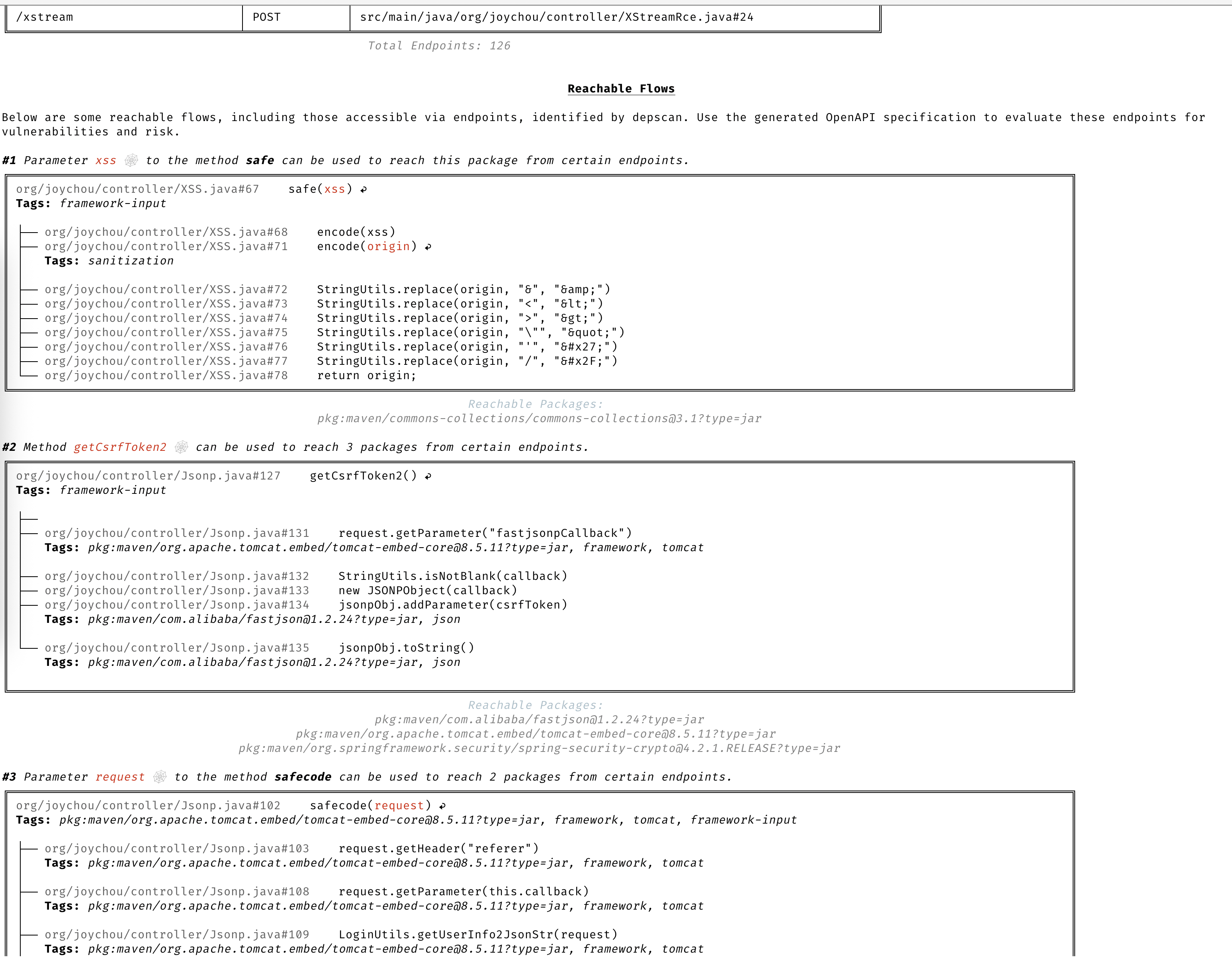
dep-scan computes reachability for seven language ecosystems through four slicers. A vulnerable package whose code is actually on an executed path is marked Reachable, while a package that is merely declared in the BOM but never called is not. Every slicer feeds the same shared, purl-keyed reachability engine, so the behavior is uniform across languages. Reachability is on by default (--reachability-analyzer FrameworkReachability); SemanticReachability additionally attributes reached services, endpoints, and post-build (binary/container) reachability.
For the concepts behind reachability and prioritization, read the reachability model and prioritization chapters. For per-language worked examples, see the Language Guides. For the compliance story (VDR and CSAF VEX), see the VDR guide and the CSAF VEX guide.
Reachability is on by default under --profile research, which is what dep-scan uses when reachability is on. The commands below are enough to get started; the per-language guides cover binary resolution, backend and network safety, restore requirements, and worked examples on the in-repo fixtures.
Rust (rusi). cdxgen runs rusi and persists its report, which dep-scan converts into the shared pipeline, so a crate that is actually called (for example time::now() for RUSTSEC-2020-0071) is Reachable while one merely present is not. See the Rust reachability guide.
depscan -i ./my-rust-app -o ./reports --profile research
Go (golem). dep-scan invokes golem directly for Go projects (needs go on PATH), marking a module Reachable when its functions are on a traced path. Use --go-analyzer-network offline for untrusted repos with a warm module cache. See the Go reachability guide.
depscan -i ./my-go-app -o ./reports -t go
.NET (dosai). cdxgen runs dosai, which emits an explicit per-package reachability verdict (PackageReachability with ReachabilityKind and Confidence) that dep-scan treats as authoritative, so a NuGet package actually called (for example JsonConvert.DeserializeObject on a controlled input) is Reachable. Scan a restored tree for versioned purls. See the .NET reachability guide.
depscan -i ./my-dotnet-app -o ./reports -t dotnet
JVM, JavaScript/TypeScript, Python, and PHP (atom). These four ecosystems share the atom slicer, which builds a language-agnostic intermediate representation and performs static slicing. See the JVM, JS, Python, and PHP reachability guide.
depscan --profile research -t java -i ./my-java-app -o ./reports --explain
To move beyond framework-forward reachability to endpoint, service, and post-build tiers, pass --reachability-analyzer SemanticReachability with a --bom-dir of lifecycle BOMs. See the semantic reachability guide.
Understand CVEs clearly without having to read through the description.

Only focus on CVEs that need your attention.

Always stay a step ahead with advanced vulnerability and exploit prediction.

dep-scan is ideal for use during continuous integration (CI) and as a local development tool.
sudo npm install -g @cyclonedx/cdxgen
# Normal version recommended for most users (MIT)
pip install owasp-depscan
# For a full version with all extensions and server mode (Multiple Licenses)
pip install owasp-depscan[all]
This would install two commands called cdxgen and depscan.
You can invoke the scan command directly with the various options.
cd <project to scan>
depscan --src $PWD --reports-dir $PWD/reports
The full list of options is below:
usage: depscan [-h] [--config CONFIG] [--no-banner] [-i SRC_DIR_IMAGE] [-o REPORTS_DIR] [--csaf]
[--profile {appsec,research,operational,threat-modeling,license-compliance,generic,machine-learning,ml,deep-learning,ml-deep,ml-tiny}]
[--lifecycle {pre-build,build,post-build} [{pre-build,build,post-build} ...]]
[--technique {auto,source-code-analysis,binary-analysis,manifest-analysis,hash-comparison,instrumentation,filename} [{auto,source-code-analysis,binary-analysis,manifest-analysis,hash-comparison,instrumentation,filename} ...]]
[--bom-engine {auto,CdxgenGenerator,CdxgenServerGenerator,CdxgenImageBasedGenerator,BlintGenerator} |
--vulnerability-analyzer {auto,VDRAnalyzer,LifecycleAnalyzer}] [--reachability-analyzer {off,FrameworkReachability,SemanticReachability}] [--no-suggest]
[--risk-audit] [--cdxgen-args CDXGEN_ARGS] [--private-ns PRIVATE_NS] [-t PROJECT_TYPE [PROJECT_TYPE ...]] [--bom BOM | --bom-dir BOM_DIR | --purl SEARCH_PURL]
[--report-template REPORT_TEMPLATE] [--report-name REPORT_NAME] [--deep] [--fuzzy-search] [--search-order {purl,pcu,cpe,cpu,url}] [--no-universal]
[--no-vuln-table] [--server] [--server-host SERVER_HOST] [--server-port SERVER_PORT] [--cdxgen-server CDXGEN_SERVER] [--debug] [-q | --explain] [-v]
Fully open-source security and license audit for application dependencies and container images based on known vulnerabilities and advisories.
options:
-h, --help show this help message and exit
--config CONFIG Path to the configuration file. Default: $PWD/.config/depscan.toml
--no-banner Do not display the logo and donation banner. Please make a donation to OWASP before using this argument.
-i, --src SRC_DIR_IMAGE
Source directory or container image or binary file
-o, --reports-dir REPORTS_DIR
Reports directory
--csaf Generate a OASIS CSAF VEX document
--profile {appsec,research,operational,threat-modeling,license-compliance,generic,machine-learning,ml,deep-learning,ml-deep,ml-tiny}
Profile to use while generating the BOM. For granular control, use the arguments --bom-engine, --vulnerability-analyzer, or --reachability-analyzer.
--lifecycle {pre-build,build,post-build} [{pre-build,build,post-build} ...]
Product lifecycle for the generated BOM. Multiple values allowed.
--technique {auto,source-code-analysis,binary-analysis,manifest-analysis,hash-comparison,instrumentation,filename} [{auto,source-code-analysis,binary-analysis,manifest-analysis,hash-comparison,instrumentation,filename} ...]
Analysis technique to use for BOM generation. Multiple values allowed.
--bom-engine {auto,CdxgenGenerator,CdxgenServerGenerator,CdxgenImageBasedGenerator,BlintGenerator}
BOM generation engine to use. Defaults to automatic selection based on project type and lifecycle.
--vulnerability-analyzer {auto,VDRAnalyzer,LifecycleAnalyzer}
Vulnerability analyzer to use. Defaults to automatic selection based on bom_dir argument.
--reachability-analyzer {off,FrameworkReachability,SemanticReachability}
Reachability analyzer to use. Default FrameworkReachability.
--no-suggest Disable suggest mode
--risk-audit Perform package risk audit (slow operation). Npm only.
--cdxgen-args CDXGEN_ARGS
Additional arguments to pass to cdxgen
--private-ns PRIVATE_NS
Private namespace to use while performing oss risk audit. Private packages should not be available in public registries by default. Comma separated
values accepted.
-t, --type PROJECT_TYPE [PROJECT_TYPE ...]
Override project types if auto-detection is incorrect. Multiple values supported.
--bom BOM Examine using the given Software Bill-of-Materials (SBOM) file in CycloneDX format. Use cdxgen command to produce one.
--bom-dir BOM_DIR Examine all the Bill-of-Materials (BOM) files in the given directory.
--purl SEARCH_PURL Scan a single package url.
--custom-data CUSTOM_DATA
Path to directory containing custom vulnerability data (JSON/YAML/TOML) to override/augment results.
--report-template REPORT_TEMPLATE
Jinja template file used for rendering a custom report
--report-name REPORT_NAME
Filename of the custom report written to the --reports-dir
--deep Perform deep scan by passing this --deep argument to cdxgen. Useful while scanning docker images and OS packages.
--fuzzy-search Perform fuzzy search by creating variations of package names. Use this when the input SBOM lacks a PURL.
--search-order {purl,pcu,cpe,cpu,url}
Attributes to use while searching for vulnerabilities. Default: PURL, CPE, URL (pcu).
--no-universal Depscan would attempt to perform a single universal scan instead of individual scans per language type.
--no-vuln-table Do not print the table with the full list of vulnerabilities. This can help reduce console output.
--server Run depscan as a server
--server-host SERVER_HOST
depscan server host
--server-port SERVER_PORT
depscan server port
--server-allowed-hosts [SERVER_ALLOWED_HOSTS ...]
List of allowed hostnames or IPs that can access the server (e.g., 'localhost 192.168.1.10'). If unspecified, no host allowlist is
enforced.
--server-allowed-paths [SERVER_ALLOWED_PATHS ...]
List of allowed filesystem paths that can be scanned by the server. Restricts `path` parameter in /scan requests.
--cdxgen-server CDXGEN_SERVER
cdxgen server url. Eg: http://cdxgen:9090
--debug Run depscan in debug mode.
-q, --quiet Makes depscan quiet.
--explain Makes depscan to explain the various analysis. Useful for creating detailed reports.
--explanation-mode {Endpoints,EndpointsAndReachables,NonReachables,LLMPrompts}
Style of explanation needed. Defaults to Endpoints and Reachables.
--annotate Include the generated text VDR report as an annotation. Defaults to true when explain is enabled; false otherwise.
-v, --version Display the version
Pre-built single-file executables are attached to each GitHub release. They bundle a matching cdxgen SEA binary, so BOM generation works out of the box without installing Python, Node.js, or cdxgen.
Each asset has a matching .sha256 file for verification.
# Example: Linux x86_64
curl -LO https://github.com/owasp-dep-scan/dep-scan/releases/latest/download/depscan-linux-amd64
curl -LO https://github.com/owasp-dep-scan/dep-scan/releases/latest/download/depscan-linux-amd64.sha256
sha256sum -c depscan-linux-amd64.sha256
chmod +x depscan-linux-amd64
./depscan-linux-amd64 --src $PWD --reports-dir $PWD/reports
[!NOTE] The macOS binaries are currently unsigned. On first run macOS Gatekeeper may block them; clear the quarantine attribute with
xattr -d com.apple.quarantine ./depscan-darwin-arm64(or allow the binary under System Settings, Privacy & Security).
[!NOTE] The vulnerability database is still downloaded on first run. Only cdxgen is bundled, not the vuln DB. Use the
depscan-vdbcommand to select a specific database variant, for exampledepscan-vdb download --scope appfor a smaller app-only database. See the vulnerability database guide for the full image matrix.
All standalone binaries bundle blint, but not its optional nyxstone disassembly backend (which has no wheels and no Windows support). Deep disassembly-based binary analysis is therefore unavailable in the standalone binaries; use the Python package (pip install owasp-depscan[all]) if you need it.
Scan a Java project.
depscan --src <path> -o containertests -t java
Scan latest tag of the container shiftleft/scan-slim
depscan --src shiftleft/scan-slim -o containertests -t docker
Include license to the type to perform the license audit.
depscan --src shiftleft/scan-slim -o containertests -t docker license
You can also specify the image using the sha256 digest
depscan --src redmine@sha256:a5c5f8a64a0d9a436a0a6941bc3fb156be0c89996add834fe33b66ebeed2439e -o containertests -t docker
You can also save container images using docker or podman save command and pass the archive to depscan for scanning.
docker save -o /tmp/scanslim.tar shiftleft/scan-slim:latest
# podman save --format oci-archive -o /tmp/scanslim.tar shiftleft/scan-slim:latest
depscan --src /tmp/scanslim.tar -o reports -t docker
Refer to the docker tests under the GitHub action workflow for this repo for more examples.
ghcr.io/owasp-dep-scan/dep-scan container image can be used to perform the scan.
To scan with default settings
docker run --rm -v $PWD:/app ghcr.io/owasp-dep-scan/dep-scan depscan --src /app --reports-dir /app/reports
To scan with custom environment variables based configuration
docker run --rm \
-e VDB_HOME=/db \
-e GITHUB_TOKEN=<token> \
-v /tmp:/db \
-v $PWD:/app ghcr.io/owasp-dep-scan/dep-scan depscan --src /app --reports-dir /app/reports
In the above example, /tmp is mounted as /db into the container. This directory is then specified as VDB_HOME for caching the vulnerability information. This way the database can be cached and reused to improve performance.
dep-scan and cdxgen could be run in server mode. Use the included docker-compose file to get started.
git clone https://github.com/owasp-dep-scan/dep-scan
docker compose up
The bundled compose file sets DEPSCAN_SERVER_API_KEY to a development placeholder by default so the dep-scan service can bind to 0.0.0.0. Override this value before exposing the service outside a local lab.
depscan --server --server-host 127.0.0.1 --server-port 7070
If you need to bind dep-scan to a non-local address, set an API key first:
export DEPSCAN_SERVER_API_KEY="change-this-before-production"
depscan --server --server-host 0.0.0.0 --server-port 7070
[!IMPORTANT] dep-scan refuses to bind to a non-local address without either
DEPSCAN_SERVER_API_KEYor an explicit opt-in viaDEPSCAN_SERVER_ALLOW_UNAUTHENTICATED_BIND=true.
Use the /scan endpoint to perform scans.
[!NOTE] The
typeparameter is mandatory in server mode. When API key authentication is enabled, send the key usingX-API-KeyorAuthorization: Bearer <key>.
curl \
-H 'X-API-Key: dev-only-change-me' \
--json '{"path": "/tmp/vulnerable-aws-koa-app/sbom_file.json", "type": "js"}' \
http://127.0.0.1:7070/scan
curl \
-H 'Authorization: Bearer dev-only-change-me' \
--json '{"url": "https://github.com/HooliCorp/vulnerable-aws-koa-app", "type": "js"}' \
http://127.0.0.1:7070/scan \
-o app.vdr.json
curl -X POST \
-H 'X-API-Key: dev-only-change-me' \
-H 'Content-Type: multipart/form-data' \
-F 'file=@/tmp/app/sbom_file.json' \
http://127.0.0.1:7070/scan?type=js
Setup uv by following the official documentation.
uv sync --all-extras --all-packages
uv run depscan --help
uv run pytest
vdb --clean
vdb --download-image
# To scan containers and OS images
# vdb --download-full-image
uv run depscan --config .config/depscan-dev.toml
This would automatically use the configuration specified in the local config file.
Full documentation is at depscan.readthedocs.io. Key pages:
MIT License
This project was donated to the OWASP Foundation in August 2023 by AppThreat Ltd.
This project is funded through NGI Zero Core, a fund established by NLnet with financial support from the European Commission's Next Generation Internet program. Learn more at the NLnet project page.
| Language / ecosystem | Reachability engine | Default analyzer |
|---|
| Java / JVM (Groovy, Kotlin, Scala) | atom | FrameworkReachability |
| JavaScript / TypeScript | atom | FrameworkReachability |
| Python | atom | FrameworkReachability |
| PHP | atom | FrameworkReachability |
| Rust | rusi | FrameworkReachability |
| Go | golem | FrameworkReachability |
| .NET (C#, VB, F#, R) | dosai | FrameworkReachability |
| Platform | Architecture | Asset |
|---|
| Linux (glibc) | x86_64 | depscan-linux-amd64 |
| Linux (glibc) | arm64 | depscan-linux-arm64 |
| Linux (musl / Alpine) | x86_64 | depscan-linux-amd64-musl |
| Linux (musl / Alpine) | arm64 | depscan-linux-arm64-musl |
| macOS | Apple silicon | depscan-darwin-arm64 |
| macOS | Intel | depscan-darwin-amd64 |
| Windows | x86_64 | depscan-windows-amd64.exe |

