 nvlabs/cufuzz
A GPU-oriented coverage-guided fuzzer for userland CUDA applications

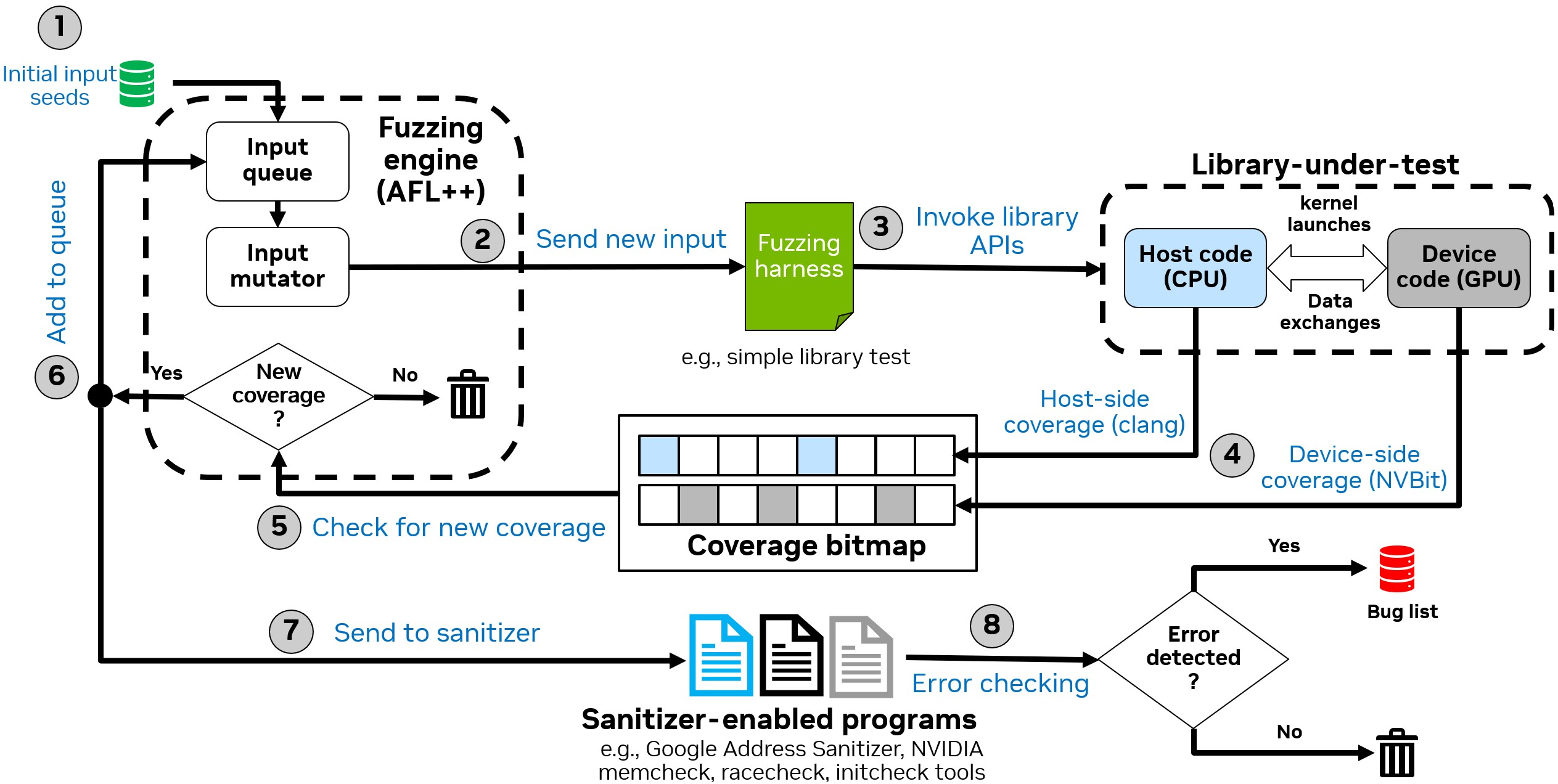
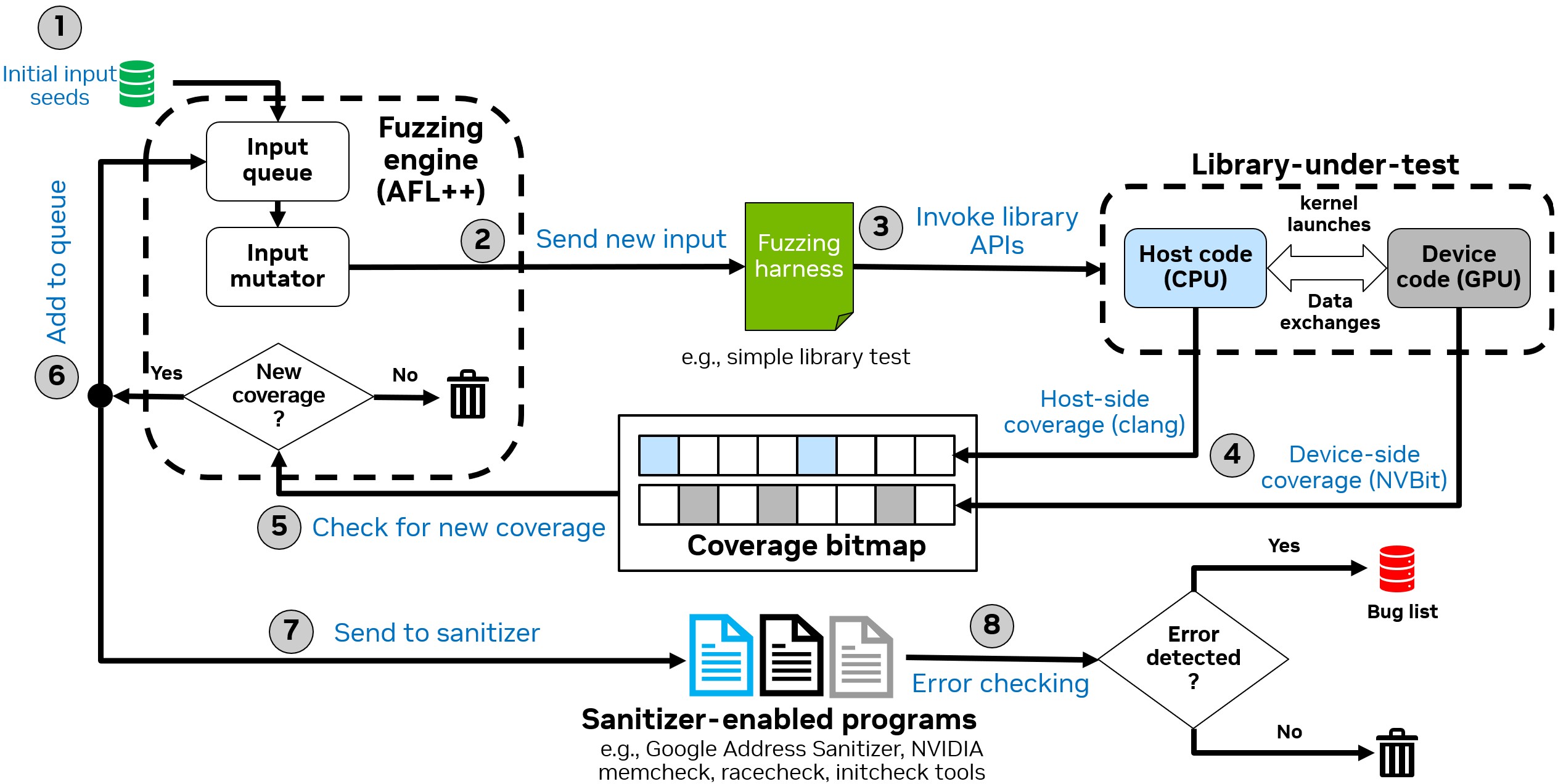
This repository contains the artifacts for cuFuzz, a GPU-oriented coverage-guided fuzzer for userland CUDA applications. cuFuzz combines host-side and device-side coverage collection with sanitization to effectively discover bugs in CUDA programs.
cufuzz-artifacts/
├── src/                        # Core cuFuzz components
│   ├── cufuzz_cov_nvbit/       # NVBit-based device-side coverage collection tool
│   └── cufuzz_sand/            # Sanitizer wrappers for SAND integration
├── targets/                    # Example fuzzing targets
│   └── sampleApp/              # Simple CUDA app with intentional bug for testing
├── scripts/                    # Evaluation and analysis scripts
├── Tools/                      # External dependencies
│   ├── AFLplusplus/            # AFL++ fuzzer (git submodule)
│   └── AFLplusplus.patch       # cuFuzz patches for AFL++
├── third-party-licenses/       # Third-party license files
│   ├── LICENSE_from_aflplusplus  # AFL++ Apache 2.0 license
│   └── LICENSE_from_nvbit        # NVBit NVIDIA EULA
├── images/                     # Documentation images
├── build.sh                    # Automated build script
├── verify_build.sh             # Quick verification test
├── Dockerfile                  # Docker container definition
├── LICENSE                     # Apache License 2.0
└── CONTRIBUTING.md             # Contribution guidelines and DCO
cuFuzz was tested on the following hardware configuration:
| Component | Specification |
|---|---|
| GPU | NVIDIA A40 (48GB VRAM, Compute Capability 8.6) |
| CPU | Intel Xeon Platinum 8362 (64 cores, 2 threads/core) |
| Memory | 120GB+ RAM recommended |
| Storage | 50GB+ free space for Docker image and fuzzing outputs |
Other GPUs: cuFuzz should work on other NVIDIA GPUs with Compute Capability ≥ 7.0. Adjust the GPU_ARCH environment variable accordingly (see GPU Architecture Configuration).
| Component | Version |
|---|---|
| Ubuntu | 22.04 LTS |
| NVIDIA Driver | 570.144 or compatible |
| CUDA Toolkit | 12.9 |
| Docker | 20.10+ (recommended) |
| nvidia-container-toolkit | Required for --gpus flag support |
| clang | 14 |
The fastest way to try cuFuzz is to use a Docker container. Our Dockerfile uses the official NVIDIA CUDA 12.9 development image.
tar -xzvf cufuzz-artifacts.tar.gz
cd cufuzz-artifacts

# Clone AFL++ (required dependency)
git clone https://github.com/AFLplusplus/AFLplusplus.git Tools/AFLplusplus
cd Tools/AFLplusplus
git checkout 9cac7ced05eb9f36c1d0b02ad594b3b09cd3938b
cd ../..
Build the Docker image, specifying your GPU architecture:
sudo docker build --build-arg GPU_ARCH=<your_arch> -t cufuzz .
GPU architecture reference:
| GPU Family | Architecture | Examples |
|---|---|---|
| Ampere (Data Center) | sm_80 | A100 |
| Ampere (Consumer/Pro) | sm_86 | A40, RTX 3090, RTX 3060 |
| Hopper | sm_90 | H100 |
| Ada Lovelace | sm_89 | RTX 4090, L40 |
| Turing | sm_75 | RTX 2080, T4 |
For a complete list, see: https://developer.nvidia.com/cuda-gpus
Example for A40/RTX 3090:
sudo docker build --build-arg GPU_ARCH=sm_86 -t cufuzz .
Note: This step may take several minutes depending on your machine and network connection.
sudo docker run --rm --gpus all -it -v /:/my_workspace cufuzz bash
Once the Docker container is running, verify the build:
root@container:~/cufuzz# ./verify_build.sh
Install the required dependencies on Ubuntu 22.04:
apt-get update && apt-get install -y build-essential python3-dev automake cmake git flex \
    bison libglib2.0-dev libpixman-1-dev python3-setuptools cargo libgtk-3-dev lld llvm llvm-dev \
    clang ninja-build cpio libcapstone-dev wget curl python3-pip vim less libxxhash-dev bc zlib1g-dev
Set the GPU_ARCH environment variable for your GPU (see architecture table above):
export GPU_ARCH=sm_86 # Change to match your GPU
cd Tools/AFLplusplus
patch -N -p1 < ../AFLplusplus.patch
export CXX=/usr/bin/clang++-14
export CC=/usr/bin/clang-14
make -j8 &> build.log
Download NVBit version 1.7.5:
mkdir -p Tools/NVBit
wget https://github.com/NVlabs/NVBit/releases/download/v1.7.5/nvbit-Linux-x86_64-1.7.5.tar.bz2
tar -xvf nvbit-Linux-x86_64-1.7.5.tar.bz2
mv nvbit_release_x86_64/* Tools/NVBit/
rm -rf nvbit_release_x86_64 nvbit-Linux-x86_64-1.7.5.tar.bz2
Build our NVBit coverage tool:
cd src/cufuzz_cov_nvbit/
export GPU_ARCH=sm_86  # Adjust for your GPU
ARCH=$GPU_ARCH make
cd src/cufuzz_sand
AFL_SAN_NO_INST=1 ../../Tools/AFLplusplus/afl-clang-fast -O2 wrapper_san.c -o wrapper_memcheck.out
AFL_SAN_NO_INST=1 ../../Tools/AFLplusplus/afl-clang-fast -DSAN_MODE_INIT -O2 wrapper_san.c -o wrapper_initcheck.out
AFL_SAN_NO_INST=1 ../../Tools/AFLplusplus/afl-clang-fast -DSAN_MODE_RACE -O2 wrapper_san.c -o wrapper_racecheck.out
AFL_SAN_NO_INST=1 ../../Tools/AFLplusplus/afl-clang-fast -DSAN_MODE_ASAN -O2 wrapper_san.c -o wrapper_asan.out
After building cuFuzz, invoke fuzzing using the following command:
CUFUZZ_MAP_SIZE=65536 AFL_SKIP_CPUFREQ=1 AFL_PRELOAD=/PATH/TO/cufuzz_cov.so \
    ./Tools/AFLplusplus/afl-fuzz -x sample.dict -i input_samples/ -o output_dir/ \
    -t 1000000 ./cuda_app.out @@
| Variable | Description | Example |
|---|---|---|
AFL_SKIP_CPUFREQ | Skip CPU scaling policy check | AFL_SKIP_CPUFREQ=1 |
AFL_PRELOAD | Path to NVBit coverage tool | AFL_PRELOAD=/path/to/cufuzz_cov.so |
| Variable | Description | Example |
|---|---|---|
CUFUZZ_MAP_SIZE | Coverage map size in bytes | CUFUZZ_MAP_SIZE=65536 |
COV_PERSISTENT | Enable AFL persistent mode support (0=no, 1=yes) | COV_PERSISTENT=1 |
GPU_ARCH | Target GPU architecture for builds | GPU_ARCH=sm_86 |
| Variable | Description | Example |
|---|---|---|
ORIGINAL_APP | Path to vanilla (uninstrumented) application | ORIGINAL_APP=./cuda_app |
SANITIZER_PATH | Path to compute-sanitizer binary | SANITIZER_PATH=/usr/local/cuda/bin/compute-sanitizer |
SANITIZER_ARG | Arguments for memcheck sanitizer | SANITIZER_ARG="--tool=memcheck --error-exitcode 99" |
SANITIZER_ARG_RACE | Arguments for racecheck sanitizer | SANITIZER_ARG_RACE="--tool=racecheck --error-exitcode 99" |
SANITIZER_ARG_INIT | Arguments for initcheck sanitizer | SANITIZER_ARG_INIT="--tool=initcheck --error-exitcode 99" |
The AFL_SAN_ABSTRACTION variable controls which inputs are fed to sanitizers:
| Value | Description | Sensitivity | Performance |
|---|---|---|---|
all_trace | Feed all inputs to sanitizers | Highest | Slowest |
simplify_trace | Feed inputs with unique execution paths | High | Balanced |
unique_trace | Feed inputs with unique coverage signatures | Medium | Faster |
coverage_increase | Feed only inputs causing coverage increase | Lowest | Fastest |
Recommended: AFL_SAN_ABSTRACTION=simplify_trace (default)
