
BlockGuard is a Windows Data Loss Prevention (DLP) agent that intercepts and controls file access at the process level. It ensures that only authorized processes — identified by executable path, cryptographic hash, Authenticode signature, and integrity level — can read protected files.





BlockGuard is a Windows Data Loss Prevention (DLP) agent that intercepts and controls file access at the process level. It ensures that only authorized processes — identified by executable path, cryptographic hash, Authenticode signature, and integrity level — can read protected files. All other processes are denied by default at the OS kernel level via NTFS ACLs.
| Feature | Description |
|---|---|
| Deny-by-Default ACLs | Protected files are locked down at agent startup — only SYSTEM and Administrators retain access |
| Real-Time ETW Monitoring | Kernel-level file I/O events captured via Event Tracing for Windows |
| 6-Layer Process Validation | Executable path, SHA-256 hash, Authenticode signature, owner SID, integrity level, parent process chain |
| DPAPI File Encryption | Protected files encrypted at rest using Windows Data Protection API |
| Auto-Revoking Temporary Access | Authorized processes receive time-limited ACL grants that auto-expire |
| Tamper Detection | Periodic integrity checks detect and auto-remediate ACL modifications |
| Structured Audit Logging | JSON audit trail of all access attempts (SIEM-ready) |
| Windows Service | Runs as a background Windows Service under NT AUTHORITY\SYSTEM |
BlockGuard uses a three-layer modular architecture:
┌─────────────────────────────────────────────────────────────────┐
│                    BlockGuard.Agent (Windows Service)            │
│                    Orchestrates all layers                       │
├───────────────────┬─────────────────────┬───────────────────────┤
│  Layer 1          │  Layer 2            │  Layer 3              │
│  MONITORING       │  POLICY & IDENTITY  │  PROTECTION           │
│                   │                     │                       │
│  • ETW Kernel     │  • Process Identity │  • DPAPI Encryption   │
│    File Trace     │    Validator (6     │  • Structured Audit   │
│  • ACL Enforcer   │    checks)          │    Logger (JSON)      │
│    (deny-by-      │  • Policy Evaluator │                       │
│    default)       │    (AND-logic       │                       │
│                   │    rules)           │                       │
│                   │  • Identity Cache   │                       │
│                   │    (LRU + TTL)      │                       │
└───────────────────┴─────────────────────┴───────────────────────┘
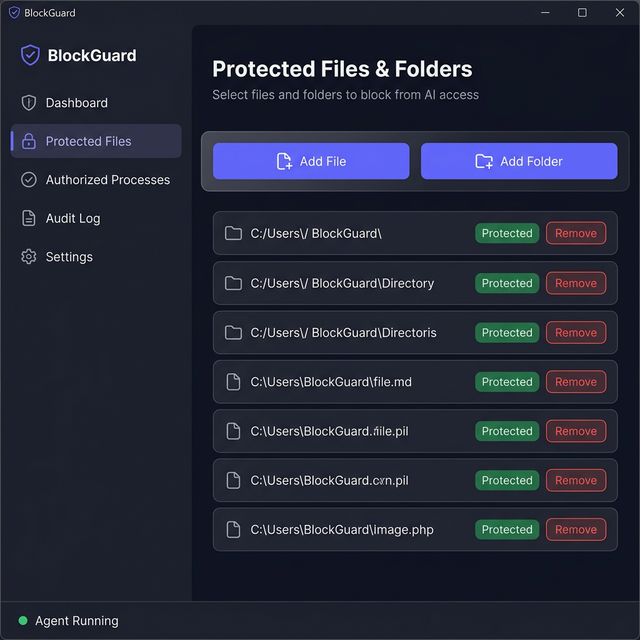
BlockGuard includes a WPF desktop application for managing protected files and folders through a visual interface — no need to edit appsettings.json manually.

# From the project root
dotnet run --project src/BlockGuard.UI
Note: The UI reads and writes
appsettings.jsonfrom the Agent project. After saving changes, restart the BlockGuard Agent service for them to take effect.
Before running BlockGuard, ensure the following are installed on your Windows machine:
| Requirement | Minimum Version | Check Command |
|---|---|---|
| Windows OS | Windows 10 / Server 2019 | winver |
| .NET SDK | 9.0 | dotnet --version |
| Administrator Privileges | Required | Run terminal as Admin |
# Download from https://dotnet.microsoft.com/download/dotnet/9.0
# Or use winget:
winget install Microsoft.DotNet.SDK.9
git clone [email protected]:m2l33k/BlockGuard.git
cd BlockGuard
dotnet restore BlockGuard.sln
dotnet build BlockGuard.sln --configuration Release
You should see:
Build succeeded.
    0 Warning(s)
    0 Error(s)
Edit src/BlockGuard.Agent/appsettings.json to define what files to protect and which processes are authorized:
{
  "BlockGuard": {
    "ProtectedPaths": [
      "C:\\Secrets\\ai-model-keys",
      "C:\\Secrets\\api-credentials.json"
    ],
    "AuthorizedProcesses": [
      {
        "RuleName": "AI-Model-Inference-Engine",
        "ExecutablePath": "C:\\Program Files\\MyAI\\inference.exe",
        "MinimumIntegrityLevel": "Medium",
        "RequireSignature": false
      }
    ]
  }
}
# Run as Administrator (required for ETW + ACL operations)
dotnet run --project src/BlockGuard.Agent
All configuration lives in src/BlockGuard.Agent/appsettings.json under the "BlockGuard" section.
An array of files or directories to guard. Directories protect all files recursively.
"ProtectedPaths": [
  "C:\\Secrets\\ai-model-keys",
  "C:\\Secrets\\api-credentials.json",
  "D:\\Confidential\\reports"
]
Each rule defines the criteria a process must match to be granted access. All non-null fields must match (AND-logic):
| Field | Type | Description |
|---|---|---|
RuleName | string | Human-readable name for this rule (used in audit logs) |
ExecutablePath | string? | Full path to the authorized executable (case-insensitive) |
ExpectedFileHash | string? | SHA-256 hash of the executable (tamper detection) |
ExpectedSignerSubject | string? | Authenticode certificate subject (e.g., "CN=Contoso") |
MinimumIntegrityLevel | string | Minimum Windows integrity level: Untrusted, Low, Medium, High, System |
RequireSignature | bool | If true, the executable must have a valid Authenticode signature |
Example: Path-based rule (for an AI model process)
{
  "RuleName": "AI-Model-Inference-Engine",
  "ExecutablePath": "C:\\Program Files\\MyAI\\inference.exe",
  "ExpectedFileHash": null,
  "ExpectedSignerSubject": null,
  "MinimumIntegrityLevel": "Medium",
  "RequireSignature": false
}

