 leo4j/invoke-sessionhunter
Retrieve and display information about active user sessions on remote computers. No admin privileges required.

Retrieve and display information about active user sessions on remote computers. No admin privileges required.
The tool leverages the remote registry service to query the HKEY_USERS registry hive on the remote computers. It identifies and extracts Security Identifiers (SIDs) associated with active user sessions, and translates these into corresponding usernames, offering insights into who is currently logged in.
If the -CheckAdminAccess switch is provided, it will gather sessions by authenticating to targets where you have local admin access using Invoke-WMIRemoting (which most likely will retrieve more results)
It's important to note that the remote registry service needs to be running on the remote computer for the tool to work effectively. In my tests, if the service is stopped but its Startup type is configured to "Automatic" or "Manual", the service will start automatically on the target computer once queried (this is native behavior), and sessions information will be retrieved. If set to "Disabled" no session information can be retrieved from the target.
Load Invoke-SessionHunter in memory
iex(new-object net.webclient).downloadstring('https://raw.githubusercontent.com/Leo4j/Invoke-SessionHunter/main/Invoke-SessionHunter.ps1')
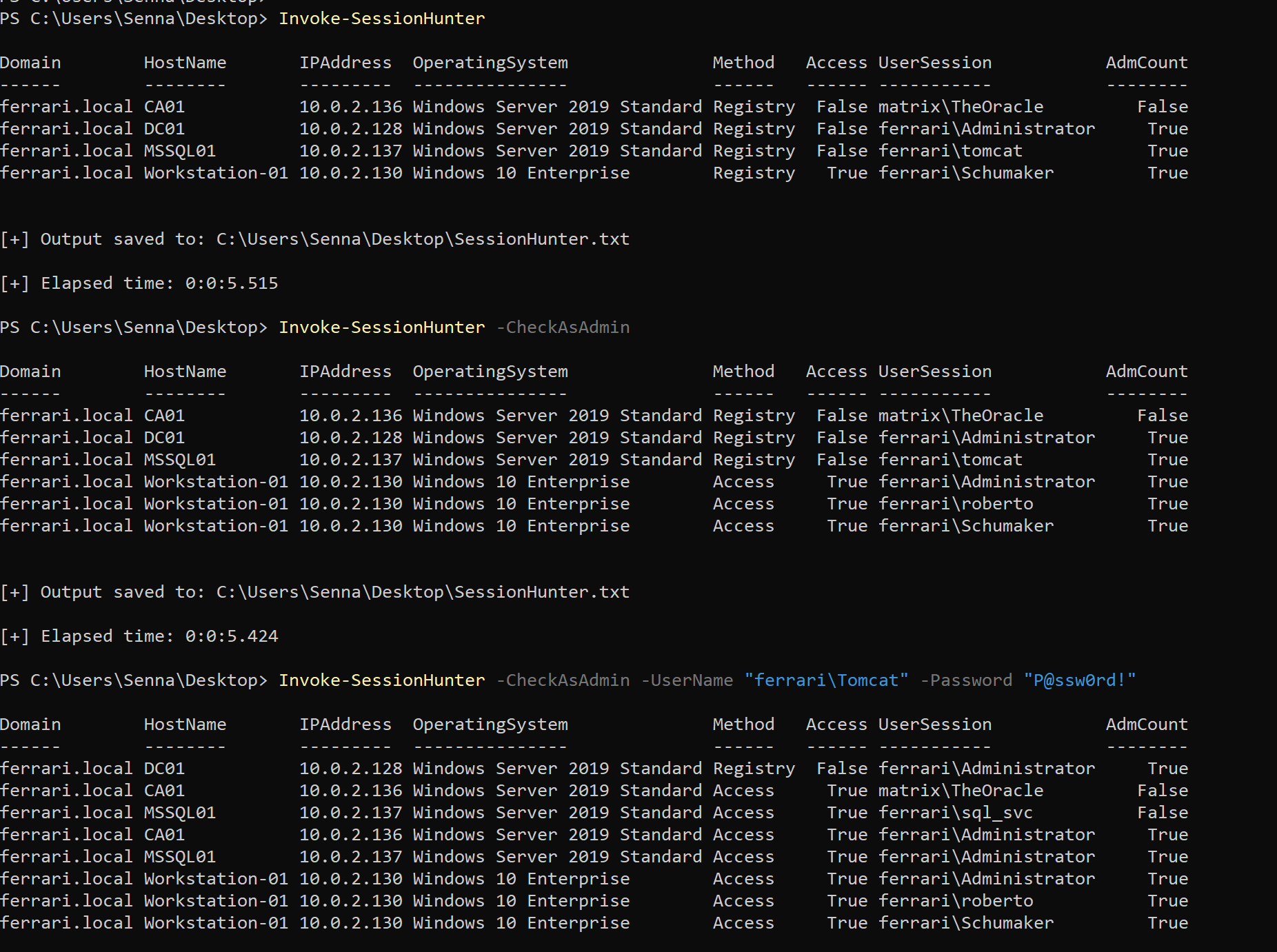
If run without parameters or switches it will retrieve active sessions for all computers in the current domain by querying their remote registry
Invoke-SessionHunter
Gather sessions by authenticating to targets where you have local admin access ('klist sessions' command is run on targets)
Invoke-SessionHunter -CheckAsAdmin
You can optionally provide credentials in the following format
Invoke-SessionHunter -CheckAsAdmin -UserName "ferrari\Administrator" -Password "P@ssw0rd!"
Invoke-SessionHunter is designed to keep your host machine, your current user, and the provided username out of scope.
As a result, they won't show among the retrieved sessions.
If you want to include them within the retrieved results please provide the -ShowAll and/or -IncludeLocalHost switches.
Invoke-SessionHunter -ShowAll -IncludeLocalHost
Invoke-SessionHunter will skip any target where the remote registry fails to respond within 2000ms (2 seconds).
You have control on the timeout by providing the -Timeout parameter | Default = 2000, increase for slower networks.
Invoke-SessionHunter -Timeout 5000
Use the -Match switch to show only targets where you have admin access and a privileged user is logged in
Invoke-SessionHunter -Match
All switches can be combined
Invoke-SessionHunter -CheckAsAdmin -UserName "ferrari\Administrator" -Password "P@ssw0rd!" -Timeout 5000 -Match
Invoke-SessionHunter -Domain contoso.local
Invoke-SessionHunter -Targets "DC01,Workstation01.contoso.local"
Invoke-SessionHunter -Targets c:\Users\Public\Documents\targets.txt
Invoke-SessionHunter -Servers
Invoke-SessionHunter -Workstations
Invoke-SessionHunter -Hunt "Administrator"
Invoke-SessionHunter -RawResults
Note: if a host is not reachable it may hang for a while
Invoke-SessionHunter -NoPortScan






