 karollooool/cve-2026-119987-writeup
CVE-2026-119987: Windows App Store Elevation of Privilege

Microsoft published CVE-2026-119987 as an Important Windows App Store elevation of privilege, CVSS 7.8, CWE-426 (Untrusted Search Path).
The issue is in InstallService's package plug-in handling. InstallService runs as LocalSystem, but it can end up loading InstallServicePlugin.dll from an MSIX package installed by a standard user. The package doesn't have to be signed or registered in development mode either, which is what made this interesting to me.
I reported this back in July. The reproduction I'm talking about here is the one I sent MSRC on September 12, using an unsigned, non-development MSIX installed under WindowsApps. No Developer Mode, no loose development package, and no write to the machine-wide plug-in registry state from the caller. MSRC initially dismissed it because they believed all that was required. They confirmed on October 30 that it wasn't, assessed it as Important and still kept the report as a duplicate. On November 6 I received the full $8,000 bounty. Unfortunately I still can't publish the PoC, full timeline or additional details, there's more to this story that I can't talk about yet.
InstallService runs in svchost.exe and has a plug-in mechanism for its install work. Some identifiers are built in, like WU and ChainedWork, but there is also a package plug-in path. For that one, the identifier is interpreted as a package family name, the service resolves the package for the requesting user and then takes its installation directory and appends InstallServicePlugin.dll.
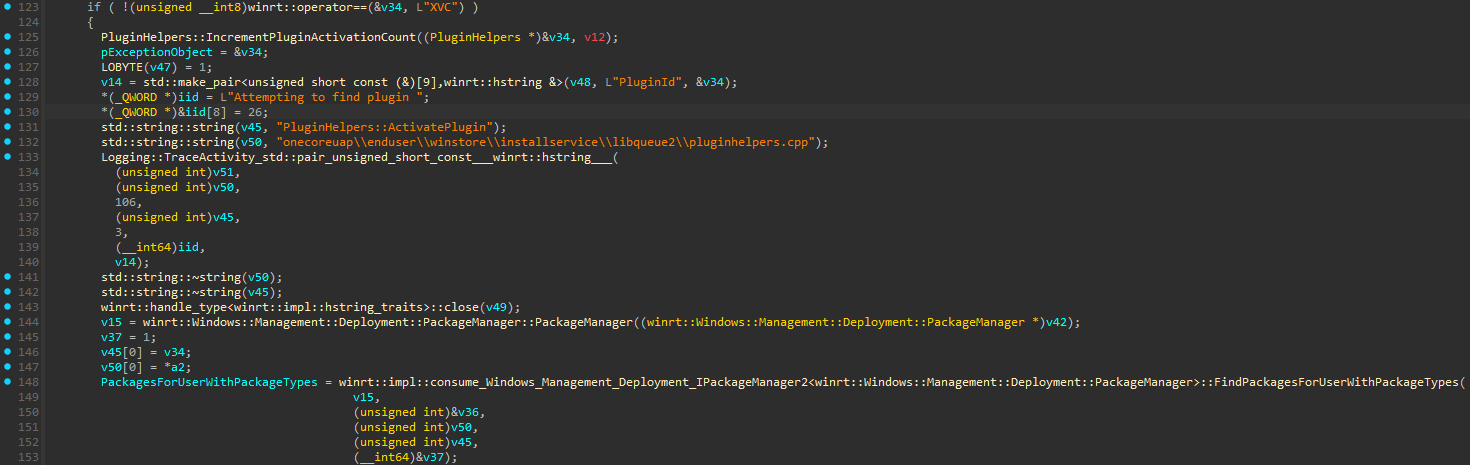
In PluginHelpers::ActivatePlugin the interesting part comes down to this:
pluginId = work.FulfillmentPluginId
package = resolve_package_for_requesting_user(pluginId)
pluginPath = package.InstalledLocation + "\InstallServicePlugin.dll"
module = LoadLibraryW(pluginPath)
entry = GetProcAddress(module, "ActivatePlugin")
plugin = entry(...)
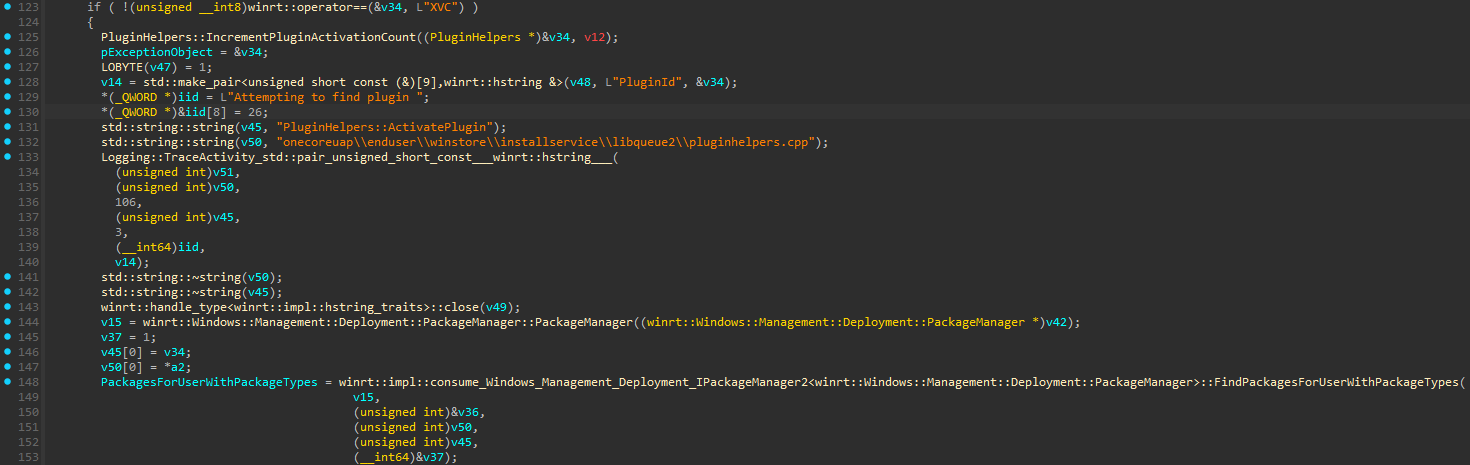
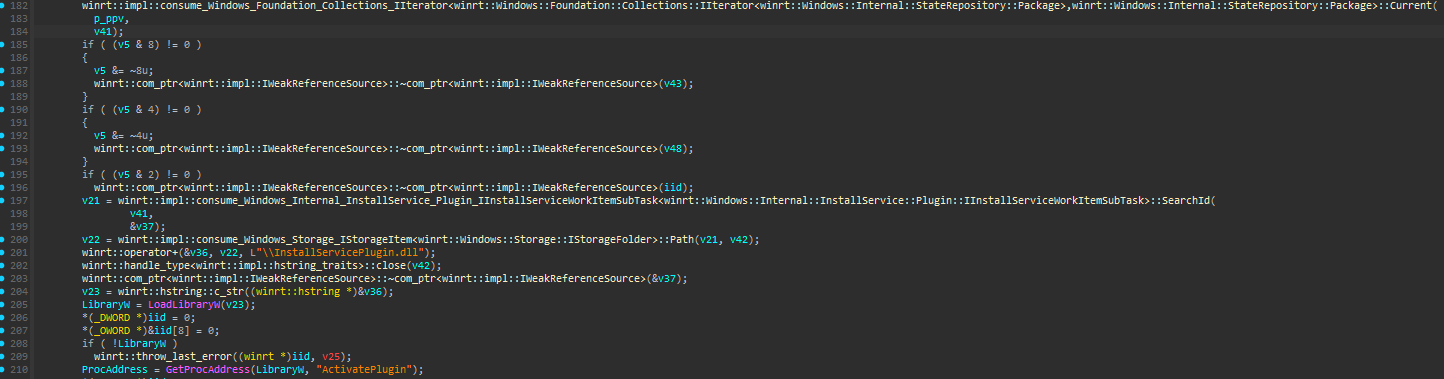
The problem here is that I'm not passing any DLL path to LoadLibraryW myself, all I provide is the package family name and InstallService resolves the package, builds the DLL path and loads it under SYSTEM even though the package and its contents came from a standard user.
Microsoft classified it as CWE-426, although it isn't the usual DLL search order issue. The filename is fixed and the directory comes from the package the caller selected.
I used an unsigned MSIX main package with InstallServicePlugin.dll in its root and a uap10:HostRuntimeDependency on Microsoft.WindowsAppRuntime.CBS.2. There is no application or extension in the manifest declaring this DLL as an entry point. InstallService is what gives that file a meaning as a native plug-in.
The relevant manifest entries:
<Identity
    Name="Research.InstallService.NoDev.<unique value>"
    Publisher="CN=Unsigned, OID.2.25.311729368913984317654407730594956997722=1"
    Version="1.0.0.0" />

<uap10:HostRuntimeDependency
    Name="Microsoft.WindowsAppRuntime.CBS.2"
    Publisher="CN=Microsoft Corporation, O=Microsoft Corporation, L=Redmond, S=Washington, C=US"
    MinVersion="2.1.1.100" />
The special OID is for the unsigned package identity. I'm not replacing any Microsoft package or pretending the package is signed, it's a new package identity supplied by the user.
For the installation I used PackageManager.AddPackageByUriAsync, with development deployment disabled and unsigned deployment allowed for that request:
$options.DeveloperMode = $false
$options.AllowUnsigned = $true

$operation = $manager.AddPackageByUriAsync(
    [Uri]:https://raw.githubusercontent.com/karollooool/cve-2026-119987-writeup/main/:new($stagePackage),
    $options)
After installation it reports IsDevelopmentMode=False and SignatureKind=None. The package lives below WindowsApps and the standard user can't modify the installed files there anymore. Which is fine, but the contents were still provided by that user. Protecting the installed directory against writes doesn't make the DLL inside it trusted code for InstallService.
AllowUnsigned is a per-deployment option here, not the Developer Mode machine policy. This distinction was also the reason for quite a bit of back and forth with MSRC, because the reproduction works without enabling Developer Mode beforehand.
The entry point I used is Windows.Internal.InstallService.Control.InstallServiceControl. I activate it with RoActivateInstance, query the interface and call CreateInstallServiceWork directly through its ABI, no generated projection.
Runtime class: Windows.Internal.InstallService.Control.InstallServiceControl
Interface IID: {e4893a99-9270-42b9-9a62-683d6ceed250}
Method:        zero-based vtable slot 8, CreateInstallServiceWork
CreateInstallServiceWork takes six HSTRING arguments and returns a work object. For this request the first four are empty, the fifth has the work properties and the sixth is {}.
argument 1 = ""
argument 2 = ""
argument 3 = ""
argument 4 = ""
argument 5 = propertiesJson
argument 6 = "{}"
The part that matters is FulfillmentPluginId. It's set to the package family name, both in the properties and the serialized fulfillment data. The other package identity fields refer to the same installed package.
{
  "SkipCatalogLookup": true,
  "IsDiscInstall": true,
  "IsInteractive": false,
  "RequiresElevation": false,
  "FulfillmentPluginId": "<package family name>",
  "PackageFullName": "<package full name>",
  "PackageFamilyName": "<package family name>",
  "SerializedFulfillmentData": "{...matching package identity and FulfillmentPluginId...}"
}
This also doesn't need the caller to modify PluginList or StaticPluginMap. The package family name is already coming from the work request, and the service uses it when resolving the package.
Once that package is selected, PluginHelpers::ActivatePlugin loads the root DLL with LoadLibraryW. In my reproduction the ActivatePlugin export itself returns E_NOTIMPL, the execution already happens during the native load. The result was code running in InstallService as LocalSystem (S-1-5-18), from a package installed by a non-admin user.
I reproduced it on Windows 11 25H2 build 26200.9445 and the tested future-platform builds 29648.1000 and 29661.1000, using the same non-development package setup.
Not yet : )






