
Skip to content
KitploitKITPLOIT
ToolsExploitsBlog
Log in
Submit
ToolsExploitsBlog
Submit

Hacking, PenTest, and Cybersecurity Tools for Your Security Arsenal!

Kitploit is a directory of hacking, cybersecurity, and pentesting tools. Discover the latest project updates to find vulnerabilities, analyze systems, automate testing, and strengthen your security.

FeedsContactPrivacy© 2026 Kitploit

Tool Directory

Categories

View all categories
Loading categories
Pantheon — IoT Camera Reconnaissance and Live Viewer | Kitploit

Tools/GitHubGitHub/josh0xa/pantheon
OSINT (Open Source Intelligence)ReconnaissanceIoT SecurityInformation GatheringCrawler
GitHubjosh0xa/pantheon

Pantheon

IoT Camera Reconnaissance and Live Viewer

View Repository
18525712 years agoReviewed by Kitploit
Share

Pantheon

About Pantheon

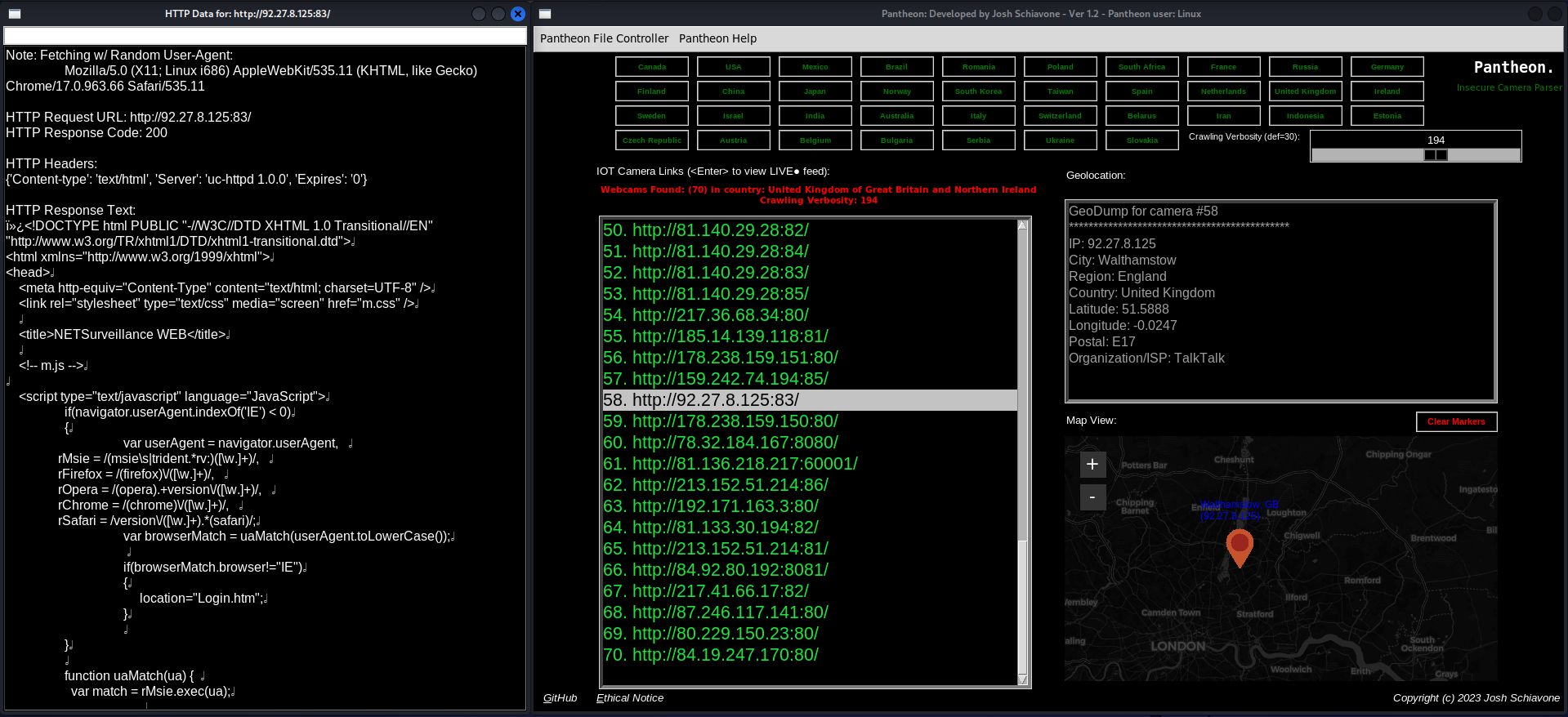
Pantheon is a GUI application that allows users to display information regarding network cameras in various countries as well as an integrated live-feed for non-protected cameras.

Functionalities

Pantheon allows users to execute an API crawler. There was original functionality without the use of any API's (like Insecam), but Google TOS kept getting in the way of the original scraping mechanism.

Installation

  1. git clone https://github.com/josh0xA/Pantheon.git
  2. cd Pantheon
  3. pip3 install -r requirements.txt
    Execution: python3 pantheon.py
  • Note: I will later add a GUI installer to make it fully indepenent of a CLI

Windows

  • You can just follow the steps above or download the official package here.
  • Note, the PE binary of Pantheon was put together using pyinstaller, so Windows Defender might get a bit upset.

Ubuntu

  • First, complete steps 1, 2 and 3 listed above.
  • chmod +x distros/ubuntu_install.sh
  • ./distros/ubuntu_install.sh

Debian and Kali Linux

  • First, complete steps 1, 2 and 3 listed above.
  • chmod +x distros/debian-kali_install.sh
  • ./distros/debian-kali_install.sh

MacOS

  • The regular installation steps above should suffice. If not, open up an issue.
  • or, you can just follow the steps above or download the official package here.
  • Move it to your applications folder after installation.
  • Please note that you are going to have to run Pantheon higher privileges to utilize the file saving.
  • $ /Applications/Pantheon.app/Contents/MacOS/Pantheon - after installation.

Usage

(Enter) on a selected IP:Port to establish a Pantheon webview of the camera. (Use this at your own risk)

(Left-click) on a selected IP:Port to view the geolocation of the camera.
(Right-click) on a selected IP:Port to view the HTTP data of the camera (Ctrl+Left-click for Mac). Users can also search for keywords in the HTTP dump.

Adjust the map as you please to see the markers.

  • Also note that this app is far from perfect and not every link that shows up is a live-feed, some are login pages (Do NOT attempt to login).

Ethical Notice

The developer of this program, Josh Schiavone, is not resposible for misuse of this data gathering tool. Pantheon simply provides information that can be indexed by any modern search engine. Do not try to establish unauthorized access to live feeds that are password protected - that is illegal. Furthermore, if you do choose to use Pantheon to view a live-feed, do so at your own risk. Pantheon was developed for educational purposes only. For further information, please visit: https://joshschiavone.com/panth_info/panth_ethical_notice.html

License

MIT License
Copyright (c) Josh Schiavone

Download Tool

Most Popular

View all →

Discover the most used tools by our community.

  • 1

    OsintHunter

    letox4/osinthunter

    🎯 The ultimate OSINT toolkit: investigation graph, confidence scoring, alias families, map, timeline and reports. 49 modules, 400+ sites, no API keys required.

    806
  • 2

    ghostlock-app

    yukonga/ghostlock-app

    GhostLock One-Tap Execution App (CVE-2026-43499)

    523
  • 3

    ARTEX

    baarai/artex

    LLM multi-agent autonomous penetration testing platform with planner/worker agents, asset and exploration graphs, MITM traffic recording, and vulnerability retesting.

    441
  • 4

    redforge

    cybersecurity91/redforge

    Browser-side red team toolkit with 102 offline tools for recon, payload generation, credential attacks, crypto, encoding and engagement reporting.

    346
  • 5

    looking-glass

    anonghosty/looking-glass

    CSIRT platform that ingests Shadowserver reports into MongoDB and replays them as interactive maps, analysis, findings, advisories and executive dashboards.

    270
  • 6

    CyberStrikeAI

    ed1s0nz/cyberstrikeai

    The system of action for AI-native cybersecurity—where intent becomes governed execution, evidence becomes operational memory, and every operation improves the next.

    264

Explore all tools

Browse our collection of tools

View all tools →





