
Skip to content
KitploitKITPLOIT
ToolsExploitsBlog
Log in
Submit
ToolsExploitsBlog
Submit

Hacking, PenTest, and Cybersecurity Tools for Your Security Arsenal!

Kitploit is a directory of hacking, cybersecurity, and pentesting tools. Discover the latest project updates to find vulnerabilities, analyze systems, automate testing, and strengthen your security.

FeedsContactPrivacy© 2026 Kitploit

Tool Directory

Categories

View all categories
Loading categories
EKFiddle — Your Swiss Army knife to analyze malicious web traffic based on the popular Fiddler web debugger. | Kitploit
Tools/GitHubGitHub/jeromesegura/ekfiddle
OSINT (Open Source Intelligence)Packet Sniffing & AnalysisWeb SecuritySteganographyMalware AnalysisThreat Intelligence
GitHubjeromesegura/ekfiddle

EKFiddle

Your Swiss Army knife to analyze malicious web traffic based on the popular Fiddler web debugger.

View Repository
642128701 year agoReviewed by Kitploit
Share

EKFiddle v.1.2.6

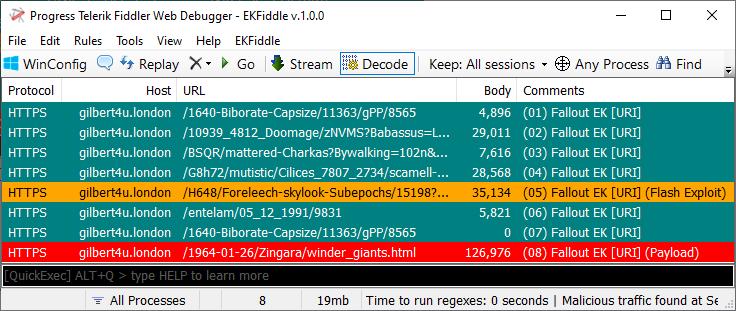
An extension/rules for the Fiddler Classic web debugger to analyze malicious web traffic.

Fiddler Classic

Settings Window

Installation

  • Download and install Fiddler from here: https://www.telerik.com/fiddler

  • Download and run EKFiddleExtension.exe

Alternatively, download EKFiddle.dll and put it into Fiddler's Scripts folder (%AppData%\Local\Programs\Fiddler\Scripts)

Note: The EKFiddle.dll version replaces the previous CustomRules.cs.

Features

Top level menu

The top level menu gives you the ability to access certain features and settings for the EKFiddle extension.

Regexes

The Regexes menu item lets you view, edit, run and update the regexes that are used to identify web sessions and color them / add comments accordingly.

Settings Window

Added support for AND/OR operators:

[regex] *AND* [regex] *AND* [regex]

[regex] *OR* [regex] *OR* [regex]

YARA support

image

Advanced Filters

The Advanced Filters menu item is for filtering web traffic based on a compiled list of domains, URLs, IP addresses, or hashes that you want to exclude.

Settings Window

You can also filter traffic by tags:

Settings Window

UI mode

Fiddler's default UI only shows a limited number of columns. By choosing the Advanced UI, you can view more information about web sessions, including CMS type, SHA-256, etc.

Settings Window

Real-time monitoring options

  • Real-time monitoring
  • CMS detection
  • Inspect Images (slow)

These real-time options can be enabled to automatically flag traffic as web sessions are being captured. CMS detection attempts to identify what kind of Content Management System a website is running and displays it within a new column (Advanced UI required). Inspect Images will look at the content of supposed images to see if they are the wrong mime-type or hide content (steganography).

Settings Window

Themes

Customize Fiddler's application and SAZ icons with the EKFiddle theme or retro versions of Fiddler.

Settings Window

Settings Window

AutoBrowser

Automate browsing tasks by loading a list of URLs from a text file and let Fiddler record all the traffic.

Settings Window

Upstream proxy

Connect to another proxy (anonymous or private) via Fiddler

Settings Window

Check for Updates...

Check for the latest version of EKFiddle.

About

Displays the About page for the EKFiddle project.

Contextual menu

The contextual menu (right click) allows you to perform additional actions on the selected web session(s).

Settings Window

Hostname

  • Copy
  • Google Search
  • Internet Archive Lookup
  • Sucuri SiteCheck Scan
  • Urlscan.io Lookup
  • VirusTotal Lookup

IP Address

  • Copy
  • Google Search
  • Urlscan.io Lookup
  • VirusTotal Lookup

Response Body

  • Copy SHA-256
  • Copy SHA-1
  • Copy MD5
  • Save to Disk
  • Urlscan.io Lookup
  • VirusTotal Lookup

Extract

  • Google Analytics ID
  • Phone Number

Filter

  • Hide Hostname
  • Hide IP Address
  • Hide URL
  • Hide Response Body Hash

Connect-the-dots

This feature enables you to see the flow between a web session and previous ones. This is helpful to retrace traffic.

Full Traffic Summary

Copies to the clipboard a text-base summary of web sessions that can be easily used to share with others.

Tags

Add or edit tags (separate column in Advanced UI mode) for each web session.

Settings Window

Uninstallation

  • Delete EKFiddle.dll from Fiddler's Script folder, delete EKFiddle's folder (Documents\Fiddler2\EKFiddle)
Download Tool

Most Popular

View all →

Discover the most used tools by our community.

  • 1

    OsintHunter

    letox4/osinthunter

    🎯 The ultimate OSINT toolkit: investigation graph, confidence scoring, alias families, map, timeline and reports. 49 modules, 400+ sites, no API keys required.

    867
  • 2

    ghostlock-app

    yukonga/ghostlock-app

    GhostLock One-Tap Execution App (CVE-2026-43499)

    544
  • 3

    ARTEX

    baarai/artex

    LLM multi-agent autonomous penetration testing platform with planner/worker agents, asset and exploration graphs, MITM traffic recording, and vulnerability retesting.

    385
  • 4

    redforge

    cybersecurity91/redforge

    Browser-side red team toolkit with 102 offline tools for recon, payload generation, credential attacks, crypto, encoding and engagement reporting.

    360
  • 5

    looking-glass

    anonghosty/looking-glass

    CSIRT platform that ingests Shadowserver reports into MongoDB and replays them as interactive maps, analysis, findings, advisories and executive dashboards.

    302
  • 6

    CyberStrikeAI

    ed1s0nz/cyberstrikeai

    The system of action for AI-native cybersecurity—where intent becomes governed execution, evidence becomes operational memory, and every operation improves the next.

    279

Explore all tools

Browse our collection of tools

View all tools →






