 jasondoyle/komfy-switch-wifi-password-disclosure
Proof-of-concept and writeup showing how to retrieve Wi-Fi SSID/password from a D-Link Komfy smart switch over BLE by reversing the iOS app’s custom base64 encoding.

Intro
This writeup will detail my finding on D-Link's Komfy Switch with Camera to retrieve the device's associated wifi ssid and password over bluetooth 4.0 (BLE). The Komfy switch is a home security and automation product that can replace a wall switch in your house to provide video surveillance, monitoring of temperature, humidity levels, air quality, and remote control of light switches.
Bluetooth BLE Profiling
Some quick profiling of the BLE device was done with the LightBlue iOS app before deciding to dig in any further. At this point, the Komfy device was online and configured with typical use case settings. Connecting to Komfy with LightBlue, I noticed a non-standard GATT service revealing eight custom characteristics (or functions). A couple such characteristics were receiving an unusual amount of data considering 20 bytes is the max per the BLE specification. If both peripheral and master devices support it, a higher MTU can be negotiated to support what is commonly referred to as "long" reads or writes. The fist screenshots below show the GATT services and characteristics (starting with 0xB002 to 0xB00A). The next two screenshots show the two characteristics this writeup will focus on (0xB006 and 0xB007). The 0xB006 and 0xB007 characteristic displayed the Wifi SSID and what looked to be a base64 encoded string after decoding it to ascii. However, base64 decoding the string did not reveal any readable data as illustrated in the last screenshot.


The Komfy App: Tracing Method Calls
To better understand the GATT characteristics implemented by the Komfy device, I dumped the Komfy iOS app methods using class-dump-z and setup method tracing for methods of interest. The complete class dump can be referenced here. I was particularly interested in the BLEDevice class along with any other methods referencing bluetooth. Method tracing can be setup using the Logify.pl perl script detailed by Prateek here.

The above screenshot shows the method trace output during a fresh install and config of Komfy. Notice the Wifi password "chipotlemakesmehappy" in cleartext and then that base64 looking string again that the LightBlue app retrieved from the 0xB007 GATT characteristic seen earlier. The trace actually shows a call to the +[Base64 encode:] method which caused confusion at first given that it could not be base64 decoded using a standard library. It was almost determined that the base64 decoded value was encrypted or further encoded until realization that +[Base64 encode:] was a privately implemented method (not from the NSData class). This funky encoding needed to be reckoned with.
Disassembly with Hopper
Now to reverse engineering the "base64" encoding scheme implemented by D-Link ("reverse engineering" makes it sound way harder than it actually was given the end result). Loading the Komfy app up in Hopper and analyzing the -[BLEDevice getWifiPassword:] and +[Base64 decode:] methods were the obvious starting points. Analyzing -[BLEDevice getWifiPassword:] validated that the 0xB007 GATT characteristic was indeed retrieving the Wifi password.

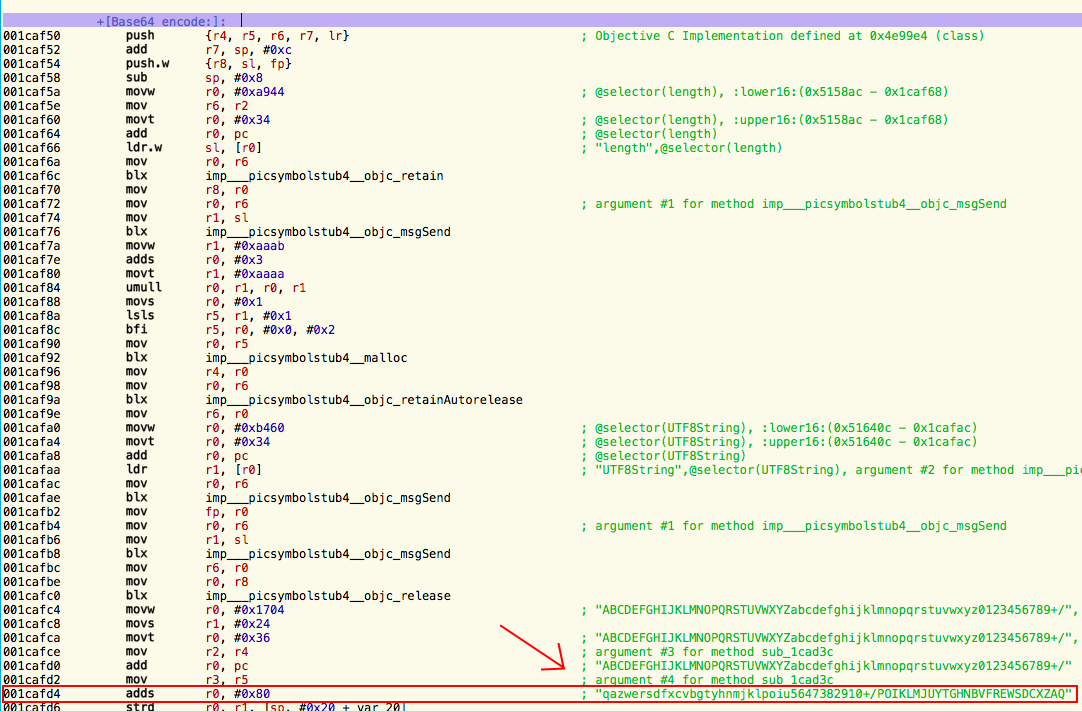
Going through the ARM assembly of +[Base64 decode:] looked pretty similar to the standard NSData class implementation so I hopped over to scan through +[Base64 encode:]. Hopper quickly tipped me off to the answer. A string constant was printed near one of the assemebly instructions which included all the letters of the standard base64 alphabet, but completely out of order. Slightly embarrassed for not thinking of some trivial substitution no harder than the original caesar cipher, I wrote a script to unscramble the base64 characters and viola! "chipotlemakesmehappy" was printed on the screen.

So essentially, here's how to unscramble and base64 decode the string:

The complete autopwn script here.
And, yes, Chipotle truly does make me happy.
The Ubertooth BLE capture can be downloaded here.






