
Skip to content
KitploitKITPLOIT
ToolsBlog
Submit
ToolsBlog
Submit

Hacking, PenTest, and Cybersecurity Tools for Your Security Arsenal!

Kitploit is a directory of hacking, cybersecurity, and pentesting tools. Discover the latest project updates to find vulnerabilities, analyze systems, automate testing, and strengthen your security.

··Feeds·Contact·Privacy·© 2026 Kitploit

Tool Directory

Categories

View all categories
Loading categories
ProxyBridge — Proxifier Alternative to redirect any Windows/MacOS/Linux TCP and UDP traffic to HTTP/Socks5 proxy | Kitploit
Tools/GitHubGitHub/interceptsuite/proxybridge
Packet Sniffing & AnalysisWeb Proxies & InterceptionNetwork SecurityPenetration TestingUtilities & FrameworksRed Teaming
GitHubinterceptsuite/proxybridge

ProxyBridge

Proxifier Alternative to redirect any Windows/MacOS/Linux TCP and UDP traffic to HTTP/Socks5 proxy

View Repository
5.7k3437 days agoReviewed by Kitploit

Most Popular

View all →

Discover the most used tools by our community.

Explore all tools

Browse our collection of tools

View all tools →
Share
Website

ProxyBridge

ProxyBridge Logo

Build Windows Build macOS Build Linux Total Downloads

InterceptSuite%2FProxyBridge | Trendshift   InterceptSuite%2FProxyBridge | Trendshift

ProxyBridge is a lightweight, open-source universal proxy client (Proxifier alternative) that provides transparent proxy routing for applications on Windows, macOS, and Linux. It redirects TCP and UDP traffic from specific processes through SOCKS5 or HTTP proxies, with the ability to route, block, or allow traffic on a per-application basis. ProxyBridge fully supports both TCP and UDP proxy routing and works at the system level, making it compatible with proxy-unaware applications without requiring any configuration changes.

[!TIP] ProxyBridge routes your traffic - InterceptSuite lets you see inside it. Full MITM proxy with SSL/TLS inspection, live request editing, scripting, and support for TCP, UDP, StartTLS, DTLS and more. Built by the same team. Try InterceptSuite →

Table of Contents

  • ProxyBridge
    • Table of Contents
    • Download
      • 🌐 Official Download Portal
      • 📦 Release Packages
        • Linux One-Command Quick Install:
    • Features
    • Documentation
    • Screenshots
      • macOS
      • Windows
        • GUI
        • CLI
      • Linux
        • GUI
        • CLI
    • Use Cases
    • InterceptSuite
    • License
    • Author
    • Credits

💖 Support ProxyBridge Development
If you find ProxyBridge useful, consider sponsoring to support ongoing development and new features!

Sponsor InterceptSuite

Download

🌐 Official Download Portal

Visit our Official Download Page for the latest automated builds and platform detection.

📦 Release Packages

Linux One-Command Quick Install:

root@kitploit:~
curl -Lo deploy.sh https://raw.githubusercontent.com/InterceptSuite/ProxyBridge/refs/heads/master/Linux/deploy.sh && sudo bash deploy.sh

macOS via Homebrew (official):

root@kitploit:~
brew install --cask proxybridge

Windows via winget:

root@kitploit:~
winget install InterceptSuite.ProxyBridge

[!WARNING] The winget package is community-maintained and not official. It may lag behind releases or be unverified. For guaranteed-latest, verified builds always use the Official Download Page.

[!NOTE] For historical versions, change logs, and direct access to raw assets, visit the GitHub Releases page.

Features

  • Cross-platform - Available for Windows, macOS and Linux
  • Dual interface - Feature-rich GUI and powerful CLI for all use cases
  • Process-based traffic control - Route, block, or allow traffic for specific applications
  • Universal compatibility - Works with proxy-unaware applications
  • Multiple proxy protocols - Supports SOCKS5 and HTTP proxies
  • System-level interception - Reliable packet capture at kernel/network extension level
  • No configuration needed - Applications work without any modifications
  • Protocol agnostic - Compatible with TCP and UDP protocols (HTTP/HTTPS, HTTP/3, databases, RDP, SSH, games, DTLS, DNS, etc.)
  • Traffic blocking - Block specific applications from accessing the internet or any network (LAN, localhost, etc.)
  • Flexible rules - Direct connection, proxy routing, or complete blocking per process
  • Advanced rule configuration - Target specific processes, IPs, ports, protocols (TCP/UDP), and hostnames with wildcard support - full IPv4 and IPv6 support on Windows
  • Process exclusion - Prevent proxy loops by excluding proxy applications
  • Import/Export rules - Share rule configurations across systems with JSON-based import/export

[!CAUTION] Beware of Fake ProxyBridge Downloads

Multiple fake ProxyBridge download sources have been identified. Some of these sources distribute unwanted binaries and malicious software.

❌ Do NOT download ProxyBridge from any third-party or unofficial sources.

✅ Official ProxyBridge sources (only):

  • GitHub Repository: https://github.com/InterceptSuite/ProxyBridge/
  • Official Website: https://interceptsuite.com/download/proxybridge

If you prefer not to use prebuilt binaries, you may safely build ProxyBridge yourself by following the Contribution Guide and compiling directly from the official source code.

ProxyBridge does not communicate with any external servers except its own update feed at https://download.interceptsuite.com/proxybridge.json for update checks (triggered only on app launch or manual update checks);

Documentation

[!IMPORTANT] 📖 Full Documentation

Everything you need to get started and go deep:

  • Installation and setup guides
  • Proxy rules and rule configuration
  • CLI reference
  • UDP, IPv6, HTTP/3, DTLS setup
  • Troubleshooting and advanced usage

interceptsuite.com/docs/proxybridge

Screenshots

macOS

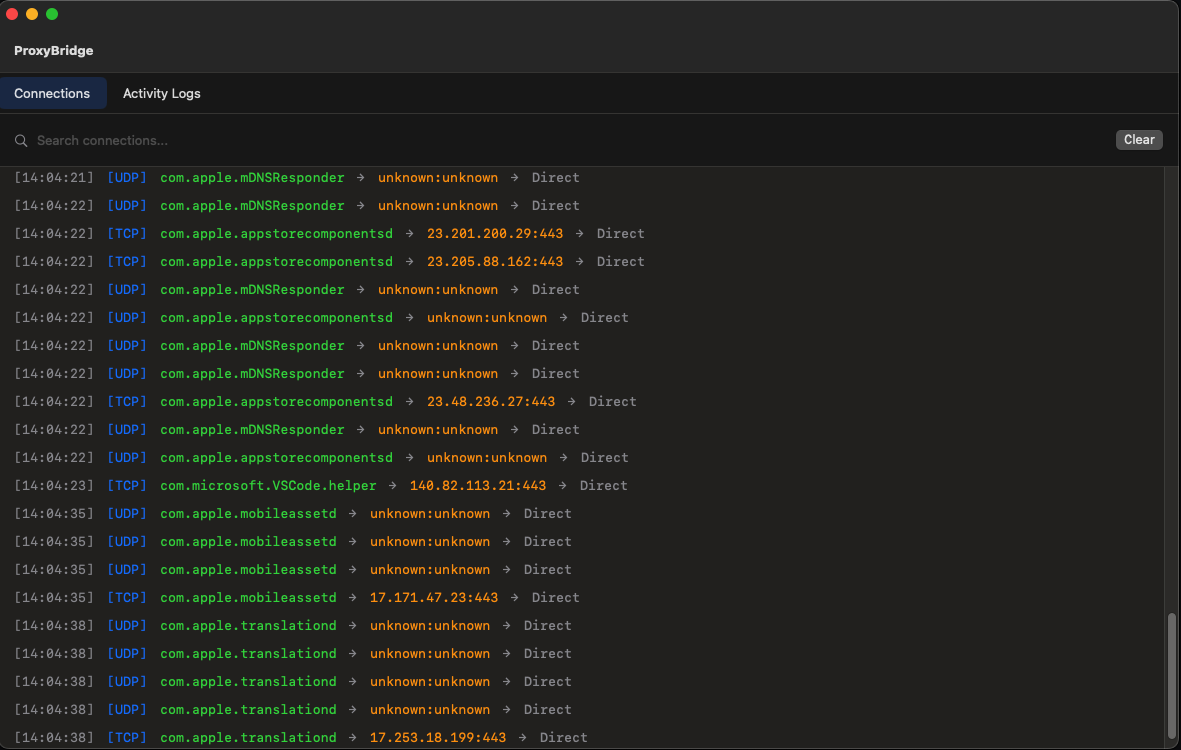
ProxyBridge macOS Main Interface
ProxyBridge GUI - Main Interface

Proxy Settings macOS
Proxy Settings Configuration

Proxy Rules macOS
Proxy Rules Management

Add/Edit Rule macOS
Add/Edit Proxy Rule

Windows

GUI

ProxyBridge Windows Main Interface
ProxyBridge GUI - Main Interface

Proxy Settings
Proxy Settings Configuration

Proxy Rules
Proxy Rules Management

Proxy Tester
Proxy Tester

CLI

ProxyBridge CLI
ProxyBridge CLI Interface

Linux

GUI

ProxyBridge Linux Main Interface
ProxyBridge GUI - Main Interface

Proxy Settings Linux
Proxy Settings Configuration

Proxy Rules Linux
Proxy Rules Management

Add/Edit Rule Linux
Add/Edit Proxy Rule

CLI

ProxyBridge Linux CLI
ProxyBridge CLI Interface

Use Cases

  • Redirect proxy-unaware applications (games, desktop apps) through InterceptSuite/Burp Suite for security testing
  • Route specific applications through Tor, SOCKS5 or HTTP proxies
  • Intercept and analyze traffic from applications that don't support proxy configuration
  • Test application behavior under different network conditions
  • Analyze protocols and communication patterns

InterceptSuite

ProxyBridge is a proxy client - it routes your application traffic through any SOCKS5 or HTTP proxy. It does not inspect or modify the traffic itself.

InterceptSuite is a MITM SOCKS5 proxy server built for traffic interception and analysis. Point ProxyBridge at InterceptSuite and you can inspect everything:

  • Full TLS/SSL interception and certificate spoofing
  • TCP, UDP, StartTLS, DTLS traffic analysis
  • Live request and response editing
  • Scripting and automation

ProxyBridge routes the traffic in. InterceptSuite sees inside it.

Try InterceptSuite →

License

MIT License - See LICENSE file for details

Author

Sourav Kalal / InterceptSuite

Credits

Windows Implementation: This project is built on top of WinDivert by basil00. WinDivert is a powerful Windows packet capture and manipulation library that makes kernel-level packet interception possible. Special thanks to the WinDivert project for providing such a robust foundation.

Based on the StreamDump example from WinDivert: https://reqrypt.org/samples/streamdump.html

The Windows GUI and CLI are written in native C using the Win32 API, keeping the footprint small and startup instant.

macOS Implementation: Built using Apple's Network Extension framework for transparent proxy capabilities on macOS.

Linux Implementation: Built using Linux Netfilter NFQUEUE for kernel-level packet interception and iptables for traffic redirection. The GUI uses GTK3 for native Linux desktop integration.

Download Tool
PlatformDownload LinkPackage TypeSystem Requirements
WindowsDownload Installer.exeWindows 10+ (64-bit), Admin privileges
macOSDownload Installer.pkg (Universal)macOS 13.0+ ARM/x64 (Ventura or later)
LinuxDownload Tarball.tar.gzx64 Kernel with NFQUEUE support